Увод
This manual provides essential instructions for setting up, operating, and maintaining your AOLON Tetra R4 Smart Watch. Please read it carefully to ensure proper use and to maximize the device's features.
Геттинг Стартед
1. Отпакирање
Your AOLON Tetra R4 Smart Watch package includes the following items:
- AOLON Tetra R4 Smart Watch
- Кабл за пуњење
- Упутство за употребу
- Гледај Банд

Image: Product Size And Packaging List
2. Пуњење уређаја
Before first use, fully charge your smart watch. The device features a 350 mAh battery, providing up to 7 days of typical use and up to 30 days of standby time. A full charge takes approximately 2.5 hours.
- Повежите магнетни кабл за пуњење са прикључцима за пуњење на задњој страни сата.
- Прикључите УСБ крај кабла у стандардни УСБ адаптер за напајање (није укључен) или УСБ порт рачунара.
- Екран сата ће приказивати статус пуњења.
Video: This video demonstrates the unboxing and initial setup of the Tetra R4 Smart Watch, including charging and basic UI navigation.
3. Инсталација и упаривање апликације
To unlock the full potential of your smart watch, download and install the ГлориФитПро апликација на вашем паметном телефону.
- Scan the QR code in the included user manual or search for "GloryFitPro" in your smartphone's app store (App Store for iOS, Google Play for Android).
- Омогућите Блуетоотх на свом паметном телефону.
- Open the GloryFitPro app and follow the on-screen instructions to add your device.
- Select "Aolon Tetra R4" from the list of available devices to connect.

Image: Connect the Smart Watch Via APP GloryFitPro "Aolon Tetra R4"
Управљање паметним сатом
1. Основна навигација
The AOLON Tetra R4 features a 1.43-inch AMOLED full touch screen, a rotating crown, and two physical buttons for intuitive control.
- Екран на додир: Превуците прстом лево, десно, горе или доле да бисте се кретали кроз меније и функције. Додирните да бисте изабрали.
- Ротирајућа круна: Rotate to scroll through lists or adjust settings. Press to confirm or return to the watch face.
- Физичка дугмад: Use for quick access to specific functions or to power on/off the device.
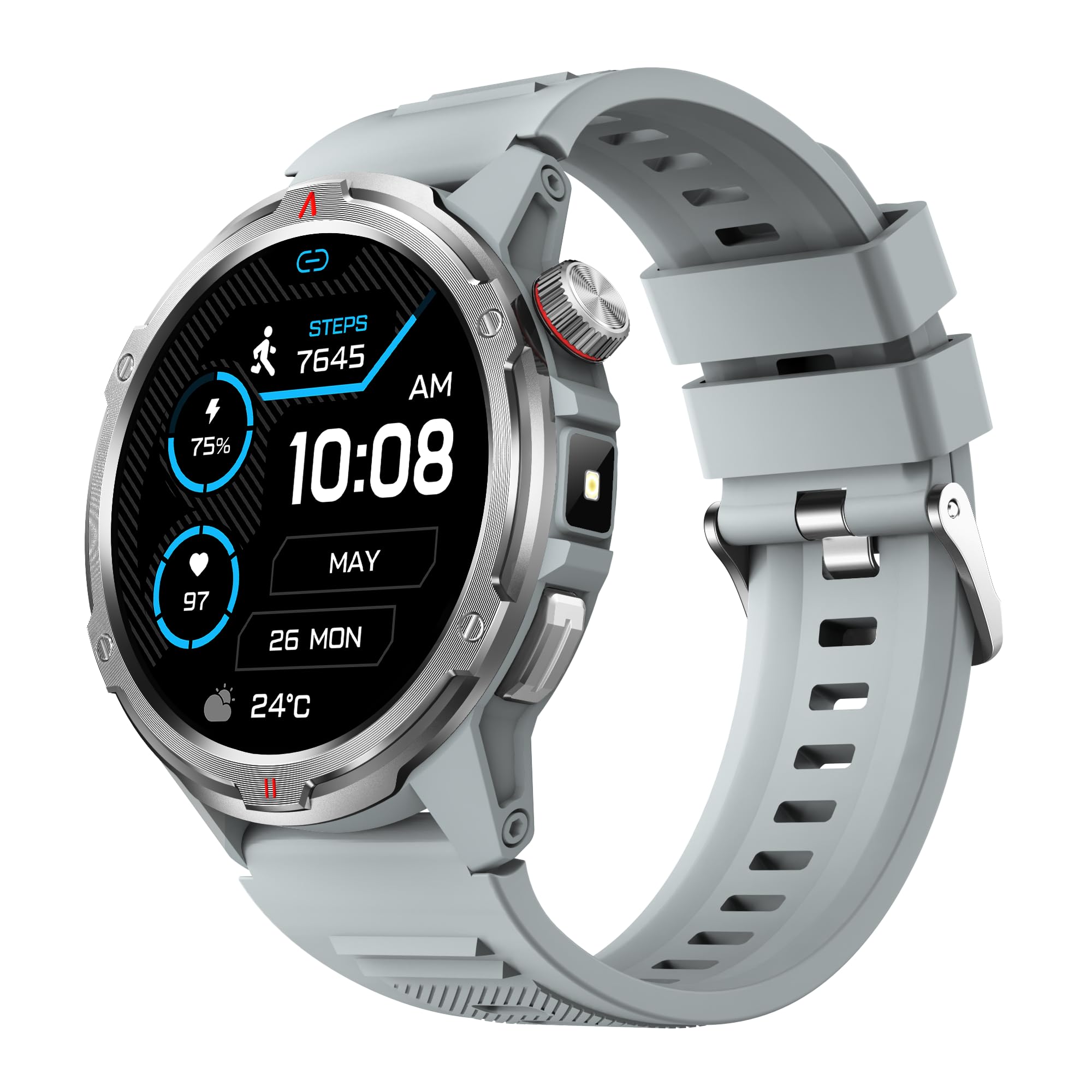
Image: Main product view showing the 1.43" AMOLED HD Full Touch Screen and physical buttons.
2. Комуникационе карактеристике
Stay connected directly from your wrist with Bluetooth calling and smart notifications.
- Блуетоотх позивање: With the latest Bluetooth 5.2 chip, a high-quality speaker, and microphone, you can make and receive calls directly from your watch. You can also add up to 100 contacts and view евиденције позива.
- Паметна обавештења: Receive message alerts, alarms, and other daily essentials from your paired smartphone. (Note: Message reply is not supported).

Image: BT Call & Message Sync Watch
Video: This video highlights the stylish design and various features of the smartwatch, including communication capabilities.
3. Праћење здравља
The AOLON Tetra R4 utilizes Cywee Professional Algorithms for accurate health tracking, providing insights into your well-being.
- Мониторинг срчане фреквенције: Real-time heart rate monitoring throughout the day, whether at rest or during high-intensity exercise.
- Монитор кисеоника у крви (СпО2): Measure your blood oxygen level anytime to regulate your body.
- Праћење нивоа стреса: Built-in PPG, SAR, AFE sensors and advanced algorithms monitor stress levels and provide alerts.
- Монитор спавања: Combined with advanced algorithm analysis, it tracks deep sleep, light sleep, awake time, and REM sleep to help you understand and improve your sleep quality.
- Праћење менструалног циклуса: Provides intelligent management and thoughtful reminders for women's health.
- One-Tap Measurement: Check your heart rate, blood oxygen, and stress level simultaneously with a single tap.

Image: Heart Rate Monitoring
Video: This video demonstrates the heart rate and SpO2 monitoring features of the smartwatch.
4. Спортски режими и праћење активности
Track your fitness journey with over 100 sports modes and comprehensive activity tracking.
- 100+ спортских режима: Supports a wide range of activities, from running and cycling to swimming and mountaineering.
- Праћење активности: Records steps, calories burned, and distance covered.
- AGPS Function: Built-in AGPS provides accurate positioning and trajectory tracking for outdoor activities.

Image: 100+ More Sport Modes
Video: This video showcases the smart health features and the variety of over 100 sports modes available on the watch.
5. Outdoor Tools
Designed for outdoor enthusiasts, the Tetra R4 includes practical tools for navigation and convenience.
- компас: Уграђени компас за навигацију.
- Лампа: A convenient flashlight function for low-light situations.
- AGPS, Altimeter, Barometer: Auxiliary functions to assist with outdoor exploration.

Image: Built-in AGPS Movement
Video: This video demonstrates the IP68 waterproof rating and suitability for daily activities, including outdoor use.
6. Прилагођавање
Personalize your watch to match your style and preferences.
- Лица за гледање: Choose from over 150 pre-designed dials in the app, or customize your watch face with your own photos.

Image: Choose from a variety of watch faces
7. Остале практичне функције
The Tetra R4 offers a range of additional features to enhance your daily life.
- Ажурирања о времену
- Аларм Цлоцк
- Штоперица и тајмер
- Контрола музике
- Remote Shutter for camera control
- Find Mobile Phone function
- Калкулатор
- Светски сат
- Хитни позив
- Гласовни асистент

Image: Multiple Practical Functions
Video: This video demonstrates various multi-functional aspects of the Aolon Tetra R4 Smart Watch.
Одржавање
1. Водоотпорна оцена
The AOLON Tetra R4 Smart Watch has an ИП68 водоотпорна оцена. This means it is resistant to dust and can withstand immersion in water up to 1.5 meters for up to 30 minutes. It is suitable for daily use, including hand washing, rain, and shallow swimming. However, it is not recommended for hot showers, saunas, or diving, as steam and high water pressure can compromise the seals.

Image: IP68 Level Waterproof
2. Чишћење и њега
To maintain your watch's performance and appearance:
- Редовно бришите сат и каиш меком крпомamp тканина.
- Избегавајте употребу јаких хемикалија или абразивних средстава за чишћење.
- Уверите се да су контакти за пуњење чисти и суви пре пуњења.
3. Оптимизација трајања батерије
Да бисте продужили век трајања батерије:
- Подесите осветљеност екрана на нижи ниво.
- Disable the Always-On Display (AOD) feature if not needed.
- Limit background app refresh and notifications.
- Turn off continuous heart rate monitoring if not required for extended periods.
Решавање проблема
If you encounter issues with your AOLON Tetra R4 Smart Watch, try the following solutions:
- Сат се не укључује/не пуни: Ensure the charging cable is securely connected to both the watch and a power source. Try a different USB port or power adapter.
- Проблеми са повезивањем (Bluetooth): Make sure Bluetooth is enabled on your smartphone and the watch is within range. Restart both the watch and your phone, then attempt to re-pair via the GloryFitPro app.
- Time synchronization incorrect: Ensure the watch is properly connected to the GloryFitPro app, as time is usually synced automatically from your phone. Reinstalling the app might resolve persistent issues.
- Inaccurate step count or health data: Ensure the watch is worn snugly on your wrist. Calibrate the device through the app if available.
- Екран не реагује: Restart the watch by pressing and holding the power button. If unresponsive, allow the battery to fully drain and then recharge.
Спецификације
| Феатуре | Спецификација |
|---|---|
| Број модела | Tetra R4 |
| Дисплаи | 1.43-инчни AMOLED, резолуција 466x466 |
| Капацитет батерије | 350 мАх |
| Typical Use Battery Life | До 7 дана |
| Време приправности | До 30 дана |
| Време пуњења | Прибл. 2.5 сата |
| Водоотпорна оцена | ИП68 |
| Повезивање | Блуетоотх 5.2 |
| Компатибилност оперативног система | Андроид 4.4+, иОС 9.0+ |
| Мониторинг здравља | Heart Rate, SpO2, Stress, Sleep, Menstrual Cycle |
| Спортски режими | 100+ |
| Outdoor Features | Compass, Flashlight, AGPS, Altimeter, Barometer |
| Тежина | 52 грама |
Гаранција и подршка
AOLON provides a 12-месечна гаранција for the Tetra R4 Smart Watch. For any questions or issues, please contact AOLON Customer Support through Amazon. Our support team aims to provide a responsive resolution within 24 hours.


