Увод
This manual provides detailed instructions for the setup, operation, and maintenance of your Taiahiro Wireless Gaming Keyboard and Mouse Combo. This combo features a 98-key RGB backlit mechanical keyboard with blue switches and an ergonomic wireless gaming mouse, offering versatile connectivity options (USB-C, 2.4G, Bluetooth 5.0) for various devices.
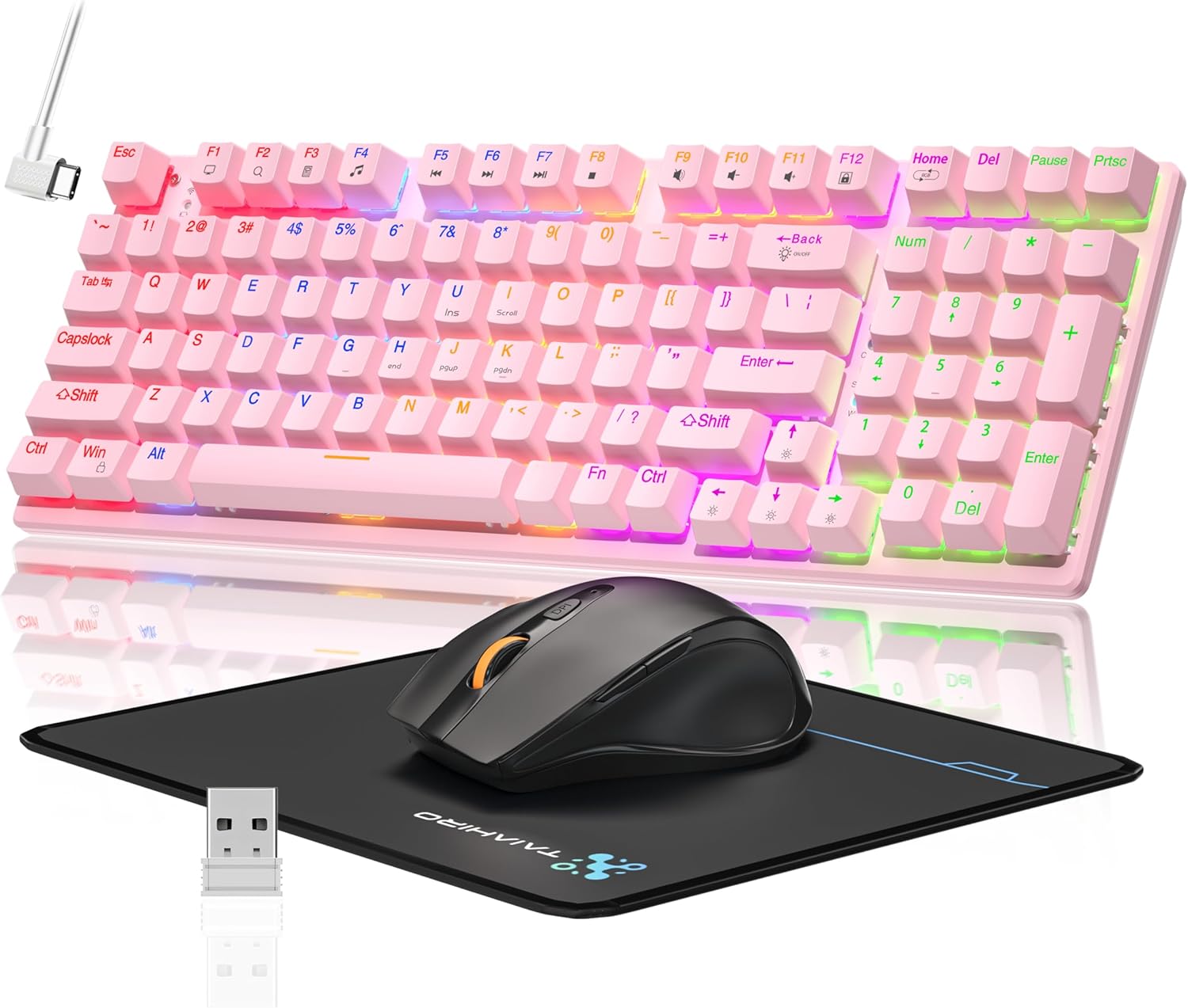
Image: The Taiahiro Wireless Gaming Keyboard and Mouse Combo, featuring a pink 98-key mechanical keyboard with RGB backlighting, a black ergonomic mouse, and a mouse pad. A USB receiver is also visible.
Садржај пакета
- Бежична механичка тастатура
- Бежични играчки миш
- УСБ-Ц кабл
- 2.4Г УСБ пријемник
- Подлога за миш
- Кориснички приручник (овај документ)
Сетуп
Подешавање тастатуре
The keyboard supports three connectivity modes: USB-C wired, 2.4G wireless, and Bluetooth 5.0.
- Жична веза преко USB-C порта: Connect the provided USB-C cable from the keyboard to an available USB port on your computer. The keyboard will be recognized automatically.
- 2.4Г бежична веза:
- Locate the 2.4G USB receiver, typically stored in the mouse or keyboard compartment.
- Прикључите 2.4G USB пријемник у слободан USB порт на рачунару.
- Ensure the keyboard's mode switch (usually on the back or side) is set to 2.4G mode.
- Тастатура би требало да се аутоматски повеже.
- Блуетоотх 5.0 веза:
- Уверите се да је прекидач за режим тастатуре подешен на Bluetooth режим.
- На свом уређају (рачунар, лаптоп, таблет, паметни телефон) омогућите Блутут и потражите нове уређаје.
- Select "Taiahiro Keyboard" (or similar name) from the list of available devices.
- Пратите упутства на екрану да бисте завршили упаривање.

Image: A pink mechanical keyboard connected to various devices (monitor, laptop, tablet) illustrating its triple-mode connectivity via Bluetooth, 2.4GHz, and USB-C.
Подешавање миша
The mouse supports 2.4G wireless and Bluetooth connectivity.
- 2.4Г бежична веза:
- Insert 1 AA battery (not included) into the mouse.
- Plug the 2.4G USB receiver (shared with keyboard) into an available USB port on your computer.
- Ensure the mouse's power switch is turned ON.
- Миш би требало да се аутоматски повеже.
- Блуетоотх веза:
- Insert 1 AA battery (not included) into the mouse.
- Ensure the mouse's power switch is turned ON and set to Bluetooth mode.
- На свом уређају омогућите Bluetooth и потражите нове уређаје.
- Select "Taiahiro Mouse" (or similar name) from the list of available devices.
- Пратите упутства на екрану да бисте завршили упаривање.

Image: A wireless gaming mouse highlighting its 4 adjustable DPI levels and showing the battery compartment with a tiny USB receiver and space for a 1AA battery.
Упутство за употребу
Функције тастатуре
- RGB позадинско осветљење: The keyboard features 8 different RGB lighting modes.
- Притисните Фн + Хоме да бисте се кретали кроз режиме осветљења.
- Притисните Fn + ↑/↓ to adjust brightness (5 levels).
- Притисните Fn + ←/→ to adjust breathing speed (5 levels).
- Мултимедијални тастери: Користите Fn key in combination with F-keys for multimedia controls (e.g., Fn+F1 for media player, Fn+F2 for volume down, etc.). Refer to the keycap legends for specific functions.
- Подесива стопала: The keyboard has adjustable feet on the underside to change the typing angle for ergonomic comfort.
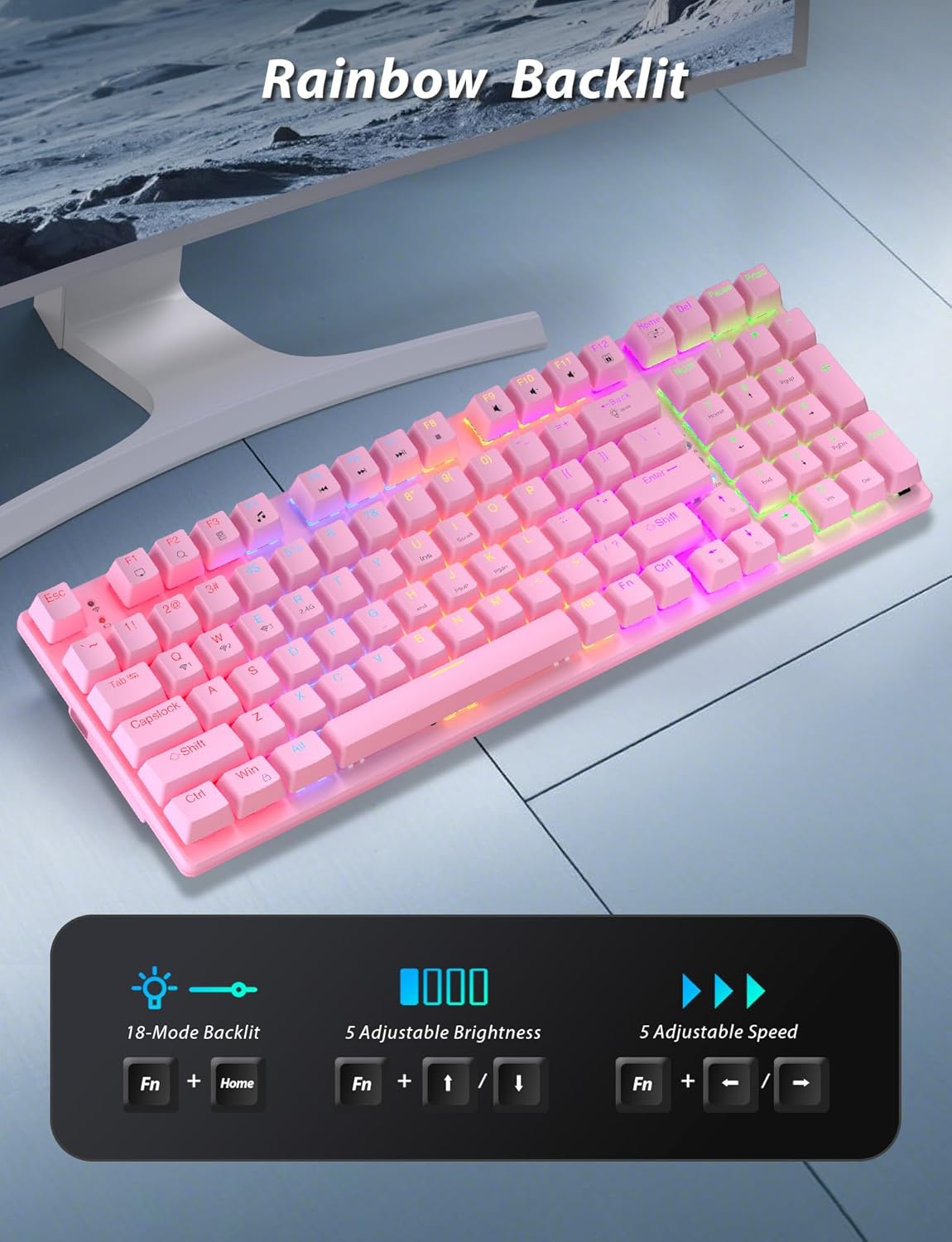
Image: A pink mechanical keyboard displaying its rainbow backlit keys, with an overlay showing the key combinations (Fn + Home, Fn + ↑/↓, Fn + ←/→) for controlling 8 modes, 5 adjustable brightness levels, and 5 adjustable speeds.

Слика: Крупни план view of the side of the pink mechanical keyboard, showing its ergonomic sloped design and the adjustable feet extended for comfortable typing. The accompanying mouse is also shown on a mousepad.
Функције миша
- ДПИ подешавање: The mouse features 4 adjustable DPI levels (800/1600/2400/3200). Press the DPI button (usually located behind the scroll wheel) to cycle through the sensitivity settings.
- Ергономски дизајн: The contoured shape of the mouse is designed to fit comfortably in your hand, reducing fatigue during extended use.
- Anti-skid Scroll Wheel: Provides precise scrolling control.

Image: A wireless gaming mouse with a prominent scroll wheel and DPI button, illustrating its 4 adjustable DPI levels (800/1600/2400/3200), ergonomic shape, and forward/back buttons.
Одржавање
- Чишћење: Користите меку, суву крпу за чишћење површина тастатуре и миша. За темељније чишћење, благо протрљајтеamp cloth can be used, ensuring no liquid enters the internal components. Avoid harsh chemicals or abrasive materials.
- Замена батерије: For the mouse, replace the AA battery when performance degrades. For the keyboard, recharge via the USB-C cable when the battery indicator shows low power.
- Складиштење: Када се не користи дуже време, чувајте комбинацију на хладном и сувом месту, даље од директне сунчеве светлости и екстремних температура.
Решавање проблема
| Проблем | Решење |
|---|---|
| Keyboard/Mouse not connecting via 2.4G. |
|
| Keyboard/Mouse not connecting via Bluetooth. |
|
| RGB backlighting not working or dim. |
|
| Mouse cursor erratic or unresponsive. |
|
Спецификације
| Феатуре | Детаљ |
|---|---|
| Број модела | БК6301 |
| Тип тастатуре | 98-Key Mechanical Keyboard |
| Тип прекидача | Плави прекидачи |
| Повезивање тастатуре | USB-C (Wired), 2.4G Wireless, Bluetooth 5.0 |
| Mouse Connectivity | 2.4G бежична веза, Bluetooth |
| Нивои DPI миша | 800/1600/2400/3200 |
| Позадинско осветљење | RGB (8 Modes, 5 Brightness, 5 Speed) |
| Компатибилни уређаји | PC, Laptop, Smartphone, Tablet (Windows, macOS, Android) |
| Трајање тастера на тастатури | 50 милиона кликова |
| Димензије тастатуре | Approx. 14.96 x 5.51 x 3.15 inches (from Package Dimensions) |
| Тежина артикла | 2.72 pounds (combo weight) |
| Батерија за миш | 1 к АА батерија (није укључена) |
| Батерија за тастатуру | 1 x C battery (included) Note: This seems unusual for a keyboard, usually Li-ion. Based on input "1 C batteries required. (included)". Will state as per input. |

Слика: Крупни план view of the mechanical blue switches on the keyboard, showing the keycap removed and the switch mechanism, along with specifications like 50,000,000 keystrokes life, key force, and stroke travel.
Гаранција и подршка
Taiahiro products are designed for reliability and performance. For warranty information or technical support, please refer to the contact details provided on the product packaging or visit the official Taiahiro webсајту. Сачувајте рачун о куповини за гаранције.
For further assistance, you may contact Taiahiro customer service through their official channels. Please provide your product model number (BK6301) and a detailed description of the issue when seeking support.


