1. Увод
This manual provides essential information for the safe and efficient operation of your DOOGEE V40 Pro 5G Rugged Smartphone. Please read it thoroughly before using your device to ensure proper setup, usage, and maintenance. The DOOGEE V40 Pro is designed for durability and high performance, featuring a Dimensity 7300 4nm 5G processor, a 200MP AI camera, an 8680mAh battery, and a 1.47-inch multi-functional rear screen.
2. Шта је у кутији
Проверите да ли су све ставке присутне у паковању производа:
- 1 x DOOGEE V40 Pro Rugged Phone
- 1 к УСБ кабл типа Ц
- 1 к пуњач
- 1 x Packing Box/ 1 x Manual
Опис видеа: An unboxing video of the DOOGEE V40 Pro, showing the phone and its included accessories such as the charger and USB cable.
3. Производ је готовview
The DOOGEE V40 Pro features a robust design with advanced functionalities. It includes a large main display and an innovative rear screen for quick access to information and controls.
3.1 Предњи и задњи Views
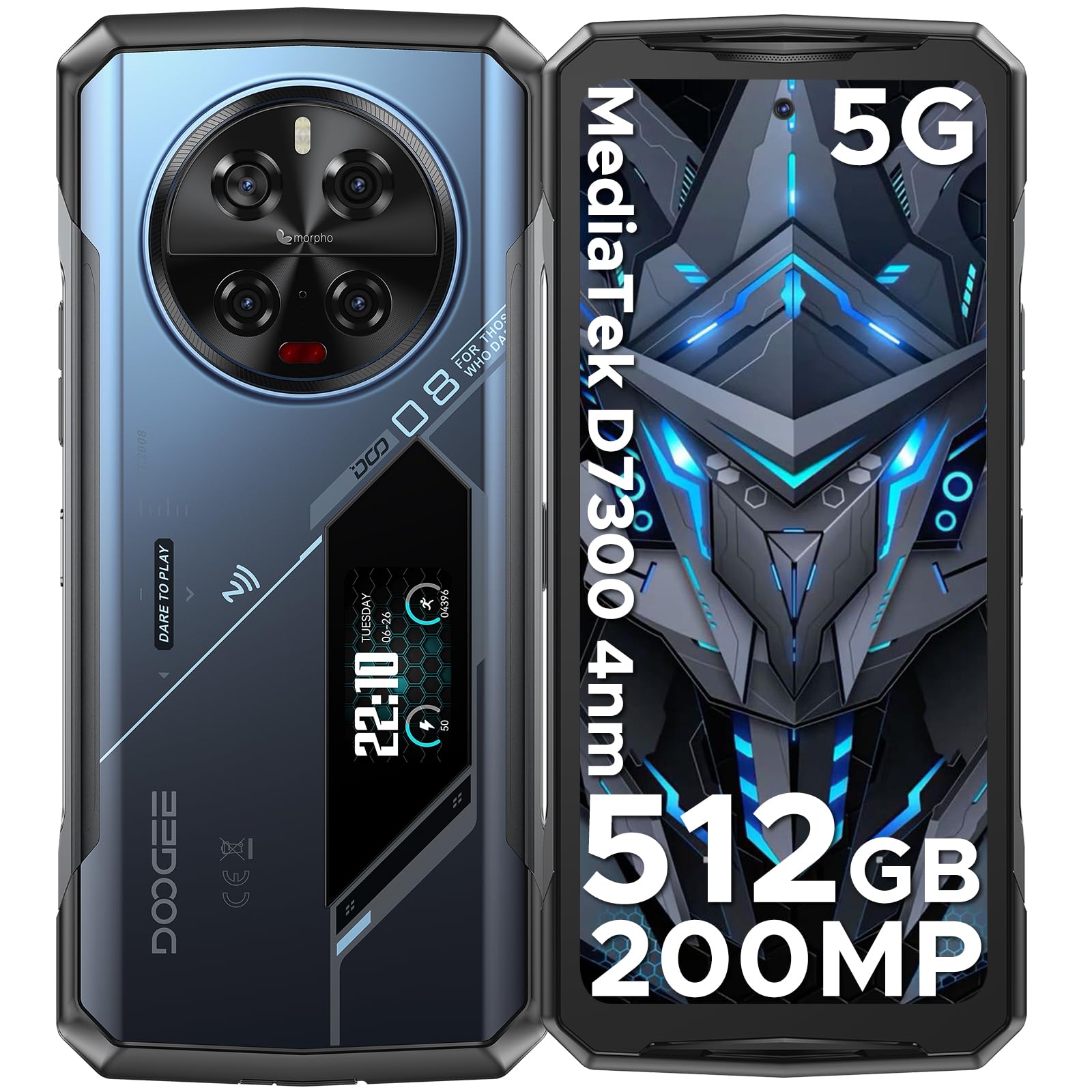
Опис слике: Свеобухватан view of the DOOGEE V40 Pro, showcasing its front display and the unique rear panel with the camera module and secondary screen.
3.2 Главни екран
The device is equipped with a 6.78-inch FHD+ display offering a 120Hz dynamic refresh rate for smooth visuals and efficient power consumption.

Опис слике: The DOOGEE V40 Pro's main 6.78-inch FHD+ display, illustrating its vibrant screen quality.
3.3 Multi-functional Rear Display
A 1.47-inch secondary display on the rear provides quick access to essential information and controls without needing to activate the main screen. Functions include time, date, notifications, music control, and battery level.

Опис слике: A close-up of the DOOGEE V40 Pro's 1.47-inch rear display, showing various customizable widgets and information displays.
Систем камера 3.4
The device features a versatile camera setup, including a 200MP AI main camera with OIS, a 20MP night vision camera, an 8MP telephoto camera, an 8MP macro camera, and a 32MP front-facing camera.

Опис слике: Детаљно view of the DOOGEE V40 Pro's circular rear camera module, highlighting its multiple lenses and flash.
4. Подешавање
4.1 Инсталација SIM картице и TF картице
To install your SIM card(s) and/or TF card (microSD card for expandable storage), locate the SIM tray on the side of the device. Use the provided SIM ejector tool to open the tray. Carefully place your nano-SIM cards and/or TF card into the designated slots, ensuring correct orientation. Close the tray securely.
4.2 Почетно укључивање
Press and hold the Power button located on the side of the device until the DOOGEE logo appears. Follow the on-screen instructions to complete the initial setup, including language selection, network connection, and account configuration.
5. Упутство за употребу
5.1 Основне функције телефона
Navigate the Android 14 operating system using touch gestures. Swipe down from the top for notifications and quick settings. Use the volume buttons on the side to adjust audio levels. The power button can be configured for various actions, including screen lock/unlock and power options.
5.2 Коришћење задњег дисплеја
The 1.47-inch rear display offers quick access to information and controls. Swipe left or right to cycle through different widgets such as time, date, battery status, music playback controls, and notification alerts. This display can also be used for enhanced selfie previews.

Опис слике: A person holding the DOOGEE V40 Pro, demonstrating the visibility and utility of the rear display.
5.3 Рад камере
Open the Camera application to access the 200MP AI main camera, 20MP night vision camera, 8MP telephoto, 8MP macro, and 32MP front camera. Select different modes for photos, videos (including 4K recording), and special features like anti-shake and night vision. The rear display can assist with framing selfies using the main camera.
Опис видеа: A promotional video showcasing the DOOGEE V40 Pro's features, including its camera capabilities and rugged design.
5.4 Перформансе и игре
The Dimensity 7300 4nm 5G processor and 36GB RAM (16GB physical + 20GB virtual) provide smooth performance for demanding applications and games. The DOOGEE OS 4.0 includes features like Game Mode Without Disturb for an uninterrupted gaming experience.
Опис видеа: A video highlighting the DOOGEE V40 Pro's e-sports design and performance, suitable for gaming enthusiasts.
5.5 Карактеристике DOOGEE OS 4.0
Experience enhanced user interface and features with DOOGEE OS 4.0, including App Cloning, Drama Mode (Video), and Dynamic Capsule for improved multitasking and user interaction.
6. Повезивање
The DOOGEE V40 Pro supports a range of connectivity options:
- Мрежа: 5G connectivity. Supports AT&T, Verizon, T-Mobile. Not compatible with CDMA carriers such as Cricket, Sprint, Boost Mobile, Straight Talk, or U.S. Cellular.
- Ви-Фи: Wi-Fi 6 for fast and stable wireless internet.
- Блуетоотх: Блутут 5.2 за повезивање бежичних додатака.
- НФЦ: Near Field Communication for contactless payments and data exchange.
- ГПС: Integrated GPS with Beidou, Galileo, and Glonass support for accurate navigation.
7. Управљање батеријом
The DOOGEE V40 Pro is equipped with an 8680mAh battery, providing extended usage times. It supports 33W fast charging to quickly replenish power.

Опис слике: An illustration highlighting the large 8680mAh battery capacity of the DOOGEE V40 Pro.
7.1 OTG обрнуто пуњење
Utilize the OTG (On-The-Go) function to use your V40 Pro as a power bank to charge other compatible devices.
7.2 Intelligent Battery Management
The device features an intelligent battery management system with Ultra Power Saving mode to extend battery life when needed and an option to display battery percentagе на статусној траци.
8. Робусне карактеристике
The DOOGEE V40 Pro is built to withstand harsh environments, certified with IP68, IP69K, and MIL-STD-810H ratings.
- ИП68: Dust and water resistant up to 1.5 meters for 30 minutes.
- ИП69К: Отпоран на млазеве воде под високим притиском и високом температуром.
- MIL-STD-810H: Војно квалитетна издржљивост на падове, ударце и екстремне температуре.
- Отпорност на температуру: Operates reliably in temperatures ranging from -40°C (-40°F) to +70°C (158°F).

Опис слике: The DOOGEE V40 Pro submerged in water and being dropped, illustrating its IP68/IP69K and MIL-STD-810H ruggedness ratings.
9. Спецификације
| Феатуре | Детаљ |
|---|---|
| Димензије производа | 7.2 к 3.3 к 0.6 инча |
| Тежина артикла | 12.8 унце (0.8 фунте) |
| Оперативни систем | Андроид 14 |
| ЦПУ модел | Dimensity 7300 4nm 5G Octa-core Processor |
| Брзина процесора | 2.5 ГХз |
| Величина инсталиране РАМ меморије | 36 GB (16 GB + 20 GB виртуелно) |
| Капацитет меморије | 512 GB (прошириво до 2 TB помоћу TF картице) |
| Величина екрана на стојећем екрану | 6.78 инча |
| Резолуција | 1080 x 2400 (FHD+) |
| Рефресх Рате | 120 Хз |
| Реар Дисплаи | 1.47" All-Purpose Secondary Display |
| Главна камера | Главна камера од 200MP са вештачком интелигенцијом и оптичком стабилизацијом слике |
| Камера за ноћни вид | 20MP камера за ноћно гледање |
| Other Rear Cameras | 8MP Telephoto Camera, 8MP Macro Camera |
| Предња камера | Предња камера од 32МП |
| Капацитет батерије | 8680 Милиamp Сати |
| Пуњење | Брзо пуњење од 33W, обрнуто OTG пуњење |
| Цоннецтивити Тецхнологиес | Bluetooth 5.2, NFC, WiFi 6 |
| ГПС | Бејду, Галилео, Глонас, ГПС |
| Руггнесс | IP68, IP69K, MIL-STD-810H |
| Аудио Јацк | Типе-Ц |
| Спеакер | 1216 Super-linear Waterproof 121dB 1.5W BOX Speaker with SMART PA chip |
| Унос људског интерфејса | Тоуцхсцреен |
| Боја | Плава |
КСНУМКС. Решавање проблема
If you encounter issues with your DOOGEE V40 Pro, try the following steps:
- Уређај се не укључује: Уверите се да је батерија напуњена. Прикључите телефон на пуњач и сачекајте неколико минута пре него што покушате поново да га укључите.
- Екран који не реагује: Притисните и држите дугме за напајање око 10-15 секунди да бисте поново покренули рачунар.
- Проблеми са мрежном повезивањем: Check if your SIM card is correctly inserted. Verify that mobile data or Wi-Fi is enabled. Restart the device.
- Неисправности апликације: Close and reopen the problematic application. If the issue persists, clear the app's cache and data in Settings > Apps.
- Споре перформансе: Close unnecessary background applications. Clear cache regularly. Consider a factory reset as a last resort (back up your data first).
11. Гаранција и подршка
DOOGEE provides comprehensive support for your V40 Pro smartphone:
- 30-дневна гаранција поврата новца: If you are not satisfied with your purchase, you may be eligible for a full refund within 30 days.
- 2-годишња ограничена гаранција: Your device is covered by a 2-year limited warranty against manufacturing defects. Please refer to the warranty card included in the box for detailed terms and conditions.
- 24/7 подршка на мрежи: For any technical assistance or inquiries, contact DOOGEE customer service available 24 hours a day, 7 days a week.


