1. Увод
Thank you for choosing the Hama WK-300 Multi-Device Wireless Keyboard. This compact office keyboard is designed for wireless control of computers, smartphones, and tablets, offering versatile connectivity via Bluetooth or a 2.4 GHz radio connection with a USB-A receiver. It allows simultaneous connection to up to three devices, providing a seamless experience for various tasks.
2. Безбедносна упутства
- Немојте отварати уређај нити наставити да га користите ако се оштети.
- Не покушавајте сами да сервисирате или поправљате производ. Препустите све сервисне радове квалификованим стручњацима.
- Заштитите производ од прљавштине, влаге и прегревања и користите га само у сувим окружењима.
- Чувајте овај производ, као и све електричне производе, ван домашаја деце.
- Не користите производ у областима где употреба електронских уређаја није дозвољена.
- Одмах одложите материјал за паковање у складу са локалним прописима.
3. Садржај пакета
Молимо вас да проверите да ли пакет садржи следеће ставке:
- 1 Hama WK-300 Multi-Device Wireless Keyboard
- 1 USB-A Receiver (typically stored in the battery compartment)
- 1 Упутство за употребу
Напомена: За рад су потребне ААА батерије и нису укључене у пакет.
4. Подешавање
4.1 Инсталација батерије
- Пронађите одељак за батерију на доњој страни тастатуре.
- Отворите поклопац одељка за батерије.
- Уметните једну ААА батерију, водећи рачуна о исправном поларитету (+/-).
- Добро затворите поклопац одељка за батерије.
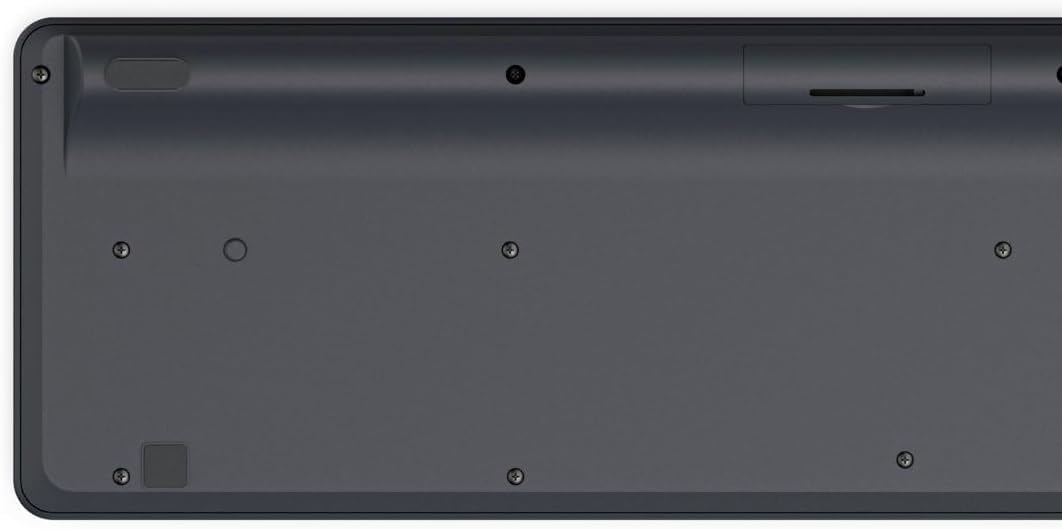
Image: Underside of the Hama WK-300 keyboard, illustrating the battery compartment and the storage slot for the USB receiver.
4.2 Повезивање са уређајима
The Hama WK-300 keyboard supports connection to up to three devices simultaneously via 2.4 GHz radio (channel 1) and Bluetooth (channels 2 and 3).
4.2.1 2.4 GHz Radio Connection (Channel 1)
- Remove the USB-A receiver from its storage slot in the battery compartment.
- Plug the USB-A receiver into a free USB port on your computer.
- Switch the keyboard to channel 1 (usually indicated by a switch or button on the keyboard). The keyboard should automatically connect to your computer.
4.2.2 Bluetooth Connection (Channels 2 & 3)
- Switch the keyboard to either channel 2 or channel 3.
- Press and hold the pairing button (refer to keyboard layout for exact location, often combined with the channel switch) until the indicator light flashes, signifying pairing mode.
- On your device (smartphone, tablet, computer), go to Bluetooth settings and search for new devices.
- Select "Hama WK-300" from the list of available devices to complete the pairing process.
4.3 Пребацивање између уређаја
To switch between connected devices, simply press the corresponding channel button (1, 2, or 3) on the keyboard. The keyboard will instantly connect to the selected device.
5. Управљање тастатуром
5.1 Basic Typing Functions
The Hama WK-300 features a QWERTY layout with quiet keys, ensuring a comfortable and undisturbed typing experience. Simply begin typing after connecting to your device.

Слика: Одозго надоле view of the Hama WK-300 keyboard, highlighting its 90% layout and key functions, including the Fn key for multimedia controls.
5.2 Multimedia Functions (Fn Keys)
The F keys (F1-F12) have secondary assignments for multimedia control. To activate these functions, press and hold the Fn key simultaneously with the desired F key. This allows for quick control of media playback, volume, and other system functions without navigating through system settings.
5.3 AI Assist Button
The dedicated Assist button activates a cross-program AI assistant, enhancing productivity by providing quick access to intelligent features.
5.4 Уштеда енергије
The keyboard is battery-operated and designed for efficiency, making it ideal for mobile use. It will enter a low-power state after a period of inactivity to conserve battery life.
6. Одржавање
6.1 Чишћење тастатуре
To clean your keyboard, ensure it is turned off and disconnected from any devices. Use a soft, lint-free cloth slightly dampened with water or a mild cleaning solution. Avoid excessive moisture and abrasive cleaners. Do not immerse the keyboard in water.
6.2 Замена батерије
When the keyboard's performance diminishes or it stops responding, it may be time to replace the AAA battery. Follow the battery installation steps outlined in Section 4.1.
КСНУМКС. Решавање проблема
- Тастатура се не повезује: Ensure the keyboard has fresh batteries and is switched to the correct channel (1 for 2.4 GHz, 2 or 3 for Bluetooth). For Bluetooth, ensure the keyboard is in pairing mode and your device's Bluetooth is enabled. For 2.4 GHz, ensure the USB receiver is properly inserted into your device.
- Тастери не реагују: Check battery level. If using 2.4 GHz, try plugging the USB receiver into a different USB port. If using Bluetooth, try re-pairing the keyboard with your device.
- Повремена веза: Ensure there are no strong interference sources nearby (e.g., other wireless devices, large metal objects). Try moving closer to your device.
- Мултимедијални тастери не раде: Уверите се да притискате Fn тастер истовремено са жељеним тастером F.
8. Спецификације
| Бранд | Хама |
| Број модела | 182641 |
| Боја | Црно |
| Повезивање | 2.4 GHz Radio (USB-A receiver), Bluetooth (2 channels) |
| Број уређаја | До 3 истовремених уређаја |
| Распоред тастатуре | КВЕРТИ |
| Димензије производа (ДкШкВ) | 16 к 43.8 к 2.6 центиметара |
| Тежина артикла | 447 г |
| Батерије су потребне | 1 ААА батерија (није укључена) |
9. Гаранција
The Hama WK-300 Multi-Device Wireless Keyboard comes with a 5 година гаранције. Please retain your proof of purchase for warranty claims. For detailed warranty terms and conditions, refer to the official Hama webсајту или контактирајте корисничку подршку.
10. Подршка
For further assistance, technical support, or to inquire about spare parts, please contact Hama customer service. You can find contact information on the official Hama webсајт (ввв.хама.цом) or through your local retailer.