1. Увод
This manual provides essential information for the safe and efficient operation of your Ulefone Armor X31 rugged smartphone. Please read this manual thoroughly before using your device to ensure proper functionality and to understand its features.
The Ulefone Armor X31 is designed for durability and performance, featuring a robust build, advanced camera system, and long-lasting battery life, suitable for various environments.
2. Шта је у кутији
Проверите да ли су све ставке присутне у паковању вашег производа:
- Ulefone Armor X31 Smartphone
- AC Power Charger (100~240V)
- Type-C to Type-C Data Cable (100cm)
- Заштитна фолија за екран (унапред постављена или одвојена)
- Избацивач СИМ лежишта
- Ланиард
- Кориснички приручник (овај документ)
3. Девице Оверview
Familiarize yourself with the physical components of your Ulefone Armor X31.

Слика: Предња и задња страна view of the Ulefone Armor X31 rugged smartphone, showcasinг његов робустан дизајн и модул камере.
3.1 Физичке компоненте
- Фронт: 6.56-inch HD+ display with Corning Gorilla Glass, 16MP front camera, earpiece, sensors.
- позади: 48MP main camera, 20MP night vision camera, 2MP macro camera, LED flash, fingerprint sensor, Ulefone branding.
- стране: Power button, volume up/down buttons, custom key, SIM/microSD card slot, USB Type-C port, 3.5mm audio jack.
4. Почетно подешавање
4.1 Installing SIM Cards and MicroSD Card
- Пронађите лежиште за СИМ картицу са стране уређаја.
- Уметните алат за избацивање лежишта СИМ картице у мали отвор поред лежишта и чврсто притисните док лежиште не искочи.
- Place your Nano-SIM cards (up to two) and/or a microSD card (for storage expansion up to 2TB) into the designated slots on the tray. Ensure the gold contacts face downwards.
- Пажљиво вратите лежиште у телефон док не кликне на своје место.
4.2 Укључивање/искључивање
- За укључивање: Притисните и држите дугме за напајање док се не појави логотип Улефона.
- За искључивање: Притисните и држите дугме за напајање док се не појави мени са опцијама напајања, а затим изаберите „Искључи“.
- Рестартовати: Притисните и држите дугме за напајање док се не појави мени са опцијама напајања, а затим изаберите „Рестарт“.
4.3 Почетна конфигурација
Upon first power-on, follow the on-screen prompts to complete the initial setup, which includes selecting your language, connecting to Wi-Fi, setting up your Google account, and configuring security features.
5. Управљање вашим уређајем
5.1 Основне функције телефона
- Упућивање позива: Отворите апликацију Телефон, унесите број и додирните икону за позив.
- Слање порука: Отворите апликацију Поруке, додирните „Покрени ћаскање“, унесите примаоца и поруку, а затим пошаљите.
- Интернет конекција: Повежите се на Wi-Fi преко Подешавања > Мрежа и интернет > Wi-Fi или омогућите мобилне податке преко Подешавања > Мрежа и интернет > Мобилна мрежа.
5.2 Перформансе и складиштење

Image: Diagram illustrating the MediaTek Helio G91 processor, highlighting its 8-core CPU and 2.0GHz clock speed.
The Armor X31 is powered by a MediaTek Helio G91 8-core processor, ensuring smooth performance for daily tasks and applications. It features 6GB of physical RAM, expandable with up to 6GB of virtual RAM, totaling 12GB. Internal storage is 128GB, with support for up to 2TB via a microSD card.

Image: Graphic detailing the 12GB RAM (6GB physical + 6GB virtual) and 128GB ROM, with 2TB expansion capability.
5.3 Функције камере

Image: Visual representation of the Ulefone Armor X31's camera setup, including the 48MP main, 20MP night vision, 2MP macro, and 16MP front cameras, with exampфотографије.
- Главна камера: The 48MP main camera captures high-resolution photos. Open the Camera app and select 'Photo' mode.
- Камера за ноћно гледање: The 20MP night vision camera allows for clear imaging in low-light or complete darkness. Select 'Night Vision' mode in the Camera app.
- Макро камера: Use the 2MP macro camera for detailed close-up shots.
- Предња камера: The 16MP front camera is for selfies and video calls. Switch to the front camera in the Camera app.
- Подводни режим: This mode allows you to take photos and videos while submerged. Activate it from the camera settings or quick toggles. Ensure all ports are securely sealed before submerging the device.
5.4 Карактеристике екрана

Image: Graphic highlighting the 6.56-inch display with 720x1612 resolution, 90Hz refresh rate, 800 nits brightness, and Corning Gorilla Glass protection.
The 6.56-inch HD+ display offers a 720 x 1612 resolution and a 90Hz refresh rate for smooth visuals. With 800 nits brightness, it provides good visibility outdoors. The screen is protected by Corning Gorilla Glass for enhanced durability.
5.5 Управљање батеријом

Image: Illustration of the 6050mAh battery and its estimated usage times for standby, talk, music, and video playback.
The device is equipped with a 6050mAh battery, providing extended usage times. It supports 18W fast charging. The reverse charging feature allows you to use your phone as a power bank to charge other compatible devices via a USB-C to USB-C cable (sold separately).
5.6 Робусне карактеристике
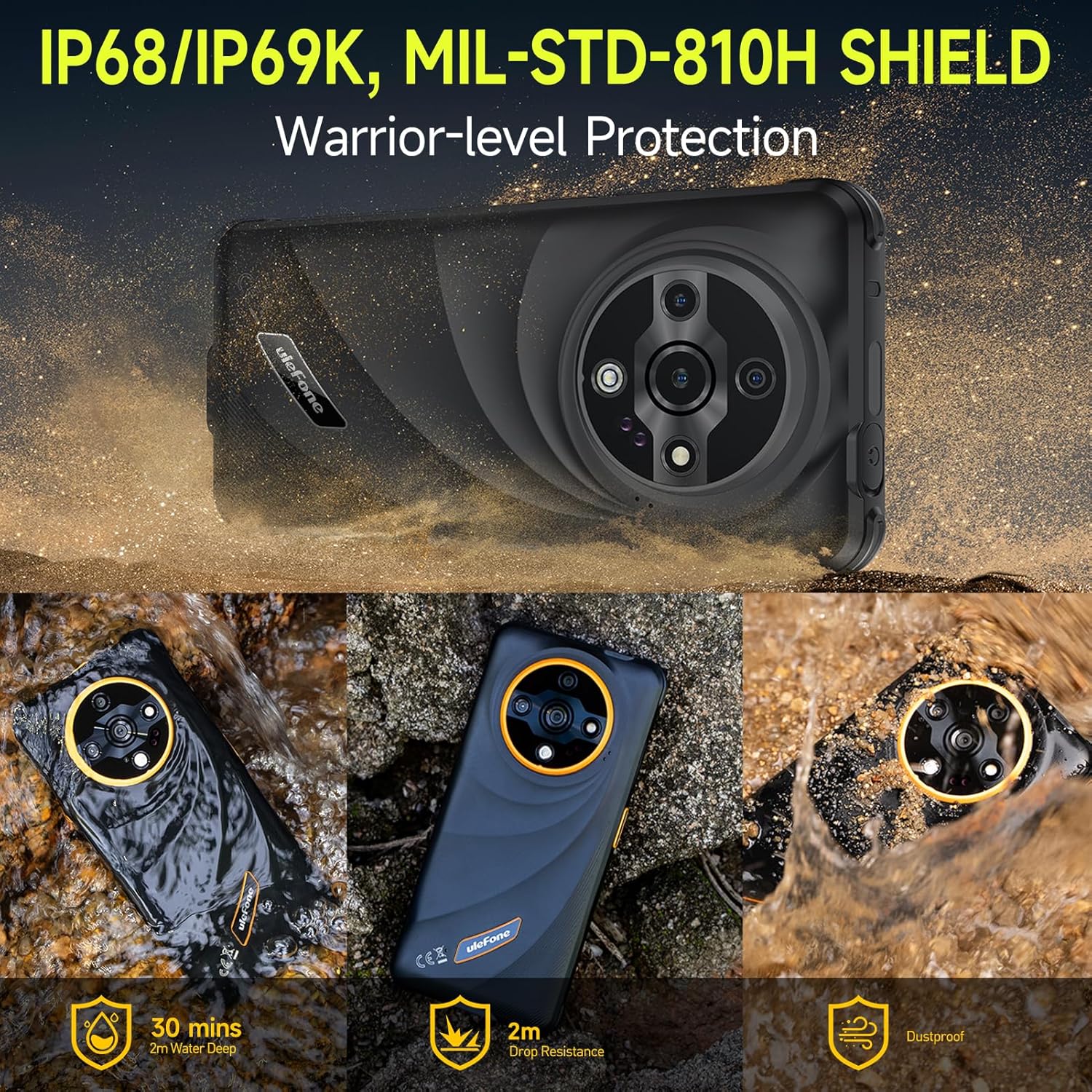
Image: Depiction of the Ulefone Armor X31's IP68/IP69K and MIL-STD-810H ratings, showing its resistance to water, drops, and dust in various scenarios.
The Armor X31 is IP68/IP69K certified and meets MIL-STD-810H standards, making it highly resistant to water, dust, and drops. It can withstand submersion in up to 2 meters of water for 30 minutes and drops from up to 2 meters.
5.7 Додатне функције
- 120 Lumen Flashlight: An independent, high-brightness flashlight is integrated for illumination in dark environments.
- Google Lens Support: Utilize Google Lens through the camera for instant translations, object identification, and image searches.
- Подршка за Вајдвајн Л1: Enables streaming of high-definition content from platforms like Netflix and Disney+.
- ИР Бластер: Use your phone as a universal remote control for compatible home appliances.
- Fingerprint Unlock & Face Unlock: Secure your device with biometric authentication.
- НФЦ: Supports contactless payments and data transfer.
- Headset-Free FM Radio: Listen to FM radio without needing to connect headphones as an antenna.
- Прилагођени кључ: A programmable button for quick access to frequently used apps or functions.
- Outdoor Toolbox: A suite of utility apps designed for outdoor activities.
- 3-Card Slot: Accommodates two SIM cards and one microSD card simultaneously.
- GPS + GLONASS + Beidou + Galileo: Multiple navigation systems for accurate positioning.
- Режим рукавица: Enhances touch screen sensitivity for operation while wearing gloves.

Image: Graphic showing Widevine L1 support, enabling HD streaming on platforms like Netflix and Disney+.
6. Одржавање
6.1 Чишћење уређаја
To clean your Armor X31, use a soft, lint-free cloth. For stubborn dirt or grime, especially after exposure to mud or saltwater, rinse the device under fresh water and ensure all ports are closed. Allow the device to air dry completely before charging or opening any ports.
6.2 Одржавање батерије
- Avoid exposing the device to extreme temperatures (below 0°C or above 45°C) as this can degrade battery performance.
- Use only the original charger and cable provided with your device to prevent damage and ensure optimal charging.
- Do not attempt to replace the battery yourself, as it is an integrated component and requires professional service.
6.3 Општа нега
Despite its rugged design, avoid unnecessary drops or impacts. Ensure all port covers are securely closed when the device is exposed to water or dust.
КСНУМКС. Решавање проблема
This section addresses common issues you might encounter with your Ulefone Armor X31.
| Иссуе | Могуће решење |
|---|---|
| Уређај се не укључује | Уверите се да је батерија напуњена. Прикључите пуњач и сачекајте неколико минута пре него што поново покушате да укључите уређај. Ако не реагује, извршите принудно поновно покретање тако што ћете држати дугме за напајање 10-15 секунди. |
| Лош мрежни сигнал | Check if your SIM card is properly inserted. Move to an area with better network coverage. Restart the device. Verify mobile data settings in 'Settings > Network & internet > Mobile network'. |
| Апликације се руше или замрзавају | Close and reopen the app. Clear the app's cache and data via 'Settings > Apps > [App Name] > Storage & cache'. Ensure the app is updated to the latest version. Restart the phone. |
| Екран на додир не реагује | Restart the device. Ensure the screen is clean and dry. If using a screen protector, ensure it is properly applied and not interfering with touch sensitivity. |
| Уређај се не пуни | Check the charging cable and adapter for damage. Ensure the USB-C port is clean and free of debris. Try a different power outlet. Use the original charger and cable. |
If you encounter issues not listed here or if solutions do not resolve the problem, please contact Ulefone customer support.
8. Спецификације
| Феатуре | Детаљ |
|---|---|
| Назив модела | Улефон Армор X31 |
| Оперативни систем | Андроид 14 |
| Процесор | MediaTek Helio G91, 8-core, 2.0 GHz |
| РАМ | 12 GB (6 GB физичке + 6 GB виртуелне) |
| Интерна меморија | 128 ГБ |
| Екпандабле Стораге | До 2 ТБ преко microSD картице |
| Дисплаи | 6.56 inches HD+ (720 x 1612), 90 Hz Refresh Rate, 800 nits Max Brightness, Corning Gorilla Glass |
| задње камере | 48MP Main Camera, 20MP Night Vision Camera, 2MP Macro Camera |
| Предња камера | 16МП |
| Капацитет батерије | 6050 мАх |
| Пуњење | 18W Fast Charging, Reverse Charging |
| Трајност | IP68/IP69K Waterproof & Dustproof, MIL-STD-810H Shockproof |
| Повезивање | Dual 4G, Wi-Fi, Bluetooth 5.2, NFC, GPS (GPS+GLONASS+Beidou+Galileo), USB Type-C, 3.5mm Audio Jack |
| Посебне карактеристике | 120 Lumen Flashlight, IR Blaster, Fingerprint Unlock, Face Unlock, Custom Key, Outdoor Toolbox, Widevine L1, Headset-Free FM Radio, Gloves Mode |
| Димензије | 6.84 к 3.23 к 0.54 инча (173.78 к 82 к 13.65 мм) |
| Тежина | 10.6 унце (301 грама) |
9. Гаранција и подршка
9.1 Гаранција произвођача
The Ulefone Armor X31 comes with a 12-month manufacturer warranty service in the US. This warranty covers defects in materials and workmanship under normal use. It does not cover damage caused by misuse, accidents, unauthorized repairs, or normal wear and tear.
9.2 Корисничка подршка
For technical assistance, warranty claims, or any questions regarding your Ulefone Armor X31, please contact Ulefone customer support. Refer to the contact information provided in your product packaging or visit the official Ulefone webсајт за детаље подршке.


