1. Увод
The HUAWEI Band 10 is a lightweight and feature-rich smartwatch designed for all-day wear. It offers advanced fitness monitoring, comprehensive sleep analysis, and an emotional wellbeing assistant. This manual provides essential information for setting up, operating, and maintaining your device.
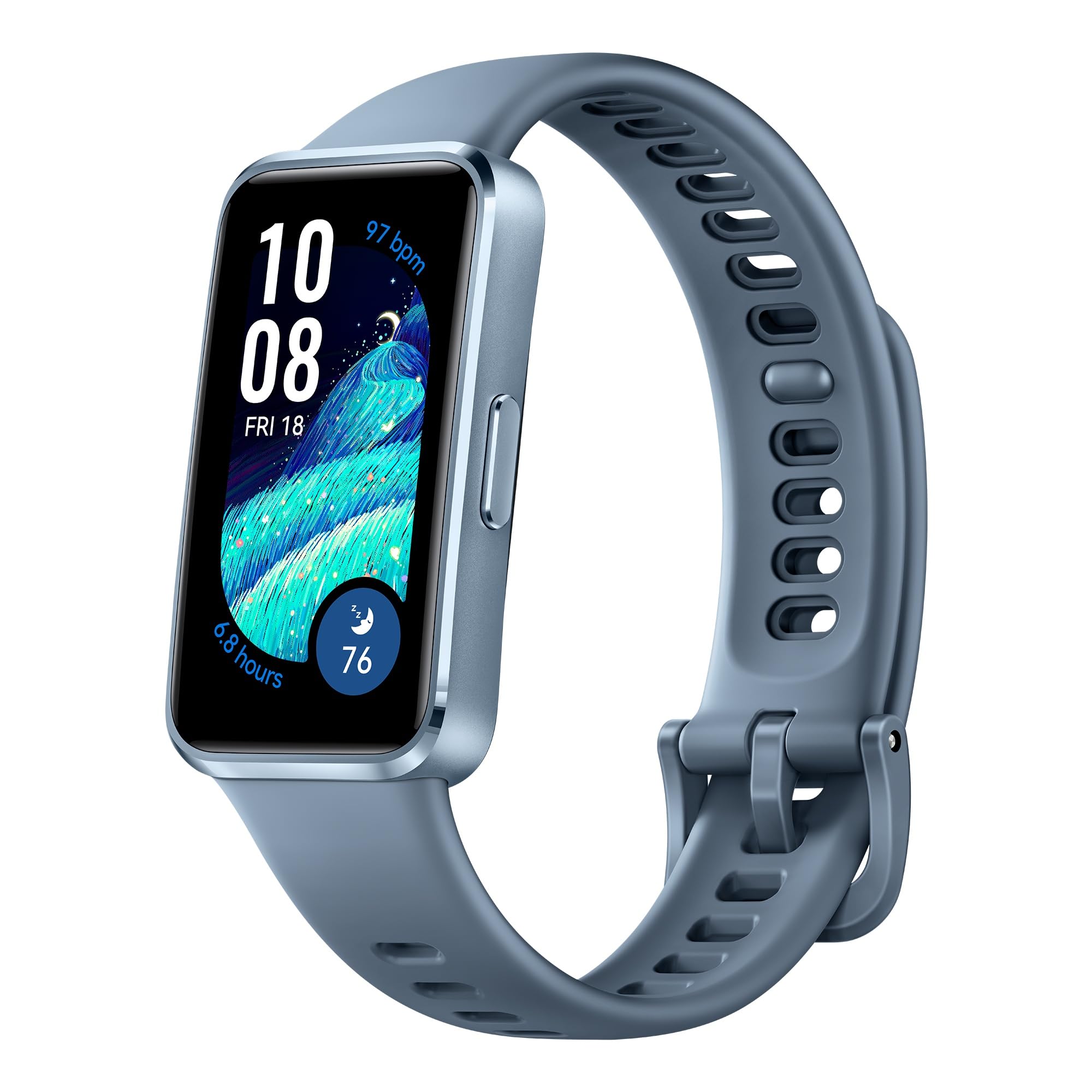
Figure 1: HUAWEI Band 10 Smartwatch
2. Шта је у кутији
Upon unboxing your HUAWEI Band 10, verify that the following items are included:
- HUAWEI Band 10 Smartwatch
- Кабл за пуњење
Please inspect all components for any signs of damage. If any items are missing or damaged, contact customer support.
3. Подешавање
3.1 Почетно пуњење и укључивање
Before first use, fully charge your HUAWEI Band 10. Connect the provided charging cable to the charging port on the back of the device and to a USB power source. The device will power on automatically once connected to power.

Figure 2: Fast charging capability of HUAWEI Band 10
3.2 Упаривање са вашим паметним телефоном
The HUAWEI Band 10 is compatible with both Android and iOS devices. To pair your device:
- Преузмите Хуавеи апликација за здравље on your smartphone. You may need to visit the official HUAWEI website to download the app if it's not available on your device's app store.
- Open the Huawei Health App and navigate to the device pairing section.
- Follow the on-screen instructions to scan the QR code displayed on your HUAWEI Band 10 or manually select the device.
- Confirm the pairing request on both your smartphone and the Band 10.
- Review and accept the End User License Agreement and privacy policies within the app to complete the setup.

Figure 3: HUAWEI Band 10 compatibility and app interface
Video 1: HUAWEI Band 10 Unboxing and Setup Guide. This video demonstrates the initial unboxing, powering on, and pairing process of the HUAWEI Band 10 with a smartphone.
4. Руковање уређајем
4.1 Основна навигација
The HUAWEI Band 10 features a responsive touchscreen and a side button for navigation. Swipe up, down, left, or right on the screen to access different features and menus. Press the side button to return to the home screen or wake the device.
4.2 AI-Powered Fitness Monitoring
The device supports 100 sports modes, utilizing an advanced 9-axis sensor and AI-enhanced stroke identification technology for accurate data. This includes ultra-accurate swimming data.

Figure 4: AI-powered fitness monitoring with 100 workout modes
4.3 Pro-Level Sleep Analysis
The HUAWEI Band 10 tracks your sleep patterns, monitoring heart rate, SpO2, respiratory rate, and detecting abnormal breathing. It provides detailed insights into sleep duration, quality rating, and deep sleep ratio to help improve your sleep health.

Figure 5: Pro-level sleep analysis with average sleep HRV and insights
4.4 Emotional Wellbeing Assistant
The emotional wellbeing assistant provides timely tips to promote positive thinking and features perceptive pet-themed watch faces that reflect your mood. This feature aims to support your mental wellness.

Figure 6: Emotional wellbeing assistant with pet-themed watch faces
4.5 Трајање батерије
The HUAWEI Band 10 offers robust battery performance. A full charge provides up to 8 days of typical use, and up to 14 days under specific conditions. With fast charging, a 5-minute charge can provide up to 2 days of use, while a full charge takes approximately 45 minutes.
5. Одржавање
5.1 Отпорност на воду
The HUAWEI Band 10 has a water resistance rating of 50 meters (5 ATM), making it suitable for swimming and other shallow-water activities. It is not recommended for diving, hot showers, or saunas.
5.2 Чишћење и нега
To maintain your device, regularly clean the band and the sensor area on the back with a soft, damp крпа. Избегавајте употребу јаких хемикалија или абразивних материјала. Уверите се да су контакти за пуњење чисти и суви пре пуњења.

Слика 7: Задња страна view of HUAWEI Band 10 with sensors
5.3 Strap Customization
The HUAWEI Band 10 features skin-friendly fluoroelastomer straps available in various colors. Straps can be interchanged to suit personal preference.

Figure 8: HUAWEI Band 10 available in multiple colors
КСНУМКС. Решавање проблема
If you encounter issues with your HUAWEI Band 10, try the following steps:
- Поново покрените уређај: Једноставно поновно покретање може решити многе мање софтверске грешке.
- Проверите Bluetooth везу: Ensure your smartphone's Bluetooth is enabled and the band is within range.
- Update the Huawei Health App: Make sure you have the latest version of the app installed.
- Re-pair the device: If connection issues persist, try unpairing and re-pairing the band with your smartphone.
- Фацтори Ресет: As a last resort, you may perform a factory reset through the device settings or the Huawei Health App. Note that this will erase all data on the band.
За додатну помоћ, погледајте информације о подршци дате у Одељку 8.
7. Спецификације
| Назив модела | HUAWEI Band 10 |
| Број модела ставке | Nora-B29F |
| Димензије производа | 4.3 к 3 к 2.45 цм |
| Тежина артикла | 100 г (0.1 килограма) |
| Величина екрана | 1.47 инча |
| Дисплаи Типе | АМОЛЕД |
| Оперативни систем | ХармониОС |
| Капацитет меморије | 4 ГБ |
| Капацитет батерије | 180 Милиamp Сати |
| Просечан век трајања батерије | 8 дана |
| Време пуњења батерије | КСНУМКС минута |
| Технологија повезивања | Блуетоотх |
| Ниво отпорности на воду | 50 метара (5 банкомата) |
| Врста материјала бенда | Флуороеластомер |
| Тип материјала кућишта | Алуминијум |
| Подржана апликација | Фитнесс Трацкер |
| Измерене метрике | Sleep Duration, Step Count, Stress |
| УПЦ | 194570002462 |
8. Гаранција и подршка
8.1 Информације о гаранцији
The HUAWEI Band 10 comes with a 1 година ограничене гаранције од датума куповине. Молимо вас да сачувате доказ о куповини за потребе гаранције. Гаранција покрива производне недостатке и кварове у нормалним условима употребе.
8.2 Корисничка подршка
For technical support, service, or warranty inquiries, please contact HUAWEI Technologies Canada Co., Ltd. at the following address or visit their support webсајт:
Адреса: 19 Allstate Parkway, Markham, ON L3R 5A4
Подршка Webсајт: https://consumer.huawei.com/ca/support/


