Увод
This manual provides detailed instructions for the 8Bitdo Ultimate 2 Bluetooth Controller. It covers setup, operation, maintenance, and troubleshooting to ensure optimal performance and longevity of your device. Please read this manual thoroughly before using the controller.

Фронт view of the 8Bitdo Ultimate 2 Bluetooth Controller in white, resting on its integrated charging dock. The controller features illuminated joysticks and standard button layout.
Садржај пакета
- 8Bitdo Ultimate 2 Bluetooth Controller
- Интегрисана станица за пуњење
- 2.4G USB Adapter (stored in dock)
- УСБ-Ц кабл за пуњење
- Кориснички приручник (овај документ)
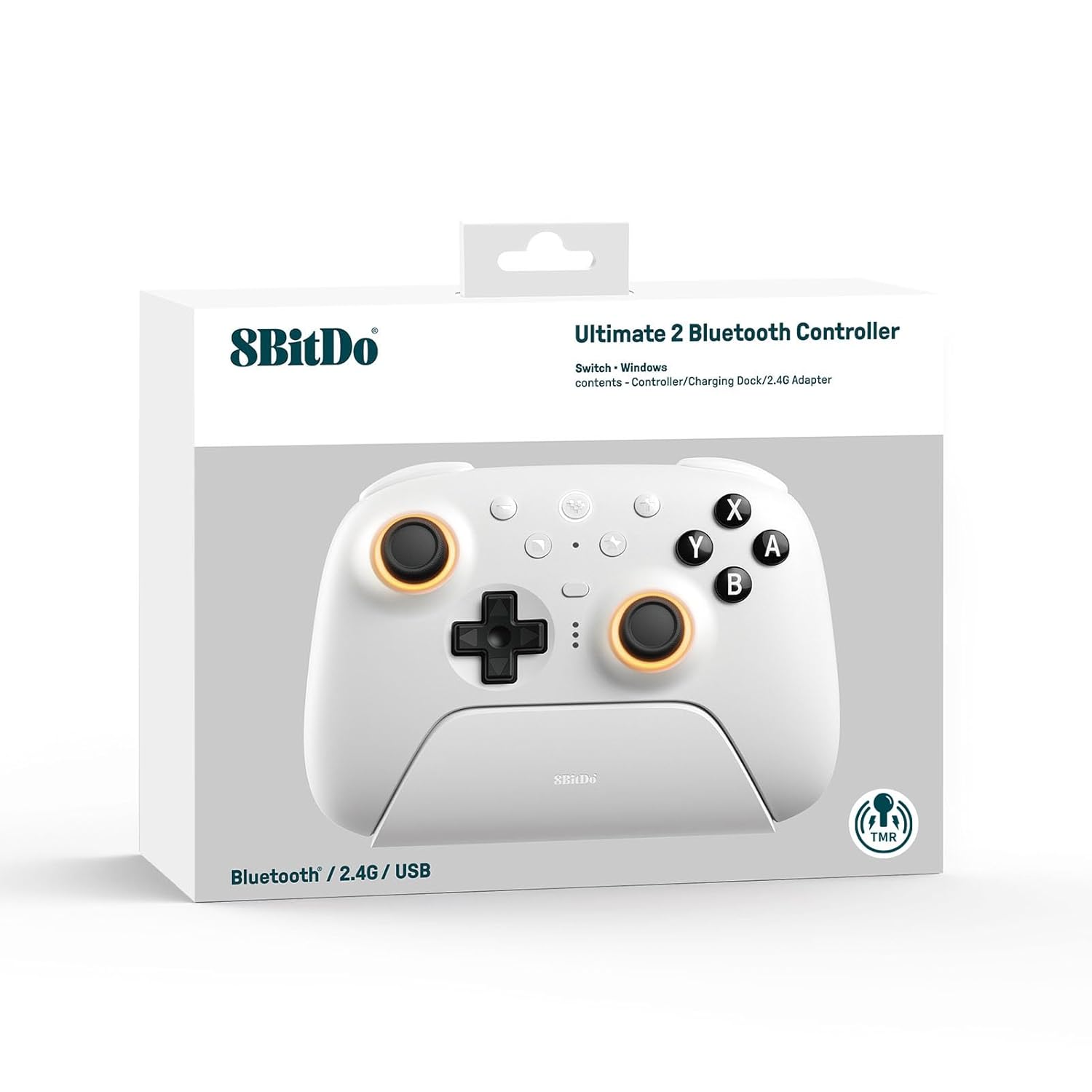
The retail packaging for the 8Bitdo Ultimate 2 Bluetooth Controller, showing the controller and its charging dock. The box highlights compatibility with Switch and Windows.
Сетуп
1. Почетно пуњење
Before first use, fully charge the controller using the integrated charging dock or a USB-C cable. The LED indicators on the controller will show charging status.

Угаони view of the 8Bitdo Ultimate 2 Bluetooth Controller securely placed on its charging dock, ready for charging or display.
2. Firmware Update (Recommended)
For optimal performance and compatibility, especially with Switch 2, it is highly recommended to update the controller's firmware using the 8Bitdo Ultimate Software V2. This software is available for download from the official 8Bitdo webсајту.
- Download and install 8Bitdo Ultimate Software V2 on your PC.
- Connect the controller to your PC via USB-C cable or the 2.4G USB adapter.
- Follow the on-screen instructions in the software to update the firmware.

A visual representation of the 8Bitdo Ultimate Software V2 interface, showing customization options for the controller's buttons, triggers, and RGB lighting.
3. Повезивање са уређајима
The 8Bitdo Ultimate 2 Bluetooth Controller supports multiple connection modes:
A. Nintendo Switch / Switch 2 (Bluetooth)
- On your Switch, go to System Settings > Controllers and Sensors > Disconnect Controllers (if any are connected).
- Select "Change Grip/Order".
- On the 8Bitdo controller, press and hold the Пар button (located on the top edge) until the LEDs start flashing rapidly.
- The Switch will detect the controller. Once connected, the player indicator LEDs on the bottom of the controller will light up solid.
Note: Ensure your Switch firmware is up to date. For Switch 2 compatibility, the controller firmware must also be updated.

A user holding the 8Bitdo Ultimate 2 Bluetooth Controller while playing on a Nintendo Switch console, demonstrating its compatibility.
B. Windows PC (2.4G Wireless via USB Adapter)
- Locate the 2.4G USB adapter stored in the bottom of the charging dock.
- Plug the 2.4G USB adapter into an available USB port on your Windows PC.
- On the 8Bitdo controller, slide the mode switch on the back to the "2.4G" position.
- The controller will automatically connect to the adapter. The player indicator LEDs will light up solid.

A user playing on a laptop with the 8Bitdo Ultimate 2 Bluetooth Controller, with the 2.4G USB adapter visible next to the charging dock, illustrating the wireless PC connection.
For direct USB-C wired connection to PC, simply connect the controller to your PC using a USB-C cable. The controller will be recognized as a standard gamepad.
Управљање контролером
Кључне карактеристике и функције
- TMR џојстици: High sensitivity, precision, and durability with RGB Fire Ring and wear-resistant joystick rings.
- Trigger Mode Switch: Easily switch between linear Hall Effect triggers and non-linear tactile triggers.
- Pro-level Back Buttons: Two customizable back buttons (P1, P2) for advanced gameplay.
- Extra R4/L4 Bumpers: Additional shoulder buttons for more control options.
- Tactile Bumpers and D-pad: Responsive and satisfying button presses.
- Vibration and Motion Control: Supported on Switch (motion control not supported on Switch 2).
- Турбо функција: Assign rapid fire to any button.
- Буђење при протресању: Not supported on Switch 2.
- Цустом Проfiles: Store up to 3 custom profiles using 8Bitdo Ultimate Software V2.

Крупни план view of the controller's TMR joysticks, highlighting the vibrant RGB lighting around the base of the sticks.

Detail shot of the controller's back buttons (P1, P2) and the tactile D-pad, showcasing their ergonomic placement.
Using the 8Bitdo Ultimate Software V2
The Ultimate Software V2 allows for extensive customization of your controller:
- Мапирање дугмади: Remap any button to your preference.
- Подешавање окидача: Fine-tune trigger sensitivity and dead zones.
- Контрола вибрација: Подесите интензитет вибрације.
- Креирање макроа: Program complex button sequences.
- РГБ осветљење: Customize joystick RGB effects (Fire Ring, Light-tracing, Rainbow Ring).

A composite image displaying various customization screens within the 8Bitdo Ultimate Software V2, including button remapping, trigger sensitivity, and RGB effects.
Одржавање
Чишћење контролера
- Use a soft, dry cloth to wipe down the controller regularly.
- За тврдокорну прљавштину, благо дampОперите крпу водом или благим, неабразивним средством за чишћење. Избегавајте прекомерну влагу.
- Do not use harsh chemicals, solvents, or abrasive materials, as these can damage the controller's finish.
- Pay special attention to the textured grips and button crevices.
Складиштење
- Чувајте контролер на хладном и сувом месту, даље од директне сунчеве светлости и екстремних температура.
- When not in use, placing the controller on its charging dock helps keep it charged and protected.
Решавање проблема
| Проблем | Могући узрок | Решење |
|---|---|---|
| Controller not connecting to Switch/PC. | Incorrect mode selected, low battery, interference, outdated firmware. | Ensure correct mode (Bluetooth for Switch, 2.4G for PC) is selected on the back switch. Charge the controller. Move closer to the console/PC. Update controller firmware via Ultimate Software V2. |
| Контролер се не пуни. | Charging dock not powered, faulty cable, dirty charging contacts. | Ensure the charging dock is properly connected to power. Try a different USB-C cable. Clean the charging contacts on both the controller and the dock. |
| Input lag or dropped connections. | Wireless interference, distance from receiver, low battery. | Reduce distance between controller and console/PC. Minimize other wireless devices. Ensure controller is fully charged. |
| Joysticks drifting or unresponsive. | Calibration issue, physical debris, software glitch. | Recalibrate joysticks using 8Bitdo Ultimate Software V2. Check for debris around the joystick base. Perform a factory reset (refer to 8Bitdo support for specific steps). |
Спецификације
- Број модела: 6922621507079
- Компатибилност: Nintendo Switch, Switch 2, Windows PC
- Повезивање: Bluetooth, 2.4G Wireless (via USB adapter), USB-C Wired
- Џојстици: TMR Joysticks with RGB lighting
- Окидачи: Switchable Hall Effect / Tactile Triggers
- Дугмад: Standard face buttons (A, B, X, Y), D-pad, L1/R1, L2/R2, L3/R3, P1/P2 (back buttons), R4/L4 (extra bumpers), Home, Capture, Plus, Minus, Star.
- Посебне карактеристике: Vibration, Motion Control (Switch only), Turbo Function, 3 Custom Profiles via Ultimate Software V2.
- батерија: 1 литијум-полимерска батерија (укључена)
- Димензије: 3.94 к 3.94 к 0.79 инча
- Тежина: 1.76 унци
- Произвођач: 8БитДо
- Земља порекла: Кина
Гаранција и подршка
За информације о гаранцији и техничку подршку, посетите званичну веб страницу 8Bitdo-а. webсајт или контактирајте њихову корисничку службу. Сачувајте рачун као доказ о куповини за потребе гаранције.
Званични 8Битдо Webсајт: ввв.8битдо.цом
Страница за подршку: подршка.8битдо.цом


