1. Увод
This manual provides detailed instructions for the installation, operation, and maintenance of your GIGABYTE GA-B760M D3HP WIFI6 motherboard. Designed for optimal performance and reliability, this motherboard supports Intel Core 14th, 13th, and 12th generation CPUs and features DDR5 memory support, PCIe 4.0 M.2 connectors, and Wi-Fi 6 connectivity. Please read this manual thoroughly before beginning installation to ensure proper setup and to maximize the lifespan of your product.
2. Кључне карактеристике
- Подршка за процесор: Compatible with Intel Core 14th, 13th, and 12th generation processors.
- Дизајн напајања: Features a 4+1+1 phase hybrid digital VRM solution for stable power delivery.
- Меморија: Supports Dual Channel DDR5 memory with 4 DIMM slots and XMP memory module support.
- Складиштење: Equipped with 2 PCIe 4.0 x4 M.2 connectors for high-speed storage.
- умрежавање: Includes GbE LAN and Wi-Fi 6 802.11ax for fast and reliable network connectivity.
3. Подешавање и инсталација
Before installing the motherboard, ensure your system is powered off and disconnected from the power source. Handle the motherboard by its edges to avoid static discharge.
3.1 Изглед матичне плоче
Familiarize yourself with the layout of the motherboard components before proceeding with installation.

Слика 1: Одозго надоле view of the GIGABYTE GA-B760M D3HP WIFI6 motherboard, showing the CPU socket, DIMM slots, PCIe slots, and various headers.
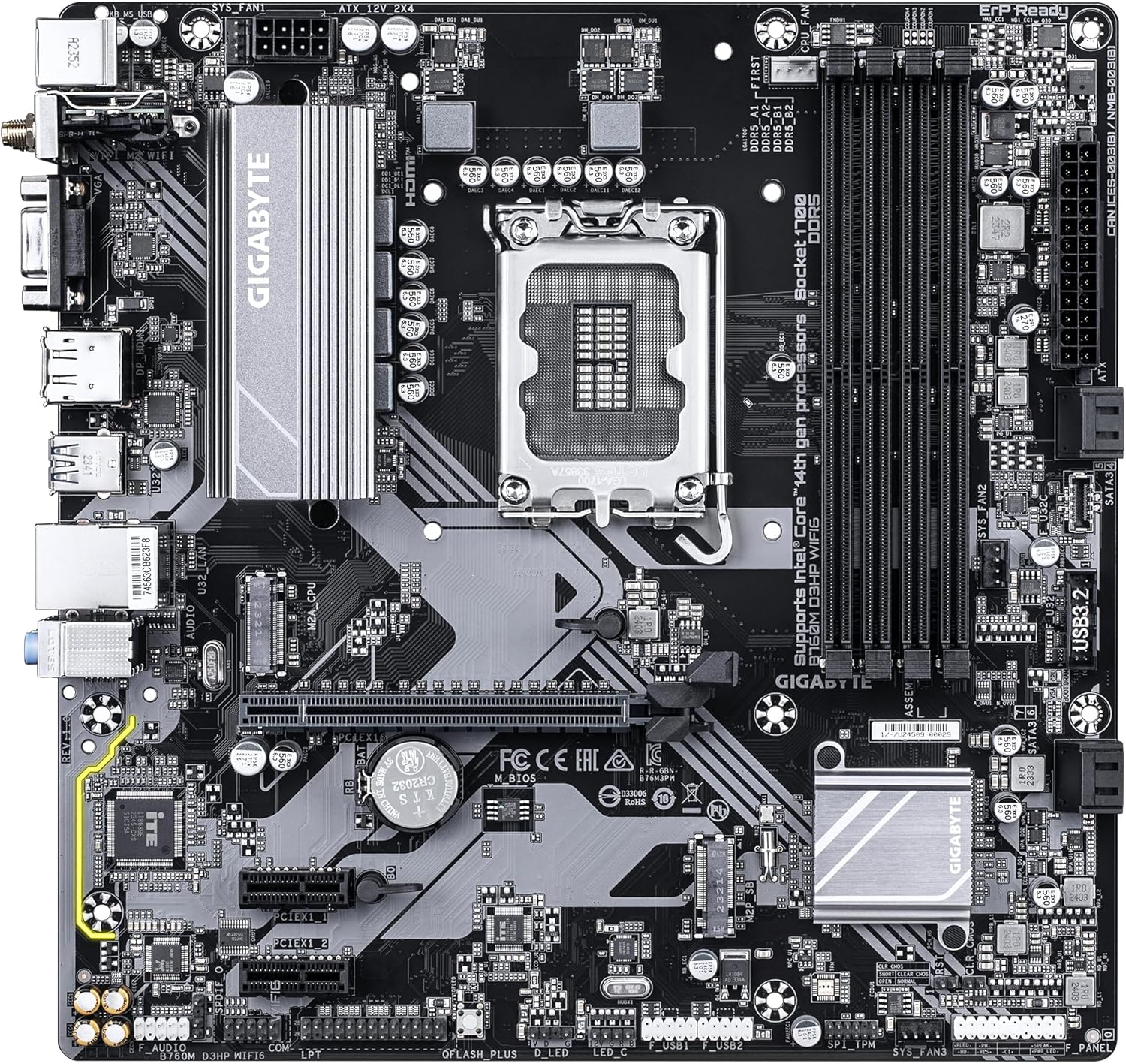
Слика 2: Англед view of the GIGABYTE GA-B760M D3HP WIFI6 motherboard, highlighting the heatsinks and overall component placement.
3.2 Инсталација ЦПУ-а
- Пронађите LGA 1700 CPU сокет на матичној плочи.
- Отворите полугу процесорског утичнице и подигните плочу за оптерећење.
- Пажљиво поравнајте процесор са подножјем, водећи рачуна да се троугласта ознака на процесору поклапа са ознаком на подножју. Немојте силом уметати процесор у подножје.
- Спустите плочу за терет и осигурајте је полугом.
- Нанесите термалну пасту на процесор и инсталирајте хладњак процесора према упутствима произвођача.
3.3 Инсталација меморије (RAM)
- Пронађите четири DDR5 DIMM слота.
- Отворите копче на оба краја DIMM слота.
- Поравнајте зарез на DDR5 меморијском модулу са кључем у DIMM слоту.
- Чврсто уметните меморијски модул у слот док се копче не залепе на своје место. Уверите се да су обе копче затворене.
- For dual-channel configuration, refer to the motherboard's specific manual for recommended slot pairing.
3.4 Storage Device Installation (M.2 SSDs and SATA Drives)
- М.2 ССД: Locate the M.2 connectors. Remove the M.2 screw/standoff. Insert the M.2 SSD into the slot at a 30-degree angle. Push down the SSD and secure it with the screw/standoff.
- SATA дискови: Connect SATA data cables from your storage drives (HDDs/SSDs) to the SATA ports on the motherboard. Connect power cables from your power supply to the drives.
3.5 Прикључци за напајање
- Повежите 24-пински главни ATX конектор за напајање са вашег напајања на одговарајући порт на матичној плочи.
- Connect the 8-pin ATX 12V CPU power connector to the port near the CPU socket.
3.6 Предња плоча и периферне везе
Connect your case's front panel connectors (power button, reset button, USB ports, audio jacks, LED indicators) to the corresponding headers on the motherboard. Refer to the motherboard's detailed manual for exact pin layouts.

Слика 3: Rear I/O panel of the GIGABYTE GA-B760M D3HP WIFI6 motherboard, showing USB ports, display outputs, audio jacks, Ethernet, and Wi-Fi antenna connectors.
4. Упутство за употребу
4.1 БИОС подешавање
Upon first boot, you may need to enter the BIOS (Basic Input/Output System) to configure settings such as boot order, date/time, and enable specific features. To enter BIOS, press the ДЕЛ key repeatedly during startup. The GIGABYTE UEFI BIOS provides an intuitive graphical interface for configuration.
4.2 Инсталација драјвера
After installing your operating system, install the necessary drivers for the motherboard's components (chipset, audio, LAN, Wi-Fi, etc.). These drivers are typically provided on a support DVD or can be downloaded from the official GIGABYTE webсајт за ваш специфични модел матичне матичне главе.
5. Одржавање
- Чишћење: Редовно чистите прашину са матичне плоче и вентилатора кућишта компримованим ваздухом. Уверите се да је систем искључен из струје пре чишћења.
- Ажурирања BIOS-а: Периодично проверавајте GIGABYTE website for BIOS updates. BIOS updates can improve system stability, compatibility, and performance. Follow the instructions provided by GIGABYTE carefully when updating the BIOS.
- Ажурирања драјвера: Редовно ажурирајте своје драјвере како бисте осигурали оптималне перформансе и компатибилност са новим софтвером и хардвером.
КСНУМКС. Решавање проблема
- Нема напајања:
- Проверите све прикључке за напајање (24-пински ATX, 8-пински CPU).
- Уверите се да је напајање укључено.
- Тестирајте напајање помоћу другог система или тестера напајања.
- Без приказа:
- Ensure the monitor is connected to the graphics card (or integrated graphics port if no discrete GPU is used).
- Поново инсталирајте графичку картицу и меморијске модуле.
- Покушајте да покренете систем само са једном РАМ меморијом.
- Нестабилност/падови система:
- Проверите температуру процесора и графичке картице.
- Уверите се да су све компоненте правилно постављене.
- Покрените алате за дијагностику меморије да бисте проверили да ли постоје грешке у РАМ меморији.
- Ажурирајте BIOS и драјвере.
- Проблеми са мрежном повезивањем:
- For wired LAN, check the Ethernet cable and router connection.
- For Wi-Fi, ensure antennas are securely attached and drivers are installed.
- Verify network settings in the operating system.
7. Спецификације
| Феатуре | Детаљ |
|---|---|
| Бранд | ГИГАБИТЕ |
| Назив модела | Б760М Д3ХП ВИФИ6 |
| ЦПУ Соцкет | ЛГА 1700 |
| Компатибилни процесори | Intel Core 14th Gen, Intel Core 13th Gen, Intel Core 12th Gen |
| Тип чипсета | Интел Б760 |
| Технологија РАМ меморије | ДДР5 |
| Брзина меморије | 5600 МХз |
| Компатибилни уређаји | Personal Computer, Desktop Computer |
| Платформа | Прозори КСНУМКС, КСНУМКС Виндовс |
| Димензије производа | 9.61 к 9.61 к 1.38 инча |
| Тежина артикла | 2.2 фунти |
8. Гаранција и подршка
За информације о гаранцији и техничку подршку, обратите се званичном GIGABYTE-овом webсајт или контактирајте корисничку службу компаније GIGABYTE. Сачувајте доказ о куповини за потребе гаранције.
Званични GIGABYTE Webсајт: ввв.гигабите.цом


