Увод
The KiiBoom Jade75 is a 75% layout mechanical keyboard featuring a unique resin molding and CNC+UV crafted case. It offers versatile connectivity options including Bluetooth 5.0, 2.4GHz wireless, and USB-C wired modes. Designed for customization, it supports QMK/VIA programming and hot-swappable switches, alongside dynamic RGB backlighting. This manual provides detailed instructions for setting up, operating, and maintaining your KiiBoom Jade75 keyboard.
Садржај пакета
Upon unboxing your KiiBoom Jade75 keyboard, please verify that all the following items are included:
- KiiBoom Jade75 Mechanical Keyboard
- УСБ-Ц кабл
- Кеицап Пуллер
- Свитцх Пуллер
- Упутство за употребу
- Additional Switches (if included in specific package)
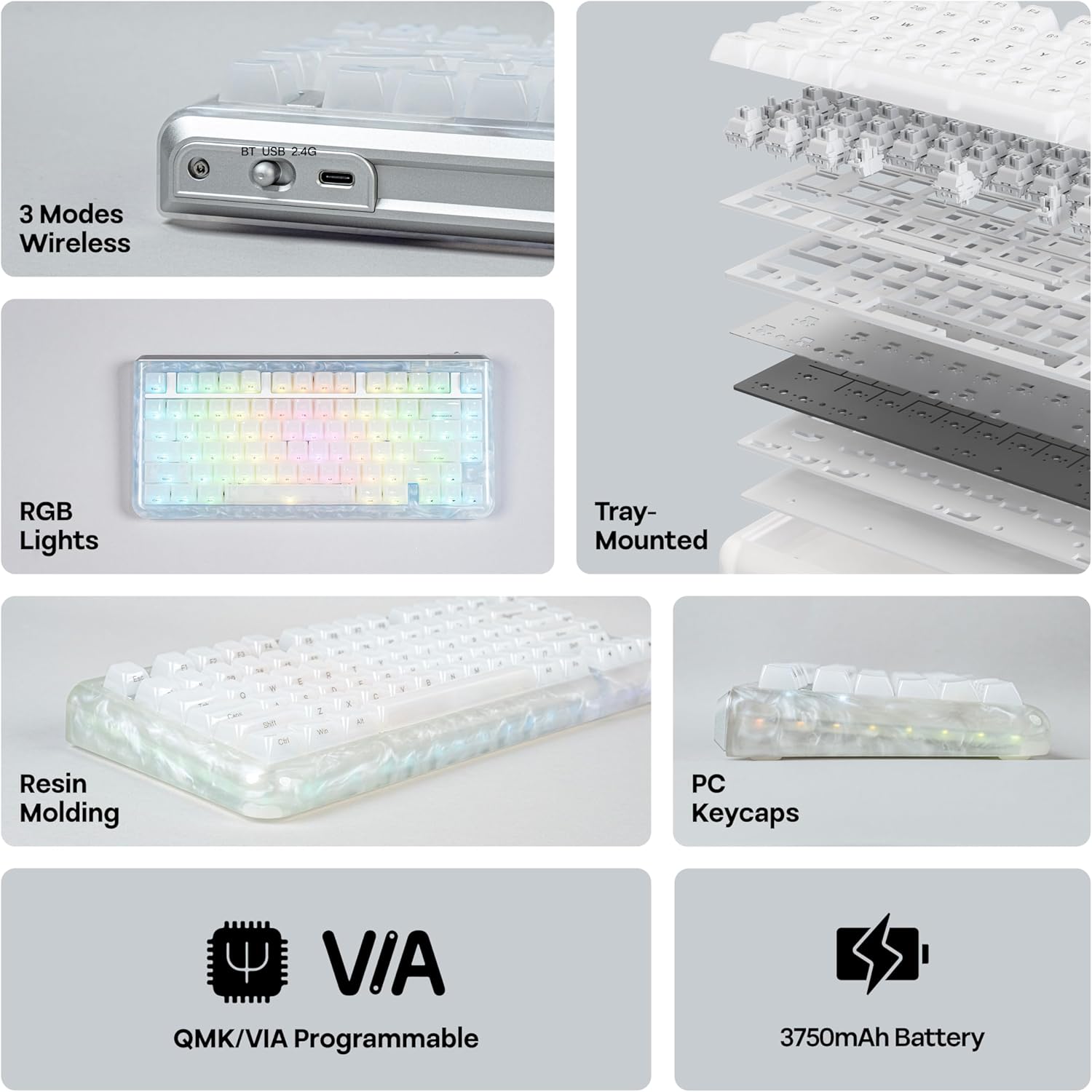
Image: KiiBoom Jade75 keyboard with its accessories, including a USB-C cable, keycap puller, and switch puller.
Video: An unboxing of the KiiBoom Jade75 keyboard, showcasing the packaging, included accessories, and a demonstration of the typing sound and RGB lighting.
Производ је завршенview
The KiiBoom Jade75 features a compact 75% layout, combining essential keys with a space-saving design. Its resin molding provides a durable and aesthetically pleasing translucent case, complemented by a tray-mounted design for a stable typing experience. The keyboard is equipped with south-facing RGB backlighting for vibrant illumination.
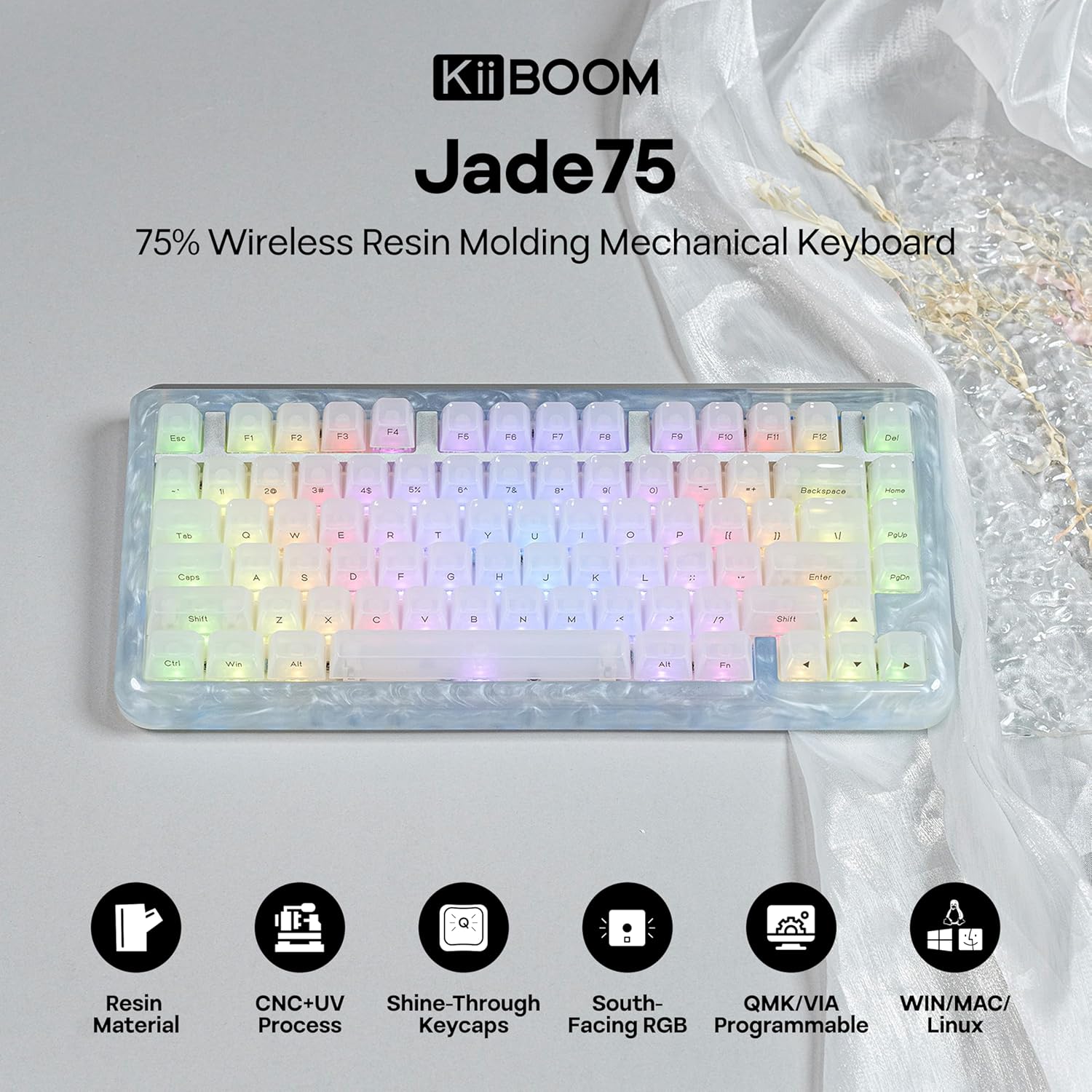
Слика: Одозго надоле view of the KiiBoom Jade75 keyboard, showcasing its 75% layout, translucent resin case, and keycap design.
Подешавање и повезивање
The KiiBoom Jade75 offers three connectivity modes: 2.4GHz wireless, Bluetooth 5.0, and USB-C wired. Choose the mode that best suits your device and usage.
1. Жични режим USB-C
- Повежите приложени USB-C кабл са USB-C портом тастатуре.
- Укључите други крај кабла у слободан УСБ порт на рачунару.
- Тастатура ће бити аутоматски препозната и спремна за употребу.
2. Бежични режим од 2.4 GHz
- Пронађите УСБ пријемник од 2.4 GHz (обично се налази у одељку на тастатури).
- Прикључите пријемник од 2.4 GHz у слободан USB порт на рачунару.
- On the keyboard, switch the mode selector to 2.4G.
- The keyboard should automatically connect to the receiver. If not, press Фн + Р да започне упаривање.
3. Режим Bluetooth 5.0
Тастатура подржава до три Bluetooth уређаја.
- On the keyboard, switch the mode selector to BT.
- Притисните и држите Фн + К, Фн + В, или Фн + Е for 3-5 seconds until the corresponding key flashes, indicating pairing mode.
- On your device (computer, tablet, smartphone), enable Bluetooth and search for "KiiBoom Jade75".
- Изаберите тастатуру за упаривање. Тастер ће престати да трепери када се повеже.
- Да бисте пребацивали између упарених Bluetooth уређаја, притисните Фн + К, Фн + В, или Фн + Е укратко.

Image: Visual representation of the KiiBoom Jade75's three connectivity modes: Bluetooth, 2.4GHz wireless, and USB-C, showing compatibility with laptops, PCs, tablets, and gaming consoles.
QMK/VIA Customization
The KiiBoom Jade75 is QMK/VIA programmable, allowing for extensive customization of key assignments, macros, and lighting effects. This feature is ideal for users who require a personalized keyboard layout and functionality.
- Download the VIA software from the official KiiBoom website or the VIA GitHub repository.
- Connect your keyboard to your computer via USB-C cable.
- Launch the VIA software. The software should automatically detect your Jade75 keyboard.
- Use the VIA interface to remap keys, create custom macros, adjust lighting settings, and define different layers for various functions.
- Changes are applied in real-time to the keyboard.
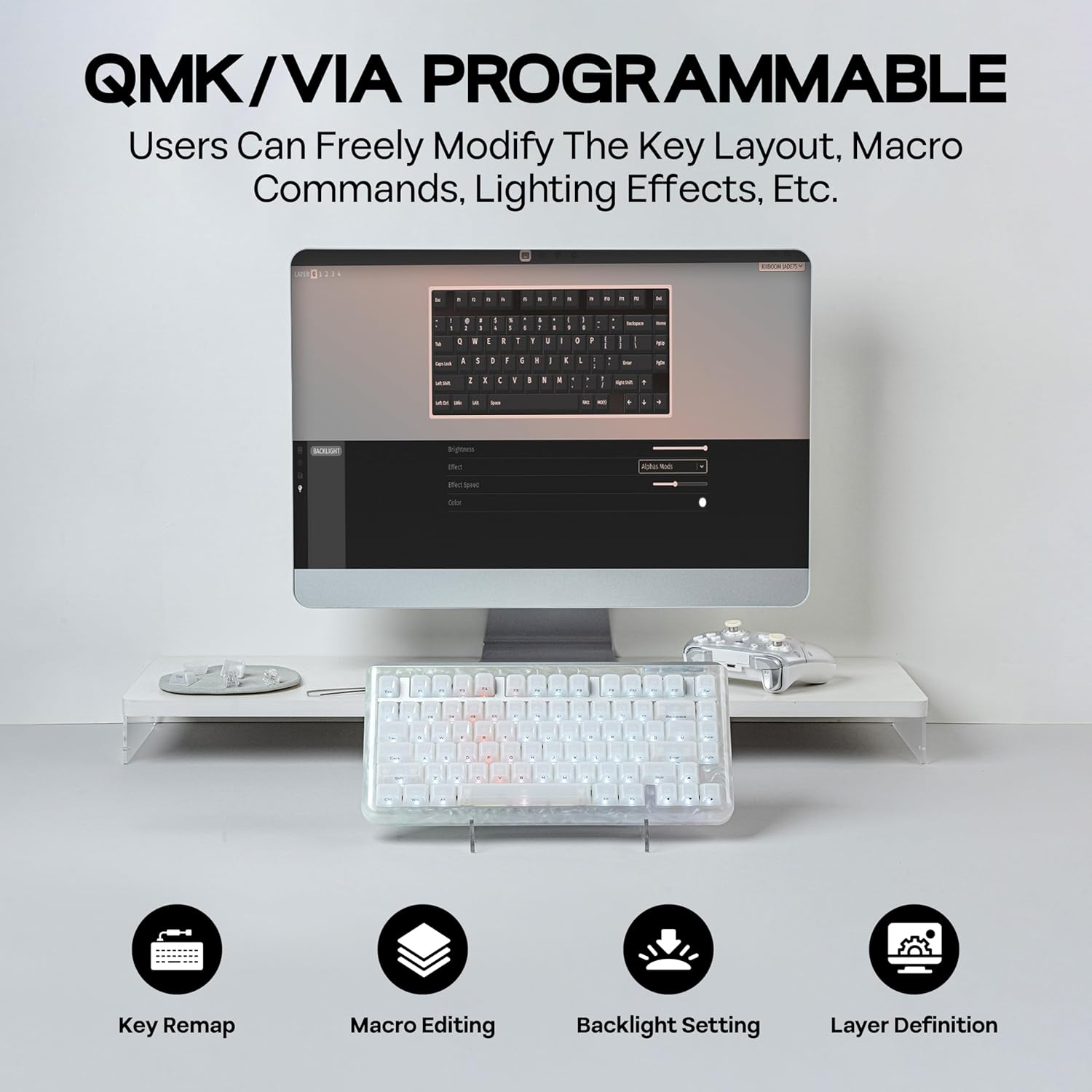
Image: A computer screen displaying the QMK/VIA software interface, illustrating options for key remapping, macro editing, backlight settings, and layer definition for the KiiBoom Jade75 keyboard.
РГБ контрола осветљења
The KiiBoom Jade75 features dynamic RGB backlighting with 16.8 million color options and various customizable modes. The south-facing RGB LEDs enhance the visual appeal, especially with the translucent resin case.
- Toggle Backlight Effects: Притисните Фн + \| to cycle through different backlight modes.
- Toggle Sidelight Effects: Притисните Фн + З to change the sidelight effects.
- Укључите/искључите светла: Притисните Фн + Бацкспаце to toggle the keyboard lighting on or off.
- Подесите осветљеност/брзину: Use the VIA software for fine-tuning brightness, speed, and specific color settings.

Image: The KiiBoom Jade75 keyboard illuminated with colorful RGB backlighting, demonstrating various lighting effects and key combinations for control.
Прекидачи са заменљивом брзином
The KiiBoom Jade75 features a hot-swappable PCB, allowing you to change mechanical switches without soldering. This enables easy customization of your typing feel and sound.
- Уклоните капицу тастатуре: Use the keycap puller to gently remove the desired keycap.
- Уклоните прекидач: Use the switch puller to carefully grip the top and bottom clips of the switch and pull it straight up.
- Уметни нови прекидач: Поравнајте пинове новог прекидача са отворима на штампаној плочи. Пажљиво притисните прекидач надоле док не кликне на своје место. Уверите се да пинови нису савијени.
- Замена тастера: Вратите поклопац тастера назад на нови прекидач.
Напомена: Ensure the keyboard is disconnected or powered off before changing switches to prevent accidental key presses or damage.

Слика: Детаљна view of the KiiBoom Jade75's hot-swappable PCB, demonstrating the process of removing and inserting switches, along with a close-up of a KiiBoom Linear Switch and plate-mount stabilizer.
Одржавање
Proper maintenance ensures the longevity and performance of your KiiBoom Jade75 keyboard.
- Чишћење тастера: Use the keycap puller to remove keycaps. Clean them with mild soap and water, then dry thoroughly before reattaching.
- Чишћење кућишта: Wipe the resin case with a soft, damp тканина. Избегавајте јаке хемикалије које могу оштетити завршни слој.
- Уклањање прашине: Користите компримовани ваздух да уклоните прашину и остатке између тастера и прекидача.
- Одржавање батерије: For optimal battery life, avoid fully discharging the keyboard frequently. Charge it regularly using the provided USB-C cable.
Решавање проблема
If you encounter issues with your KiiBoom Jade75, refer to the following common solutions:
- Тастатура не реагује:
- Уверите се да је тастатура напуњена или повезана преко USB-C кабла.
- Check the mode switch (2.4G, BT, USB-C) is set correctly.
- For wireless modes, ensure the receiver is plugged in (2.4G) or Bluetooth is enabled and paired (BT).
- Покушајте да поново покренете рачунар или уређај.
- Кључеви се не региструју:
- Remove the keycap and switch for the affected key. Re-insert the switch firmly, ensuring pins are straight.
- Тестирајте са другим прекидачем ако је доступан.
- РГБ осветљење не ради:
- Ensure lighting is turned on (Фн + Бацкспаце).
- Check lighting settings in the VIA software.
- Блуетоотх прекид везе:
- Уверите се да је тастатура у домету вашег уређаја.
- Поново упарите тастатуру са својим уређајем.
- Проверите да ли има сметњи од других бежичних уређаја.
If issues persist, please contact KiiBoom customer support for further assistance.
Спецификације
| Феатуре | Детаљ |
|---|---|
| Бранд | KiiBoom |
| Модел | Jade75 |
| Лаиоут | 75% |
| Повезивање | 2.4 GHz бежична веза, Bluetooth 5.0, USB-C жична веза |
| Материјал кућишта | Resin Molding & CNC+UV Crafted |
| Кеицап Материал | ПЦ (поликарбонат) |
| Прекидачи | Hot-Swappable (KiiBoom Linear Switch) |
| Позадинско осветљење | RGB (окренут ка југу) |
| Програмабилност | Компатибилно са QMK/VIA |
| Компатибилни уређаји | Играчка конзола, лаптоп, рачунар, паметни телефон, таблет |
| Оперативни системи | Виндовс, Мац, Линук |
| Димензије производа | 12.99 cm D x 12.99 cm Š x 1.77 cm V |
Гаранција и подршка
KiiBoom products are designed for quality and durability. For warranty information, product support, or technical assistance, please visit the official KiiBoom webсајт или директно контактирајте њихову корисничку службу. Сачувајте доказ о куповини за потребе гаранције.
Official KiiBoom Store: KiiBoom Store on Amazon


