
1. Безбедносна упутства
Please read all instructions carefully before assembly and use to ensure safe operation and prevent injury or damage. Keep this manual for future reference.
- Пре склапања проверите да ли су све компоненте присутне и неоштећене. Не користите ако неки делови недостају или су неисправни.
- Држите децу и кућне љубимце даље од стола током рада како бисте спречили незгоде.
- Ensure there are no obstructions (walls, furniture, cables, etc.) in the desk's path during height adjustment.
- Do not place heavy or unstable objects on the desk that exceed its maximum load capacity of 100 kg.
- Avoid placing the desk near heat sources, open flames, or in excessively humid environments.
- Unplug the desk from the power outlet before cleaning, maintenance, or if it will be unused for an extended period.
- Користите само приложени адаптер за напајање и каблове.
- Do not attempt to modify or disassemble the desk's electrical components. Contact qualified service personnel for repairs.
2. Производ је готовview
The FLEXISPOT EC5 Lite is an electric height-adjustable desk frame designed for ergonomic workspaces. It features a robust dual-motor system and a stable 3-column leg design.
Кључне карактеристике:
- Dual-Motor Lifting System: Provides smooth, quiet (<50 dB) and stable height adjustments.
- Wide Height Range: Adjustable from 60 cm to 125 cm to accommodate various user preferences and activities.
- Висока носивост: Supports up to 100 kg, suitable for multiple monitors and office equipment.
- Smart Memory Panel: Allows saving and recalling up to 4 preferred height settings.
- Технологија против судара: Automatically stops and retracts the desk if an obstacle is detected during movement, ensuring safety.
- Робусна конструкција: Made with reinforced steel for durability and stability.

Figure 2.1: Ultra-High Load Capacity (100 kg)

Figure 2.2: Large Height Adjustment Range (60-125 cm)

Figure 2.3: Powerful Dual Motors
3. Подешавање и монтажа
The FLEXISPOT EC5 Lite desk frame is designed for straightforward assembly, typically completed in under 25 minutes. A detailed instruction manual is included with the product for step-by-step guidance.
Савети за склапање:
- Ослободите простран простор за монтажу.
- Lay out all parts and hardware according to the included manual.
- Уверите се да су сви завртњи чврсто затегнути, али немојте их превише затезати.
- The frame's width is adjustable to fit various tabletop sizes.

Figure 3.1: Wide Adjustable Frame Width
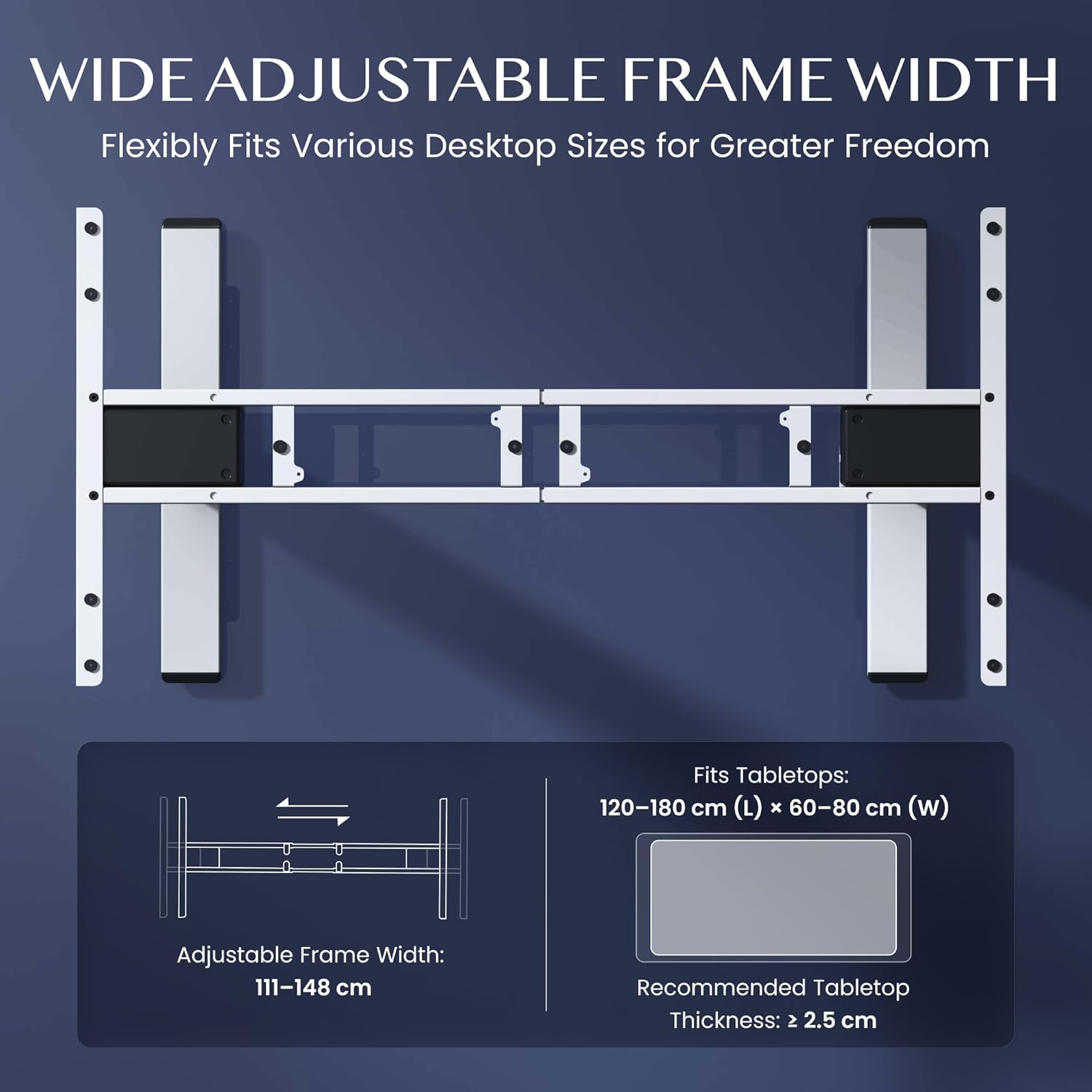
Figure 3.2: Easy Installation Components
4. Упутство за употребу
The FLEXISPOT EC5 Lite desk is operated via a digital control panel, offering intuitive height adjustment and memory functions.
Дигитална контролна табла:

Слика 4.1: Дигитална контролна табла
Подешавање висине:
- Користите Горе (^) и Доле (v) arrow buttons on the control panel to manually adjust the desk height.
- The current height will be displayed on the LED screen.
Меморијска подешавања:
The desk allows you to save up to 4 preferred height settings for quick adjustments.
- Подесите сто на жељену висину помоћу дугмади горе/доле.
- Притисните тастер 'М' дугме. На дисплеју ће се приказати „S-“.
- Одмах притисните једно од нумеричких дугмади (1, 2, 3 или 4) to save the current height to that preset. The display will show 'S-1', 'S-2', etc., to confirm.
- Да бисте позвали сачувану висину, једноставно притисните одговарајуће дугме са бројем (1, 2, 3 или 4). Сто ће се аутоматски померити на сачувану позицију.
Систем против судара:
The desk is equipped with an anti-collision sensor. If the desk encounters an obstacle during upward or downward movement, it will automatically stop and retract slightly to prevent damage or injury.
5. Одржавање
Regular maintenance ensures the longevity and optimal performance of your FLEXISPOT EC5 Lite desk.
- Чишћење: Wipe the desk frame and control panel with a soft, damp cloth. Avoid using harsh chemicals, abrasive cleaners, or excessive moisture.
- Инспекције: Периодично проверавајте све завртње и вијке да бисте били сигурни да су затегнути. По потреби их поново затегните.
- Управљање кабловима: Ensure all cables are neatly organized and not pinched or tangled, especially during height adjustments.
- Кабл за напајање: Inspect the power cord for any signs of damage. If damaged, discontinue use and contact customer support.
КСНУМКС. Решавање проблема
If you encounter issues with your FLEXISPOT EC5 Lite desk, refer to the following common troubleshooting steps:
- Сто се не помера:
- Check if the power cord is securely plugged into both the desk and a working power outlet.
- Ensure no objects are obstructing the desk's movement, triggering the anti-collision system.
- Uneven Movement or Error Codes:
- Perform a reset: Lower the desk to its lowest position and hold the 'Down' button for approximately 5-10 seconds until the desk slightly lowers further or an 'RST' message appears, then releases. The desk should then reset to its lowest point.
- If an error code persists, consult the full product manual or contact customer support.
- Бука током рада:
- A slight motor hum is normal. If the noise is excessive or unusual, check for loose components or contact support.
Video 6.1: Crash Test Demonstration. This video illustrates the desk's stability and durability under impact, showing minimal disturbance to items on the FlexiSpot desk compared to others.
7. Спецификације
Detailed technical specifications for the FLEXISPOT EC5 Lite Electric Standing Desk frame.

Figure 7.1: Desk Dimensions and Specifications
| Феатуре | Спецификација |
|---|---|
| Бранд | ФЛЕКСИСПОТ |
| Модел | ЕЦ5 Лите |
| Боја | Бела |
| Димензије производа (Д к Ш к В) | 68 x 148.6 x 125 cm (frame) |
| Материјал | легирани челик |
| Опсег подешавања висине | 60 - 125 цм |
| Максимални капацитет оптерећења | 100 кг |
| Максимална брзина | 25 мм/с |
| Ниво буке | <50 дБ |
| Frame Width Adjustment | 111 - 148 цм |
| Recommended Tabletop Size | 120-180 cm (L) x 60-80 cm (W) |
| Препоручена дебљина плоче стола | ≥ 2.5 цм |
| Посебне карактеристике | Electric, Height Adjustable, Smart Memory, Anti-collision Safety |
8. Гаранција и подршка
FLEXISPOT stands behind the quality of its products with comprehensive warranty coverage.
- Frame and Motors: 5 године гаранције.
- Електронске компоненте: 2 године гаранције.
For warranty claims, technical assistance, or any questions regarding your FLEXISPOT EC5 Lite desk, please contact FLEXISPOT customer support through their official website or your point of purchase. Please have your purchase receipt and product model information ready.