Увод
This manual provides detailed instructions for the Sharp Printing Calculator CS-2635LW. Please read this manual thoroughly before using the calculator to ensure proper operation and to maximize its features. Keep this manual for future reference.
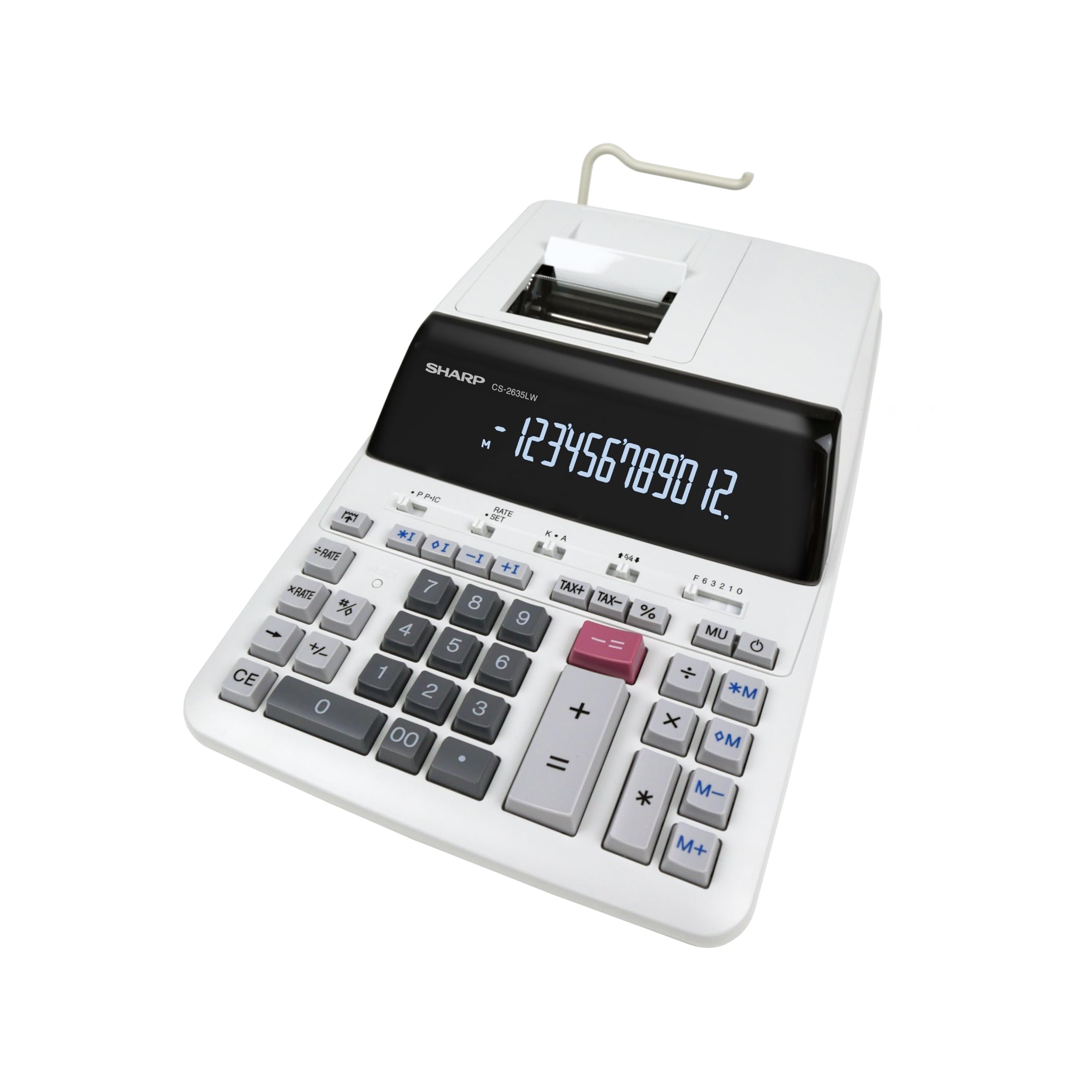
Фронт view of the Sharp CS-2635LW Printing Calculator, showing the display, keypad, and paper roll mechanism.
Сетуп
1. Распакивање
Carefully remove the calculator and all accessories from the packaging. Verify that all components are present: the calculator unit, AC adapter, and user manual.
2. Прикључак за напајање
Connect the supplied AC adapter to the power input port on the calculator and then plug it into a standard electrical outlet. The calculator operates on electric power and includes a CR2032 backup battery for memory retention.
3. Инсталација ролне папира
- Отворите поклопац ролне папира.
- Place a new paper roll onto the paper roll holder.
- Feed the end of the paper roll into the printer mechanism until it catches.
- Close the paper roll cover.

The calculator with a paper roll correctly installed, ready for printing.
4. Backup Battery Installation
The calculator uses a CR2032 battery for memory backup. Locate the battery compartment, usually on the underside of the unit. Insert the CR2032 battery with the correct polarity (+/-) as indicated. This battery ensures data retention even when the main power is disconnected.

Позади view of the calculator, showing the power input and potentially the battery compartment location.
Упутство за употребу
1. Basic Calculations
- Додатак (+): Унесите први број, притисните +, унесите други број, притисните +.
- Одузимање (-): Унесите први број, притисните -, унесите други број, притисните -.
- множење (к): Унесите први број, притисните x, унесите други број, притисните =.
- Дељење (÷): Унесите први број, притисните ÷, унесите други број, притисните =.
- Притисните CE to clear the last entry, or C да обришете све уносе.
2. Посебне функције
- Tax Calculation (+/- TAX): Користите наменски +ТАКС и -ПОРЕЗ keys for tax calculations. Refer to the full manual for setting tax rates.
- Memory Functions (M+, M-, *M): Користите M+ to add to memory, M- to subtract from memory, and *M to recall memory.
- Rounding: The calculator features rounding functions. Consult the full manual for specific rounding settings.
3. Штампање
The CS-2635LW features two-color printing (black/red) at 4.3 lines per second. Negative results are highlighted in red for easy identification. Ensure the paper roll is correctly installed and the ink ribbon is functional for optimal printing.

Сиде view of the calculator, highlighting the ergonomic keypad design.
Одржавање
1. Чишћење
Wipe the calculator's exterior with a soft, dry cloth. For stubborn dirt, use a slightly damp cloth with mild detergent, then wipe dry. Do not use abrasive cleaners or solvents. Keep the display and printer mechanism free of dust and debris.
2. Paper Roll Replacement
When the paper roll is nearly empty, replace it following the steps outlined in the "Paper Roll Installation" section under Setup.
3. Ink Ribbon Replacement
The ink ribbon should be replaced when printouts become faint or colors are inconsistent. Open the printer cover, remove the old ribbon cartridge, and insert a new one, ensuring it is properly seated. Refer to the full manual for detailed instructions specific to ribbon replacement.
4. Backup Battery Replacement
If memory settings are lost when the calculator is unplugged, the CR2032 backup battery may need replacement. Follow the steps in the "Backup Battery Installation" section under Setup.
Решавање проблема
| Проблем | Могући узрок | Решење |
|---|---|---|
| Calculator does not power on. | АЦ адаптер није повезан или је неисправан. | Ensure AC adapter is securely connected and plugged into a working outlet. Test the outlet with another device. |
| No printout or faint print. | Paper roll empty or incorrectly installed; ink ribbon worn out. | Replace paper roll. Reinstall paper roll correctly. Replace ink ribbon. |
| Нетачни резултати прорачуна. | Incorrect input; incorrect mode setting; internal error. | Double-check all entered numbers and operations. Ensure the calculator is in the correct mode (e.g., decimal settings). Try resetting the calculator (refer to the full manual for reset procedures). |
| Memory data lost after power off. | CR2032 backup battery is depleted or missing. | Замените резервну батерију CR2032. |
Спецификације
- Модел: Sharp CS-2635LW
- Приказ: 12-digit Digitron display
- Брзина штампања: 4.3 реда у секунди
- Тип штампања: Two-color (black/red)
- Извор напајања: Electric power with CR2032 backup battery
- Димензије: 36.7 цм (Д) к 23.7 цм (Ш) к 9.7 цм (В)
- Тежина: 850 грама
- Кључне функције: Tax calculation (+/- TAX), Memory functions (M+, M-, *M), Rounding
- Материјал: Метал, Пластика
- Compatible Environments: Commercial, Retail, Office
Информације о гаранцији
This Sharp product is covered by a standard manufacturer's warranty. For specific warranty terms, conditions, and duration, please refer to the warranty card included with your product or contact Sharp customer service. Keep your proof of purchase for warranty claims.
Корисничка подршка
For technical assistance, troubleshooting beyond this manual, or service inquiries, please contact Sharp customer support. Contact details can typically be found on the manufacturer's website or in the product packaging. Please have your model number (CS-2635LW) and serial number ready when contacting support.