1. Увод
This manual provides essential information for the proper setup, operation, and maintenance of your Ulefone Armor 29 Ultra 5G rugged smartphone. Please read this guide thoroughly before using your device to ensure optimal performance and longevity.
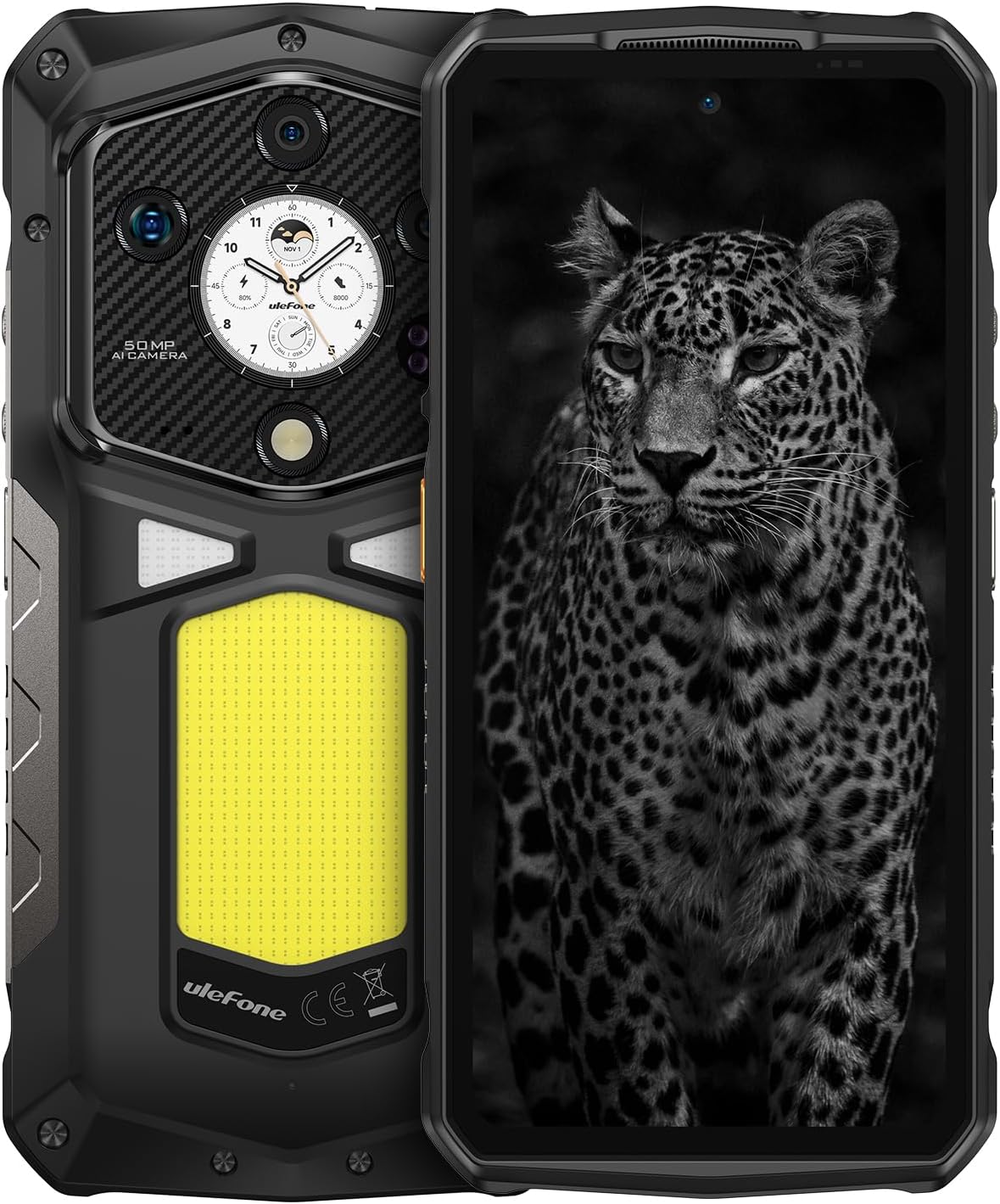
Слика 1.1: Предњи и задњи део view of the Ulefone Armor 29 Ultra 5G smartphone.
2. Подешавање
2.1 Садржај кутије
Проверите да ли су све ставке присутне у пакету:
- Ulefone Armor 29 Ultra 5G Smartphone
- AC Power Charger (100~240V)
- Type-C to Type-C Data Cable (100cm)
- Заштитна фолија за екран (унапред постављена или одвојена)
- Избацивач СИМ лежишта
- Ланиард

Image 2.1: Contents included in the Ulefone Armor 29 Ultra retail box.
2.2 Инсталација СИМ картице
- Пронађите лежиште за СИМ картицу са стране уређаја.
- Уметните алат за избацивање лежишта СИМ картице у мали отвор поред лежишта и чврсто притисните док лежиште не искочи.
- Поставите Nano-SIM картицу(е) и/или microSD картицу у предвиђене слотове на лежишту. Водите рачуна о исправној оријентацији.
- Carefully reinsert the tray into the phone until it is flush with the device body.
2.3 Почетно укључивање
Press and hold the Power button (located on the right side of the phone) until the Ulefone logo appears. Follow the on-screen instructions to complete the initial setup, including language selection, Wi-Fi connection, and Google account setup.
3. Упутство за употребу
3.1 Перформансе и складиштење
The Armor 29 Ultra is powered by the MediaTek Dimensity 9300+ processor, offering robust performance. It features up to 32GB RAM (16GB physical + 16GB virtual) and 1TB internal storage, expandable up to 2TB via microSD card.
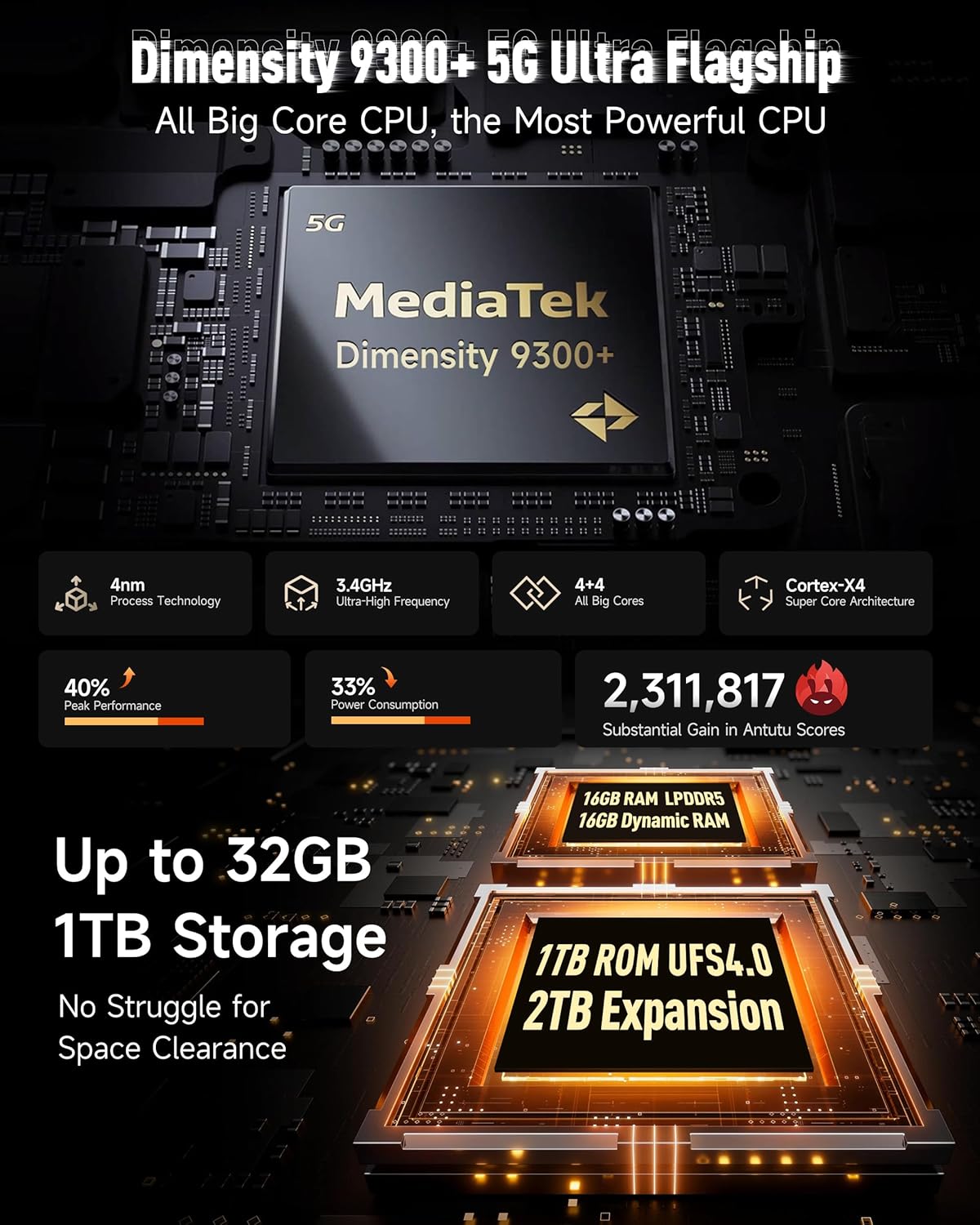
Слика 3.1: Готовоview of the Dimensity 9300+ processor and memory configuration.
3.2 Dual AMOLED Display
The device features a 6.67-inch flexible AMOLED main display with a 120Hz refresh rate and up to 2200 nits peak brightness. A 1.04-inch flexible AMOLED sub-display on the rear provides quick access to notifications, music controls, and selfie previews.

Image 3.2: Details of the 6.67-inch main AMOLED display and the 1.04-inch sub-display.
Систем камера 3.3
The Armor 29 Ultra is equipped with a versatile camera system:
- Главна камера од 50 МП: 1-inch Sony IMX989 sensor, capable of 8K video recording.
- Ноћна камера од 64 МП: OMNIVISION OV64B sensor with 4 infrared LEDs for enhanced low-light visibility.
- 50MP Ultra-wide Macro Lens: Samsung JN1 sensor with a 117.3° field of view.
- Предња камера од 50 МП: За селфије високе резолуције и видео позиве.

Слика 3.3: Готовоview of the triple rear camera setup and front camera.
3.4 Батерија и пуњење
The device features a 21200mAh battery. It supports 120W flash charging, allowing for a 20% charge in approximately 10 minutes. Additionally, it offers 10W reverse charging to power other devices.

Image 3.4: Details on the 21200mAh battery capacity and 120W fast charging capabilities.
3.5 LED Light and Warning Lights
The Armor 29 Ultra includes a powerful 1000-lumen LED camping light with 570 LEDs and a 5-watt output. It also features red and blue warning lights for emergency situations, which can operate in constant or flashing modes with selectable alarm sounds.

Image 3.5: Illustration of the 1000-lumen LED light and emergency warning lights.
3.6 Робусност и издржљивост
The phone is designed to meet MIL-STD 810G standards and boasts IP68 and IP69K ratings, providing protection against water, dust, dirt, sand, humidity, and salt mist. The display is protected by Corning Gorilla Glass 5.

Image 3.6: Visual representation of the phone's IP68/IP69K and MIL-STD-810H durability ratings.
3.7 Повезивање
The Armor 29 Ultra supports global 5G networks with dual SIM dual standby. It features Wi-Fi 7, Bluetooth 5.4, NFC, Infrared, USB 3.2 Gen 2, and comprehensive GPS (GPS + GLONASS + Beidou + Galileo).

Image 3.7: Information on 5G network support and Wi-Fi 7 capabilities.
3.8 uSmart Expansion Connector
The device includes a uSmart Expansion Connector for compatibility with various external accessories, enhancing its functionality for specialized tasks.

Image 3.8: The uSmart Expansion Connector and examples of compatible accessories.
3.9 Android 15 and AI Features
The Armor 29 Ultra runs on Android 15, offering the latest features and security updates. It integrates an AI engine for enhanced computations and supports third-party AI applications.

Image 3.9: Visual representation of the Android 15 operating system interface.
4. Одржавање
4.1 Општа нега
- Avoid exposing the phone to extreme temperatures or direct sunlight for prolonged periods.
- Do not attempt to disassemble the device, as this will void the warranty and may cause damage.
- Keep the charging port and other openings free from dust and debris.
4.2 Чишћење
To clean the device, use a soft, lint-free cloth. For stubborn dirt, a slightly damp cloth with mild soap can be used, ensuring all ports are securely closed. Avoid using harsh chemicals or abrasive materials.
4.3 Ажурирања софтвера
Редовно проверавајте и инсталирајте ажурирања софтвера како бисте осигурали оптималне перформансе, безбедност и приступ новим функцијама. Идите до Подешавања > Систем > Ажурирање система да проверите доступна ажурирања.
КСНУМКС. Решавање проблема
5.1 Уређај се не укључује
- Уверите се да је батерија напуњена. Прикључите телефон на пуњач и сачекајте неколико минута пре него што покушате поново да га укључите.
- Притисните и држите дугме за напајање најмање 10-15 секунди да бисте извршили присилно поновно покретање.
5.2 Проблеми са наплатом
- Verify that the charging cable and adapter are securely connected and undamaged.
- Покушајте да користите други компатибилни пуњач и кабл.
- Clean the charging port gently with a dry, soft brush to remove any debris.
5.3 Проблеми са мрежном повезивањем
- Проверите да ли је СИМ картица правилно уметнута и активирана.
- Поново покрените телефон.
- Иди на Подешавања > Мрежа и интернет > Мобилна мрежа and ensure mobile data is enabled and the correct network type is selected.
- Ресетуј подешавања мреже: Подешавања > Систем > Опције ресетовања > Ресетуј Wi-Fi, мобилне уређаје и Bluetooth.
5.4 Camera Malfunction
- Обришите кеш меморију и податке апликације Камера: Settings > Apps > See all apps > Camera > Storage & cache > Clear cache / Clear storage.
- Поново покрените телефон.
- Уверите се да нема физичких препрека на сочивима камере.
6. Спецификације
| Феатуре | Спецификација |
|---|---|
| Димензије производа | 6.98 к 3.37 к 1.32 инча |
| Тежина артикла | 2.66 фунти (688 г) |
| Број модела ставке | arm29u |
| Оперативни систем | Андроид 15 |
| Брзина процесора | 3.4 GHz (Dimensity 9300+) |
| Величина инсталиране РАМ меморије | 32 GB (16 GB физичке + 16 GB виртуелне) |
| Капацитет меморије | 1024 GB (1TB), expandable up to 2TB |
| Величина екрана на стојећем екрану | 6.67 Inches (Main AMOLED) |
| Sub-Display Size | 1.04 инча (AMOLED) |
| Рефресх Рате | 120 Hz (главни екран) |
| Резолуција | 8K (Scanner Resolution, likely referring to video recording capability) |
| Главна камера | 50MP (Sony IMX989, f/1.9) |
| Камера за ноћни вид | 64MP (OV64B, f/1.79) with 4 IR LEDs |
| Ултраширока/макро камера | 50MP (Samsung JN1, f/2.2, 117.3° FOV) |
| Предња камера | 50МП |
| Капацитет батерије | 21200 Милиamp Сати |
| Пуњење | Пуњење блицем од 120W, обрнуто пуњење од 10W |
| Цоннецтивити Тецхнологиес | Bluetooth 5.4, Infrared, NFC, USB 3.2 Gen 2, Wi-Fi 7, 5G |
| ГПС | ГПС, ГЛОНАСС, Бејду, Галилео |
| Посебне карактеристике | Always On Display, Dual Screen, Fast Charging, Rugged Body, Water Resistant, 1000LM LED Light, Custom Key, uSmart Expansion Connector |
| Аудио Јацк | 3.5 мм |
| Вирелесс Царриер | Откључано |
7. Гаранција и подршка
7.1 Информације о гаранцији
Ulefone provides a 12-month manufacturer warranty service in the US for the Armor 29 Ultra. This warranty covers manufacturing defects under normal use. Please retain your proof of purchase for warranty claims.
7.2 Корисничка подршка
For any questions, technical assistance, or warranty inquiries regarding your Ulefone Armor 29 Ultra, please contact Ulefone customer support. Refer to the contact information provided in your product packaging or visit the official Ulefone webсајт за детаље подршке.


