1. Увод
This manual provides detailed instructions for the safe and effective use of your OLIGHT Oclip Series Headlamp Strap Bundle, featuring the Oclip Pro EDC Flashlight. Please read this manual thoroughly before operation and retain it for future reference.

Image 1.1: The OLIGHT Oclip Pro EDC Flashlight and its compatible Headlamp Страп.
2. Производ је готовview
2.1 Oclip Pro EDC Flashlight
The Oclip Pro is a versatile clip-on light designed for everyday carry. It features multiple lighting solutions to suit various needs.
- Three Lighting Solutions: Includes a floodlight with 500 lumens, a 120-meter range spotlight, and a 40/4 lumen red light.
- User-friendly UI Design: Modes are switched via a selector.
- Индикатор батерије: Located in the center of the switch, it displays the current battery level.

Image 2.1: Various angles of the OLIGHT Oclip Pro, highlighting its compact design and clip.
2.2 Oclip Headlamp Страп
The Oclip Headlamp Strap is designed to convert your Oclip series flashlight into a hands-free headlamp. It is compatible with Oclip, Oclip Pro, and Oclip Ultra models.
- Flexible Rotating Light Holder: Хеадлamp bracket allows for 160-degree rotation, ensuring optimal light direction. This mechanism is tested for over 5,000 flips.
- Квалитетни материјали: Constructed from premium nylon for durability, lightweight comfort, and a secure fit.

Image 2.2: The OLIGHT Headlamp Strap, designed for hands-free use of Oclip series flashlights.
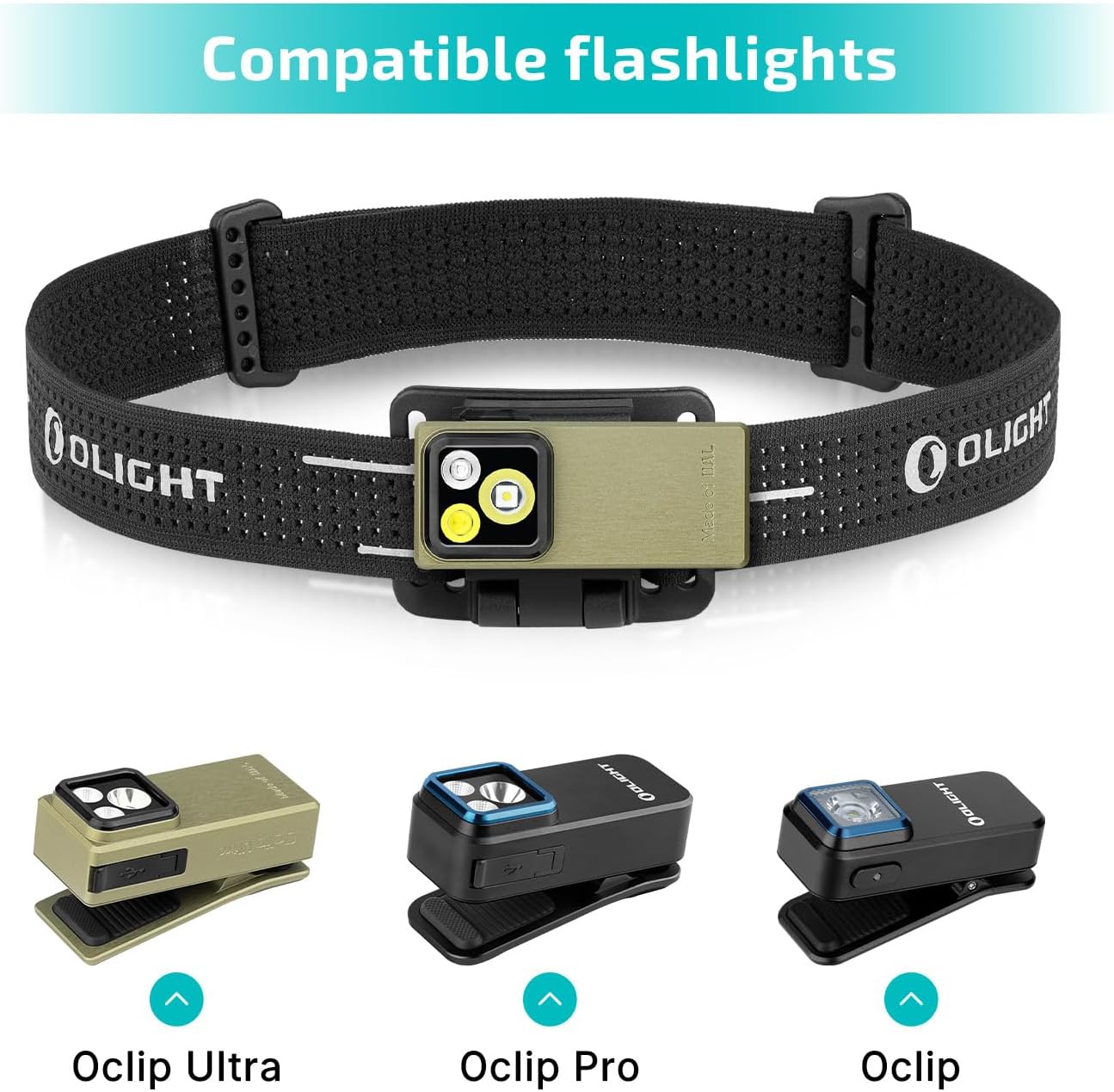
Слика 2.3: Заглављеamp strap shown with compatible Oclip Ultra, Oclip Pro, and Oclip flashlights.

Image 2.4: Size and feature comparison between the Oclip Pro and Oclip models.
3. Подешавање
3.1 Attaching the Oclip Pro to the Headlamp Страп
- Ensure the Oclip Pro flashlight is in the unlocked state (refer to Section 4.4 for lockout/unlock instructions).
- Align the clip of the Oclip Pro flashlight with the bracket on the headlamp каиш.
- Gently push the flashlight into the bracket until it securely clips into place. You should hear a distinct click.
- Adjust the angle of the flashlight within the bracket to your desired position. The bracket allows for 160-degree rotation.
- Ставите главуamp strap on your head and adjust for a comfortable and secure fit.

Image 3.1: The Oclip Pro attached to the headlamp strap, providing hands-free illumination.
3.2 Alternative Mounting Options for Oclip Pro
The Oclip Pro can also be clipped onto various surfaces or attached to metal objects due to its magnetic base, offering versatile hands-free lighting without the headlamp каиш.

Слика 3.2: Примерamples of the Oclip Pro being used by clipping it to a shirt, belt, or attaching it magnetically to a metal surface.
4. Упутство за употребу
4.1 Укључивање/искључивање
To turn the Oclip Pro on or off, press the main switch button located on the side of the flashlight.
4.2 Промена режима
The Oclip Pro features a selector for switching between different lighting modes (floodlight, spotlight, red light). Rotate the selector to choose your desired mode.
4.3 Подешавање осветљености
While the flashlight is on, press and hold the main switch button to cycle through the brightness levels. The typical order of brightness is Low, Medium, then High. Moonlight mode and Turbo mode may be accessed with specific button presses (refer to the diagram below).

Image 4.1: Visual guide for adjusting brightness levels, including Moonlight, Low, Medium, High, and Turbo modes.
4.4 Lockout & Unlock
For first-time use or to prevent accidental activation, the Oclip Pro may be in a locked state. To unlock, press and hold the main switch button for approximately 1 second. To engage lockout mode, press and hold the button for more than 2 seconds while the light is off.

Image 4.2: Instructions for locking and unlocking the Oclip Pro flashlight.
4.5 Индикатор батерије
The battery indicator in the center of the switch provides real-time information about the remaining battery level. Refer to the product's specific indicator guide for detailed interpretations (e.g., green for high, yellow for medium, red for low).
5. Одржавање
To ensure the longevity and optimal performance of your OLIGHT Oclip Pro and Headlamp Strap, follow these maintenance guidelines:
- Чишћење: Wipe the flashlight and strap with a soft, damp крпа. Избегавајте јаке хемикалије или абразивне материјале.
- Пуњење: Recharge the Oclip Pro using the provided charging cable when the battery indicator shows low power.
- Складиштење: Чувајте производ на хладном и сувом месту далеко од директне сунчеве светлости и екстремних температура.
- инспекција: Повремено проверавајте главуamp strap for any signs of wear or damage.
КСНУМКС. Решавање проблема
If you encounter issues with your OLIGHT Oclip Pro, refer to the following common problems and solutions:
- Светло се не укључује:
- Проверите да ли је батеријска лампа у режиму закључавања (погледајте одељак 4.4).
- Уверите се да је батерија напуњена.
- Светлосни излаз је слаб:
- The battery might be low; recharge the device.
- Уверите се да је сочиво чисто.
- Flashlight not securely attaching to strap:
- Verify that the flashlight is correctly aligned with the bracket and pushed in until it clicks.
- Inspect the strap bracket and flashlight clip for any damage.
For further assistance, please contact OLIGHT customer support.
7. Спецификације
| Феатуре | Спецификација |
|---|---|
| Врста производа | EDC Flashlight with Headlamp Страп |
| Бранд | ОЛИГХТ |
| Модел | Оцлип Про |
| Посебна карактеристика | Пуњива |
| Боја | Зелена |
| Извор напајања | Напаја се батеријама (литијум јонски) |
| Тип извора светлости | ЛЕД |
| Material (Strap) | Најлон |
| Вхите Бригхтнесс | 500 лумена (макс.) |
| Ниво отпорности на воду | Није водоотпоран |
| Тип монтаже | Head Mount, Clip-on Mount |
| Број светла | 2 (Floodlight, Spotlight, plus Red Light) |
| Карактеристике сијалица | Multi-mode, Red Light Feature |
8. Гаранција и подршка
OLIGHT products are manufactured to high-quality standards. For information regarding warranty coverage, product registration, or technical support, please visit the official OLIGHT webсајт или контактирајте њихову службу за кориснике. Сачувајте рачун као доказ о куповини за потребе гаранције.
OLIGHT Official Webсајт: www.olightstore.com


