Увод
This manual provides essential information for setting up, operating, and maintaining your TCL 32S5K 32-inch QLED Smart TV. Please read these instructions carefully before using your television to ensure proper functionality and safety. Keep this manual for future reference.

Фронт view of the TCL 32S5K 32-inch QLED Smart TV. This image shows the television screen displaying vibrant colors, supported by two sleek stands.
Шта је у кутији
Проверите да ли су све компоненте присутне у паковању:
- TCL 32S5K Television
- Повер Адаптер
- Повер Цабле
- Ремоте Цонтрол
- ТВ сталак (2 комада)
- Кориснички приручник (овај документ)
Сетуп
1. Причвршћивање постоља за телевизор
- Пажљиво поставите телевизор екраном надоле на меку, равну површину како бисте спречили оштећења.
- Поравнајте свако постоље са одговарајућим отворима на дну телевизора.
- Причврстите постоља помоћу приложених шрафова. Уверите се да су чврсто причвршћени.

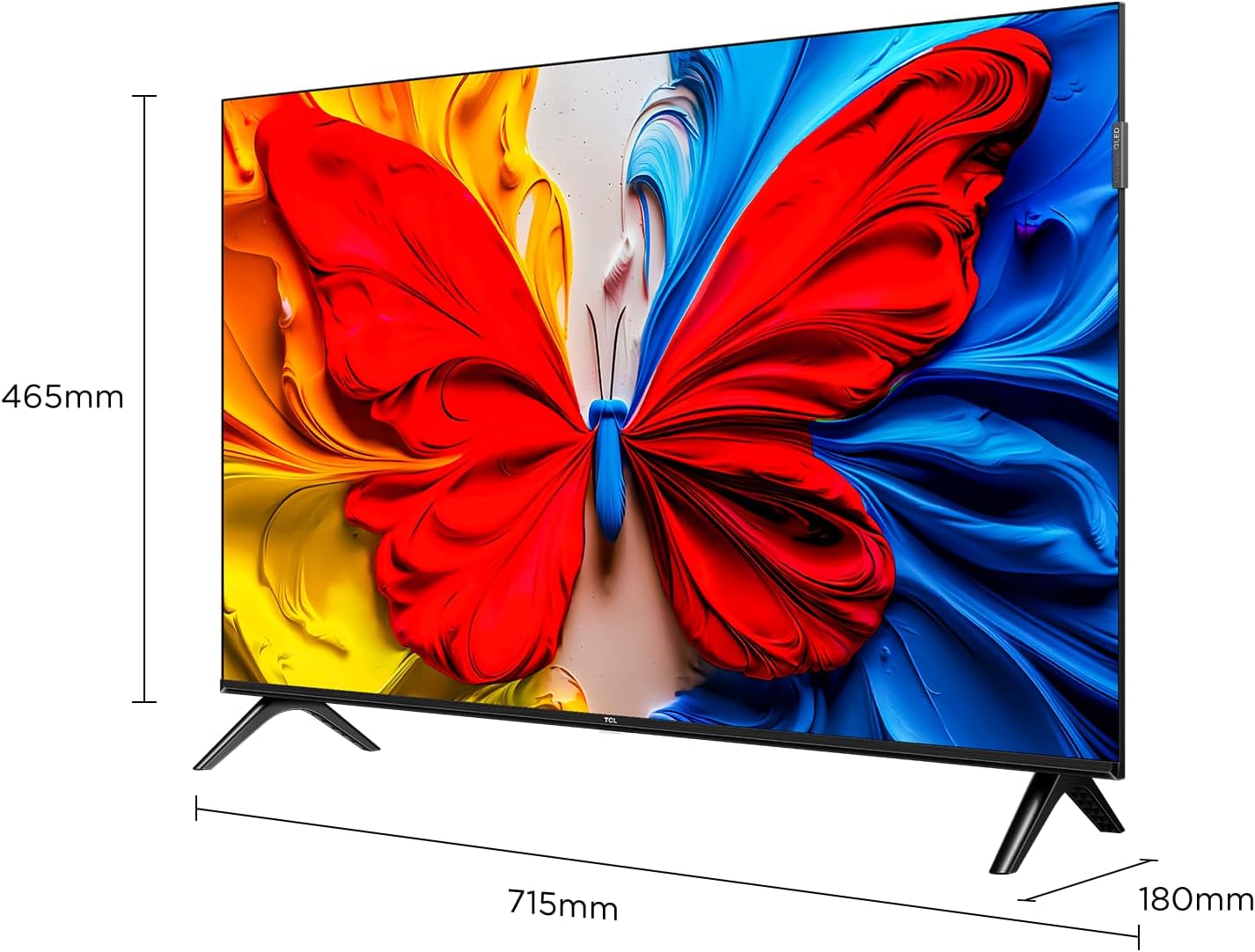
Image illustrating the dimensions of the TCL 32S5K TV and how the stands are attached to the bottom of the unit. The image shows measurements for width (715mm) and height (465mm).
2. Монтажа на зид (опционо)
If you choose to wall mount your TV, refer to the instructions provided with your wall mount kit. Ensure the wall mount is compatible with the VESA mounting pattern of the TCL 32S5K TV. Professional installation is recommended for wall mounting.
Позади view of the TCL 32S5K TV, showing the VESA mounting points and various input ports. This view is useful for understanding wall mount compatibility and cable management.
3. Повезивање спољних уређаја
The TV features multiple ports for connecting external devices:
- ХДМИ портови: Connect Blu-ray players, game consoles, cable/satellite boxes, etc. (Total 2 HDMI ports).
- УСБ портови: Повежите УСБ дискове за репродукцију медија.
- Ви-Фи: Повежите се на кућну мрежу за приступ интернету и стримовање.
- Блуетоотх: Connect compatible wireless accessories.

Сиде view of the TCL 32S5K TV, highlighting the accessible input ports including HDMI and USB. This image helps users locate the connectivity options.
4. Прикључак за напајање
Connect the power cable to the TV's power input, then plug the other end into a suitable electrical outlet.
5. Почетно подешавање
При првом укључивању, телевизор ће вас водити кроз процес почетног подешавања, укључујући:
- Избор језика.
- Мрежна веза (Wi-Fi).
- Google Account sign-in (for Google TV features).
- Channel scanning (if connecting an antenna).
Упутство за употребу
Ремоте Цонтрол
The included remote control allows you to navigate the TV's interface and control various functions. Insert two AAA batteries (not included) into the remote control, observing polarity.
- Дугме за напајање: Укључује или искључује ТВ.
- Дугме за унос: Selects input sources (HDMI 1, HDMI 2, USB, etc.).
- Дугмад за навигацију: Up, Down, Left, Right arrows to move through menus.
- Дугме ОК: Потврђује изборе.
- Дугме за назад: Враћа се на претходни екран.
- Хоме дугме: Приступа почетном екрану Google TV-а.
- Дугмад за јачину звука: Подешава ниво јачине звука.
- Дугмад канала: Changes TV channels (if applicable).
- Дугме за Google асистент: Активира гласовну контролу.
Интерфејс за Google TV
Your TCL 32S5K TV runs on the Google TV operating system, providing access to a wide range of streaming apps, movies, and shows. Navigate using the remote control to browse content, search, and manage settings.
- Почетни екран: Displays personalized content recommendations, installed apps, and quick access to inputs.
- апликације: Преузмите и управљајте апликацијама из Google Play продавнице.
- Подешавања: Access TV settings for picture, sound, network, system, and more.
Кључне карактеристике
QLED Display Technology
The TCL 32S5K features QLED (Quantum Dot LED) technology, which enhances color volume and accuracy, delivering a more vibrant and lifelike viewing experience compared to conventional LED TVs.

Diagram explaining the difference between Colorful Quantum Crystal (TCL QLED) and Conventional Quantum Crystal, highlighting the layers and efficiency.
HDR 10 Support
With HDR 10 support, the TV can display a wider range of brightness and contrast, revealing more detail in both the darkest and brightest areas of the picture. This results in a more dynamic and immersive visual experience.

Comparison image showing a scene with HDR (left) and without HDR (right), demonstrating the enhanced detail and dynamic range provided by HDR 10.
Долби Аудио
Experience rich, clear, and powerful sound with Dolby Audio. This technology optimizes the TV's audio output for an immersive listening experience, whether you're watching movies, sports, or playing games.

Image depicting a TV screen displaying a dynamic ocean wave, with visual elements suggesting enhanced audio quality, representing Dolby Audio.
Режим игре
Game Mode automatically optimizes display settings for gaming, reducing input lag and improving responsiveness. This provides a smoother and more enjoyable gaming experience.

Split-screen image comparing "Game Mode Off" (left) and "Game Mode On" (right) during a video game scene, illustrating the visual improvements and reduced lag.
Слим Десигн
The TCL 32S5K features a modern, slim design with a metallic bezel-less display, allowing the screen to blend seamlessly into your living space and providing a more immersive viewинг искуство.

Приказ сликаasing the slim profile and metallic bezel-less design of the TCL 32S5K TV, emphasizing its modern aesthetic.
Одржавање
- Чишћење екрана: Нежно обришите екран меком крпом која не оставља влакна. За тврдокорне мрље користите средство за чишћење екрана посебно дизајнирано за телевизоре, нанесено на крпу, а не директно на екран.
- Чишћење кабинета: Користите меку, суву крпу за брисање кућишта телевизора. Избегавајте употребу абразивних средстава за чишћење или растварача.
- вентилација: Уверите се да вентилациони отвори телевизора нису блокирани како бисте спречили прегревање.
- Кабл за напајање: Редовно проверавајте кабл за напајање да ли је оштећен. Уколико је оштећен, контактирајте корисничку подршку ради замене.
Решавање проблема
Пре него што контактирате корисничку подршку, испробајте следећа решења за уобичајене проблеме:
| Проблем | Могуће решење |
|---|---|
| Нема струје / ТВ се не укључује. |
|
| Нема слике, али је звук присутан. |
|
| Нема звука, али је слика присутна. |
|
| Даљински управљач не ради. |
|
| TV turns on for a few seconds then shuts off. |
|
Спецификације
| Феатуре | Детаљ |
|---|---|
| Назив модела | 32С5К |
| Величина екрана | 32 инча |
| Дисплаи Тецхнологи | КЛЕД |
| Резолуција | 1920 к 1080 (ФХД) |
| Рефресх Рате | 60 Хз |
| Подржан ХДР формат | ХДР10 |
| Аудио технологија | Dolby Audio, DTS, Dolby Atmos |
| Оперативни систем | Гоогле ТВ |
| Повезивање | Wi-Fi, Bluetooth, 2x HDMI, USB |
| Димензије производа (Д x Ш x В) | 2.95"Д к 28.15"Ш к 16.61"В |
| Тежина артикла | 4.42 килограма |
| Тип монтаже | Носач за сто, Носач за зид |
| Укључене компоненте | Power Adapter, Power Cable, Remote Control, Stand, User Manual |
Гаранција и подршка
За информације о гаранцији, погледајте гарантни лист који је приложен уз ваш производ или посетите званичну веб страницу TCL-а. website. For technical support or service inquiries, please contact TCL customer service through their official channels. Keep your purchase receipt as proof of purchase for warranty claims.
Више информација и подршке можете пронаћи на TCL продавница на Амазону.


