1. Увод
This manual provides detailed instructions for the setup, operation, and maintenance of your MOBAPAD Huben2 Wireless Switch Controller Pro. Please read this manual thoroughly before using the product to ensure optimal performance and longevity.
2. Безбедносне информације
- Држите контролер даље од воде и других течности.
- Do not expose the controller to extreme temperatures.
- Избегавајте испуштање или излагање контролера јаким ударцима.
- Do not attempt to disassemble or repair the controller yourself. Contact customer support for assistance.
- Користите само приложени кабл за пуњење или сертификовани USB-C кабл за пуњење.
3. Садржај пакета
Проверите да ли су све ставке присутне у вашем пакету:
- MOBAPAD Huben2 Wireless Controller Pro
- УСБ-Ц кабл за пуњење
- Wireless Dongle (2.4G)
- PU Travel Case
- Replaceable D-pad (Cross/Circle)
- Упутство за употребу (овај документ)
4. Распоред контролера
Familiarize yourself with the buttons and features of your Huben2 controller.

Слика 4.1: Предња страна view of the MOBAPAD Huben2 Wireless Controller Pro. Shows the joysticks, face buttons (A, B, X, Y), D-pad, and central function buttons.
- Леви/десни аналогни штапићи: Capacitive joysticks with 4,096-step precision.
- Дугмад A/B/X/Y: Omron mechanical face buttons.
- Д-пад: Replaceable cross or circle D-pad.
- Л1/Д1 (Дугмад на рамену): Standard shoulder buttons.
- L2/R2 (Окидачи): Dual-mode triggers (Hall Effect and Microswitch).
- M1/M2/M3/M4 Buttons: Four programmable back buttons.
- Хоме дугме: Powers on/off and returns to system home screen.
- Дугме за снимање екрана: Снима снимке екрана.
- Дугмад плус/минус: Standard system menu buttons.
- Турбо дугме: Activates/deactivates turbo function.
- УСБ-Ц порт: За пуњење и жичану везу.

Слика 4.2: Задња страна view showing the four programmable M1, M2, M3, M4 back buttons.
5. Подешавање
5.1 Пуњење контролера
Before first use, fully charge the controller. Connect the provided USB-C cable to the controller's USB-C port and the other end to a USB power source (e.g., console, PC, or USB wall adapter). The charging indicator will show the charging status.
- A full charge provides approximately 15 hours of gameplay.

Figure 5.1: The controller features a 1000mAh battery for extended gameplay.
5.2 Начини повезивања
The Huben2 controller supports three connection methods:

Figure 5.2: The controller supports 2.4G wireless, Bluetooth, and wired connections across various platforms.
- 2.4G Wireless (via Dongle):
- Compatible with Windows PC, Steam, and Android TV.
- Insert the 2.4G wireless dongle into a USB port on your device.
- Turn on the controller. It should automatically connect to the dongle.
- Блуетоотх бежични:
- Compatible with Nintendo Switch, Nintendo Switch 2, Android, and iOS devices.
- На свом уређају идите до подешавања Bluetooth-а и омогућите Bluetooth.
- На контролеру притисните и држите дугме за Bluetooth упаривање (погледајте распоред контролера за тачну локацију) док индикаторска светла не почну брзо да трепћу.
- Select "MOBAPAD Huben2" from the list of available devices on your system to pair.
- For Nintendo Switch, the controller can wake the console from sleep mode after initial pairing and firmware update via the Mobapad app.
- Жична веза:
- Compatible with Windows PC and Android TV.
- Connect the controller to your device using the USB-C cable. The controller will be recognized automatically.
6. Упутство за употребу
6.1 Укључивање/искључивање
- Укључено: Притисните дугме Почетна.
- Искључивање: Press and hold the Home button for 3-5 seconds. The controller will also power off automatically after a period of inactivity.
6.2 Dual Trigger Modes
The L2 and R2 triggers feature dual modes for different gaming experiences:

Figure 6.1: Visual representation of the 2mm Microswitch Trigger and 10mm Hall Linear Trigger modes.
- Microswitch Trigger (2mm): Provides a short, tactile click for rapid input, ideal for FPS games.
- Hall Effect Linear Trigger (10mm): Offers analog input with a longer travel distance, suitable for racing or simulation games.
- Промена режима: Use the physical switches located near the L2/R2 triggers to toggle between modes.
6.3 Customizable Features (Back Buttons, Macros, App Support)
The Huben2 controller offers extensive customization options:
- Programmable Back Buttons (M1-M4): Assign single button presses or complex macros to the four back buttons using the dedicated Mobapad PC/mobile application.
- Rapid-Fire Turbo Mode: Activate turbo functionality for any button. Refer to the Mobapad app or controller manual for specific button combinations to enable/disable.
- Mobapad App: Download the official Mobapad application for Windows or mobile devices to:
- Adjust joystick dead zones and response curves.
- Прилагодите интензитет вибрација.
- Create and manage macros.
- Update controller firmware.
6.4 HD Rumble and ALPS Linear Motors
The controller features dual ALPS linear motors for precise HD Rumble feedback, reacting to in-game sound and motion with 0ms startup time.
6.5 6-Axis Motion Control
The integrated 6-axis motion sensor provides precise motion control for compatible games.

Figure 6.2: The controller's internal 6-axis sensing motors enable precise motion control.
6.6 Replaceable D-pad and Faceplate
The controller allows for customization of the D-pad and faceplate.
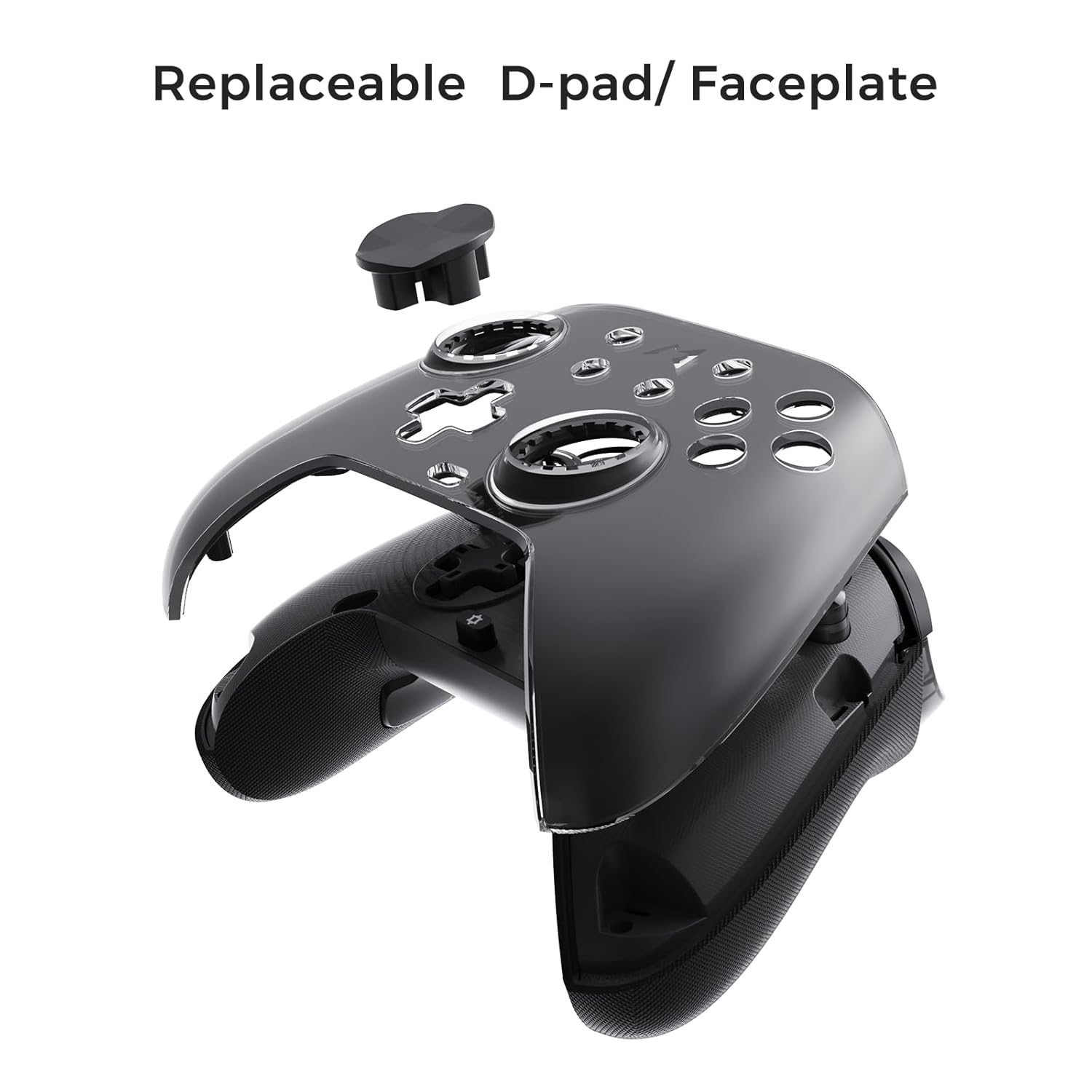
Figure 6.3: The D-pad and faceplate can be replaced for customization or preference.
- To replace the D-pad, gently remove the magnetic faceplate and then lift out the D-pad. Insert the desired D-pad (cross or circle) and reattach the faceplate.
7. Одржавање
- Чишћење: Користите меку, суву крпу за чишћење контролера. За тврдокорну прљавштину, благо дampНапрхајте крпу водом. Не користите јаке хемикалије или абразивна средства за чишћење.
- Складиштење: Store the controller in a cool, dry place, away from direct sunlight and extreme temperatures. When not in use for extended periods, store it in the provided PU travel case.
- Одржавање батерије: Да бисте продужили век трајања батерије, избегавајте често потпуно пражњење контролера. Редовно га пуните, чак и ако га не користите стално.
КСНУМКС. Решавање проблема
| Проблем | Могући узрок | Решење |
|---|---|---|
| Контролер се не укључује. | Ниска батерија. | Пуните контролер најмање 30 минута. |
| Controller does not connect wirelessly. | Not in pairing mode; out of range; interference; incorrect mode selected. | Ensure controller is in pairing mode. Move closer to the device. Check for other wireless devices causing interference. Verify correct connection mode (2.4G or Bluetooth). |
| Input lag or dropped connections. | Wireless interference; low battery; outdated firmware. | Reduce distance to device. Charge controller. Update firmware via Mobapad app. Try wired connection. |
| Дугмад или џојстици не реагују. | Software glitch; physical obstruction; calibration issue. | Restart the controller and the connected device. Check for physical debris. Calibrate joysticks via Mobapad app. |
| HD Rumble not working. | Feature disabled in game/system settings; low battery. | Ensure rumble is enabled in game and system settings. Charge controller. |
If you encounter issues not listed here, please refer to the official MOBAPAD support webсајту или контактирајте корисничку подршку.
9. Спецификације
| Феатуре | Детаљ |
|---|---|
| Број модела | Mobapad Huben2 H6 |
| Повезивање | 2.4G бежично, Bluetooth, жично (USB-C) |
| Компатибилност | Nintendo Switch, Nintendo Switch 2, Windows, Steam, Android, iOS |
| Јоистицкс | Capacitive, 4,096-step precision, 1000Hz polling rate |
| Триггерс | Dual Mode: 2mm Omron Microswitch, 10mm Hall Effect Linear |
| Дугмад | Omron Mechanical Face Buttons, Programmable Back Buttons (M1-M4) |
| Вибрације | Dual ALPS Linear Motors (HD Rumble) |
| Контрола кретања | 6-осни жироскоп |
| Капацитет батерије | 1000мАх литијум-јонски |
| Трајање батерије | До 15 сати (приближно) |
| Димензије | 6.3 к 4.13 к 2.76 инча |
| Тежина | 1.87 фунти |
10. Гаранција и подршка
MOBAPAD products are designed and manufactured to the highest quality standards. For warranty information, technical support, or customer service inquiries, please visit the official MOBAPAD website or contact their authorized support channels. Please retain your proof of purchase for warranty claims.
Webсајт: Visit the MOBAPAD Store on Amazon


