1. Увод
The FNIRSI DST-210 is a compact and versatile 3-in-1 handheld device designed for electronic testing and measurement. It integrates the functions of a digital oscilloscope, a true RMS multimeter, and a signal generator into a single portable unit. This manual provides detailed instructions to help you effectively use and maintain your device.
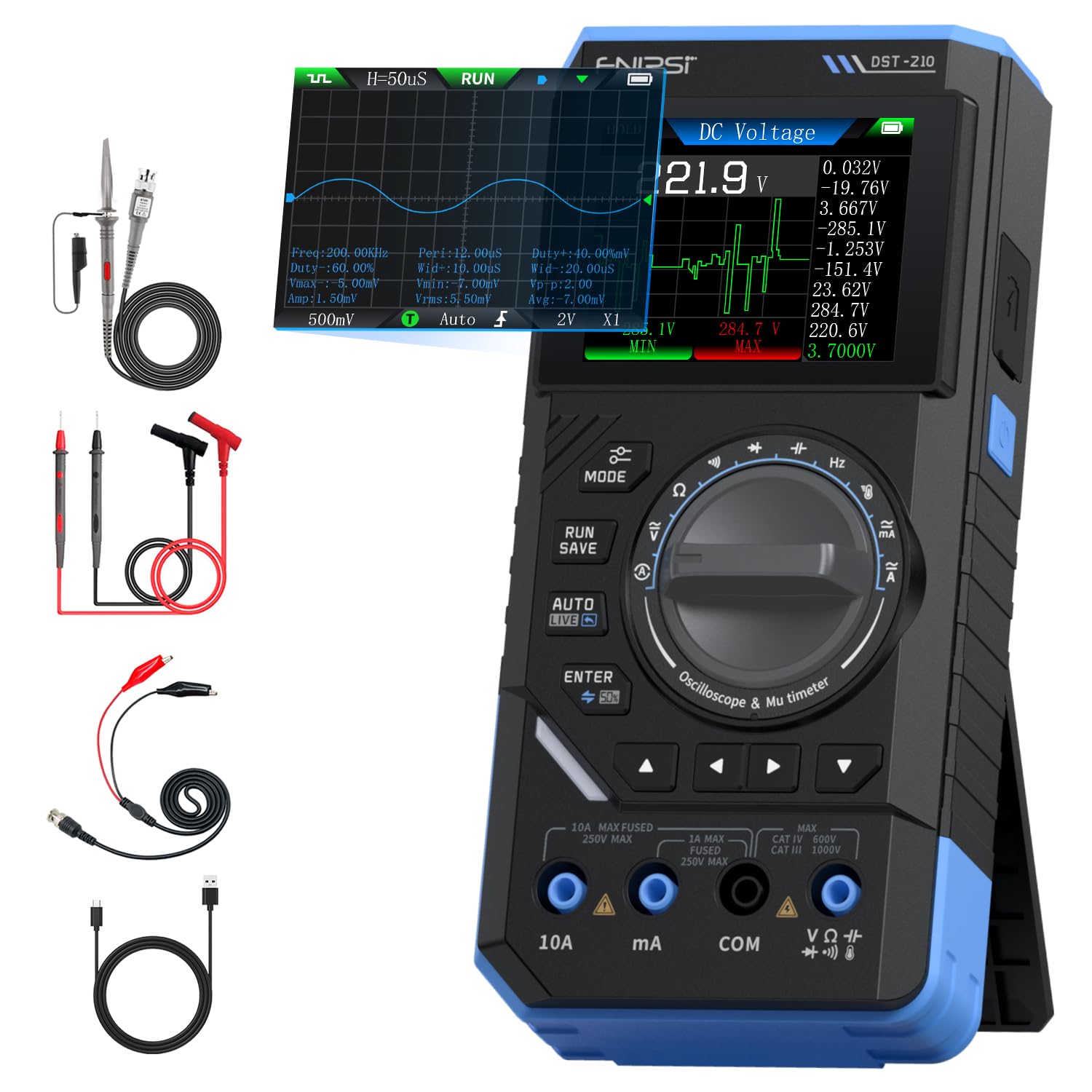
Figure 1: FNIRSI DST-210 3-in-1 Handheld Device
2. Производ је готовview
2.1 Кључне карактеристике
- 3-у-1 функционалност: Combines a digital oscilloscope, a true RMS multimeter, and a signal generator.
- Приказ: 2.8-inch TFT color LCD for clear data visualization.
- Осцилоскоп: 10MHz analog bandwidth, 48MSa/s real-time sampling rate, supports Auto/Normal/Single trigger modes, waveform image saving and display.
- мултиметар: 19999-count true RMS measurement for DC/AC voltage, DC/AC current, resistance, capacitance, frequency, temperature, diode, and continuity. Features data hold, record mode with graphical display, and LIVE function for voltage presence detection.
- Генератор сигнала: Outputs 13 types of waveforms (Sine, Square, Sawtooth, Half-wave, Full-wave, Step, Reverse Step, Index Up/Down, DC, Multi-audio, Sink Pulse, Lorentz Wave) with adjustable frequency (0-50KHz), amplitude (0.1-3.0V), and duty cycle (0-100%).
- Преносивост: Compact design with an integrated stand, powered by a 3000mAh rechargeable lithium battery providing up to 10 hours of continuous use. Type-C charging supported.
2.2 Садржај пакета
Проверите да ли су све ставке присутне у пакету:
- FNIRSI DST-210 Main Unit
- P6100 High Voltagе Пробе
- Тест каблови (црвени и црни)
- Аллигатор Цлипс
- Кабл за пуњење типа Ц
- Instruction Manual (PDF version available online)
- Пацкагинг Бок

Слика 2: Укључена додатна опрема
3. Подешавање
3.1 Пуњење уређаја
Before initial use, fully charge the DST-210. Connect the provided Type-C charging cable to the device's Type-C port and a compatible USB power adapter (5V/1A). The battery indicator on the display will show charging status.
3.2 Повезивање сонди
For accurate measurements, ensure probes are correctly connected:
- Multimeter Measurements: Insert the red test lead into the VΩHzmA or 10A jack (depending on the measurement) and the black test lead into the COM jack.
- Oscilloscope Measurements: Connect the P6100 high voltage probe to the oscilloscope input jack. Ensure the probe's attenuation setting (e.g., X1 or X10) matches the device's setting for accurate readings.
- Излаз генератора сигнала: Connect the output cable to the signal generator output port.

Figure 3: Input Jacks and Controls
4. Упутство за употребу
4.1 Укључивање/искључивање
Press and hold the power button (located on the side) to turn the device on or off.
4.2 Избор режима
Rotate the central knob to switch between Multimeter, Oscilloscope, and Signal Generator modes. Within each mode, further sub-functions can be selected using the knob or dedicated buttons.

Figure 4: Using the Oscilloscope Function
4.3 Multimeter Operation
In Multimeter mode, the device offers various measurement functions:
- Волtage/Current (DC/AC): Select the appropriate DC V, AC V, DC A, or AC A setting. Connect test leads to the circuit. The device supports a record mode that displays measurement trends graphically, and can store up to 10 sets of data.
- Отпор (Ω): Select the resistance function. Connect test leads across the component.
- Капацитет (Ф): Select the capacitance function. Connect test leads across the capacitor.
- Фреквенција (Хз): Select the frequency function. Connect test leads to the signal source.
- Тест диода: Select the diode function. Connect test leads across the diode to check its forward voltagе дроп.
- Тест континуитета: Select the continuity function. Connect test leads across a conductor; a beep indicates continuity.
- температура: Use a K-type thermocouple (not included) connected to the appropriate jacks for temperature measurement.
- LIVE Function: For single-probe voltage presence detection.

Figure 5: Multimeter Measurement Exampлес
4.4 Oscilloscope Operation
In Oscilloscope mode, the device displays waveforms:
- Приказ таласног облика: Connect the oscilloscope probe to the circuit. The device automatically adjusts settings for stable waveform display.
- Режими окидача: Select between Auto, Normal, and Single trigger modes to capture different types of signals.
- Чување таласног облика: Press the 'RUN/SAVE' button to save the current waveform image. Saved images can be reviewиздао и извезао.

Figure 6: Oscilloscope Waveform Display
4.5 Signal Generator Operation
In Signal Generator mode, the device outputs various waveforms:
- Избор таласног облика: Choose from 13 different waveform types using the menu options.
- Подешавање параметара: Adjust the frequency (0-50KHz), amplitude (0.1-3.0V), and duty cycle (0-100%) as required for your application.

Figure 7: Signal Generator Waveform Selection
4.6 PC Connection and Data Export
The DST-210 can connect to a PC via its Type-C USB port for data management and firmware updates.
- Waveform Screenshots: Long-press the 'RUN/SAVE' button to save waveform screenshots.
- Извоз података: Connect the device to a computer to view, save, and export recorded waveform images and data.
- Ажурирања фирмвера: Периодично проверавајте званични FNIRSI webсајт за ажурирања фирмвера како бисте осигурали оптималне перформансе и приступ новим функцијама. Пратите упутства која су дата уз пакет за ажурирање фирмвера.

Figure 8: PC Connection for Data Management
5. Одржавање
- Чишћење: Користите меку, суву крпу за чишћење уређаја. Не користите абразивна средства за чишћење или раствараче.
- Складиштење: Уређај чувајте на хладном и сувом месту, даље од директне сунчеве светлости и екстремних температура.
- Одржавање батерије: Да бисте продужили век трајања батерије, избегавајте често потпуно пражњење батерије. Редовно пуните уређај, чак и ако га не користите дуже време.
- Брига о сонди: Inspect test leads and probes for damage before each use. Replace any damaged accessories immediately.
КСНУМКС. Решавање проблема
| Проблем | Могући узрок | Решење |
|---|---|---|
| Уређај се не укључује. | Low battery or faulty power button. | Charge the device fully. If the issue persists, contact support. |
| Unstable or inaccurate readings in Multimeter mode. | Poor probe connection, incorrect mode selection, or external interference. | Ensure probes are securely connected. Verify the correct measurement mode is selected. Minimize external electrical interference. |
| Oscilloscope waveform is not stable. | Incorrect trigger settings or probe attenuation. | Adjust trigger level and mode. Ensure probe attenuation (X1/X10) matches the device setting. |
| Signal generator output is incorrect. | Incorrect waveform type, frequency, amplitude, or duty cycle settings. | Verify all signal generator parameters are set as desired. |
| Cannot connect to PC or export data. | Faulty USB cable, incorrect PC driver, or software issue. | Try a different Type-C cable. Ensure necessary drivers are installed on your PC. Refer to the official website for software and driver downloads. |
7. Спецификације
7.1 Параметри осцилоскопа
| Категорија | Спецификација |
|---|---|
| У реалном времену Сampлинг Рате | 48МСа / с |
| Аналог Бандвидтх | 10МХз |
| Инпут Импеданце | 1МΩ |
| Метода спајања | АЦ/ДЦ |
| Меасуремент Волtagе Распон | 1:1 Probe: ±80Vpp (±40V), 10:1 Probe: ±800Vpp (±400V) |
| Вертицал Сенситивити | 10mV/div ~ 10V/div (at X1) |
| Вертицал Оффсет | Adjustable (with indicator) |
| Хоризонтални распон временске базе | 50 нс ~ 20 с |
| Триггер Моде | Ауто, Нормал, Сингле |
| Едге Триггер | Rising/Falling Edge |
| Ниво окидача | Adjustable (with indicator) |
| Замрзавање таласног облика | Supported (HOLD function) |
| Аутоматско мерење | Max, Min, Average, RMS, Peak-to-Peak, Frequency, Duty Cycle, etc. |
7.2 Параметри мултиметра
| Меасуремент Фунцтион | Домет | Прецизност |
|---|---|---|
| ДЦ Волtage | 1.9999В/19.999В/199.99В/1000В | ±(0.5%+3) |
| АЦ Волtage | 1.9999В/19.999В/199.99В/750В | ±(1.0%+3) |
| ДЦ Цуррент | 19.999мА/199.99мА/1.9999А/9.999А | ±(1.2%+3) |
| АЦ Цуррент | 19.999мА/199.99мА/1.9999А/9.999А | ±(1.5%+3) |
| Отпор | 19.999MΩ/199.99kΩ/19.999kΩ | ±(2.0%+5) |
| Капацитет | 999.9uF/99.99uF/9.999uF/999.9nF/99.99nF, 9.999mF/99.99mF | ±(2.0%+5) |
| Фреквенција | 9.999MHz/999.9kHz/99.99kHz/9.999kHz/999.9Hz/99.99Hz | ±(0.1%+2) |
| Температура | [-55~1300°C] / [-67~2372°F] | ±(2.5%+5) |
| Диода/Континуитет | Подржано | Н/А |
| LIVE Function | Подржано | Н/А |
7.3 Параметри генератора сигнала
| Категорија | Спецификација |
|---|---|
| Излазни таласни облици | 13 врсте |
| Вавеформ Фрекуенци | КСНУМКС ~ КСНУМКСКХз |
| Дути Цицле | 0 ~ 100% (adjustable) |
| Вавеформ Ampлитуде | 0.1 ~ 3.0В |
7.4 Опште спецификације
| Категорија | Спецификација |
|---|---|
| Модел производа | ДСТ-210 |
| Дисплаи | 2.8-инчни TFT екран у боји |
| Позадинско осветљење | Бригхтнесс Адјустабле |
| Повер Суппли | Тип-Ц (5В/1А) |
| Батерија | 3000мАх |
| језичка подршка | кинески, енглески |
| Величина производа | Прибл. 177.43 мм к 87 мм к 35 мм |
| Тежина производа | Прибл. 300г |
8. Гаранција и подршка
For any questions, issues, or support needs regarding your FNIRSI DST-210, please contact us through the following methods:
- Амазон порука: If you purchased the product on Amazon, you can contact us via the Amazon messaging system. Go to your 'Order History', select the relevant order, and click 'Problem with order' or 'Contact Seller'.
- Подршка путем е-поште: You can also reach our after-sales service center directly via email at support@fnirsi.com. Please include your order number and a detailed description of your issue for faster assistance.
When attaching large photos or videos, email support is recommended due to potential attachment size limits on Amazon's messaging system.
Video 1: Demonstration of FNIRSI DST-210's Multimeter, Oscilloscope, and Signal Generator Functions.


