1. Увод
Welcome to the user manual for your new DOOGEE Fire3Ultra Rugged Phone 16. This guide provides essential information to help you set up, operate, maintain, and troubleshoot your device. Please read thoroughly to ensure optimal performance and longevity of your rugged smartphone.
Шта је у кутији

Image: Contents of the DOOGEE Fire 3 Ultra retail package.
- 1 x DOOGEE Fire 3 Ultra Rugged Phone
- 1 к УСБ кабл типа Ц
- 1 к пуњач
- 1 x Pre-applied Protective Film
- 1 x Отварач за картице
- 1 к Упутство за употребу
- 1 к Сервисна картица
Видео за распакивање
Video: A detailed unboxing of the DOOGEE Fire 3 Ultra, showing all included accessories.
2. Производ је готовview
The DOOGEE Fire3Ultra is a rugged smartphone designed for durability and performance. It features a compact display, a large battery, and advanced camera capabilities, all powered by the latest Android operating system.
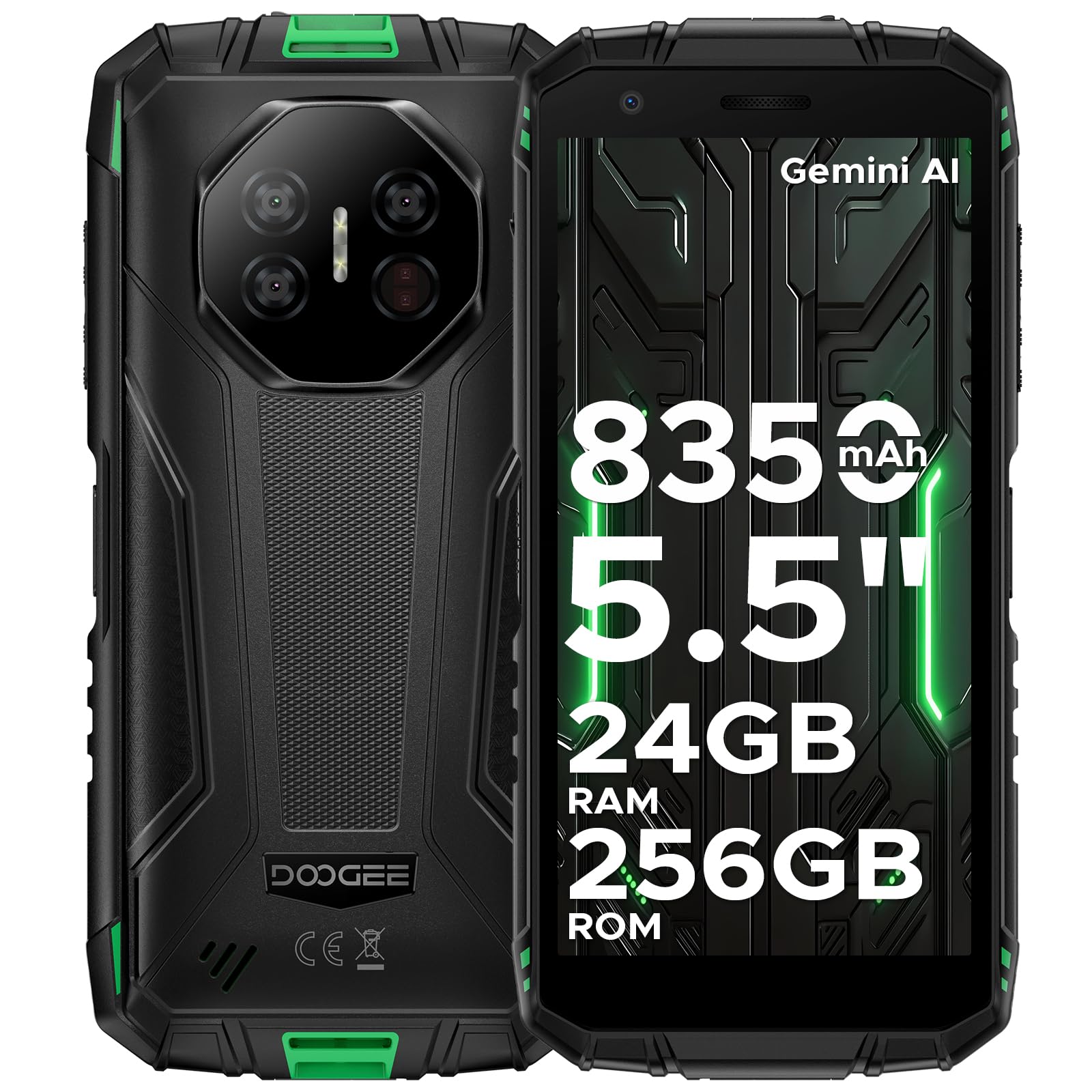
Image: The DOOGEE Fire 3 Ultra rugged phone held in hand, highlighting its compact design and key features.
Кључне карактеристике
- Робустан дизајн: Сертификовано по IP68/IP69K и MIL-STD-810H стандардима за отпорност на воду, прашину и падове.
- Приказ: 5.5-inch HD+ IPS display for clear visuals.
- батерија: 8350mAh large battery with 18W fast charging and reverse charging support.
- Перформансе: Powered by Unisoc T7200 Octa-Core Processor.
- Меморија и складиштење: Up to 24GB RAM (6GB basic + 18GB virtual) and 256GB internal storage, expandable up to 2TB.
- камере: 16MP AI main camera, 8MP front camera, and 20MP night vision camera.
- Оперативни систем: Android 15 OS with built-in Gemini AI.
- Повезивање: Supports Wi-Fi, 4G cellular technology, NFC, and accurate navigation systems.
Производ је завршенview Видео
Видео: Оверview of the DOOGEE Fire 3 Ultra Rugged Phone, showcasinг његов дизајн и карактеристике.
3. Подешавање
Почетно укључивање
To power on your DOOGEE Fire3Ultra, press and hold the Power button located on the side of the device until the DOOGEE logo appears. Follow the on-screen prompts to complete the initial setup, including language selection and network connection.
Инсталација SIM картице и MicroSD картице
Locate the SIM card tray on the side of your phone. Use the provided card slot opener to eject the tray. Insert your Nano-SIM card(s) and/or MicroSD card into the designated slots. Ensure the cards are correctly oriented before reinserting the tray firmly into the phone.
Подешавање безбедности
For enhanced security, set up a screen lock method. Navigate to Подешавања > Безбедност to choose from Pattern, PIN, Password, Fingerprint, or Face Unlock. Follow the on-screen instructions to register your chosen security method. The device supports both fingerprint and face unlock for convenient and secure access.
4. Упутство за употребу
Дисплаи Феатурес

Image: The DOOGEE Fire 3 Ultra display showcasing eye care features for reduced strain during long use.
- Режим неге очију: Reduces blue light emission to prevent eye strain during prolonged use. Activate this feature in Display Settings.
- Тамни режим: Changes the system's color scheme to a darker palette, which can reduce eye fatigue in low-light conditions and save battery.
Карактеристике камере

Image: Graphic highlighting the 16MP AI Main Camera and 8MP Front Camera of the DOOGEE Fire 3 Ultra.
- Главна камера са вештачком интелигенцијом од 16 МП: Capture high-quality photos with AI enhancements.
- Предња камера од 8 МП: За јасне селфије и видео позиве.
- Ноћна камера од 20 МП: See clearly even in complete darkness.
- AI Scene Recognition: Automatically optimizes camera settings for various scenes.
- Multiple Photography Features: Includes Pro Mode, Anti-Flicker, Beauty Mode, Portrait Mode, Panoramic Photography, and Continuous Photography.
AI Features (Gemini AI)

Image: Visual representation of the DOOGEE Fire 3 Ultra's built-in Gemini AI capabilities, including content creation and image analysis.
The DOOGEE Fire3Ultra integrates Gemini AI to assist with various tasks, including content creation, image analysis, code development, language learning, and smart assistance. Access these features through the AI Agent application.
Android 15 OS Features

Image: Graphic illustrating various features of the Android 15 OS on the DOOGEE Fire 3 Ultra, such as App Cloning and Enhanced Privacy Protection.
Experience a smarter and more secure mobile experience with Android 15. Key features include App Cloning for multiple accounts, Smart Motion Sensing, Super Clipboard, Split Screen multitasking, Enhanced Privacy Protection, Screen Awareness, Live Caption (English only), Glove Mode for touch sensitivity with gloves, and Video Enhancement.
Connectivity & Digital Toolkit

Image: Features of the DOOGEE Fire 3 Ultra as a rugged partner, including Widevine L1 support, accurate navigation, and NFC.

Image: Icons representing the various tools available in the DOOGEE Fire 3 Ultra's Digital Toolkit, such as Compass and Sound Meter.
- Подршка за Вајдвајн Л1: Enjoy high-definition streaming content from popular platforms.
- Прецизан навигациони систем: Reliable GPS for outdoor adventures.
- НФЦ подршка: За бесконтактна плаћања и пренос података.
- Side Fingerprint & Face Unlock: Convenient and secure biometric authentication.
- Digital Toolkit: A suite of practical tools including Compass, Sound Meter, Pic Hanging, Magnifier, Protractor, Plumb Bob, Alarm Bell, Gradienter, and Height Measure.
Special Modes: Underwater Mode
The DOOGEE Fire3Ultra features an Underwater Mode, allowing you to capture photos and videos while submerged. In this mode, the touchscreen functionality is disabled to prevent accidental touches from water, and physical buttons are used for control. Ensure all ports are securely sealed before using the phone underwater.
Video: A demonstration of the Ulefone Armor X32 undergoing a durability test, showcasing its water and drop resistance. (Note: This video features a similar rugged phone model and is for demonstration of ruggedness features).
5. Одржавање
Издржљивост и издржљивост

Image: Visuals demonstrating the IP68/IP69K and MIL-STD-810H certifications for the DOOGEE Fire 3 Ultra, highlighting its water, dust, and drop resistance.
The DOOGEE Fire3Ultra is built to withstand harsh environments, certified with IP68, IP69K, and MIL-STD-810H ratings. This means it is water-proof, drop-proof, and dust-proof. Always ensure all port covers are securely closed to maintain its water and dust resistance.
Пуњење и одржавање батерије

Image: Graphic detailing the 8350mAh large battery of the DOOGEE Fire 3 Ultra, including fast charging and reverse charging capabilities.
The device is equipped with an 8350mAh large battery, providing extended usage times. It supports 18W fast charging for quick power-ups and also features reverse charging, allowing you to use your phone as a power bank for other devices like earbuds or smartwatches. Use only the provided charger and cable to ensure optimal charging and battery health.
Battery Features Video
Video: A video highlighting the large battery capacity and charging features of the DOOGEE Fire 3 Rugged Phone.
КСНУМКС. Решавање проблема
If you encounter any issues with your DOOGEE Fire3Ultra, please refer to the following common troubleshooting steps:
- Уређај се не укључује: Уверите се да је батерија напуњена. Повежите телефон са пуњачем и сачекајте неколико минута пре него што покушате да га поново укључите.
- Проблеми са мрежном повезивањем: Verify that your SIM card is correctly inserted and activated. Check your network settings and ensure mobile data is enabled. The DOOGEE Fire3Ultra is unlocked for all carriers, but network compatibility may vary based on your region and carrier's bands.
- Екран осетљив на додир не реагује: Restart the device. If the issue persists, perform a factory reset (note: this will erase all data).
- Рушење/замрзавање апликација: Clear the cache of the problematic app or reinstall it. Ensure your device's software is up to date.
- Water/Dust Damage Concerns: If the device has been exposed to water or dust, ensure all ports are dry and sealed. If functionality is affected, contact customer support.
7. Спецификације
| Феатуре | Спецификација |
|---|---|
| Тежина артикла | 1.1 фунти (499 грама) |
| ASIN | B0FFH3F761 |
| Број модела ставке | Фајер 3 Ултра |
| Батерије | Потребна је 2 литијум-полимерска батерија. (укључено) |
| Оперативни систем | Андроид 15 |
| Цоннецтивити Тецхнологиес | Wi-Fi, 4G Cellular Technology |
| ГПС | False (Note: Accurate Navigation System is mentioned in A+ content, this might refer to a specific GPS chip or feature) |
| Друге функције екрана | Бежични |
| Резолуција скенера | 720 к 1440 |
| Форм Фацтор | Бар |
| Боја | Бела |
| Време разговора телефоном | 30 сата |
| Произвођач | ДООГЕЕ |
| Датум првог доступног | 25. јуна 2025. године |
| Капацитет меморије | 256 ГБ |
| Величина екрана на стојећем екрану | 5.5 инча |
| Капацитет батерије | 8350 Милиamp Сати |
| Величина екрана | 5.5 инча |
| Резолуција | 720 к 1440 |
| Рефресх Рате | 90 Хз |
| Назив модела | Fire3ultra |
| Вирелесс Царриер | Откључано за све превознике |
8. Гаранција и подршка
Your DOOGEE Fire3Ultra Rugged Phone 16 comes with a limited warranty. Please refer to the 'Limited Warranty' card included in your package for specific terms and conditions. For technical support, service inquiries, or further assistance, please visit the official DOOGEE website or contact their customer service directly. Contact information can typically be found on the manufacturer's website or in the included service card.


