1. Увод
This manual provides essential instructions for the setup, operation, and maintenance of your SPC Zeus 2 Pro Smartphone. Designed for ease of use, this device features a simplified interface, physical buttons, and dedicated support features for seniors. Please read this manual thoroughly to ensure proper usage and to maximize the benefits of your new smartphone.
2. Садржај пакета
Након отварања пакета, проверите да ли су присутне све следеће ставке:
- SPC Zeus 2 Pro Smartphone
- База за пуњење
- УСБ Типе-Ц кабл
- zidni adapter
- Алат за избацивање лежишта СИМ картице
- Quick Start Guide (This Manual)
3. Девице Оверview
The SPC Zeus 2 Pro is equipped with a 6.1-inch display and physical buttons for call management, designed for straightforward interaction.

Слика 3.1: Фронт view of the SPC Zeus 2 Pro Smartphone in its charging base, displaying the simplified "Easy Mode" interface with large, clear icons for essential functions. Physical call answer and end buttons are located at the bottom.
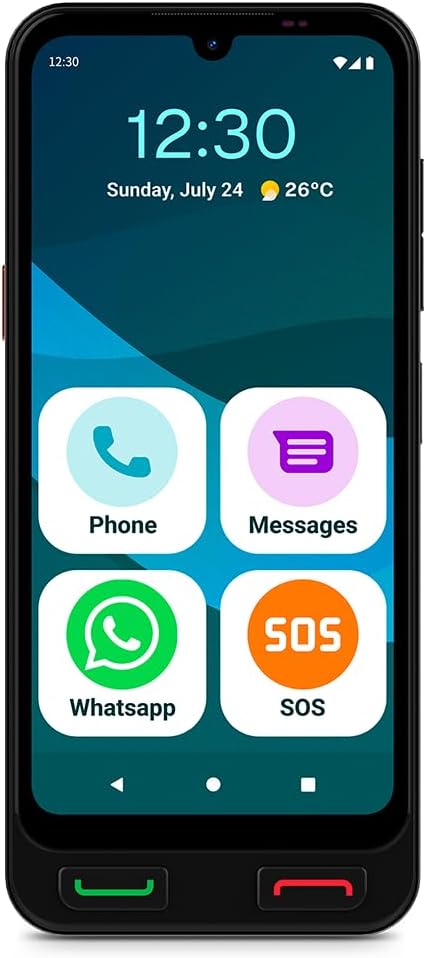
Слика 3.2: Фронт view of the SPC Zeus 2 Pro Smartphone, highlighting the 6.1-inch screen and the "Easy Mode" layout with oversized application icons.
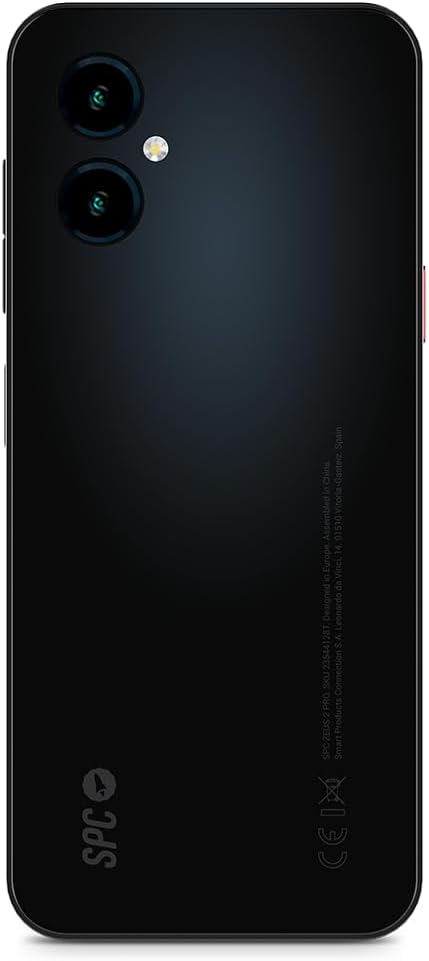
Слика 3.3: Позади view of the SPC Zeus 2 Pro Smartphone, featuring the dual camera system and the brand's logo.
3.1. Физичка дугмад и портови
- Дугме за одговор на позив: Green button below the screen to accept incoming calls.
- Дугме за прекид позива: Red button below the screen to end calls or return to the home screen.
- СОС дугме: Located on the side, for emergency contact activation.
- Дугмад за јачину звука: On the side, to adjust audio levels.
- Дугме за напајање: On the side, to turn the device on/off or lock/unlock the screen.
- УСБ Типе-Ц порт: За пуњење и пренос података.
4. Подешавање
4.1. Почетно укључивање и конфигурација
- Притисните и држите Дугме за напајање док се екран не осветли.
- Follow the on-screen start-up assistant. This guide will walk you through initial settings.
- During setup, you can choose between Андроид режим (standard smartphone interface) or Еаси Моде (simplified interface with large icons).
- Adjust icon size and distribution as prompted.
4.2. SIM Card / eSIM Installation
Your SPC Zeus 2 Pro supports Dual SIM functionality and eSIM.
- Пронађите лежиште за СИМ картицу са стране уређаја.
- Insert the provided SIM tray ejector tool into the small hole next to the tray and gently push until the tray pops out.
- Place your Nano-SIM card(s) into the designated slots on the tray.
- Пажљиво вратите лежиште у телефон.
- For eSIM activation, follow the instructions provided by your mobile network operator.
4.3. Пуњење уређаја
The smartphone comes with a convenient charging base.
- Connect the USB Type-C cable to the charging base and the wall adapter.
- Укључите зидни адаптер у утичницу.
- Place the SPC Zeus 2 Pro Smartphone into the charging base. Ensure it is seated correctly and the charging indicator appears on the screen.
- Alternatively, you can connect the USB Type-C cable directly to the phone's charging port.

Слика 4.1: The SPC Zeus 2 Pro Smartphone positioned in its charging base, illustrating the ease of charging without direct cable connection to the phone.
5. Упутство за употребу
5.1. Упућивање и примање позива
- Да бисте упутили позив: In Easy Mode, tap the "Phone" icon or a contact photo. Select the desired contact or dial the number. Press the green physical button to initiate the call.
- Да бисте примили позив: When a call comes in, press the green physical button to answer.
- Да бисте прекинули позив: Press the red physical button to terminate the call.
5.2. Messaging (SMS and WhatsApp)
- СМС: Tap the "Messages" icon to send and receive text messages.
- ВхатсАпп: Tap the "WhatsApp" icon to access the application for instant messaging and calls.
5.3. Using the SOS Button
The dedicated SOS button is designed for emergencies.
- In an emergency, press and hold the СОС дугме са стране телефона.
- The phone will automatically initiate a cycle of calls and SMS messages to pre-configured emergency contacts.
- This cycle will repeat up to three times if no response is received from the emergency contacts.
5.4. SPC Care Application
The SPC Care app allows family members to remotely assist with phone settings and monitor the user's safety.
- Даљинска подешавања: Family members can rearrange icons, adjust volume, or increase font size from their own smartphone (Android or iOS) via the SPC Care app.
- Локација у реалном времену: The app provides real-time location tracking, allowing authorized family members to know the user's whereabouts.
- Security Notifications: The SPC Care app can send notifications if the phone has been unused for several hours or if the battery level is low, indicating potential issues.
5.5. Употреба камере
The SPC Zeus 2 Pro features a 50 MP rear camera and a 5 MP front camera.
- Tap the Camera icon on the home screen or app drawer to open the camera application.
- Select between the front or rear camera.
- Tap the shutter button to capture photos or record videos.
5.6. Сигурносне карактеристике
The device supports fingerprint and facial recognition for secure unlocking.
- Дођите до Подешавања > Безбедност to set up fingerprint or face unlock.
- Follow the on-screen instructions to register your fingerprint or facial data.
5.7. NFC Payments
The SPC Zeus 2 Pro supports NFC for contactless payments.
- Ensure NFC is enabled in Подешавања > Повезани уређаји > Подешавања везе > NFC.
- Set up your preferred payment application (e.g., Google Pay) and add your payment cards.
- Да бисте извршили плаћање, држите задњу страну телефона близу компатибилног терминала за плаћање.
6. Одржавање
6.1. Брига о батерији
- Избегавајте екстремне температуре, које могу смањити век трајања батерије.
- Charge the device regularly, preferably using the provided charging base or cable.
- Не остављајте батерију потпуно испражњену дуже време.
6.2. Чишћење
- Користите меку крпу која не оставља влакна да бисте очистили екран и кућиште телефона.
- Избегавајте употребу јаких хемикалија или абразивних материјала.
- Држите портове без прашине и остатака.
КСНУМКС. Решавање проблема
| Проблем | Могући узрок | Решење |
|---|---|---|
| Телефон се не укључује | Батерија је празна или празна | Charge the phone using the provided charger and cable/base for at least 30 minutes. |
| Не могу да упућујем или примам позиве | No network signal, SIM card issue, or airplane mode is on. | Check network signal strength. Ensure SIM card is correctly inserted. Turn off airplane mode in settings. Contact your service provider. |
| Екран не реагује | Софтверски квар или привремено замрзавање. | Restart the phone by holding the power button. If unresponsive, force restart (refer to device specific instructions if available, usually holding power and volume down). |
| SPC Care app notifications not received | App permissions, internet connection, or settings issue. | Ensure the phone has an active internet connection. Check app permissions for notifications. Verify settings within the SPC Care app on both devices. |
8. Спецификације
| Феатуре | Детаљ |
|---|---|
| Назив модела | ZEUS 2 PRO |
| Број модела | 23544128Т |
| Бранд | СПЦ |
| Оперативни систем | Андроид 15 |
| Величина екрана | 6.1 инча |
| Резолуција | 720 к 1560 |
| Рефресх Рате | 60 Хз |
| РАМ | 4 ГБ |
| Интерна меморија | 128 GB (прошириво) |
| Брзина процесора | 2.3 GHz (Octa-core) |
| Задња камера | 50 мегапиксела |
| Предња камера | 5 мегапиксела |
| Састав батерије | Литијум-јонски |
| Повезивање | Bluetooth, USB Type C, NFC |
| Посебне карактеристике | Dual SIM, Mobile Hotspot, Integrated GPS, Expandable Memory, Fast Charging Support, Fingerprint Unlock, Face Unlock, SOS Button, Charging Base. |
9. Гаранција и подршка
Your SPC Zeus 2 Pro Smartphone is covered by a standard manufacturer's warranty. Please refer to the warranty card included in your package for specific terms and conditions.
For technical support, troubleshooting assistance, or further inquiries, please visit the official SPC webсајт или контактирајте њихову службу за кориснике. Контакт информације се обично могу наћи на паковању производа или на произвођачевој webсајту.


