
FLEXISPOT V9-Max-AR
FLEXISPOT V9-Max-AR Exercise Bike with 2D Desktop User Manual
Model: V9-Max-AR (Exercise Bike with Desk)
1. Увод
This manual provides essential information for the safe and effective use of your FLEXISPOT V9-Max-AR Exercise Bike with 2D Desktop. Please read all instructions carefully before assembly and operation. Retain this manual for future reference.
Важне информације о безбедности
- Пре сваке употребе уверите се да су сви делови безбедно причвршћени.
- Не прекорачујте максималну препоручену тежину од 300 фунти.
- Држите децу и кућне љубимце даље од бицикла за вежбање током рада.
- Консултујте се са лекаром пре него што започнете било који нови програм вежбања.
- Use the product on a stable, level surface.
2. Производ је готовview и компоненте
The FLEXISPOT V9-Max-AR is a versatile exercise bike designed for indoor use, featuring an integrated 2D adjustable desktop. It combines a stationary bike with a functional workspace, allowing for simultaneous exercise and productivity.

Figure 2.1: User operating the FLEXISPOT V9-Max-AR Exercise Bike with the desktop in use.
Key features include an 8-level quiet magnetic resistance system, an LCD display for tracking workout metrics, and a robust design supporting up to 300 lbs. The adjustable seat and desktop accommodate various user heights and preferences.
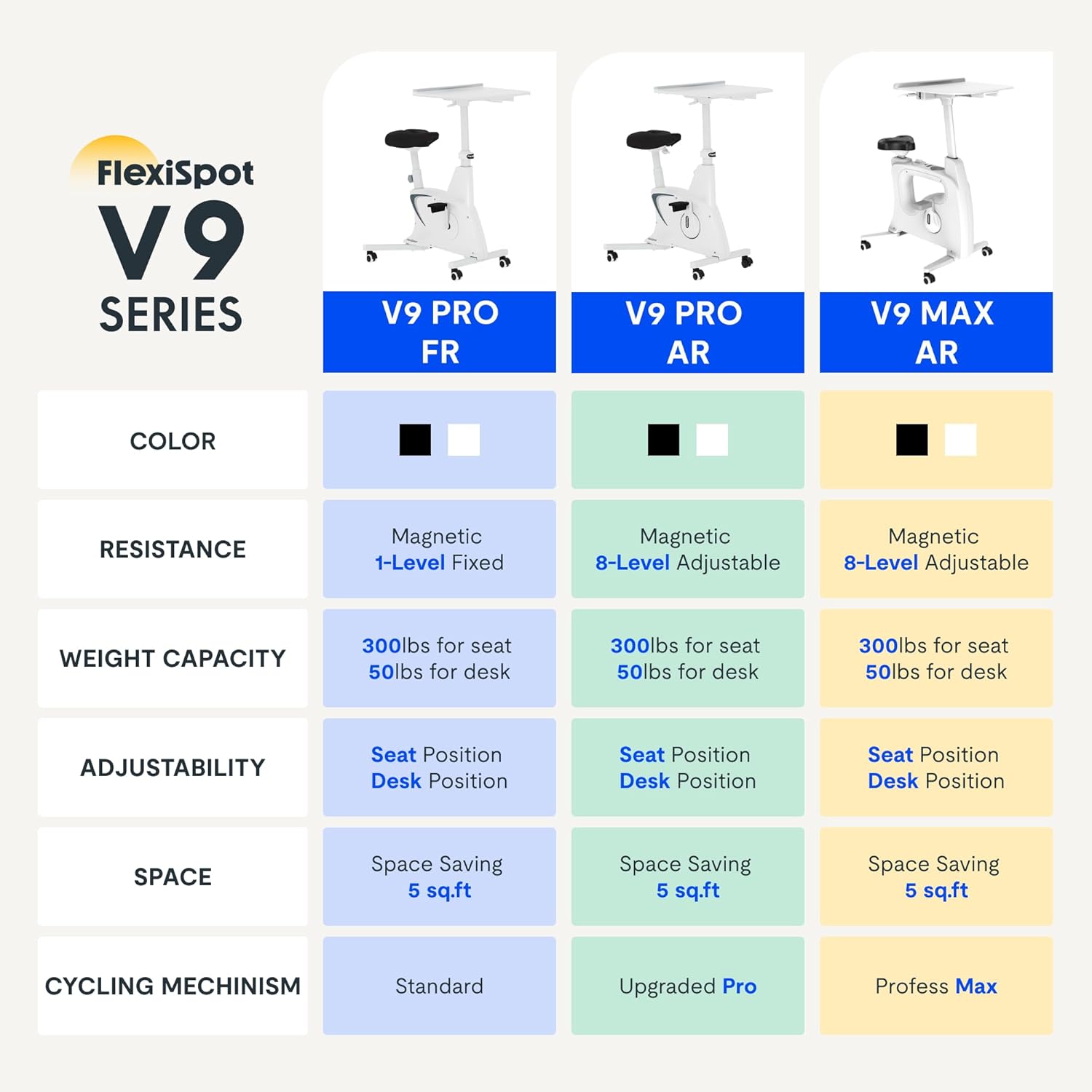
Figure 2.2: Comparison of FlexiSpot V9 series models, highlighting features like resistance and adjustability.
Главне компоненте:
- Main Frame with Flywheel and Resistance Mechanism
- Подесиво седиште
- Adjustable Desktop
- Педале
- LCD Display Console
- Транспорт Вхеелс
3. Подешавање и монтажа
The FLEXISPOT V9-Max-AR is designed for quick and straightforward assembly, typically requiring about 10 minutes.
Кораци склапања:
- Распакујте све компоненте и проверите их у односу на листу паковања.
- Attach the front and rear stabilizers to the main frame using the provided screws.
- Install the pedals, ensuring the left pedal is tightened counter-clockwise and the right pedal clockwise.
- Mount the seat post and seat onto the main frame, securing them firmly.
- Attach the desktop support column to the main frame.
- Secure the desktop to its support column.
- Insert batteries into the LCD display (batteries not included) and connect the sensor wire.
- Ensure all screws and connections are tightened before first use.

Figure 3.1: Illustration of adjustable components for personalized setup.
4. Упутство за употребу
Adjusting Seat and Desktop:
- Висина седишта: Use the quick-release lever located on the seat post to adjust the seat to a comfortable height. Ensure your leg has a slight bend at the knee when the pedal is at its lowest point.
- Desktop Height: The desktop can be adjusted vertically. Locate the adjustment lever beneath the desktop and raise or lower the desktop to your desired working height.
- Desktop Depth: The desktop can also be adjusted horizontally (forward/backward) to optimize your working posture.
Нивои отпора:
The V9-Max-AR features 8 levels of quiet magnetic resistance. Rotate the resistance knob, located below the desktop, clockwise to increase resistance and counter-clockwise to decrease it.

Figure 4.1: LCD display and resistance control knob.
Коришћење ЛЦД дисплеја:
The built-in LCD display monitors your workout statistics. It tracks:
- Време
- Брзина
- Удаљеност
- Сагореле калорије
- Total Distance Covered (Odometer)
- Брзина ротације
Press the button on the display to cycle through different metrics or hold it to reset values (refer to display specific instructions for exact operation).
Using the 2D Desktop:
The spacious desktop (20" x 22.8") is designed to hold a laptop, notebook, mobile phone, or water cup. It provides a stable surface for working or entertainment while exercising.

Figure 4.2: Desktop in use for studying or working.
Преносивост:
Equipped with movable silent wheels, the exercise bike can be easily relocated within your home or office. Simply tilt the bike and roll it to your desired position.
5. Одржавање
Regular maintenance ensures the longevity and optimal performance of your FLEXISPOT V9-Max-AR Exercise Bike.
- Чишћење: Редовно бришите бицикл средством за осветљењеamp крпу и благи детерџент. Избегавајте абразивна средства за чишћење или раствараче.
- инспекција: Periodically check all bolts, nuts, and moving parts for tightness. Tighten any loose components immediately.
- подмазивање: За систем магнетног отпора није потребно посебно подмазивање.
- Складиштење: Чувајте бицикл на сувом и хладном месту, даље од директне сунчеве светлости и екстремних температура.
КСНУМКС. Решавање проблема
Овај одељак се бави уобичајеним проблемима са којима се можете сусрести приликом коришћења бицикла за вежбање.
| Проблем | Могући узрок | Решење |
|---|---|---|
| ЛЦД екран не ради | Батерије су истрошене или неправилно постављене. | Replace batteries (AAA, not included) or ensure correct polarity. |
| Unstable or wobbly bike | Лабави вијци или неравна површина. | Check and tighten all assembly bolts. Ensure the bike is on a flat, stable surface. |
| Отпор се не мења | Питање механизма отпора. | Ensure the resistance knob is properly engaged. If the issue persists, contact customer support. |
| Шкрипање или необични звуци | Loose components or friction. | Inspect all connections and tighten any loose parts. Ensure no foreign objects are interfering with moving parts. |
7. Спецификације
Detailed specifications for the FLEXISPOT V9-Max-AR Exercise Bike:
- Модел: V9-Max-AR (Exercise Bike with Desk)
- Бренд: ФЛЕКСИСПОТ
- Боја: Црно
- Механизам отпора: Магнетиц
- Број нивоа отпора: 8
- Препорука за максималну тежину: 300 фунти
- Димензије производа (Д x Ш x В): 37.6 cm x 23.2 cm x 47.2 cm
- Desktop Dimensions: Приближно 20 cm x 22.8 cm
- Minimum Height (Seat): 29.6 инча
- Maximum Height (Overall): 47.2 Inches (desktop height can go up to 47.2")
- Извор напајања: Погон на педале (неелектрични)
- Систем погона: Појас
- Посебна карактеристика: Adjustable Seat, Adjustable Desktop
- Препоручена употреба: Индоор
- Space Occupied: Приближно 5 квадратних стопа

Слика 7.1: Димензије производа.
8. Гаранција и подршка
FLEXISPOT is committed to providing quality products and customer satisfaction.
- враћа: Овај производ испуњава услове за лак повраћај у року од 30 дана. За детаље погледајте политику повраћаја на вашој платформи за куповину.
- гаранција: For specific warranty terms and conditions, please refer to the official FLEXISPOT webсајт или директно контактирајте њихову корисничку подршку.
- Корисничка подршка: For any questions, assistance, or troubleshooting not covered in this manual, please contact FLEXISPOT customer support. Contact information can typically be found on the manufacturer's webсајт или вашу документацију о куповини.
9. Додатне информације
While no specific official product videos were provided in the product data, users may find helpful assembly or usage guides on the manufacturer's official website or their authorized channels. Always ensure the source is official for accurate information.