Увод
Хвала вам на куповиниasing the Matbip Multi-Platform Wireless Gaming Controller. This controller is designed to enhance your gaming experience across various platforms, including Nintendo Switch, Android, iOS, and PC. It features advanced functions such as TURBO burst, macro programming, customizable RGB lighting, and HD vibration, providing precise control and immersive feedback. Please read this manual carefully before use to ensure proper operation and to fully utilize all features.
Производ је завршенview
Familiarize yourself with the various components and buttons of your Matbip controller.
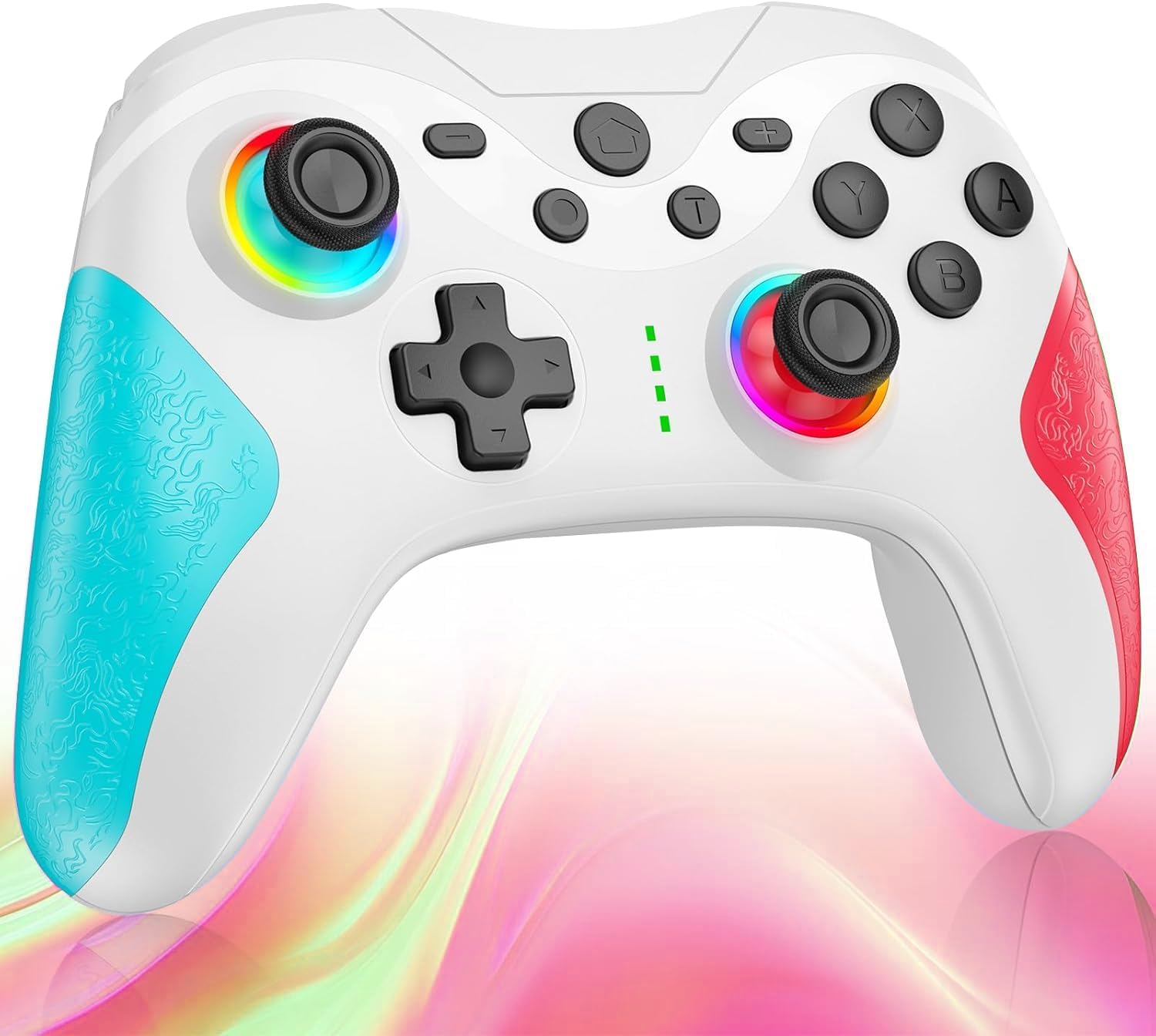
слика: Фронт view of the Matbip Multi-Platform Wireless Gaming Controller. It features a white body with blue textured grips on the left and red textured grips on the right. The joysticks are illuminated with a rainbow RGB light. Standard buttons (A, B, X, Y), a D-pad, and central function buttons (Home, Plus, Minus, T) are visible.
Кључне компоненте:
- Леви/десни џојстик: For directional control, with customizable RGB lighting.
- Д-Пад: За прецизан усмерни унос.
- Дугмад за акције (A/B/X/Y): Standard gaming input buttons.
- Shoulder Buttons (L/R/ZL/ZR): Top-mounted trigger and bumper buttons.
- Back Buttons: Additional programmable buttons on the rear for strategic gameplay.
- Хоме дугме: Враћа се на почетни екран система.
- Дугмад Плус (+) / Минус (-): System-specific function buttons.
- T Button (TURBO): Activates and manages the TURBO burst function.
- Порт за пуњење: УСБ-Ц порт за пуњење.
- Индикаторска светла: Приказ статуса везе и нивоа батерије.
Сетуп
1. Пуњење контролера
Before first use, fully charge the controller. Connect the provided USB-C cable to the controller's charging port and the other end to a USB power source (e.g., console, PC, or USB wall adapter). The indicator lights will show charging status and turn off when fully charged.
2. Упаривање са уређајима
The controller supports Bluetooth wireless connection across multiple platforms.
За Нинтендо Свитцх:
- On the Switch HOME Menu, select Контролори > Промените Грип/Ред.
- Притисните и држите Дугме за почетак on the Matbip controller for 3-5 seconds until the indicator lights flash rapidly.
- Once paired, the indicator light(s) on the controller will remain solid.
За Андроид/иОС уређаје:
- Омогућите Блуетоотх на свом Андроид или иОС уређају.
- Притисните и држите Дугме за почетак on the Matbip controller for 3-5 seconds until the indicator lights flash rapidly.
- On your device's Bluetooth settings, select the controller (e.g., "Matbip Controller") from the list of available devices to pair.
За ПЦ (Виндовс):
- Ensure your PC has Bluetooth enabled. Go to Подешавања > Уређаји > Блуетоотх и други уређаји.
- Кликните Додајте Блуетоотх или други уређај > Блуетоотх.
- Притисните и држите Дугме за почетак on the Matbip controller for 3-5 seconds until the indicator lights flash rapidly.
- Select the controller from the list of devices to pair.
Упутство за употребу
Функција ТУРБО рафала:
The TURBO function allows for rapid, automatic button presses, ideal for combat games.
- Да бисте активирали ТУРБО: Притисните и држите Т дугме, then press the desired action button (e.g., A, B, X, Y, L, R, ZL, ZR). The button will now continuously activate when held down.
- Да бисте подесили ТУРБО брзину: Док држите Т дугме, померите right joystick up or down to cycle through 3 different burst speeds.
- Да бисте деактивирали ТУРБО: Притисните и држите Т дугме, then press the same action button again.
Макро функција:
Program a sequence of button presses to a single back button for complex actions.
- Specific instructions for macro programming will be detailed in the full manual. Generally, this involves entering a programming mode, pressing the sequence, and assigning it to a back button.
Прилагодљиво РГБ осветљење:
The joysticks feature 9-color RGB lighting to enhance your gaming atmosphere.
- To change RGB color/mode: Press a specific button combination (e.g., T + Left Joystick click) to cycle through different colors and lighting effects.
HD Vibration Adjustment:
Adjust the intensity of the HD vibration feedback to your preference (4 levels).
- Да бисте подесили вибрацију: Press a specific button combination (e.g., T + D-Pad Up/Down) to cycle through the 4 vibration levels.
Жиро сензор:
The high-precision gyro sensor enables intuitive motion control in supported games.
- The gyro sensor is automatically active when connected to a compatible device (e.g., Nintendo Switch) and used in games that support motion controls.
Sleep Wake-up Function:
The controller supports waking up your Nintendo Switch console from sleep mode.
- When the Switch is in sleep mode, simply press the Дугме за почетак on the controller to wake it up and reconnect.
Одржавање
Правилно одржавање осигурава дуготрајност и оптималне перформансе вашег контролера.
- Чишћење: Користите меку, суву крпу за брисање контролера. За тврдокорну прљавштину, благо дampНапрхајте крпу водом. Не користите јаке хемикалије или абразивна средства за чишћење.
- Складиштење: Чувајте контролер на хладном и сувом месту, даље од директне сунчеве светлости, екстремних температура и влаге.
- Одржавање батерије: Avoid fully discharging the battery frequently. If storing for a long period, charge the controller to about 50% every few months.
- Избегавајте капи: Заштитите контролер од падова и удараца, који могу оштетити унутрашње компоненте.
Решавање проблема
If you encounter issues with your controller, please refer to the following common solutions:
| Проблем | Могуће решење |
|---|---|
| Контролер се не укључује. | Уверите се да је контролер напуњен. Повежите га са извором напајања помоћу USB-C кабла. |
| Controller does not pair. | Ensure Bluetooth is enabled on your device. Make sure the controller is in pairing mode (flashing lights). Try restarting both the controller and the device. |
| Кашњење или прекид везе на улазу. | Ensure there are no strong wireless interferences nearby. Move closer to the device. Re-pair the controller. |
| Дугмад или џојстици не реагују. | Try resetting the controller (refer to the full manual for reset instructions, usually a small pinhole button). Ensure no debris is obstructing the buttons. |
| Вибрација не ради. | Check if vibration is enabled in the game or system settings. Adjust the vibration intensity on the controller. |
Спецификације
| Феатуре | Детаљ |
|---|---|
| Димензије производа | 10 к 15 к 6.5 цм |
| Тежина | 300 г |
| Повезивање | Блуетоотх бежични |
| Компатибилност | Nintendo Switch, Android, iOS, PC (Windows) |
| Посебне карактеристике | TURBO Burst, Macro Function, 9-Color RGB Lighting, 4-Level HD Vibration, Gyro Sensor, Back Buttons, Sleep Wake-up |
| ASIN | B0FHWRK7CQ |
| Датум изласка | 16. јул 2025 |
Гаранција и подршка
Matbip is committed to providing high-quality products and customer satisfaction. This product comes with a standard manufacturer's warranty. For detailed warranty information, please refer to the documentation included with your purchase or contact Matbip customer support.
If you require further assistance, have questions, or encounter issues not covered in this manual, please contact our customer support team. A Japanese instruction manual is included with the product to ensure ease of use for first-time users.
Контакт информације: Please refer to the packaging or the official Matbip webсајт за најновије контакт информације за корисничку подршку.


