1. Увод
This manual provides essential information for the safe and efficient use of your XIAOMI Redmi 15C smartphone. Please read this guide thoroughly before operating your device to ensure proper functionality and to prevent damage.
The Redmi 15C is designed to offer a reliable mobile experience with its large display, powerful battery, and capable camera system.
2. Безбедносне информације
- Безбедност батерије: Do not attempt to replace the battery yourself. Use only authorized service centers. Avoid exposing the device to extreme temperatures or direct sunlight.
- Пуњење: Use only the original USB cable provided. A power adapter is not included; use a compatible 33W fast charger from a reputable manufacturer.
- Отпорност на воду и прашину: The device features IP64 dust and water resistance. This rating indicates protection against dust ingress and splashing water from any direction. It is not designed for submersion in water.
- одлагање: Dispose of the device and its battery responsibly according to local regulations. Do not dispose of in household waste.
- Безбедност вожње: Always prioritize driving safety. Do not use your phone while driving unless absolutely necessary and in compliance with local laws.
3. Садржај пакета
Проверите да ли ваш пакет садржи следеће ставке:
- Сјаоми Редми 15Ц паметни телефон
- УСБ кабл (тип-Ц)
- Алат за избацивање СИМ картице
- Водич за брзи почетак
- Гарантни лист
Note: A power adapter is not included in the box and must be purchased separately. For optimal charging, use a 33W fast charger.
4. Девице Оверview
Упознајте се са физичким компонентама вашег Redmi 15C.
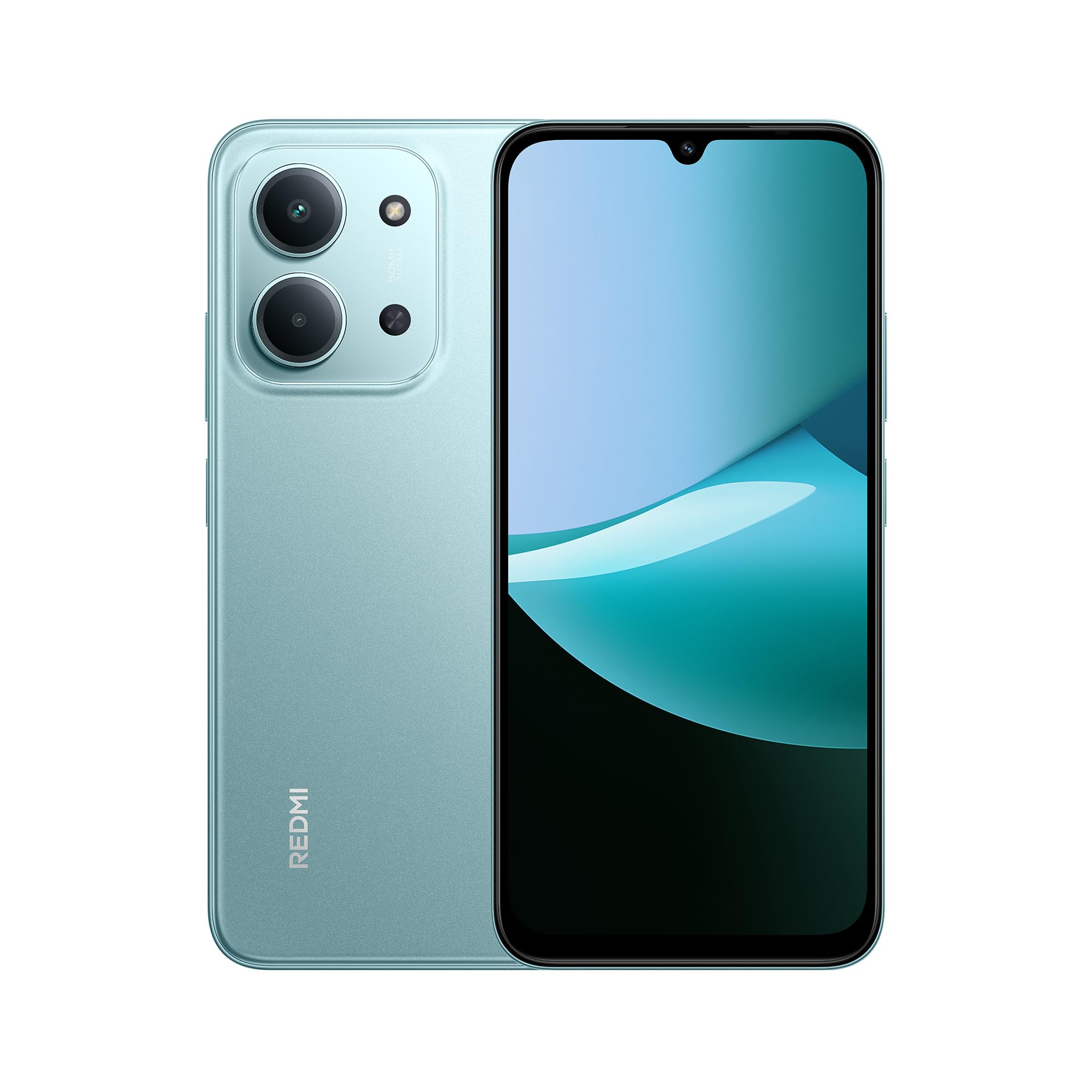
Предње и задње view of the XIAOMI Redmi 15C smartphone in Mint Green.

The slim 7.99mm body of the Redmi 15C, designed for comfortable handling.
Физичке компоненте:
- Дугме за напајање: Налази се са стране, користи се за укључивање/искључивање уређаја или буђење/успавање екрана.
- Дугмад за јачину звука: Налази се близу дугмета за напајање, користи се за подешавање јачине звука медија и позива.
- УСБ Типе-Ц порт: Налази се на дну, користи се за пуњење и пренос података.
- Лежиште за СИМ/СД картицу: Налази се са стране, за уметање СИМ картица и мицроСД картице.
- Предња камера: Налази се на врху дисплеја.
- Систем задње камере: Located on the back, featuring a 50MP AI dual camera.
- говорник: За аудио излаз.
- микрофон: For voice input during calls and recordings.
5. Почетак рада (Подешавање)
5.1. Уметање SIM/SD картице
- Пронађите лежиште за СИМ картицу са стране уређаја.
- Уметните алатку за избацивање СИМ картице у мали отвор поред лежишта и чврсто притисните док лежиште не искочи.
- Place your Nano-SIM card(s) and/or microSD card into the designated slots on the tray. Ensure the gold contacts face downwards. The device supports Dual SIM functionality.
- Пажљиво поново уметните лежиште у уређај.
5.2. Укључивање/искључивање
- За укључивање: Притисните и држите дугме за напајање док се не појави XIAOMI лого.
- За искључивање: Притисните и држите дугме за напајање док се не појави мени за напајање, а затим изаберите „Искључи“.
- Рестартовати: Притисните и држите дугме за напајање док се не појави мени за напајање, а затим изаберите „Рестарт“.
5.3. Чаробњак за почетно подешавање
Upon first power-on, the device will guide you through the initial setup process. Follow the on-screen instructions to:
- Изаберите свој језик и регион.
- Повежите се на Ви-Фи мрежу.
- Прихватите услове и одредбе.
- Sign in to your Google account or create a new one.
- Подесите закључавање екрана (ПИН, шаблон, лозинка, отисак прста, откључавање лицем).
- Вратите податке са претходног уређаја (опционо).
6. Основна операција
6.1. Навигација
The Redmi 15C features a responsive touchscreen. Use gestures such as tapping, swiping, pinching, and spreading to navigate the interface.
6.2. Обављање позива и слање порука
- Позиви: Отворите апликацију „Телефон“, унесите број и додирните икону за позив.
- Поруке: Отворите апликацију „Поруке“, додирните икону нове поруке, унесите примаоца и своју поруку.
6.3. Повезивање са Wi-Fi и Bluetooth мрежом
- Иди на Подешавања > Ви-Фи or Подешавања > Блуетоотх.
- Toggle the respective switch to turn it on.
- Select the desired network or device from the list and enter the password if prompted.
6.4. Коришћење камере
The Redmi 15C is equipped with a 50MP AI dual camera system for capturing photos and videos.

Detail of the 50MP AI dual camera system on the Redmi 15C, designed to capture clear and vibrant images.
- Отворите апликацију „Камера“.
- Изаберите жељени режим (Фотографија, Портрет, Видео, итд.).
- Додирните дугме затварача да бисте снимили фотографију или започели/зауставили снимање видеа.
6.5. Управљање батеријом
The device features a massive 6000mAh battery for extended usage.

Illustration of the 6000mAh battery inside the Redmi 15C, providing up to 82 hours of music playback.
Да бисте напунили свој уређај:

The Redmi 15C supports 33W fast charging, allowing the battery to reach 50% in approximately 31 minutes.
- Connect the USB Type-C cable to the device and a compatible 33W fast charger.
- Avoid overcharging; disconnect the charger once the battery is full.
- To optimize battery life, adjust screen brightness, disable unnecessary features, and close background apps.
7. Напредне функције
7.1. Processor Performance
The Redmi 15C is powered by a MediaTek Helio G81-Ultra octa-core processor, ensuring smooth performance for daily tasks and applications.

Visual representation of the powerful MediaTek Helio G81-Ultra octa-core processor, designed for consistent smooth performance.
7.2. Immersive Display
Experience content on the immersive 6.9-inch display with a 120Hz AdaptiveSync refresh rate, providing a smoother visual experience.

The 6.9-inch display of the Redmi 15C, featuring up to 120Hz AdaptiveSync for a fluid user interface.
7.3. AI Features with Google Gemini
The Redmi 15C integrates with Google Gemini, an AI assistant designed to help with various tasks such as writing, brainstorming, and learning.

The Redmi 15C demonstrating interaction with Google Gemini, an AI assistant for various tasks. Setup is required for this feature.
8. Одржавање
8.1. Чишћење уређаја
- Користите меку крпу која не оставља длачице да очистите екран и тело уређаја.
- Избегавајте употребу јаких хемикалија или абразивних материјала.
- Не прскајте средства за чишћење директно на уређај.
8.2. Ажурирања софтвера
Редовно проверавајте и инсталирајте ажурирања софтвера како бисте били сигурни да ваш уређај има најновије функције, безбедносне закрпе и побољшања перформанси.
- Иди на Подешавања > О телефону > Верзија MIUI-ја (or similar for Hyper OS).
- Додирните „Провери ажурирања“ и пратите упутства на екрану.
8.3. Управљање складиштем
Да бисте одржали оптималне перформансе, редовно управљајте меморијским простором свог уређаја.
- Обришите непотребно fileс, фотографије и видео снимци.
- Деинсталирајте неискоришћене апликације.
- Помери велико fileна microSD картицу (ако је инсталирана) или у складиште у облаку.
КСНУМКС. Решавање проблема
Ако наиђете на проблеме са уређајем, испробајте следећа решења:
| Иссуе | Решење |
|---|---|
| Уређај се не укључује | Уверите се да је батерија напуњена. Повежите је са пуњачем најмање 10 минута, а затим покушајте да је укључите. |
| Апликације се руше или замрзавају | Restart the device. Clear the cache of the problematic app (Подешавања > Апликације > [Назив апликације] > Меморија > Обриши кеш). |
| Лош мрежни сигнал | Check if your SIM card is properly inserted. Try restarting the device. Ensure you are in an area with network coverage. |
| Батерија се брзо празни | Смањите осветљеност екрана. Затворите апликације у позадини. Онемогућите непотребне функције попут GPS-а или Bluetooth-а када их не користите. |
| Уређај је спор или не реагује | Clear storage space. Restart the device. Check for system updates. |
If problems persist, contact customer support or visit an authorized service center.
10. Спецификације
Detailed technical specifications for the XIAOMI Redmi 15C.
| Феатуре | Спецификација |
|---|---|
| Назив модела | 15Ц |
| Оперативни систем | Hyper OS 2 |
| Процесор | MediaTek Helio G81-Ultra Octa-core |
| РАМ | 4 ГБ |
| Капацитет складиштења | 128 ГБ |
| Величина екрана | 6.9 инча |
| Резолуција екрана | 720 к 1600 |
| Рефресх Рате | 120 Хз |
| Задња камера | Двострука вештачка интелигенција (AI) камера од 50 MP |
| Предња камера | Да |
| Капацитет батерије | 6000 мАх |
| Талк Тиме | До 30 сати |
| Пуњење | 33W Fast Charging Compatible |
| Повезивање | 4G, Wi-Fi, Bluetooth, GPS |
| СИМ подршка | Дуал СИМ |
| Димензије (Д к Ш к В) | 17.3 к 8.1 к 0.82 цм |
| Тежина | 400 г |
| Посебне карактеристике | Wi-Fi Hotspot, Integrated GPS, IP64 Dust and Water Resistance |
11. Гаранција и подршка
Your XIAOMI Redmi 15C smartphone comes with a standard manufacturer's warranty. Please refer to the warranty card included in your package for specific terms and conditions, including warranty period and coverage details.
For technical support, service, or further inquiries, please visit the official XIAOMI support webсајт или контактирајте њихову корисничку службу. Сачувајте доказ о куповини за потребе гаранције.