1. Увод
Thank you for choosing the GEEKOM A5 2026 Mini PC. This compact and powerful desktop computer is designed for a wide range of tasks, from office productivity and multimedia consumption to light gaming and creative projects. This manual provides essential information for setting up, operating, maintaining, and troubleshooting your device.
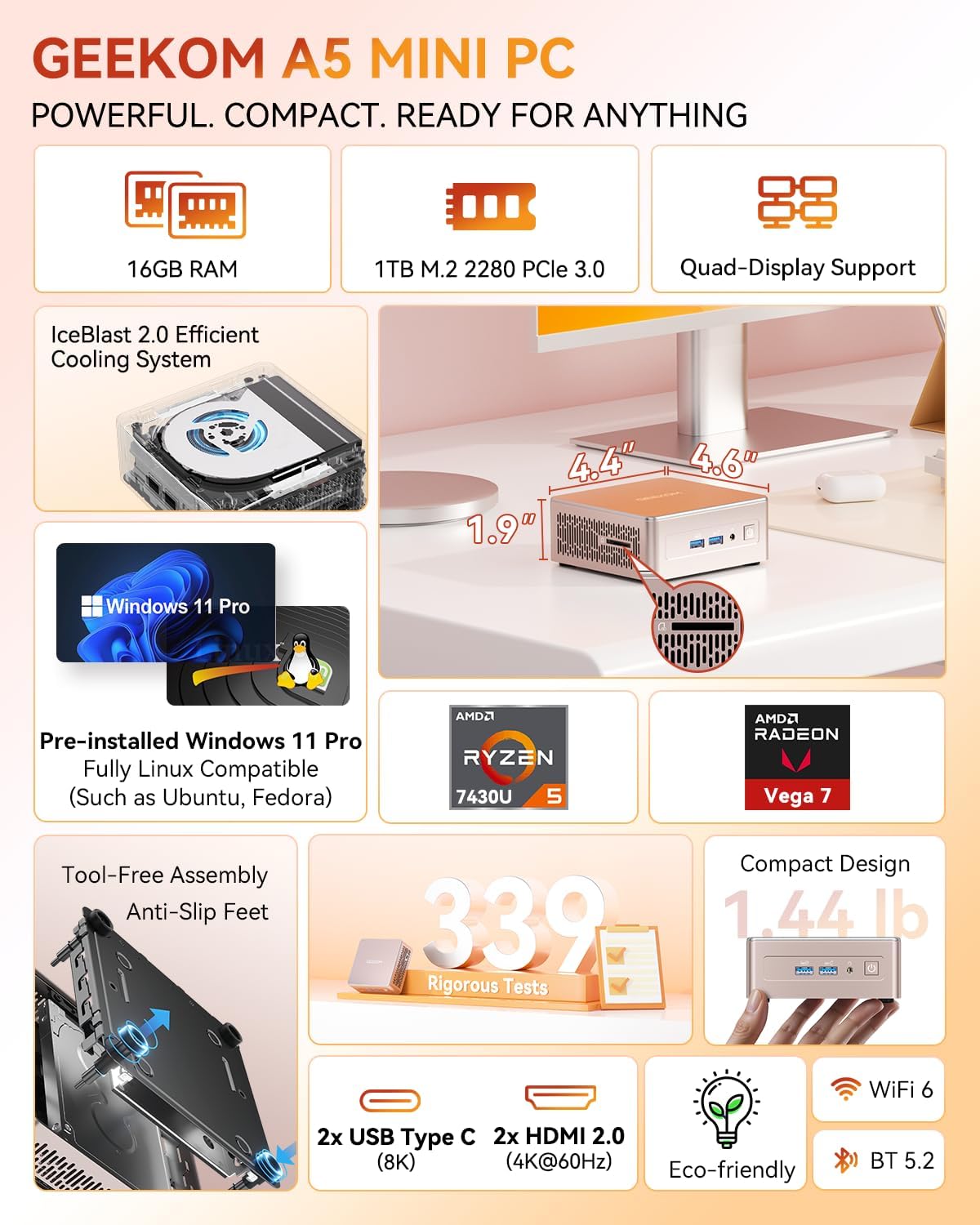
The GEEKOM A5 Mini PC, showcasing its compact size and key specifications like 16GB RAM, 1TB SSD, and Quad-Display support.
2. Подешавање
2.1 Шта је у кутији
- 1 x GEEKOM A5 Mini PC
- 1 к ХДМИ кабл
- 1 x VESA носач
- 1 к адаптер за напајање
- 1 к Упутство за употребу
2.2 Connecting Your Mini PC
Connect your GEEKOM A5 Mini PC to a power source, monitor(s), and peripherals using the available ports. The device supports up to four displays for enhanced productivity.

Детаљно view of the GEEKOM A5 Mini PC's front and rear connectivity ports, including USB, HDMI, and LAN.
Предњи портови:
- 2 x USB 3.2 Gen 2 Type-A ports (one with charging support)
- 1 к 3.5 мм прикључак за слушалице
- Дугме за напајање
Задњи портови:
- 3 x USB 3.2 Gen 2 ports (1 Type-A, 2 Type-C with DisplayPort support)
- 1 к УСБ 2.0 Типе-А порт
- 2 x HDMI 2.0 порта
- 1 x 2.5G RJ45 LAN Port
- DC Jack (Power Input)
Бочни портови:
- 1 к читач СД картица
2.3 Прво покретање
Upon first power-on, follow the on-screen instructions to complete the Windows 11 Pro setup. Ensure you have an internet connection for updates and driver installations.

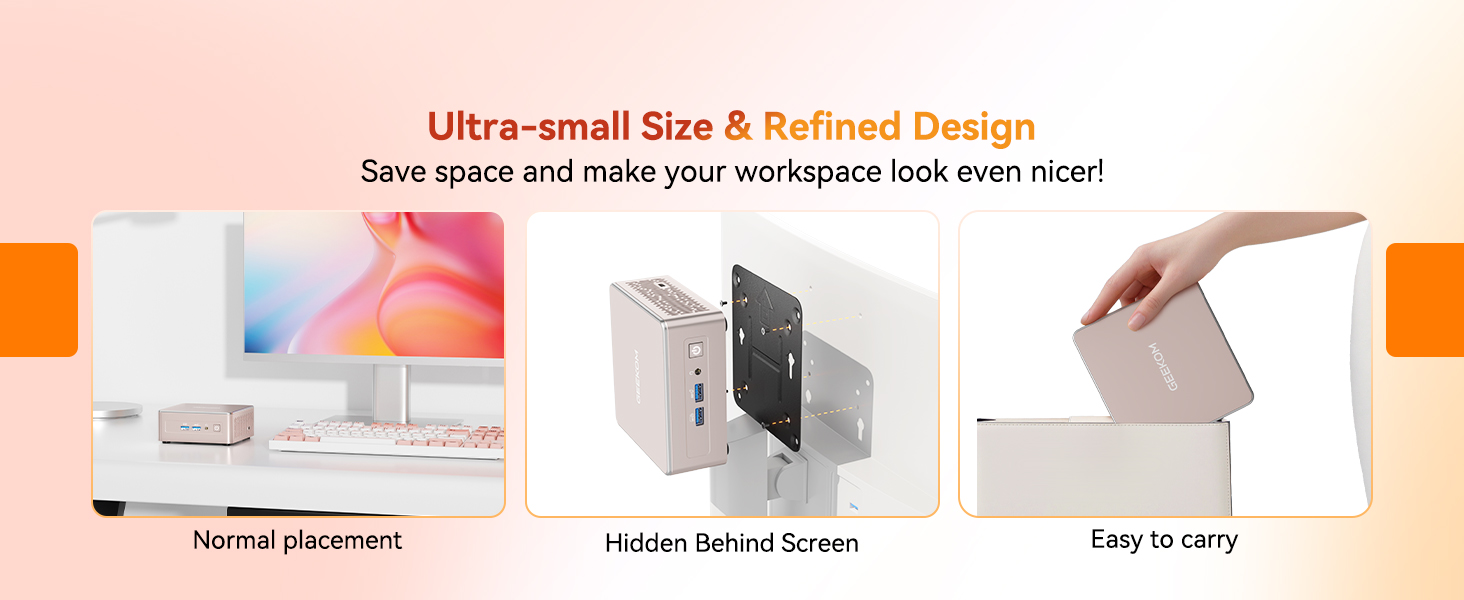
Illustrations demonstrating the compact size of the GEEKOM A5 Mini PC, its ability to be VESA mounted behind a monitor, and its portability.
3. Operating Your GEEKOM A5
3.1 Перформансе прекоview
The GEEKOM A5 is powered by an AMD Ryzen 5 7430U processor with AMD Radeon Vega 7 Graphics, 16GB of DDR4 RAM, and a 1TB NVMe SSD. This configuration provides efficient performance for daily computing tasks, including:
- Office applications and video conferencing
- 4K video streaming
- Light creative projects and photo editing
- Casual gaming (e.g., League of Legends, DOTA 2, Minecraft)
Close-up of the AMD Ryzen 5 7430U processor, the core of the GEEKOM A5 Mini PC.
3.2 Multi-Display Setup
The GEEKOM A5 supports up to four displays simultaneously, with resolutions up to 8K via the USB 3.2 Gen 2 Type-C ports and 4K@60Hz via the HDMI 2.0 ports. This allows for an expansive workspace for multitasking.

The GEEKOM A5 Mini PC supporting a quad-display setup, demonstrating its capability for multitasking across multiple screens.
3.3 Повезивање
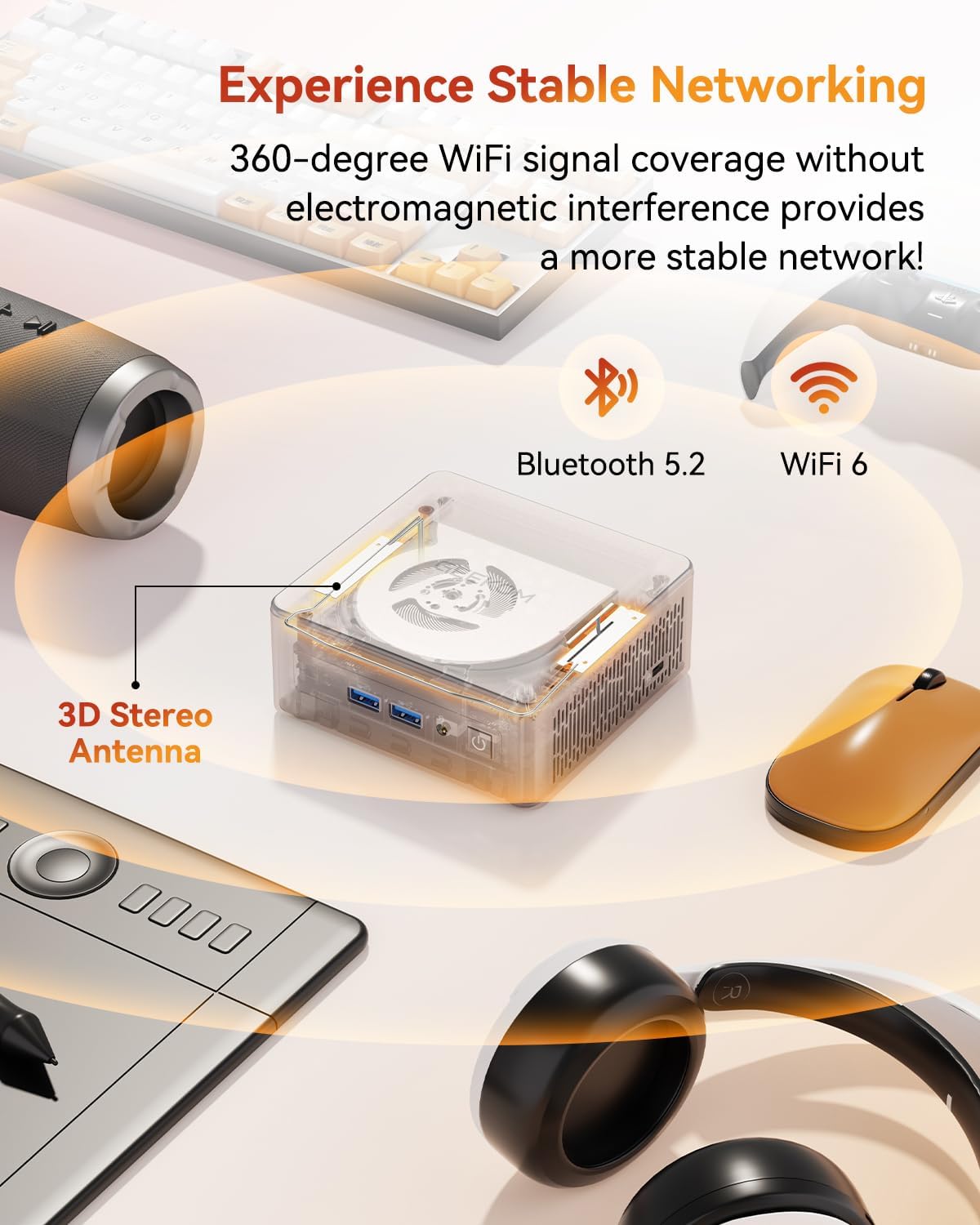
Enjoy fast and stable wireless connections with Wi-Fi 6, offering speeds up to 3 times faster than Wi-Fi 5. Bluetooth 5.2 ensures quick and reliable pairing with your wireless accessories.

The GEEKOM A5 Mini PC featuring stable networking with Bluetooth 5.2 and Wi-Fi 6, supported by a 3D stereo antenna.
КСНУМКС Оперативни систем
The GEEKOM A5 comes with Windows 11 Pro pre-installed, offering a secure and user-friendly experience. It also supports various Linux distributions, providing flexibility for advanced users.

The GEEKOM A5 Mini PC with Windows 11 Pro pre-installed, also indicating support for Linux operating systems like Ubuntu.
4. Одржавање и надоградње
4.1 Проширење складишног простора
The GEEKOM A5 offers flexible storage options:
- 1TB PCIe NVMe SSD (upgradable to 4TB)
- Additional M.2 2242 slot
- 2.5" HDD bay for up to 2TB total storage
Унутрашње view of the GEEKOM A5 Mini PC, highlighting the M.2 2280 PCIe Gen4*4 SSD slot, M.2 2242 SATAIII SSD slot, and 2.5 inch SATA HDD slot for storage expansion.
4.2 Memory Upgradability
The 16GB DDR4 RAM is upgradable to 64GB, providing ample memory for demanding applications and multitasking. The use of standard DDR4 RAM offers greater flexibility and value compared to soldered LPDDR solutions.
This video explains the benefits of the GEEKOM A5's 16GB DDR4 RAM and 1TB NVMe SSD configuration, highlighting its balance for performance and cost-effectiveness.
4.3 Систем хлађења
The GEEKOM A5 features the IceBlast 2.0 Efficient Cooling System, designed with larger fan blades, dual copper tubes, and a full copper heatsink. This advanced cooling solution effectively reduces internal temperatures, maintaining high performance without thermal throttling.

An internal diagram illustrating the IceBlast 2.0 cooling system of the GEEKOM A5, highlighting larger fan blades and dual copper tubes for efficient heat dissipation.
This video showcases the GEEKOM IceBlast Improved Cooling System, detailing its design for efficient heat management and sustained performance.
4.4 Трајност
The A5 mini computer is engineered with a 3x-reinforced ABS+PC shell, a strategically placed metal mid-frame, and a baseplate. This construction ensures optimal strength-to-cooling balance and durability, complemented by vibration-damping feet and a 3D antenna.
Експлодирао view of the GEEKOM A5 Mini PC, showing its reinforced ABS housing, metal inner frame, silent fan, heat sinks, motherboard, and M.2 NVMe PCIe 3.0 SSD.
This video demonstrates GEEKOM's rigorous quality validation process, including various tests to ensure product durability and reliability.
КСНУМКС. Решавање проблема
If you encounter any issues with your GEEKOM A5 Mini PC, please consider the following basic troubleshooting steps:
- Нема напајања: Уверите се да је адаптер за напајање безбедно повезан и са Мини рачунаром и са исправном утичницом.
- Без приказа: Verify that your monitor(s) are correctly connected to the HDMI or USB-C (DisplayPort) outputs and are set to the correct input source. Try different cables or monitors if possible.
- Проблеми са периферним уређајима: Check USB connections for keyboards, mice, and other peripherals. Try connecting them to different USB ports.
- Мрежна повезаност: For Wi-Fi issues, ensure your router is working and the Mini PC is within range. For wired connections, check the Ethernet cable and router status.
- Систем не реагује: Perform a hard reboot by holding down the power button for 5-10 seconds until the device powers off, then restart.
For more complex issues, refer to the official GEEKOM support resources or contact customer service.
6. Спецификације
| Феатуре | Спецификација |
|---|---|
| Процесор | AMD Ryzen 5 7430U (4.3 GHz Max Boost Clock) |
| Графика | АМД Радеон Вега 7 графика |
| РАМ | 16 GB DDR4 (Upgradable to 64 GB) |
| Складиштење | 1 TB NVMe SSD (Upgradable to 4 TB), M.2 2242 slot, 2.5" HDD bay |
| Оперативни систем | Виндовс 11 Про |
| Максимална резолуција екрана | 7680 x 4320 Pixels (8K via Type-C) |
| Бежично повезивање | Wi-Fi 6 (802.11ax), Bluetooth 5.2 |
| УСБ портови | 5 x USB 3.2 Gen 2 (3 Type-A, 2 Type-C), 1 x USB 2.0 Type-A |
| Видео Оутпут | 2 x HDMI 2.0, 2 x USB 3.2 Gen 2 Type-C (DisplayPort) |
| ЛАН | 2.5G RJ45 Ethernet |
| Читач картица | Читач СД картица |
| Тежина артикла | 3.47 фунти |
| Димензије | 4.6 × 4.4 × 1.9 инча |
| Боја | Росе Голд |
7. Гаранција и подршка
GEEKOM offers a 3 година гаранције for the A5 Mini PC, reflecting confidence in its materials and build quality. Your purchase is also secured with a Политика поврата од 30 дана.
7.1 Корисничка подршка
For any questions, concerns, or assistance, please contact the dedicated GEEKOM after-sales team:
- Find the Seller on Amazon: Log in to your Amazon buyer's account, find your order, and click "Get help" for product assistance.
- Подршка путем е-поште: Пошаљите емаил на shirley.li@geekom.tw. The support team will respond promptly.
This video compares the energy consumption of the GEEKOM A5 Mini PC with other systems, illustrating its eco-friendly and low-power features.


