1. Увод
The COMFAST WR773BE WiFi 7 Repeater is a high-performance wireless device designed to extend the coverage and enhance the speed of your existing WiFi network. Utilizing the latest 802.11be (WiFi 7) standard, it offers dual-band connectivity (2.4 GHz and 5 GHz) with speeds up to 3600 Mbps, providing a stable and fast internet experience for multiple connected devices. This manual will guide you through the setup, operation, and maintenance of your repeater.
1.1 Производ завршенview

Фронт view of the COMFAST WR773BE WiFi 7 Repeater, highlighting its compact design and four external antennas. The device features LED indicators for power, network port, and WiFi status.
1.2 Садржај пакета
Пажљиво проверите садржај пакета. Ако било која ставка недостаје или је оштећена, обратите се продавцу.
- COMFAST WR773BE WiFi 7 Repeater Unit
- Упутство за употребу
- Етхернет кабл РЈ45
- Адаптер за напајање (ЕУ утикач)
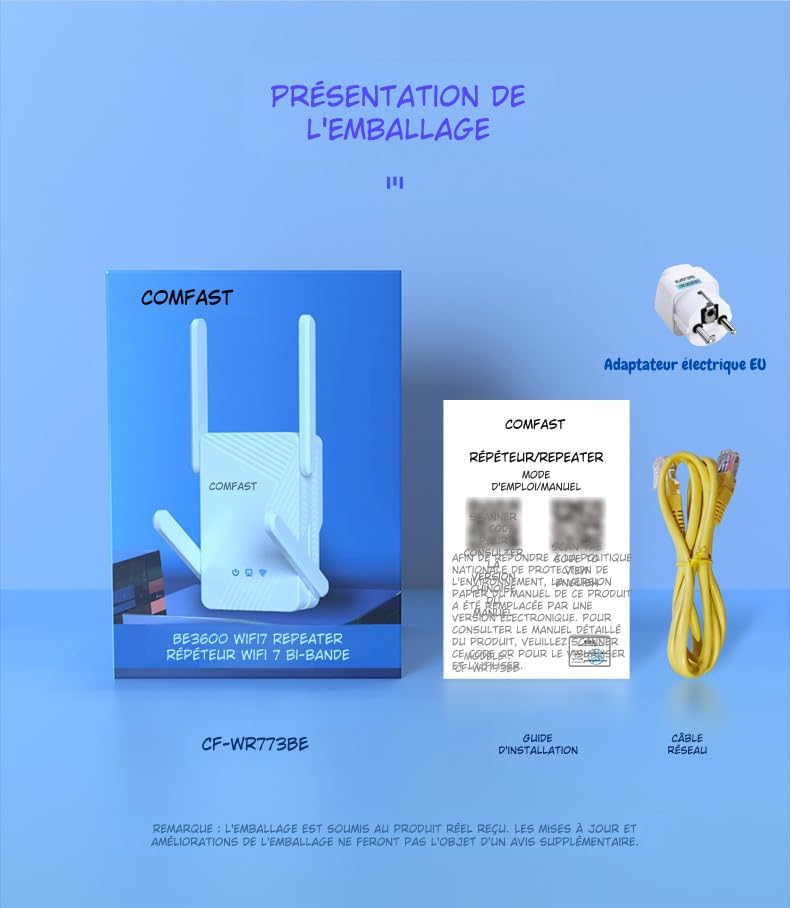
The package includes the COMFAST WR773BE WiFi 7 Repeater unit, a user manual, an RJ45 Ethernet cable, and an EU power adapter. Ensure all components are present upon unboxing.
2. Водич за подешавање
Follow these steps to set up your COMFAST WR773BE WiFi 7 Repeater.
2.1 Основна инсталација
- Укључено: Plug the repeater into an electrical outlet near your main router. Wait for the Power LED to turn solid blue.
- Позиционирање: For optimal performance, place the repeater halfway between your router and the area where you want to improve WiFi coverage. Avoid obstacles like thick walls or large metal objects.
- веза: The repeater can be configured via WPS or a web претраживач.
2.2 Configuration via WPS (Recommended)
WPS (Wi-Fi Protected Setup) is the easiest way to connect your repeater to your router.
- Plug the repeater into a power outlet.
- Притисните WPS дугме на главном рутеру.
- Within two minutes, press the WPS button on the COMFAST WR773BE repeater.
- The WiFi Status LED on the repeater will blink during connection and turn solid blue when successfully connected.
2.3 Конфигурација преко Web Бровсер
If your router does not support WPS, or if you prefer manual setup, use a web претраживач.
- Plug the repeater into a power outlet.
- Connect your computer or smartphone to the repeater's default WiFi network (e.g., "COMFAST_XXXX"). No password is required initially.
- Отвори а web прегледач и унесите подразумевану ИП адресу (обично 192.168.10.1 or репеатер.нет) in the address bar. Refer to the manual for the exact default IP.
- Пријавите се користећи подразумевано корисничко име и лозинку (обично админ/админ).
- Follow the on-screen instructions to select your router's WiFi network and enter its password.
- Configure the repeater's extended network name (SSID) and password.
- Save the settings and wait for the repeater to restart. The WiFi Status LED will turn solid blue upon successful connection.
3. Радни режими
The COMFAST WR773BE supports multiple operating modes to suit various network requirements.
3.1 Режим понављања
In Repeater Mode, the device extends the range of your existing WiFi network, eliminating dead zones. This is the most common mode for home users.
3.2 Режим приступне тачке (АП)
In AP Mode, the device connects to your wired network via an Ethernet cable and broadcasts a new wireless network. This is useful for adding WiFi capability to a wired-only network.
3.3 Режим рутера
In Router Mode, the device acts as a primary router, connecting to your modem and creating a new private network. This mode is suitable for small offices or homes without an existing router.
4. ЛЕД индикатори
The LED indicators provide real-time status of the repeater's operation.
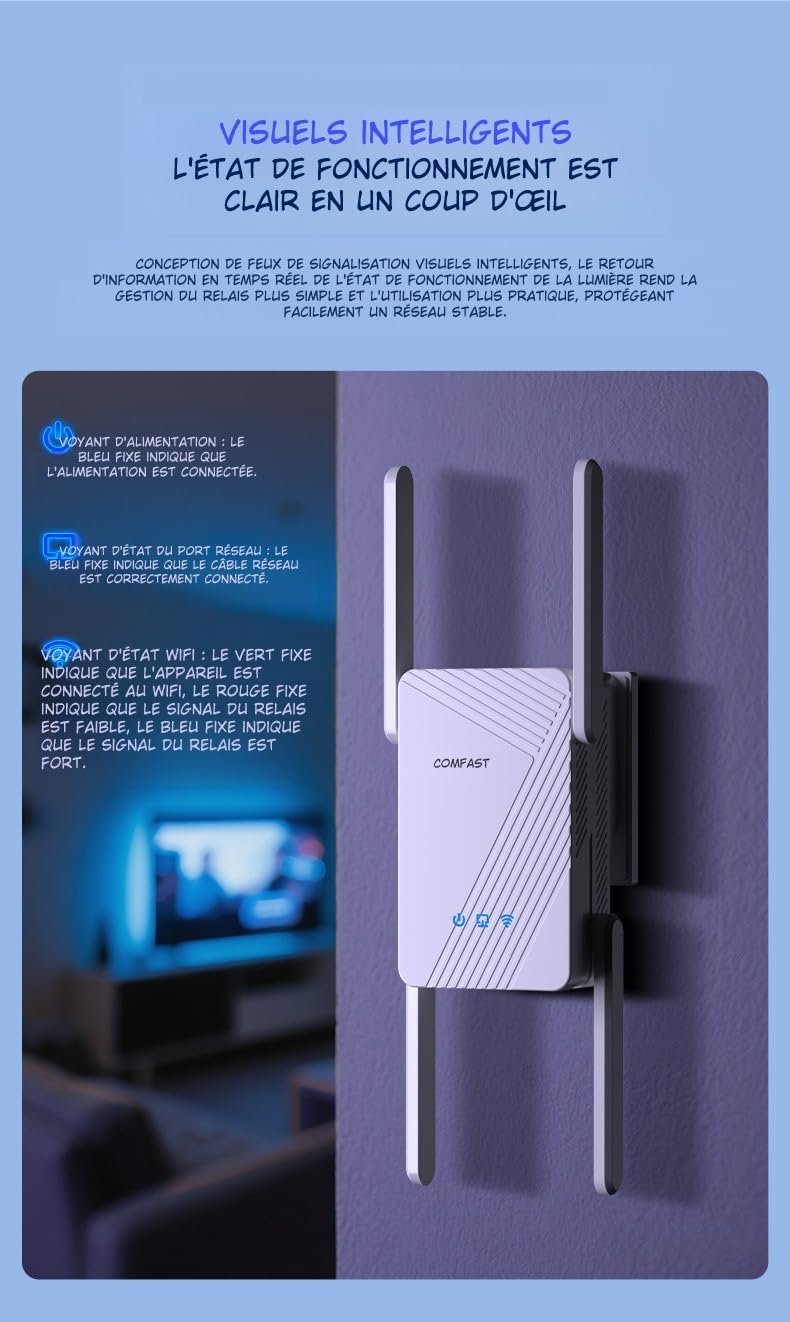
This image illustrates the LED indicators on the repeater. The Power LED (blue) indicates power status, the Network Port LED (blue) shows Ethernet cable connection, and the WiFi Status LED (red for weak, blue for strong) indicates signal strength.
| Индикатор | Статус | Опис |
|---|---|---|
| ЛЕД за напајање | Солид Блуе | The device is powered on and operating correctly. |
| Network Port LED | Солид Блуе | An Ethernet cable is correctly connected to the RJ45 port. |
| WiFi Status LED | Солид Ред | The WiFi signal from the main router is weak. Consider repositioning the repeater closer to the router. |
| WiFi Status LED | Солид Блуе | The WiFi signal from the main router is strong, and the repeater is working optimally. |
5. Одржавање
Proper maintenance ensures the longevity and optimal performance of your repeater.
5.1 Нега и чишћење
- Одржавајте уређај чистим и без прашине. Користите меку, суву крпу за чишћење.
- Не користите течна или аеросолна средства за чишћење, јер могу оштетити уређај.
- Avoid exposing the repeater to extreme temperatures, humidity, or direct sunlight.
5.2 Вентилација
The COMFAST WR773BE is designed with efficient heat dissipation to maintain stable operation.

The repeater features an efficient heat dissipation design with ventilation openings to maintain stable operation and prevent overheating, ensuring long-term performance.
- Уверите се да отвори за вентилацију нису блокирани.
- Поставите уређај у добро проветрено место како бисте спречили прегревање.
КСНУМКС. Решавање проблема
If you encounter issues with your repeater, refer to the following common problems and solutions.
- Нема напајања:
- Ensure the power adapter is securely plugged into the repeater and a working electrical outlet.
- Check if the Power LED is solid blue. If not, try a different outlet.
- Weak or No Signal:
- Reposition the repeater closer to your main router.
- Check the WiFi Status LED. If it's red, the signal from the router is weak.
- Ensure there are no major obstructions (e.g., thick walls, metal objects) between the repeater and the router.
- Не могу приступити Web Страница управљања:
- Ensure your device is connected to the repeater's WiFi network.
- Verify that you are entering the correct IP address (e.g., 192.168.10.1) or domain name (e.g., repeater.net) in the browser.
- Обришите кеш меморију и колачиће прегледача или покушајте са другим прегледачем.
- Заборављена лозинка:
- Perform a factory reset by pressing and holding the reset button (usually a small pinhole) for about 5-10 seconds until the LEDs flash. The device will revert to factory default settings.
7. Спецификације
Detailed technical specifications for the COMFAST WR773BE WiFi 7 Repeater.

The back of the repeater displays key technical specifications, including data rates, antenna gain, wireless speeds for 2.4GHz and 5GHz bands, power consumption, and supported functionalities like AP, Repeater, and Router modes.
| Феатуре | Детаљ |
|---|---|
| Број модела | WR773BE |
| вирелесс стандард | IEEE 802.11be (WiFi 7) |
| Брзина преноса података | До 3600 Мбпс |
| Фрекуенци Банд | Двопојасни опсег (2.4 GHz и 5 GHz) |
| Брзина од 2.4 GHz | До 688 Мбпс |
| Брзина од 5 GHz | До 2882 Мбпс |
| Антене | 4*5dBi High-Gain Antennas |
| Портс | 1 x 10/100/1000Mbps RJ45 WAN/LAN Port |
| Оперативни режими | Repeater, AP, Router |
| Потрошња енергије | 18В |
| Димензије (Д к Ш к В) | 4.8P x 9.5D x 13V cm |
| Боја | Бела |
| Компатибилни уређаји | Surveillance Camera, Game Console, PC, Laptop, Smartphone, Tablet, Smart TV |
8. Гаранција и подршка
Information regarding spare parts availability and software updates for this product is not available at this time. For warranty claims or technical support, please refer to the purchase documentation or contact your retailer directly.


