1. Увод
Хвала вам на куповиниasing the LG 43-Inch Class QNED AI 4K Smart TV. This manual provides essential information for the safe and efficient operation of your television. Please read it thoroughly before use and keep it for future reference.
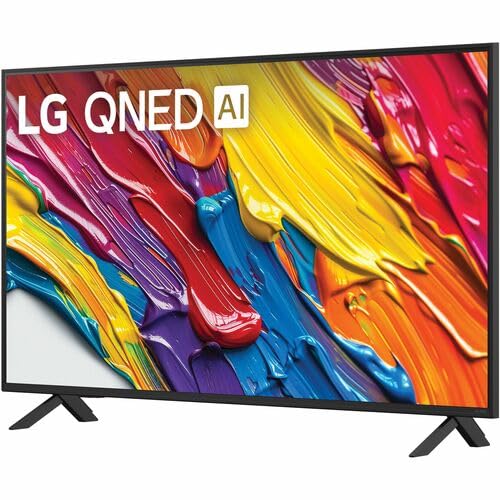
The LG QNED AI 4K TV offers vivid, immersive color with its wide color gamut technology, enhanced by the α7 AI Processor Gen8. It intelligently optimizes picture and sound based on content. Powered by LG webOS 24, it provides a streamlined streaming experience with customizable Quick Cards and the Magic Remote. Enjoy virtual 5.1 surround sound, FILMMAKER MODE, and advanced gaming features like FreeSync, VRR, and GeForce NOW.
2. Безбедносне информације
Увек се придржавајте основних мера безбедности када користите овај производ како бисте смањили ризик од пожара, струјног удара или повреда.
- Не излажите телевизор киши или влази.
- Не отварајте телевизорasinг; све сервисирање препустите квалификованом особљу.
- Обезбедите одговарајућу вентилацију и не блокирајте вентилационе отворе.
- Користите само кабл за напајање који је испоручен уз телевизор.
- Држите телевизор даље од извора топлоте и директне сунчеве светлости.
- Avoid placing heavy objects on the power cord or TV.
3. Шта је у кутији
Проверите да ли су све компоненте присутне:
- LG 43-инчни QNED AI паметни телевизор 4K класе
- Повер Цабле
- Даљински управљач (укључене су 2 ААА батерије)
- Компоненте постоља
- Кориснички приручник (овај документ)
4. Подешавање
4.1 Причвршћивање постоља
Пажљиво поставите телевизор екраном надоле на меку, равну површину. Причврстите компоненте постоља на предвиђене отворе на дну телевизора помоћу приложених завртња. Уверите се да је постоље безбедно причвршћено пре него што поставите телевизор усправно.
Слика: Позади view of the LG 43QNED82AUA TV with its stand.
4.2 Монтажа на зид (опционо)
This TV supports VESA mount standard 200 x 200 mm. For wall mounting, remove the stand and use a compatible wall mount bracket (sold separately). Follow the instructions provided with your wall mount.
4.3 Повезивање уређаја
Connect your external devices (cable box, Blu-ray player, gaming console, etc.) to the appropriate ports on the TV. The TV features 3 HDMI ports, 1 USB port, Ethernet, and S/PDIF (Optical) for audio output.

Image: Connectivity ports on the back of the LG 43QNED82AUA TV.
4.4 Укључивање
Plug the power cable into the TV and then into a wall outlet. Press the power button on the remote control or on the TV to turn it on. Follow the on-screen instructions for initial setup, including network connection and channel scanning.
5. Управљање телевизором
5.1 Даљински управљач
The included Magic Remote allows for intuitive control with point-and-click functionality, voice commands, and a scroll wheel. Insert the two AAA batteries (included) into the remote control.
5.2 WebОС 24 паметна платформа
Ваш телевизор ради на LG процесорима webOS 24 operating system. Navigate through apps, settings, and inputs using the customizable Quick Cards. Access popular streaming services like Netflix, Prime Video, Disney Plus, HBO Max, and Apple TV directly from the home screen.
5.3 Подешавања слике и звука
Access the settings menu to adjust picture modes (e.g., Standard, Vivid, Cinema, Filmmaker Mode) and sound modes (e.g., AI Sound Pro, Standard, Cinema). The α7 AI Processor Gen8 automatically optimizes these settings based on the content being viewед.

Image: Dynamic QNED Color representation.
6. Паметне функције и вештачка интелигенција
6.1 AI Picture and Sound
The α7 AI Processor Gen8 enhances brightness, improves sound, and refines picture detail with 4K upscaling and Dynamic Tone Mapping. AI Sound Pro provides virtual 5.1 surround sound, and WOW Orchestra integrates TV speakers with compatible LG soundbars for an enhanced audio experience.
6.2 Voice Assistance and AI Search
Your TV has Alexa Built-in. Press the Alexa button on your remote to activate voice commands. Utilize AI Тражи personalized recommendations and to find content quickly. The TV also supports Google Assistant, Apple AirPlay 2, and Google Cast for seamless integration with your smart home ecosystem.

Image: LG AI Search interface.
7. Функције за игре
The LG QNED AI 4K TV is designed for an optimal gaming experience with a 60 Hz native refresh rate, which can be boosted up to 144 Hz with VRR (Variable Refresh Rate) enabled. It supports FreeSync and features LG Game Optimizer and Game Dashboard for quick access to gaming settings.
- FreeSync и VRR: Смањује кидање и замућивање екрана за глаткију игру.
- Оптимизатор игара и контролна табла: Centralized hub for adjusting game settings, including genre-specific picture modes.
- Цлоуд Гаминг: Access GeForce NOW and Xbox Cloud Gaming (subscriptions and compatible controllers required).
- АЛЛМ (Аутоматски режим ниске латенције): Аутоматски прелази у режим мале латенције када се открије играчка конзола.

Image: Gaming experience on the LG 43QNED82AUA TV.
8. Повезивање
Your LG QNED AI 4K Smart TV offers a variety of connectivity options:
- ДВИ: 3 ports for connecting external devices.
- УСБ: 1 port for media playback or connecting USB devices.
- Етхернет: За жичану интернет везу.
- Ви-Фи: Built-in for wireless internet access.
- Блуетоотх КСНУМКС: For connecting wireless headphones, soundbars, or other Bluetooth devices.
- Оптички (S/PDIF): За дигитални аудио излаз за звучне системе.
- Пресликавање екрана: Supports AirPlay 2 and Google Cast for casting content from mobile devices.
9. Одржавање
9.1 Чишћење телевизора
Unplug the TV before cleaning. Use a soft, dry cloth to wipe the screen and exterior. For stubborn marks, lightly dampОбришите крпу водом или специјализованим средством за чишћење екрана. Избегавајте употребу јаких хемикалија или абразивних материјала.
9.2 Ажурирања софтвера
Ensure your TV's software is up to date for optimal performance and new features. Software updates auto-download when connected to the internet. If "auto-update" is disabled, you will receive a prompt to update manually.
КСНУМКС. Решавање проблема
Ако наиђете на проблеме са телевизором, погледајте следећа уобичајена решења:
| Проблем | Решење |
|---|---|
| Нема струје | Check power cable connection, wall outlet, and remote batteries. |
| Нема слике, али је звук присутан | Verify input source, check cable connections, try a different HDMI port. |
| Нема звука, али је слика присутна | Check volume, mute status, audio output settings, and external audio device connections. |
| Даљински управљач не ради | Replace batteries, ensure no obstructions between remote and TV, re-pair Magic Remote if necessary. |
| Лош квалитет слике | Adjust picture settings, check source resolution, ensure strong signal for broadcast channels. |
| Повезивање на Ви-Фи није могуће | Restart router, check Wi-Fi password, ensure TV is within range, try wired Ethernet connection. |
For further assistance, please refer to the full electronic manual available on the LG support webсајт или контактирајте LG корисничку подршку.
11. Спецификације
| Феатуре | Детаљ |
|---|---|
| Величина екрана | 43 инча |
| Дисплаи Тецхнологи | ЛЕД (QNED) |
| Резолуција | 4К (3840 к 2160) |
| Рефресх Рате | 60 Hz (Native), up to 144 Hz (VRR) |
| Процесор | а7 АИ процесор Ген8 |
| ХДР подршка | ХДР10, ХЛГ |
| Оперативни систем | webОС 24 |
| Повезивање | Wi-Fi, Bluetooth 5.0, Ethernet, 3x HDMI, 1x USB, Optical (S/PDIF) |
| Гласовни асистенти | Alexa Built-in, Google Assistant compatible |
| Димензије (са постољем) | 10.1"Д к 38.1"Ш к 25"В |
| Тежина (без постоља) | 20.7 фунти |
| VESA стандард за монтирање | 200 к 200 мм |
| Потрошња енергије | 82 Ваттс |
| Годишња потрошња енергије | 152 киловат сати годишње |

Image: LG 43QNED82AUA TV dimensions.
12. Гаранција и подршка
12.1 Информације о гаранцији
This LG TV comes with a 1 Year Parts & Labor Limited Warranty. Please retain your proof of purchase for warranty claims. For full warranty terms and conditions, refer to the warranty card included with your product or visit the official LG webсајту.
12.2 Корисничка подршка
For technical support, product registration, or service inquiries, please visit the LG support website or contact their customer service hotline. Contact information can be found on the LG official webсајту или у документацији коју сте добили уз телевизор.