Увод
This manual provides essential instructions for the proper setup, operation, and maintenance of your ROLLEI Compactline Mini Digital Compact Camera. Please read this manual thoroughly before using the camera to ensure optimal performance and longevity of the device. Keep this manual for future reference.
Цамера Оверview
The ROLLEI Compactline Mini is a compact digital camera designed for capturing stills and video. Its small form factor makes it convenient for everyday use.

Слика 1: Фронт view of the ROLLEI Compactline Mini Digital Camera, showing the lens and Rollei branding.
Сетуп
1. Инсталација батерије
The camera uses a Lithium Ion battery (not included). Ensure you purchase a compatible battery. To install:
- Пронађите поклопац одељка за батерију на дну камере.
- Померите резу поклопца да бисте отворили одељак.
- Insert the Lithium Ion battery according to the polarity indicators inside the compartment.
- Close the battery compartment cover securely until it latches.
2. Уметање меморијске картице
The camera requires a memory card (not included) to store photos and videos. To insert a memory card:
- Open the battery compartment cover, as the memory card slot is typically located within or adjacent to it.
- Insert the memory card into the designated slot with the contacts facing the correct direction, usually indicated by a small icon.
- Пажљиво притисните картицу док не кликне на своје место.
- Затворите поклопац одељка за батерије.

Слика 2: Дно view фотоапарата, који илуструје одељак за батерију и меморијску картицу.
3. Укључивање/искључивање
To power on the camera, press and hold the power button located on the top of the camera. To power off, press and hold the power button again.

Слика 3: Врх view of the camera, highlighting the power button (left) and shutter button (right).
Управљање камером
The camera features a rear display and control buttons for navigation and function selection.
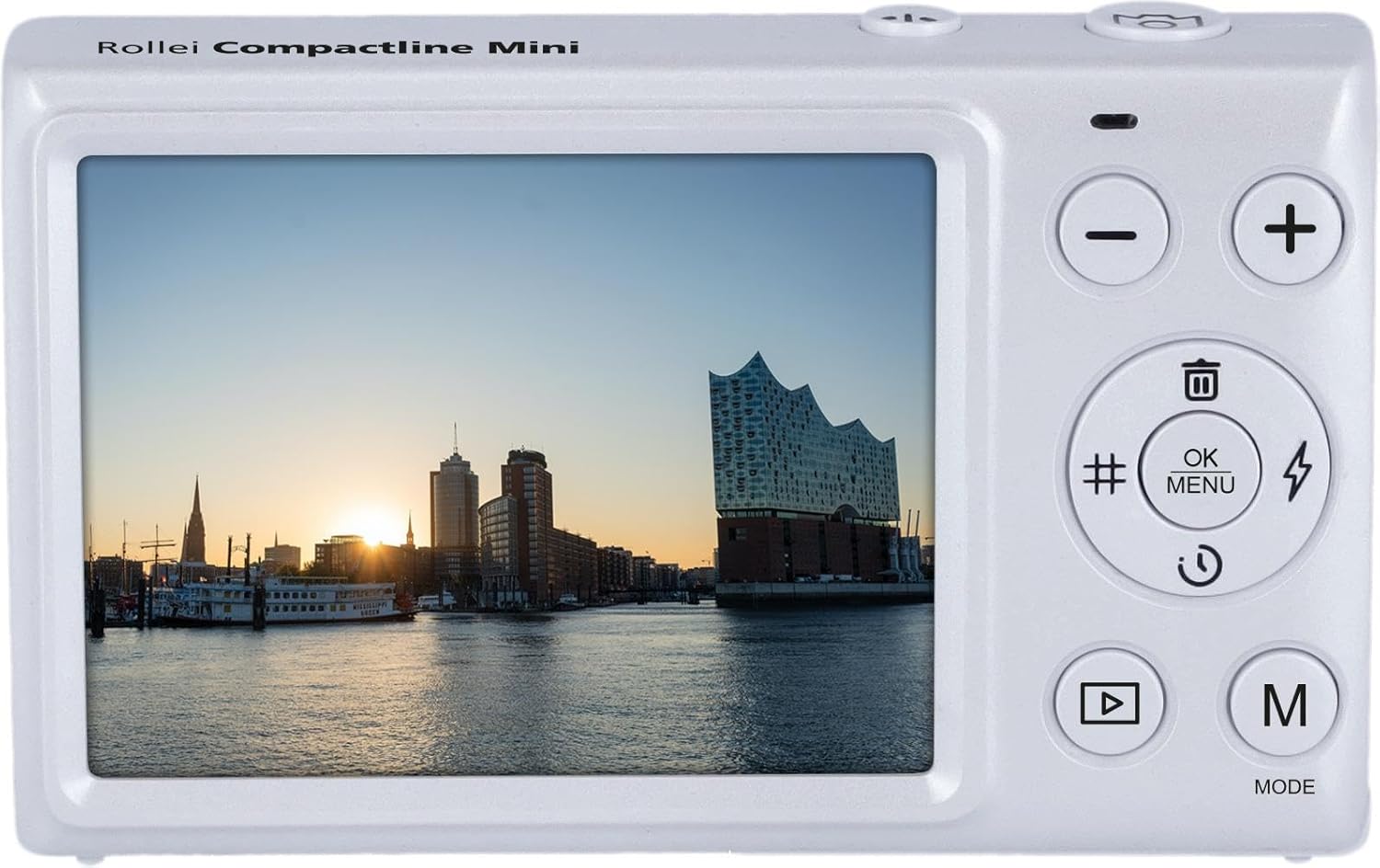
Слика 4: Позади view of the camera, displaying the screen and control panel.
1. Снимање фотографија
- Ensure the camera is in photo mode. Press the 'M' (Mode) button to cycle through available modes until the photo icon is displayed.
- Кадрирајте снимак користећи екран.
- Press the shutter button (located on the top of the camera) fully to capture the image. The camera uses automatic exposure control.
2. Снимање видео записа
- Press the 'M' (Mode) button to select video recording mode (indicated by a movie camera icon).
- Press the shutter button to start recording. A recording indicator will appear on the screen.
- Притисните дугме затварача поново да бисте зауставили снимање.
3. Навигација кроз мени и подешавања
Use the control buttons on the back of the camera to navigate menus and adjust settings:
- OK/MENU Button: Press to access the main menu or confirm selections.
- Дугмад горе/доле (+/-): Use to scroll through menu options or adjust values.
- Left/Right Buttons (#/Flash): Use for specific shortcuts or navigation within menus. The button marked with a flash symbol may control the self-timer or other functions, as the camera does not have a built-in flash.
Поставке баланса белог
To adjust white balance, navigate to the white balance setting in the menu. Available options include: Auto, Cloudy, Daylight, Fluorescent, Incandescent. Select the setting that best matches your lighting conditions for accurate color reproduction.
4. Режим репродукције
То view ваше снимљене фотографије и видео снимци:
- Press the Playback button (often indicated by a triangle symbol).
- Use the Up/Down buttons to scroll through your media.
- Притисните дугме ОК да бисте view a video or a larger image.
5. Брисање Files
In Playback mode, select the image or video you wish to delete. Press the Delete button (often indicated by a trash can icon) and confirm your selection when prompted.
Одржавање
1. Чишћење камере
- Тело камере: Користите меку, суву крпу за брисање кућишта фотоапарата. За тврдокорну прљавштину, благо дampНамочите крпу водом. Избегавајте јаке хемикалије.
- Објектив: Use a lens brush or a blower to remove dust. For smudges, use a specialized lens cleaning cloth and lens cleaning solution. Do not touch the lens surface with your fingers.
- Екран: Use a soft, lint-free cloth to gently wipe the display screen.
2. Складиштење
When not in use, store the camera in a cool, dry place away from direct sunlight and extreme temperatures. Remove the battery if the camera will not be used for an extended period to prevent leakage.
Решавање проблема
- Камера се не укључује:
- Ensure the battery is correctly inserted and fully charged.
- Check if the battery compartment cover is securely closed.
- If using a new battery, ensure it is compatible and charged. - Слике су мутне:
- Ensure the lens is clean and free from smudges or dust.
- Hold the camera steady when taking photos.
- Ensure sufficient lighting for the scene. - Грешка меморијске картице:
- Ensure the memory card is correctly inserted.
- Try formatting the memory card (this will erase all data, so back up important fileпрво).
- Пробајте другу, компатибилну меморијску картицу. - Camera freezes or is unresponsive:
- Remove the battery, wait a few seconds, and reinsert it to perform a soft reset.
- Ако проблем и даље постоји, контактирајте корисничку подршку.
Спецификације
| Феатуре | Спецификација |
|---|---|
| Назив модела | Compactline Mini |
| Број модела | 10854 |
| Технологија фото сензора | ЦМОС |
| Подржано File Форматс | ЈПЕГ, МП4 |
| Аспецт Ратио | 4:3 |
| Минимална брзина затварача | 1/2 секунди |
| Тип контроле експозиције | Аутоматски |
| Форм Фацтор | Цомпацт |
| Блиц камере | No built-in flash |
| Режими снимања | Movie, Stills |
| Viewналазач | Оптицал |
| Поставке баланса белог | Auto, Cloudy, Daylight, Fluorescent, Incandescent |
| Компатибилни уређаји | Computers (for data transfer) |
| Тип батерије | Lithium Ion (not included) |
| Ниво отпорности на воду | Није водоотпоран |
| Осетљивост на светлост | ИСО 100-800 |
| Аудио Рецординг | бр |
| Има екран у боји | бр |
| Display Maximum Resolution | 12 МП |
| Ленс Типе | Фиксно |
| Ауто Фоцус Тецхнологи | Детекција контраста |
| Фоцус Типе | Фиксни фокус |
| Фоцус Моде | Аутоматски АФ (АФ-А) |
Гаранција и подршка
For warranty information, please refer to the warranty card included with your product or visit the official Rollei website. For technical support, troubleshooting assistance beyond this manual, or service inquiries, please contact Rollei customer service through their official channels.


