Увод
The MUSE M-285 CTV is a versatile wireless headphone system designed for an enhanced audio experience with your television and other audio devices. It features 2.4 GHz wireless transmission for stable, low-latency audio, Bluetooth 5.3 for broader compatibility, and multiple input options including optical and 3.5mm AUX. The integrated charging station also functions as the transmitter, providing convenience and organization. This manual provides detailed instructions for setting up, operating, and maintaining your M-285 CTV headphones.

Image: The MUSE M-285 CTV wireless headphones resting on their dedicated charging and transmitter stand. The headphones are black with comfortable earcups.
Садржај пакета
Молимо вас да проверите пакет за следеће ставке:
- MUSE M-285 CTV Wireless Headphones
- Transmitter / Charging Station
- Power Adapter (AC Adaptor)
- Оптички аудио кабл
- 3.5 мм АУКС аудио кабл
- УСБ-Ц кабл за пуњење
- Кориснички приручник (овај документ)
Карактеристике производа
- 2.4 GHz Wireless Transmission: Enjoy stable, low-latency audio with a range of up to 30 meters, even through walls.
- Блуетоотх 5.3 повезивање: Connect wirelessly to a wide range of Bluetooth-enabled devices.
- Више аудио улаза: Optical, 3.5mm AUX, and USB-C for broad compatibility with TVs and audio sources.
- Прилагодљиви звук: Three EQ modes (Normal, Clear Voice, Full Mode) and adjustable Left/Right balance for personalized listening.
- Дуг век трајања батерије: Up to 30 hours of continuous playback on a single charge (800 mAh Li-ion battery).
- Интегрисана станица за пуњење: Conveniently charges the headphones and acts as the wireless transmitter.
- Hands-Free Function & Amplifying Microphone: Allows for clearer perception of ambient conversations or phone calls.
- Подесива трака за главу: Designed for maximum comfort during extended use.

Image: The MUSE M-285 CTV headphones on their stand, accompanied by icons illustrating key features such as Bluetooth-Out, EQ Effect, Aux-Input, and 30 hours operating time with 3-4 hours charging time.
Сетуп
1. Пуњење слушалица
- Прикључите адаптер за напајање на станицу за пуњење и укључите га у утичницу.
- Place the headphones onto the charging station. Ensure the charging contacts on the headphones align with those on the station.
- The charging indicator light on the headphones (or station) will illuminate, indicating charging is in progress. A full charge takes approximately 3.5 hours.
- Once fully charged, the indicator light may change color or turn off.
2. Повезивање предајника са аудио извором
The transmitter/charging station can connect to your TV or audio device using several methods:
2.1. 2.4 GHz Wireless Connection (Recommended for TV)
- Optical (TOSLINK) Connection:
- Connect one end of the optical audio cable to the OPTICAL OUT port on your TV.
- Connect the other end to the OPTICAL IN port on the MUSE M-285 CTV transmitter.
- Ensure your TV's audio output settings are configured to "Optical" or "PCM" (Pulse Code Modulation). Some TVs may require disabling Dolby Digital or DTS.
- 3.5 мм АУКС прикључак:
- Connect one end of the 3.5mm AUX cable to the HEADPHONE OUT or AUDIO OUT port on your TV or audio device.
- Connect the other end to the AUX IN port on the MUSE M-285 CTV transmitter.
Once connected via 2.4 GHz, the headphones will automatically pair with the transmitter when powered on.
2.2. Bluetooth Connection (for other devices)
- Ensure the headphones are powered on and not connected to the 2.4 GHz transmitter.
- Activate Bluetooth pairing mode on the headphones (refer to the operating section for specific button presses). The indicator light will flash, indicating pairing mode.
- On your Bluetooth-enabled device (e.g., smartphone, tablet), go to Bluetooth settings and search for available devices.
- Select "MUSE M-285 CTV" from the list.
- Once paired, the indicator light on the headphones will stop flashing and remain solid.

Image: A person wearing the MUSE M-285 CTV headphones while watching television, demonstrating the product in use for TV audio.
Упутство за употребу
1. Укључивање/искључивање
- To power on, press and hold the Power button on the headphones for approximately 3 seconds.
- To power off, press and hold the Power button for approximately 3 seconds.
2. Контрола јачине звука
Use the Volume Up (+) and Volume Down (-) buttons located on the headphones to adjust the listening volume.
3. Режими еквилајзера
The M-285 CTV offers three Equalizer (EQ) modes to optimize your listening experience:
- нормално: Стандардни аудио професионалацfile.
- Јасан глас: Enhances vocal clarity, ideal for dialogue in TV shows or movies.
- Пуни режим: Provides a richer, fuller sound profile.
Press the EQ button on the headphones to cycle through these modes.
4. Left/Right Balance Control
Adjust the audio balance between the left and right earcups to suit individual hearing preferences. This feature is particularly useful for users with hearing differences.
- Use the Balance Left (L) and Balance Right (R) buttons on the headphones to fine-tune the audio output for each ear.
5. Hands-Free Function and Amplifying Microphone
The integrated microphone allows you to hear ambient sounds more clearly or engage in phone calls when connected via Bluetooth.
- To activate the ambient sound amplification, press the dedicated microphone button.
- When a call comes in via Bluetooth, press the Multi-function button (often the Power button) to answer/end the call.

Image: A user wearing the MUSE M-285 CTV headphones, with various feature icons displayed, including Hands-free, 2.4 GHz, 30H Working time, Charging Transmitter Base, 3 EQ Modes, Adjustable, Foldable Design, L/R Balance Control, Optical Cable, RCA Cable, and AC Adaptor.
Одржавање
- Чишћење: Use a soft, dry cloth to clean the headphones and charging station. Do not use abrasive cleaners or solvents.
- Складиштење: When not in use, store the headphones on the charging station to keep them charged and organized. Store in a cool, dry place away from direct sunlight and extreme temperatures.
- Одржавање батерије: Да бисте продужили век трајања батерије, избегавајте често потпуно пражњење слушалица. Редовно их пуните, чак и ако се не користе дуже време.
- Отпорност на воду: The MUSE M-285 CTV headphones are није водоотпоран. Avoid exposure to water or excessive moisture.
Решавање проблема
Нема звука
- Уверите се да су слушалице укључене и напуњене.
- Verify the transmitter is properly connected to the audio source (TV) and powered on.
- Check the volume levels on both the headphones and the audio source.
- If using optical connection, ensure the TV's audio output is set to PCM and not Dolby Digital/DTS.
- If using Bluetooth, ensure the headphones are correctly paired and connected to your device.
Poor Sound Quality / Intermittent Audio
- Ensure the headphones are within the 30-meter range of the transmitter (for 2.4 GHz).
- Reduce interference by moving away from other wireless devices (Wi-Fi routers, cordless phones).
- Проверите све кабловске спојеве да ли су лабави или оштећени.
- Recharge the headphones if the battery is low.
Headphones Not Charging
- Ensure the charging station is properly connected to power.
- Verify the headphones are correctly seated on the charging station, with contacts aligned.
- Check the charging cable and power adapter for any damage.
Спецификације
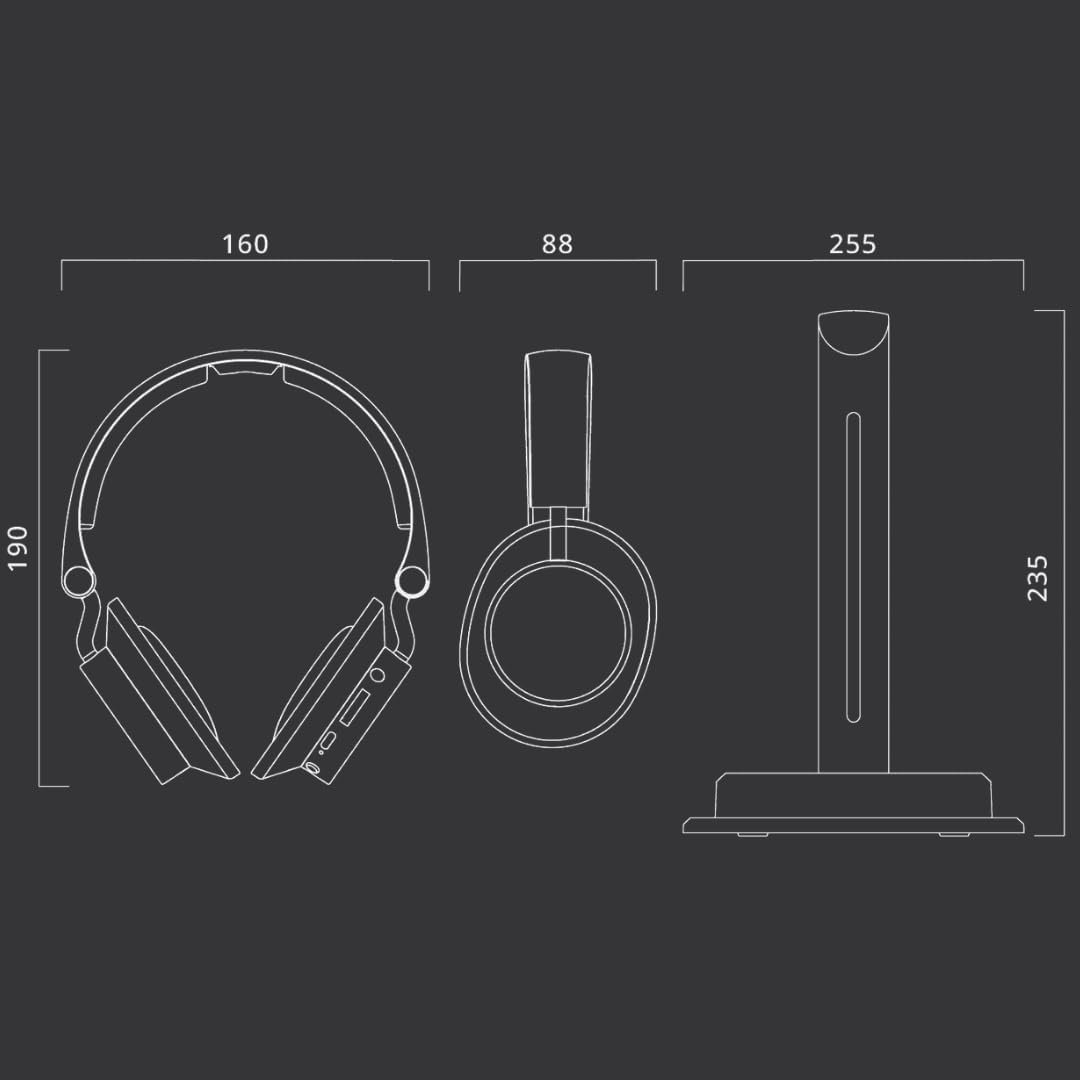
Image: Technical diagram illustrating the dimensions of the MUSE M-285 CTV headphones and their charging stand in millimeters.
| Феатуре | Спецификација |
|---|---|
| Назив модела | М-285 ЦТВ |
| Бранд | МУСЕ |
| Технологија повезивања | Wireless (2.4 GHz, Bluetooth 5.3) |
| Бежична комуникациона технологија | Блуетоотх |
| Аудио улази | Optical, 3.5mm AUX, USB-C |
| Трајање батерије | До 30 сати |
| Време пуњења | Прибл. 3.5 сата |
| Фреквенцијски одзив | 20 Hz - 20000 Hz |
| Осетљивост | 116 дБ |
| Контролни метод | Тактилна дугмад |
| Тежина | 1 Kilogram (approximate, including packaging/accessories) |
| Ниво отпорности на воду | Није водоотпоран |
| Постављање уха | Преко уха |
Гаранција и подршка
Information regarding specific warranty terms and support contact details is not available in the provided product data. Please refer to the warranty card included with your product or contact MUSE customer support directly for assistance.
For further support, visit the official MUSE webсајту или контактирајте свог продавца.