1. Важна безбедносна упутства
Please read and understand all safety instructions before using the projector. Keep this manual for future reference.
- вентилација: Do not block the projector ventilation holes. Blocking them can cause the internal components to overheat and may lead to fire. Ensure sufficient space around the projector for proper airflow.
- Стабилност: When placing the projector, ensure it is on a stable, flat surface to prevent it from falling.
- Страни предмети: Do not allow objects or liquids to enter the projector. This can cause dangerous voltage points to be touched, resulting in fire or electric shock.
- Каблови: When placing the power cord and connecting cables, arrange them carefully to prevent people from tripping and falling.
- топлота: Do not bring the projector close to fire or other heat sources to avoid fire.

Image: The bottom of the WOLFANG WP06 Mini Projector packaging, displaying important safety warnings regarding ventilation, foreign objects, and cable placement.
2. Садржај пакета
Проверите да ли су све ставке присутне у вашем пакету:
- WOLFANG WP06 Mini Projector (x1)
- Даљински управљач (к1)
- Кабл за напајање (к1)
- ХДМИ кабл (к1)
- Упутство за употребу (к1)

Image: The top of the WOLFANG WP06 Mini Projector retail box, featuring the brand logo and a line drawing of the projector.
3. Производ је готовview
The WOLFANG WP06 Mini Projector is designed for portability and ease of use, featuring a compact form factor and versatile projection capabilities.
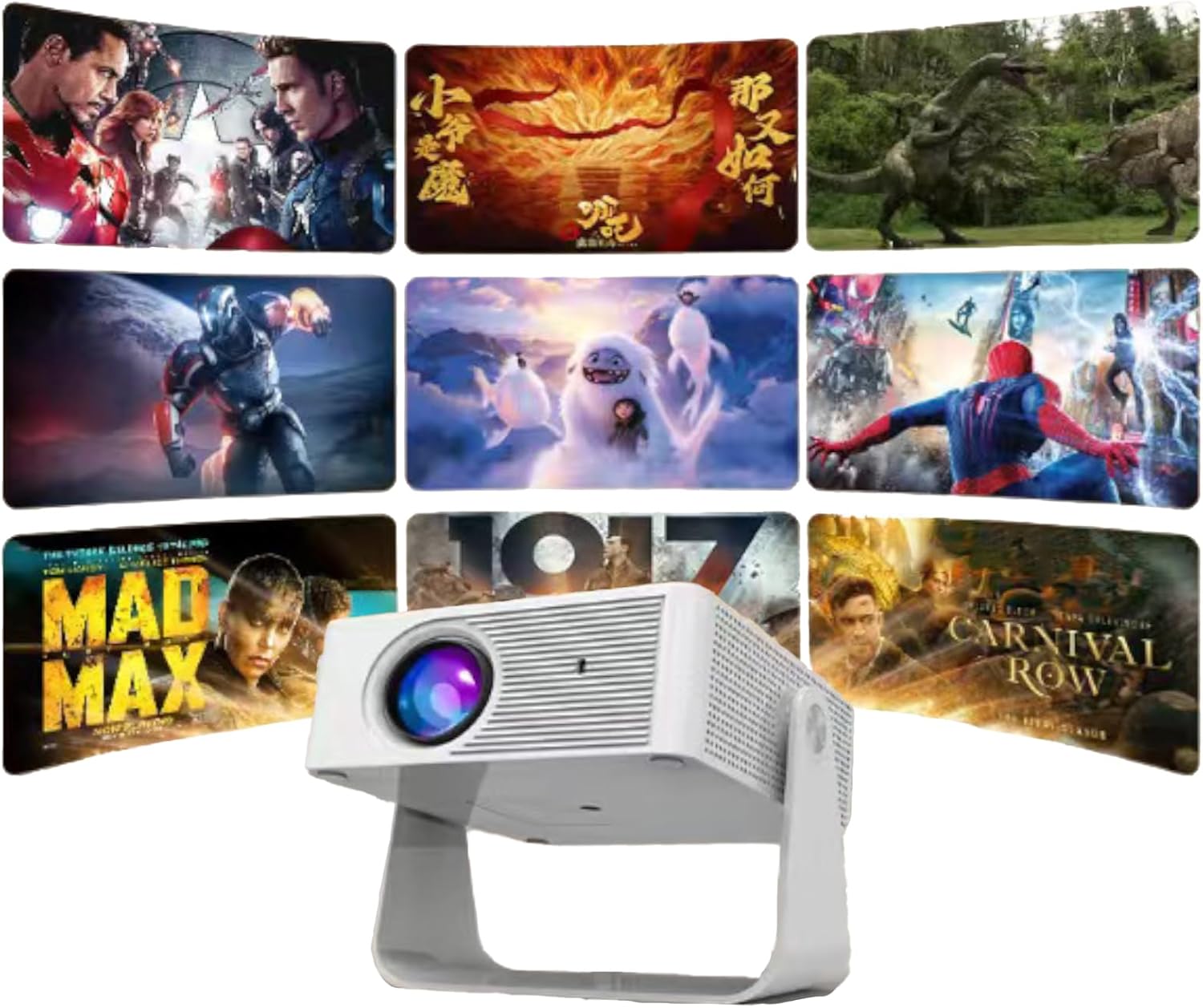
Слика: Предњи део view of the WOLFANG WP06 Mini Projector, showcasinњегов објектив и компактан дизајн.
Кључне карактеристике:
- Компактан дизајн: Palm-sized dimensions (4.8 x 3.7 x 3.4 inches) and lightweight (320g) for portability.
- 360° Rotating Stand: Integrated stand allows for flexible projection angles and multiple mounting options (ceiling, wall, tabletop, tripod).
- 1080P Support: Supports 1080P image quality for clear visuals.
- Аутоматска вертикална корекција Кеистоне: Automatically adjusts vertical image distortion for a properly rectangular picture.
- Функција зумирања од 50%: Allows for lossless image size reduction from 100% to 50%.
- Eye Care Lens: Features an improved lens designed to reduce harmful blue light.
- Рад са ниским нивоом буке: Innovative cooling technology minimizes fan noise.
- Вишеструко повезивање: HDMI, USB, and wired screen mirroring for iOS/Android devices.

Слика: Страна А view of the WOLFANG WP06 Mini Projector packaging, illustrating key features such as easy projection adjustment, mini size, and multiple input options.
4. Подешавање
4.1 Постављање
Position the projector on a stable surface or mount it according to your preference. The integrated 360° rotating stand allows for flexible angle adjustments. For ceiling or wall mounting, utilize the 1/4" screw holes located at the bottom of the projector.
4.2 Прикључак за напајање
- Повежите приложени кабл за напајање са улазним портом за напајање пројектора.
- Укључите други крај кабла за напајање у одговарајућу електричну утичницу.
4.3 Почетно укључивање
Притисните дугме за напајање на пројектору или даљинском управљачу да бисте укључили уређај. Пројектор ће покренути секвенцу покретања.
5. Упутство за употребу
5.1 Фокус и корекција трапезоидног изобличења
- Подешавање фокуса: Окрећите прстен за фокусирање на објективу пројектора док пројектована слика не постане оштра и јасна.
- Аутоматска вертикална корекција Кеистоне: The projector features automatic vertical keystone correction. If the image appears trapezoidal vertically, the projector will automatically adjust it to a rectangular shape.
5.2 Screen Mirroring (iOS and Android)
- иОС уређаји: Connect your iOS device directly to the projector using a Lightning/USB-C to USB cable. No additional HDMI adapter is required for this method.
- Андроид уређаји: Android devices can be connected via an HDMI adapter or a Chromecast wireless adapter.
- Note on Streaming Services: Due to HDCP copyright restrictions, direct screen mirroring of content from streaming services like Netflix, Prime Video, and Hulu may not be supported. It is recommended to use a TV stick or Chromecast for these platforms.
5.3 Повезивање екстерних уређаја
The projector is equipped with HDMI and USB ports for connecting various external devices.
- ХДМИ порт: Connect laptops, TV sticks, gaming consoles (e.g., PS5), DVD players, or other HDMI-enabled devices using the provided HDMI cable. Select the HDMI input source on the projector.
- УСБ порт: Connect USB storage devices for media playback or use for wired mobile phone screen projection.
- Спољни звучници: External speakers can be connected via the HDMI port (if the speaker supports HDMI ARC) or potentially via a dedicated audio output port if available (check projector for specific port).
5.4 Функција зумирања
The projector supports a lossless zoom function, allowing you to reduce the image size from 100% down to 50%. This is useful for adjusting the projection size without moving the projector, especially in smaller spaces.

Image: The WOLFANG WP06 Mini Projector projecting multiple movie scenes onto a wall, demonstrating its multimedia capabilities.
6. Одржавање
6.1 Чишћење
- Објектив: Use a soft, lint-free cloth specifically designed for optical lenses to gently clean the projector lens. Avoid abrasive materials or harsh chemicals.
- Екстеријер: Обришите спољашњост пројектора меком, сувом крпом. Не користите течна средства за чишћење директно на уређају.
- вентилација: Periodically check and gently clean the ventilation openings to ensure they are free from dust and debris, maintaining optimal airflow.
6.2 Складиштење
When not in use, store the projector in a cool, dry place, away from direct sunlight and extreme temperatures. If storing for an extended period, consider placing it in its original packaging or a protective case to prevent dust accumulation and damage.
КСНУМКС. Решавање проблема
- Нема напајања: Ensure the power cable is securely connected to both the projector and the power outlet. Check if the power outlet is functional.
- Нема слике: Verify that the correct input source is selected on the projector. Check all cable connections (HDMI, USB) to external devices. Ensure the lens cap is removed.
- Замућена слика: Adjust the focus ring on the lens. Ensure the projection surface is flat and the projector is at an appropriate distance.
- Image Distorted (not rectangular): The projector has auto vertical keystone correction. If issues persist, try repositioning the projector.
- Нема звука: Check the volume settings on both the projector and the connected source device. If using external speakers, ensure they are properly connected and powered on.
- Даљински управљач не ради: Ensure the batteries in the remote control are correctly inserted and not depleted. Point the remote directly at the projector's IR receiver.
8. Спецификације
| Феатуре | Спецификација |
|---|---|
| Бранд | ВОЛФАНГ |
| Модел | ВП06 |
| Дисплаи Тецхнологи | ЛЦД |
| Дисплаи Типе | ЛЕД, ЛЦД |
| Нативе Ресолутион | 1920 x 1080 Pixels (1080P FHD Supported) |
| Осветљеност слике | 16000 Lumen (Marketing term, actual ANSI lumens may vary) |
| Аспецт Ратио | 16:9 |
| Рефресх Рате | 60 Хз |
| Технологија повезивања | Wired mobile phone screen projection, USB, HDMI |
| Хардверски интерфејс | ХДМИ, УСБ |
| Компатибилни уређаји | Laptops, smartphones, TV sticks, gaming consoles, media players |
| Посебне карактеристике | 2025 Eye Care Lens, 360° Rotating Stand, 50% Zoom, Auto Vertical Keystone Correction, Innovative Cooling Technology |
| Форм Фацтор | Портабле |
| Тип монтаже | Ceiling Mount, Wall Mount, Tabletop Mount |
| Димензије пројектора | 4.8 к 3.7 к 3.4 инча |
| Тежина пројектора | 320 г |
| Димензије пакета | 19.2 к 16.8 к 7.6 цм |
| Тежина пакета | 620 г |

Image: A visual comparison demonstrating the enhanced clarity of a 1080P image versus a 720P image, highlighting the projector's display capabilities.
9. Гаранција и подршка
WOLFANG is committed to providing quality products and customer service.
- гаранција: The WOLFANG WP06 Mini Projector comes with a 2-year repair warranty.
- техничка подршка: За овај производ је обезбеђена доживотна техничка подршка.
Контакт информације:
For any questions, suggestions, or support needs, please contact WOLFANG through the following channels:
- Емаил: support.vc@wolfang.co
- Webсајт: www.wolfang.co
- ИоуТубе: WOLFANG Official (for unboxing and operation videos)
- ВхатсАпп: +86 19527121389
- ИнсtagРАМ: Званични ВОЛФАНГ
- Фејсбук: WOLFANG Projector

Слика: Страна А view of the WOLFANG WP06 Mini Projector packaging, listing various contact methods for customer support and warranty information.


