1. Готовоview
The IIWEY C3 PRO 4K Dash Cam 3 Channel is an advanced vehicle recording system designed to capture comprehensive footage of your driving environment. Equipped with triple Sony STARVIS 2 sensors (IMX678 for front, dual IMX675 for cabin & rear), it provides high-resolution video (4K Front + 2K Cabin + 1080P Rear) with enhanced clarity, especially in low-light conditions. Key features include HDR 3.0, Night Vision 3.0, PlateTag AI for license plate recognition, 5GHz Wi-Fi for fast data transfer, GPS logging, and intelligent parking modes.
2. Карактеристике производа
- Triple STARVIS 2 Sensors: Front (IMX678), Cabin (IMX675), and Rear (IMX675) for superior low-light performance and image clarity.
- Снимак високе резолуције: Simultaneous 4K (Front), 2K (Cabin), and 1080P (Rear) video capture.
- ХДР 3.0: Advanced High Dynamic Range technology to balance exposure in varying light conditions, reducing glare and enhancing detail.
- Night Vision 3.0: Optimized for clear nighttime recording, capturing readable license plates in near-total darkness.
- ПлатеTag АИ: Utilizes deep learning to automatically detect and highlight license plates within the IIWEY App for easy retrieval.
- 5 ГХз Ви-Фи: Enables rapid video downloads and live streaming to your smartphone via the IIWEY App.
- ГПС евиденција: Records speed and location data, providing indisputable evidence for incidents.
- Intelligent Parking Modes: (Requires optional hardwire kit) Motion Detection, Collision Detection, and Time Lapse Record for 24/7 vehicle monitoring.
- Снага суперкондензатора: Ensures durability and safety in extreme temperatures, replacing traditional batteries.
- Контрола гласом: Hands-free commands for locking videos or taking photos.
- 3.18-инчни ИПС екран: Clear and wide-angle viewing for real-time monitoring and playback.
- Лооп Рецординг: Automatically overwrites oldest footagе када је SD картица пуна.
- Г-сензор: Аутоматски закључава footage upon impact or sudden braking.
- Supports up to 512GB MicroSD Card: Includes a 128GB card for immediate use.
3. Шта је у кутији
The IIWEY C3 PRO package includes the following components:
- Main camera with GPS module
- Задња камера од 2 хиљаде
- Кабл за пуњење (3.5 метра)
- Car Mount (adhesive pads)
- Crowbar (for cable tucking)
- Обујмице за каблове (к5)
- Алат за инсталацију
- Брзи водич
- Упутство за употребу
- Гарантни лист
- Rear Camera Cable (7 meters)
- 128ГБ МицроСД картица
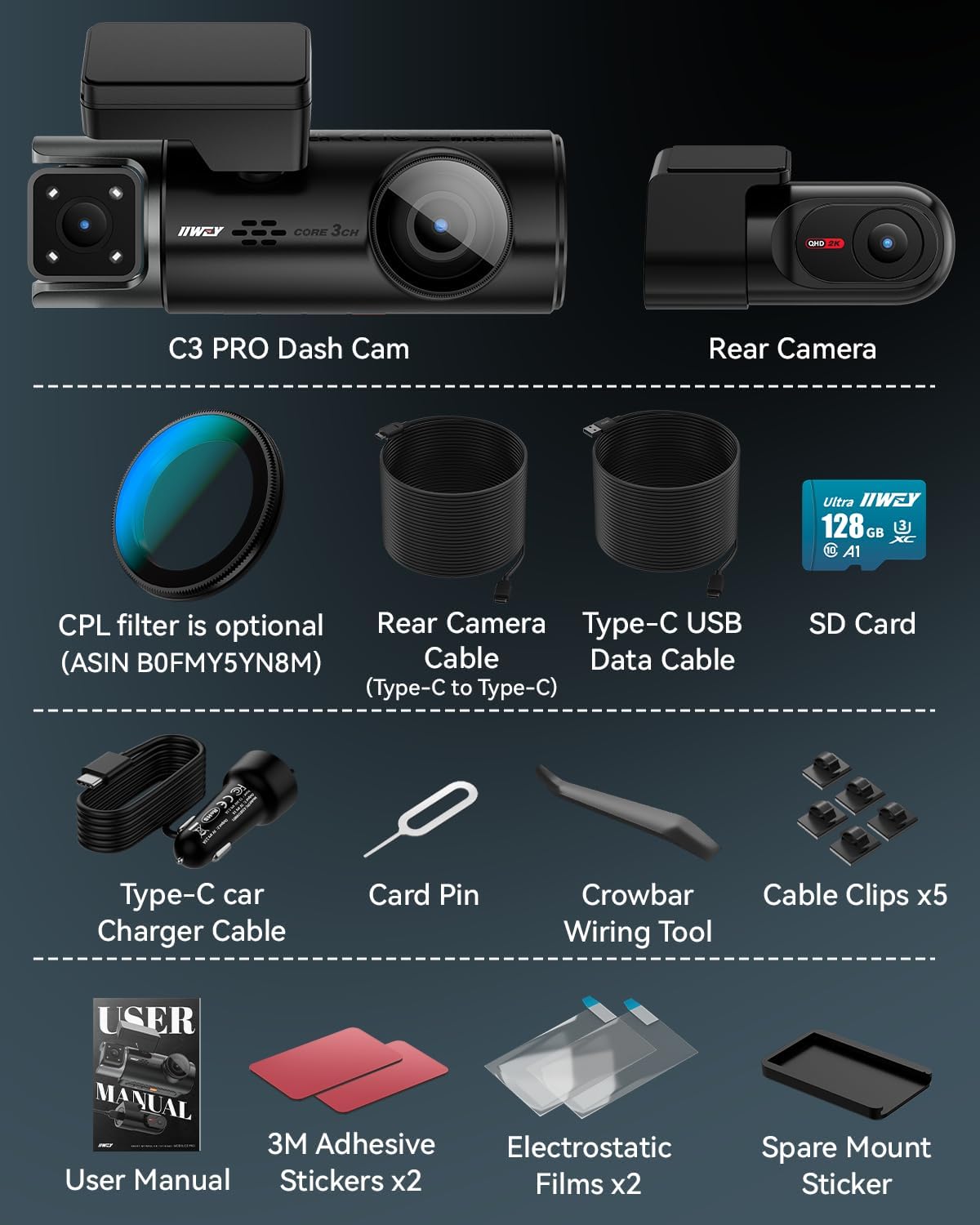
Image: All components included in the IIWEY C3 PRO package, neatly arranged.
4. Подешавање и инсталација
Follow these steps to properly install your IIWEY C3 PRO Dash Cam:
- Припремите простор за монтажу: Clean the windshield area where the main camera will be mounted. Ensure it's free of dust and grease for optimal adhesive performance.
- Mount the Main Camera: Attach the main camera with its adhesive mount behind your rearview mirror. Position it to ensure a clear view пута без ометања видљивости приликом вожње.
- Прикључите напајање: Route the 3.5-meter charging cable along the windshield edge and down to your vehicle's 12V power outlet (cigarette lighter socket). Use the provided crowbar and cable clips to neatly tuck the cable and secure it.
- Инсталирајте задњу камеру: Mount the 2K rear camera on your rear windshield using its adhesive. Connect it to the main unit using the 7-meter rear camera cable. Route this cable along the vehicle's headliner and side panels to the rear, securing it with clips.
- Убаците МицроСД картицу: Insert the provided 128GB MicroSD card into the main camera's slot.
- Укључите и тестирајте: Start your vehicle. The dash cam should power on automatically and begin recording. Verify that all three cameras are functioning and recording correctly on the display.
- Опциони комплет за ожичење: For 24/7 parking surveillance modes (Motion Detection, Collision Detection, Time Lapse), an optional IIWEY Hardwire Kit (ASIN: B0DHJNRPB9) is required and sold separately.

Image: Diagram illustrating the recommended cable routing for the front and rear cameras, ensuring a tidy installation.

Image: A visual representation of all items included in the IIWEY C3 PRO Dash Cam package, including cameras, cables, and installation tools.
Видео за инсталацију
Video: An official seller video demonstrating the installation process of the IIWEY C3 PRO 3 Channel 4K Dash Cam.
5. Упутство за употребу
Основна операција
- Укључивање/искључивање: The dash cam automatically powers on and off with your vehicle's ignition.
- Снимање: Once powered on, the dash cam automatically begins loop recording.
- Режими приказа: Use the buttons on the device to switch between different camera views (front, cabin, rear, or split-screen).
- Режим чувара екрана: The camera can activate a screen saver mode after 30 seconds or one minute to reduce distractions, especially during nighttime driving. The dash cam continues recording in the background.

Image: A visual representation of the IIWEY C3 PRO Dash Cam's three recording channels (front, interior, rear) and their wide viewинг углова.

Image: Illustrates the simultaneous 4K front, 2K cabin, and 1080P rear recording capabilities of the dash cam.

Image: Shows the dash cam's screen saver mode, designed to minimize driving distractions while recording continues.
Воице Цонтрол
The IIWEY C3 PRO supports hands-free voice commands for critical functions:
- "Lock the Video": Saves the current recording from being overwritten.
- "Take Photo": Captures a still image.
- "Turn ON Wi-Fi" / "Turn OFF Wi-Fi": Activates or deactivates the Wi-Fi connection.
- "Turn ON Audio" / "Turn OFF Audio": Controls audio recording.
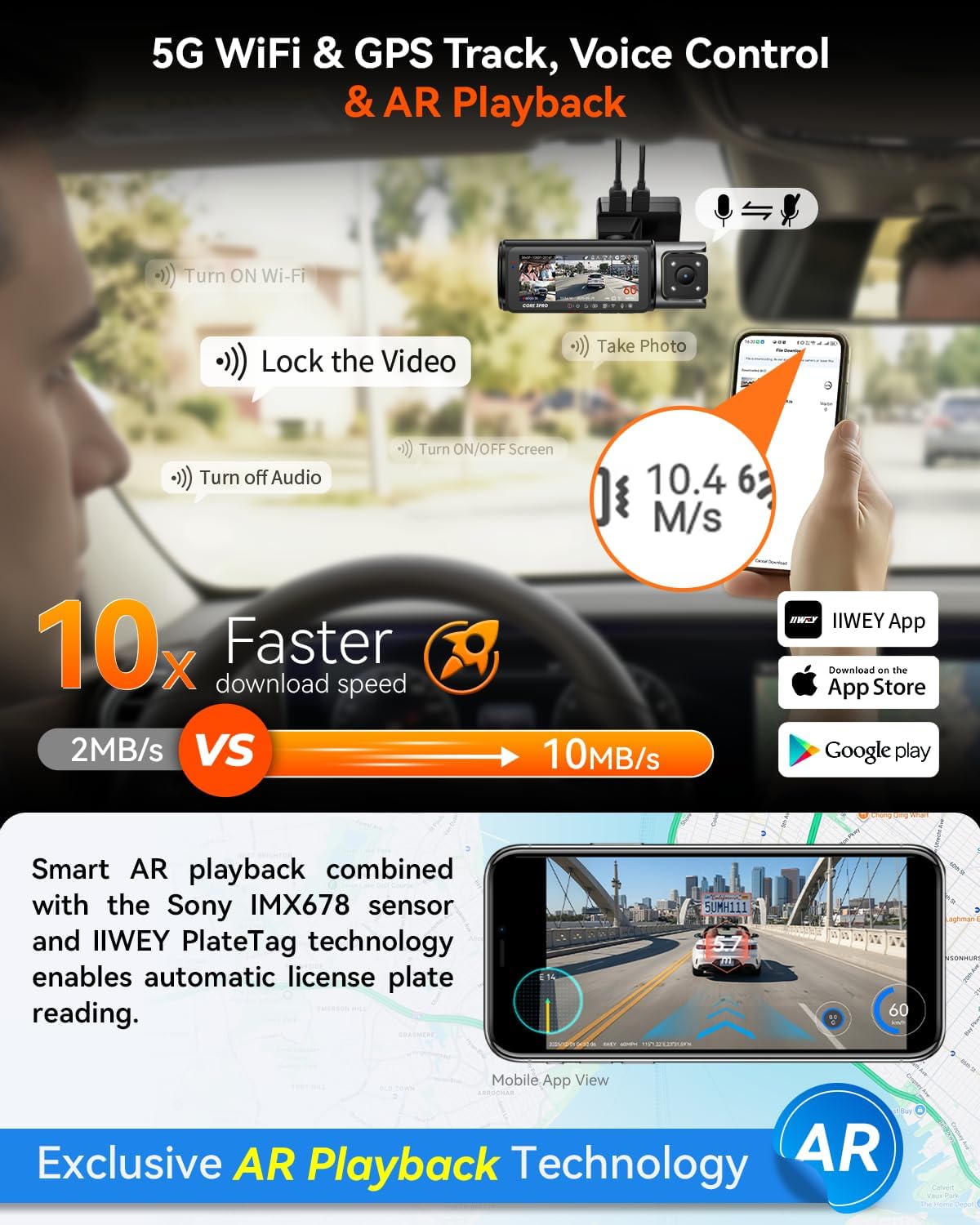
Image: Illustrates the 5GHz Wi-Fi, GPS tracking, voice control, and AR Playback features of the dash cam.

Image: Highlights the 5GHz Wi-Fi for fast downloads, GPS tracking, voice control, and AR Playback technology.
IIWEY App & 5GHz Wi-Fi
Download the IIWEY App from your smartphone's app store. Connect to the dash cam's 5GHz Wi-Fi for:
- Пренос уживо view свих камера.
- Fast footage downloads (up to 10MB/s).
- Access to PlateTag AI for license plate detection.
- Easy sharing of photos and videos.
ГПС праћење
The built-in GPS module logs your driving route, speed, and location. This data can be viewed on Google Maps via the IIWEY App or a dedicated GPS Player on your computer, providing verifiable evidence.

Image: Demonstrates how GPS tracking data, including route and speed, can be viewed on a map within the IIWEY App or a computer player.
6. Напредне функције
Intelligent Parking Guard (Requires Hardwire Kit)
With the optional IIWEY Hardwire Kit, the C3 PRO offers 24/7 parking surveillance:
- Детекција покрета: Records when movement is detected around the vehicle.
- Детекција судара: Records when an impact is detected.
- Снимање временског интервала: Continuously records at a low frame rate to save storage space while monitoring.

Image: Illustrates the three intelligent parking modes: Motion Detection, Collision Detection, and Time-Lapse Record.

Image: Shows how motion and collision detection work to monitor your vehicle when parked.

Image: Explains the time-lapse recording feature for continuous 24/7 parking monitoring with reduced file величина.
Г-сензор
The built-in G-sensor detects sudden movements, impacts, or rapid acceleration/deceleration. When triggered, it automatically locks the current video segment to prevent it from being overwritten during loop recording, ensuring critical evidence is preserved.

Image: Illustrates the G-sensor's function in detecting collisions and locking footagе, са егзистенцијомamples of front, cabin, and rear views.

Image: Shows the adjustable sensitivity levels of the G-sensor for customized accident detection.
OTA Firmware Updates
Keep your dash cam's software up-to-date with Over-The-Air (OTA) firmware updates via the IIWEY App. This ensures your device benefits from the latest features, performance improvements, and bug fixes.

Image: Illustrates the process of updating the dash cam's firmware wirelessly through the IIWEY App.
7. Одржавање
- Управљање СД картицама: Regularly format your MicroSD card (at least once a month) to maintain optimal recording performance and prevent data corruption. The C3 PRO supports up to 512GB cards.
- Чишћење сочива: Keep camera lenses clean and free of dust or smudges for clear video quality. Use a soft, lint-free cloth.
- Ажурирања фирмвера: Periodically check for and install firmware updates via the IIWEY App to ensure your device has the latest features and stability improvements.
- температура: The supercapacitor design allows operation in extreme temperatures (-4°F to 158°F). Avoid prolonged exposure to temperatures outside this range.

Image: Highlights the dash cam's support for MicroSD cards up to 512GB and its loop recording functionality.

Image: Explains the benefits of the supercapacitor, including longer lifespan, no explosion risk, and all-weather adaptability.
КСНУМКС. Решавање проблема
- Камера у аутомобилу се не укључује: Ensure the power cable is securely connected to both the dash cam and the vehicle's 12V power outlet. Verify the vehicle's power outlet is functional.
- Проблеми са снимањем: Check if the MicroSD card is inserted correctly and is not full. Format the SD card regularly. Ensure the dash cam's firmware is up-to-date.
- Лош видео квалитет: Очистите сочива камере. Уверите се да је заштитна фолија уклоњена са сочива. Проверите подешавања резолуције видеа у менију.
- Проблеми са Ви-Фи везом: Ensure Wi-Fi is enabled on the dash cam via voice command or menu. Restart both the dash cam and your smartphone.
- ГПС не ради: Уверите се да је GPS модул правилно повезан и да има јасан view of the sky. It may take a few minutes to acquire a signal.
- Гласовне команде не реагују: Speak clearly and directly towards the dash cam. Ensure the audio recording is enabled.
9. Спецификације
| Феатуре | Спецификација |
|---|---|
| Бранд | ИИВЕИ |
| Назив модела | Ц3 ПРО |
| Резолуција снимања видео записа | 4K+2K+1080P |
| Сензори | Triple STARVIS 2 (IMX678 Front, IMX675 Cabin & Rear) |
| Технологија повезивања | 5GHz Wi-Fi & GPS |
| Величина екрана | 3.18 инча ИПС |
| Фраме Рате | 30 ФПС |
| Величина укључене меморијске картице | 128 ГБ |
| Максимална подржана величина флеш меморије | 512 ГБ |
| Извор напајања | Supercapacitor (No Batteries Included) |
| Димензије производа | 6.9"Д к 5.47"Ш к 3.42"В |
| Посебне карактеристике | ПлатеTag AI, HDR 3.0, Night Vision, Parking Mode, Voice Control, Loop Recording, G-Sensor |
10. Гаранција и подршка
The IIWEY C3 PRO Dash Cam comes with an 18-месечна гаранција. For any inquiries, technical assistance, or support, please contact IIWEY customer service. They provide 24-hour responsive support to assist with setup and any operational questions.
For further assistance, please refer to the contact information provided on your Warranty Card or visit the official IIWEY webсајту.


