1. Увод
Thank you for choosing the LOEWE Leo Wireless Headphones. These premium headphones are designed to deliver an exceptional audio experience with advanced features such as Hi-Res Audio, adaptive noise cancellation, and real-time voice translation. This manual provides essential information for setting up, operating, and maintaining your headphones to ensure optimal performance and longevity.
2. Садржај пакета
Before use, please verify that all items are present in the package:
- LOEWE Leo Wireless Headphones
- УСБ-Ц кабл за пуњење
- AUX to USB-C Audio Cable
- Кожна торбица за ношење
- Хард Царриинг Цасе
- Cable Pouch
- Кориснички приручник (овај документ)
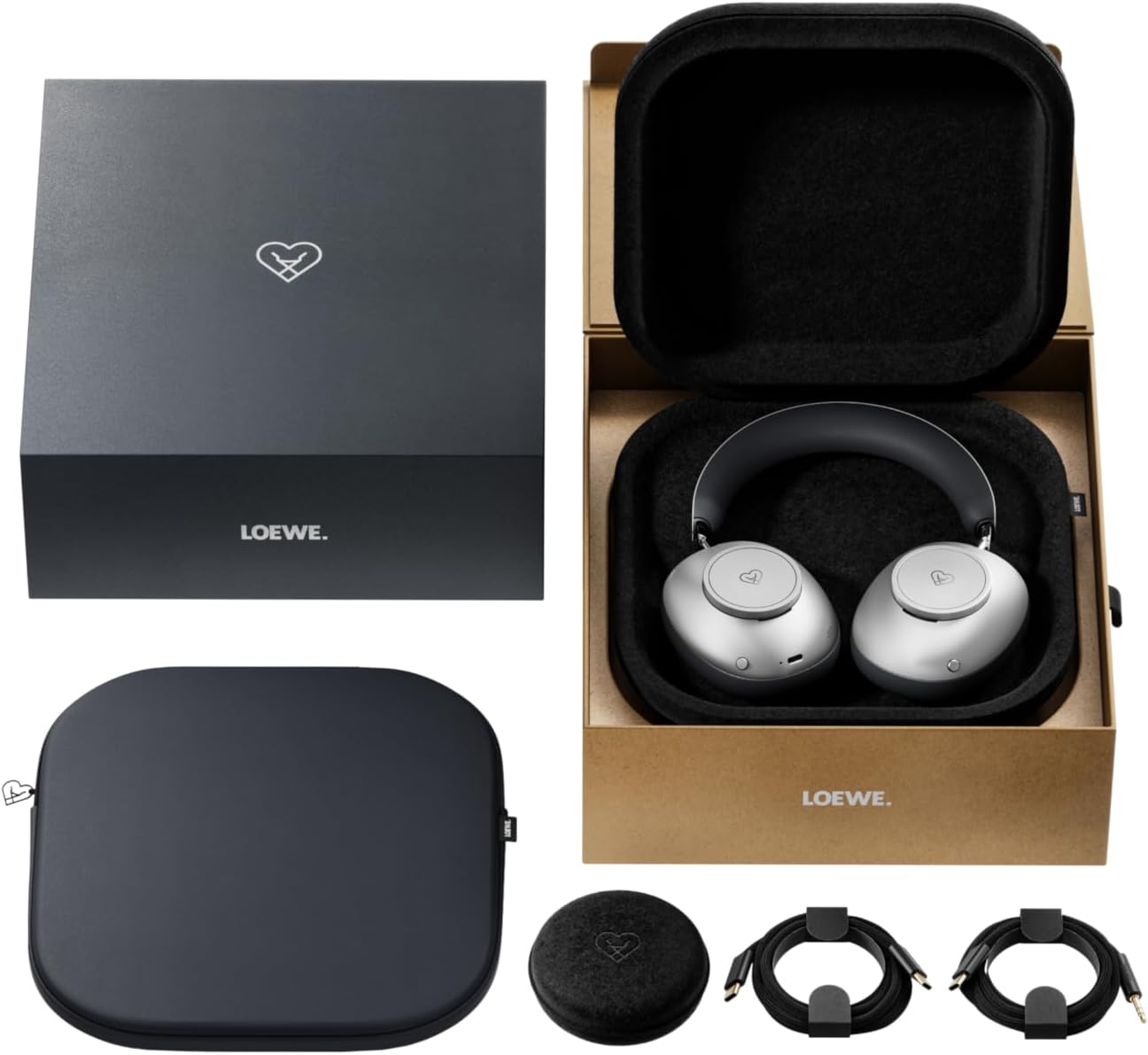
Image: The LOEWE Leo Wireless Headphones package contents, showing the headphones, USB-C cable, AUX cable, leather case, hard case, and cable pouch.
3. Производ је готовview
Familiarize yourself with the physical components and controls of your LOEWE Leo headphones.

Слика: Фронт view of the LOEWE Leo Wireless Headphones, showcasinг слушалице и траку за главу.
3.1. Контроле и портови
The headphones feature intuitive controls for easy operation:
- Контролни точкићи: Two precision-crafted rotary wheels for volume adjustment and navigation.
- Акциона дугмад: Dedicated buttons for playback control, ANC modes, and voice translation activation.
- УСБ-Ц порт: За пуњење и жично повезивање звука.
- 3.5 мм Јацк: For traditional wired audio connection.

Слика: Детаљна view of the earcup, highlighting the control dial, USB-C port, and 3.5mm audio jack.
4. Први кораци
4.1. Пуњење слушалица
Before first use, fully charge your LOEWE Leo headphones. A full charge provides up to 65 hours of continuous playback.
- Повежите приложени USB-C кабл за пуњење са USB-C портом на слушалицама.
- Повежите други крај кабла са компатибилним USB адаптером за напајање (није укључен) или USB портом рачунара.
- The LED indicator on the headphones will show the charging status. It will typically turn off or change color once fully charged.
4.2. Укључивање/искључивање
- За укључивање: Притисните и држите дугме за напајање око 3 секунде док се ЛЕД индикатор не упали.
- За искључивање: Притисните и држите дугме за напајање око 3 секунди док се ЛЕД индикатор не искључи.
4.3. Блуетоотх упаривање
The LOEWE Leo headphones utilize Bluetooth Low Energy (BLE) for faster pairing and reduced power consumption.
- Уверите се да су слушалице искључене.
- Press and hold the Power button for approximately 5 seconds until the LED indicator flashes rapidly, indicating pairing mode.
- На свом уређају (паметном телефону, таблету, рачунару) омогућите Блутут и потражите доступне уређаје.
- Select "LOEWE Leo" from the list of found devices.
- Једном када се повеже, ЛЕД индикатор ће престати да трепери и остати стално плави.
4.4. Жична веза
For a wired audio experience, use the supplied AUX to USB-C cable.
- Connect the USB-C end of the AUX cable to the headphones.
- Connect the 3.5mm end of the AUX cable to your audio source's 3.5mm jack.
- Слушалице ће се аутоматски пребацити у жични режим.
5. Управљање слушалицама
5.1. Audio Playback and Volume Control
Use the control dials and action buttons for managing your audio:
- Појачавање/утишавање: Rotate the designated control dial.
- Пусти/паузирај: Press the central action button once.
- Следећа нумера: Double-press the central action button.
- Претходни запис: Triple-press the central action button.

Image: Close-up of the earcup's control dial, used for volume and navigation.
5.2. Adaptive Noise Cancellation (ANC)
The LOEWE Leo features advanced adaptive noise cancellation that continuously analyzes your environment and adjusts in real-time.
- Активирање/деактивирање ANC-а: Press the dedicated ANC button once.
- Транспарентни режим: Press the ANC button twice to allow ambient sounds to pass through, enhancing situational awareness.

Image: Illustration of the adaptive noise cancellation feature, depicting sound wave management.
5.3. Real-time Voice Translation
Communicate across language barriers with the integrated real-time voice translation feature.
- Ensure your headphones are connected to a device with internet access and the LOEWE companion app installed.
- Activate the translation feature via the dedicated button or the companion app.
- Speak into the headphone's microphone. The translated audio will be played back in real-time.

Image: Earcup detail showing the microphone for voice input and the 'leo' icon, representing the real-time translation function.
5.4. Dolby Atmos and Spatial Audio
Experience immersive sound with Dolby Atmos and spatial audio support. This feature is automatically enabled when compatible content is played through a connected device that supports these audio technologies.
6. Одржавање и њега
6.1. Чишћење
- Обришите слушалице меком, сувом крпом која не оставља влакна.
- Не користите абразивна средства за чишћење, алкохол или хемијске раствараче.
- Keep moisture away from openings.
6.2. Брига о батерији
- Избегавајте често потпуно пражњење батерије.
- Store the headphones in a cool, dry place when not in use for extended periods.
- The battery is user-replaceable, contributing to the product's longevity.
6.3. Модуларни дизајн
The LOEWE Leo headphones feature a durable modular design with replaceable components, such as ear cushions and headbands. This design allows for easy replacement of worn parts, extending the product's lifespan.

Image: The modular construction of the LOEWE Leo headphones, showing detachable earcups and headband for maintenance or replacement.
КСНУМКС. Решавање проблема
If you encounter issues with your LOEWE Leo headphones, refer to the following common solutions:
- Нема напајања: Ensure the headphones are fully charged. Connect them to a power source using the USB-C cable.
- Нема звука:
- Проверите ниво јачине звука и на слушалицама и на повезаном уређају.
- Ensure the headphones are properly paired via Bluetooth or the AUX cable is securely connected.
- Покушајте да поново покренете и слушалице и уређај извора звука.
- Блуетоотх прекид везе:
- Ensure the headphones are within the Bluetooth range of your device (typically 10 meters).
- Disable and re-enable Bluetooth on your device, then attempt to re-pair.
- Clear the LOEWE Leo from your device's Bluetooth history and pair again.
- АНК не функционише ефикасно:
- Ensure the earcups form a good seal around your ears. Adjust the fit if necessary.
- Verify that ANC is activated.
- Voice Translation Issues:
- Check your device's internet connection.
- Ensure the LOEWE companion app is up-to-date and configured correctly.
- Говорите јасно и умереним темпом.
If problems persist, please contact LOEWE customer support.
8. Спецификације
| Феатуре | Опис |
|---|---|
| Назив модела | Лео |
| Број модела | 64641Ј10 |
| Технологија повезивања | Wireless (Bluetooth), Wired |
| Бежична комуникација | Блуетоотх са ниском потрошњом енергије (БЛЕ) |
| Карактеристике звука | Hi-Res Audio, Dolby Atmos, Spatial Audio |
| Поништавање буке | Adaptive Noise Reduction (ANC) |
| Посебне карактеристике | Real-time Voice Translation, Modular Design with Replaceable Components |
| Трајање батерије | До 65 сати (приближно) |
| Тип контроле | Button Control, Rotary Dials |
| Компатибилни уређаји | Cellular Phone, Tablet, Computer, Laptop |
| Тежина | 3 Kilograms (product weight as listed, may include packaging) |
9. Гаранција и подршка
9.1. Гаранција произвођача
The LOEWE Leo Wireless Headphones come with a Двогодишња гаранција произвођачаОва гаранција покрива недостатке у материјалу и изради при нормалној употреби. Молимо вас да сачувате доказ о куповини за потребе подношења захтева за гаранцију.
For specific terms and conditions of the warranty, please refer to the warranty card included in your product packaging or visit the official LOEWE webсајту.
9.2. Корисничка подршка
For technical assistance, troubleshooting, or warranty inquiries, please contact LOEWE customer support through their official webсајт или контакт информације наведене у документацији вашег производа.
Онлине ресурси: Visit the official LOEWE webсајт за често постављана питања, ажурирања софтвера и додатне ресурсе за подршку.


