1. Увод
This manual provides instructions for the setup, operation, and maintenance of your BEITONG KP70 Haptic Feedback Elite Gaming Controller. Please read this manual thoroughly before use to ensure proper functionality and to maximize your gaming experience.
2. Садржај пакета

Слика: Прекоview of the BEITONG KP70 controller and its included accessories, detailing the model, dimensions, connection types, battery capacity, and contents.
Проверите да ли су све ставке присутне у пакету:
- Контролер к 1
- Receiver x 1 (for 2.4G wireless connection)
- Cable x 1 (for wired connection and charging)
- Replaceable Joystick x 2
- Упутство за употребу x 1 (овај документ)
- Прикључна станица за пуњење к 1
3. Controller Layout and Features
Familiarize yourself with the various components and features of the BEITONG KP70 controller.

Слика: Детаљна view of the adaptive auto-sensing trigger mechanism, highlighting the high-performance chip, haptic feedback servo, high-precision gear set, auto-sensing switching mechanism, and haptic feedback triggers.
Adaptive Auto-Sensing Triggers: The triggers incorporate a high-performance chip, haptic feedback servo, and a high-precision gear set for responsive and immersive haptic feedback. An auto-sensing switching mechanism adjusts trigger response based on gameplay.

Image: Illustration of the damping adjustment joystick, showing the mechanism for adjusting resistance from 30gf (lighter) to 100gf (heavier).
Damping Adjustment Joystick: The joysticks feature a seamless damping adjustment mechanism, allowing users to customize resistance from 30gf (lighter, agile movement) to 100gf (heavier, precise control). Rotate clockwise for heavier resistance and counter-clockwise for lighter resistance.
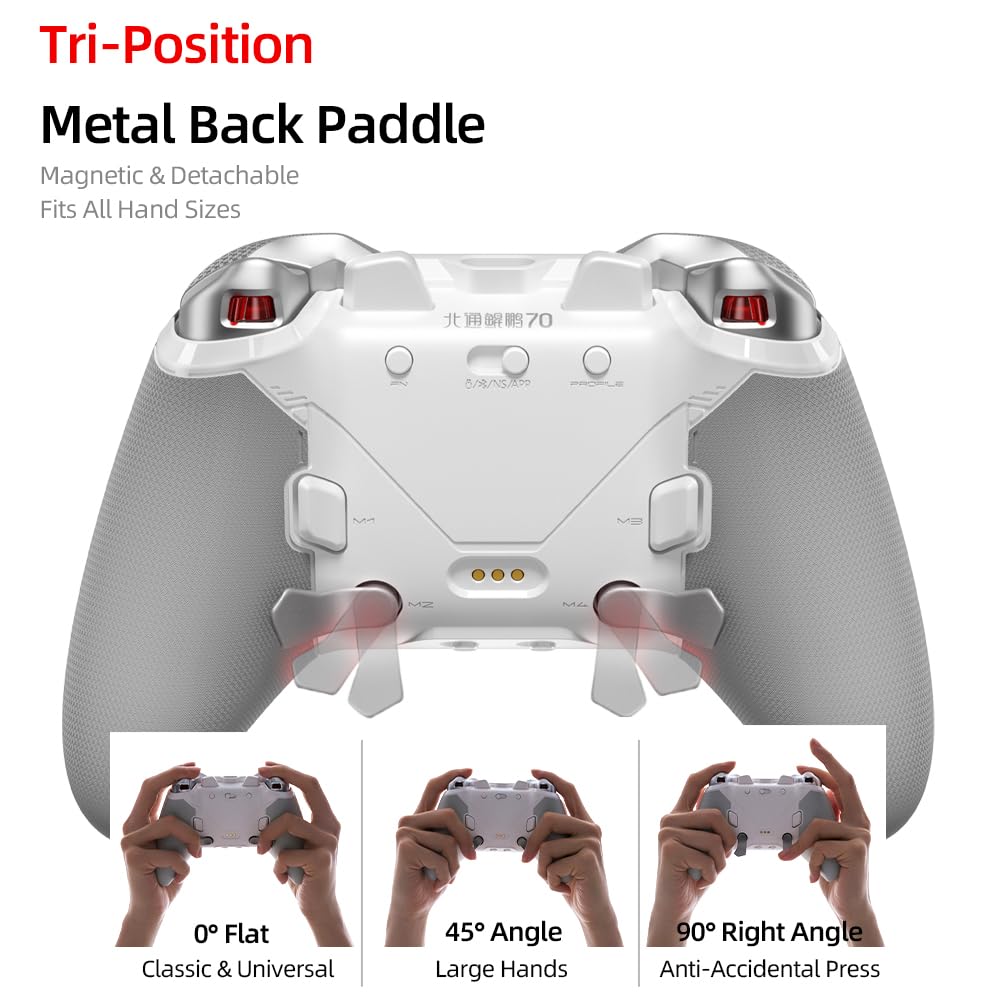
слика: View of the controller's rear, showcasing the magnetic and detachable tri-position metal back paddles and their three adjustable positions: 0° Flat, 45° Angle, and 90° Right Angle.
Tri-Position Metal Back Paddles: The controller is equipped with magnetic and detachable metal back paddles that can be adjusted to three positions: 0° Flat (classic), 45° Angle (for large hands), and 90° Right Angle (to prevent accidental presses).

Image: Comparison diagram illustrating the faster actuation and minimal delay of KP70 optical buttons (60gf actuation, 0.002s delay) compared to traditional mechanical buttons.
Optical Axis Buttons: The main action buttons utilize optical switches, providing a lighter and faster response with 60gf actuation force and an ultra-low delay of 0.002 seconds, designed for over 80 million presses.

Слика: Крупни план views of the controller's details, including the anti-slip pattern on the grips, the location of the 6 programmable buttons, and the motion sensing switch.
Додатне карактеристике:
- 6 програмабилних дугмади: Customize button functions for personalized gameplay.
- Anti-Slip Pattern: Textured grips for enhanced comfort and control.
- Motion Sensing Switch: Enables motion control functionalities in compatible games.
- Pulse Lighting: Intelligent lighting effects linked to trigger actions.
- Smart Faceplate: Supports intelligent recognition and software customization.
- Брзина анкетирања од 1000Hz: Ensures a stable and responsive connection with ultra-low latency.
4. Подешавање и повезивање
The BEITONG KP70 controller supports multiple connection methods: Wired, 2.4G Wireless, and Bluetooth. It is compatible with PC, NS (Nintendo Switch), NS2, iOS, and Android devices.
4.1 Жична веза
- Connect one end of the provided USB-C cable to the controller's USB-C port.
- Connect the other end of the USB-C cable to an available USB port on your PC or compatible device.
- Контролер ће бити аутоматски препознат и спреман за употребу.
4.2 2.4G Wireless Connection (using Receiver)
- Insert the 2.4G wireless receiver into an available USB port on your PC or compatible device.
- Укључите контролер.
- The controller will automatically pair with the receiver. An indicator light on the controller will confirm a successful connection.
4.3 Блуетоотх веза
- Уверите се да је контролер искључен из напајања.
- Press and hold the Bluetooth pairing button (refer to controller diagram for exact location) until the indicator light begins to flash rapidly, indicating pairing mode.
- On your device (PC, NS, iOS, Android), navigate to the Bluetooth settings.
- Тражи available devices and select "BEITONG KP70" from the list.
- Након упаривања, индикаторска лампица на контролеру ће почети да светли континуирано.
5. Упутство за употребу
5.1 Укључивање/искључивање
- Укључено: Press the central Home button to power on the controller.
- Искључивање: Press and hold the Home button for approximately 5 seconds to power off the controller. The controller will also automatically power off after a period of inactivity.
5.2 Adjusting Joystick Dampинг
Image: Illustration of the damping adjustment joystick, showing the mechanism for adjusting resistance from 30gf (lighter) to 100gf (heavier).
To adjust the joystick dampинг:
- For heavier, more precise control: Rotate the joystick ring clockwise. This setting is suitable for aiming in precision-based games.
- For lighter, more agile movement: Rotate the joystick ring counter-clockwise. This setting is suitable for fast-paced action games.
5.3 Configuring Back Paddles
слика: View of the controller's rear, showcasing the magnetic and detachable tri-position metal back paddles and their three adjustable positions: 0° Flat, 45° Angle, and 90° Right Angle.
The metal back paddles are magnetic and detachable. They can be set to three positions:
- 0° Flat: A classic, universal position.
- Угао од 45°: Recommended for users with larger hands.
- 90° Right Angle: Designed to prevent accidental presses during intense gameplay.
To adjust, gently pull the paddle away from the controller and reposition it into one of the three slots until it clicks magnetically into place.
5.4 Programming Buttons
The controller features 6 programmable buttons (including the back paddles). Refer to the controller's dedicated software (if available) or the specific programming instructions provided in the full manual for detailed steps on how to remap these buttons.
5.5 Haptic Feedback and Trigger Response

Слика: Прекоview of new features including adaptive haptic feedback triggers, pulse lighting, and smart faceplate capabilities.
The adaptive haptic feedback triggers provide dynamic resistance and vibration based on in-game actions. This feature is automatically managed by the controller's internal mechanisms. The pulse lighting effect is linked to trigger actions, providing visual feedback.
6. Пуњење контролера
The BEITONG KP70 controller is equipped with a 1500mAh battery. To charge the controller:
- Connect the provided USB-C cable to the controller's USB-C port.
- Повежите други крај кабла са УСБ извором напајања (нпр. рачунаром, УСБ адаптером за зид).
- Alternatively, place the controller on the included charging dock. Ensure the charging pins align correctly.
- The charging indicator light on the controller will illuminate during charging and turn off or change color when fully charged.
A full charge typically takes approximately 2-3 hours. Avoid using non-standard chargers or cables to prevent damage.
7. Одржавање
- Чишћење: Користите меку, суву крпу за чишћење контролера. За тврдокорну прљавштину, благо дamp cloth can be used, but ensure no moisture enters the controller's openings. Do not use harsh chemicals or abrasive cleaners.
- Складиштење: Чувајте контролер на хладном и сувом месту, даље од директне сунчеве светлости и екстремних температура.
- Одржавање батерије: За оптималан век трајања батерије, избегавајте често потпуно пражњење контролера. Ако складиштите батерију дуже време, пуните је до приближно 50% сваких неколико месеци.
- Нега каблова: Avoid bending or twisting the charging cable excessively to prevent internal damage.
КСНУМКС. Решавање проблема
8.1 Controller Not Powering On
- Ensure the controller is sufficiently charged. Connect it to a power source and allow it to charge for at least 30 minutes before attempting to power on again.
- Try pressing and holding the Home button for a longer duration (up to 10 seconds) to force a power cycle.
8.2 Connection Issues (Wireless/Bluetooth)
- 2.4G бежична мрежа: Ensure the receiver is securely plugged into a USB port. Try a different USB port. Re-pair the controller by following the 2.4G wireless connection steps.
- Блуетоотх: Ensure Bluetooth is enabled on your device. Forget the controller from your device's Bluetooth settings and attempt to pair again. Ensure the controller is in pairing mode (rapidly flashing indicator light).
- сметње: Move closer to your device and away from other wireless devices that might cause interference.
8.3 Buttons or Joysticks Not Responding
- Connect the controller via a wired connection to rule out wireless issues.
- Restart the controller and your device.
- Уверите се да никакве остатке не блокирају дугмад или џојстике.
- If using a PC, ensure controller drivers are up to date.
8.4 Проблеми са пуњењем
- Ensure the USB-C cable is securely connected to both the controller and the power source.
- Try a different USB-C cable and/or power adapter.
- If using the charging dock, ensure the controller is seated correctly and the charging pins are making contact.
9. Спецификације
Image: Detailed product information table for the BEITONG KP70 controller, including model number, dimensions, connection types, battery capacity, and package contents.
| Феатуре | Детаљ |
|---|---|
| Модел | BTP-KP70B |
| Димензија | 156 к 107 к 63 мм |
| Веза | Wired / 2.4G Wireless / Bluetooth |
| Батерија | 1500мАх |
| Компатибилност | PC, NS, NS2, iOS, Android |
| Поллинг Рате | 1000Хз |
| Joystick Dampинг | 30-100gf Adjustable |
| Optical Buttons | 60gf Actuation, 0.002s Delay, 80M+ Presses |
10. Гаранција и подршка
For warranty information and technical support, please refer to the warranty card included with your product or visit the official BEITONG website. You may also contact BEITONG customer service directly for assistance with product issues or inquiries.
BEITONG Official Webсајт: BEITONG Store on Amazon


