1. Производ је готовview
The Shimbol CP5 Ultra is a 5-inch Full Touch HD monitor designed to enhance mobile videography and photography for both iPhone and Android users. It provides real-time screen mirroring, touch control, and wireless connectivity, allowing users to utilize their phone's superior rear camera for vlogging, selfies, and live streaming.
- 5-инчни Фулл ХД екран: Offers a clear 1080P resolution for precise framing and previewинг.
- Real-Time Screen Mirroring with Touch Control: Operate your phone directly from the monitor, including zoom, focus adjustment, and recording initiation.
- Dual-Band Wireless Connectivity: Features 2.4G/5G dual-band technology for ultra-low latency (0.04s) and stable transmission up to 50 meters in open areas.
- Магнетни додатак: Built-in magnet securely attaches to compatible phones. A magnetic ring is included for phones without built-in magnetic support.
- Блуетоотх даљински окидач: Enables contactless shooting for solo or group photos and videos.
- Дуг век трајања батерије: Provides approximately 3.5 hours of continuous use.

2. Водич за подешавање
2.1 Распакивање и почетна наплата
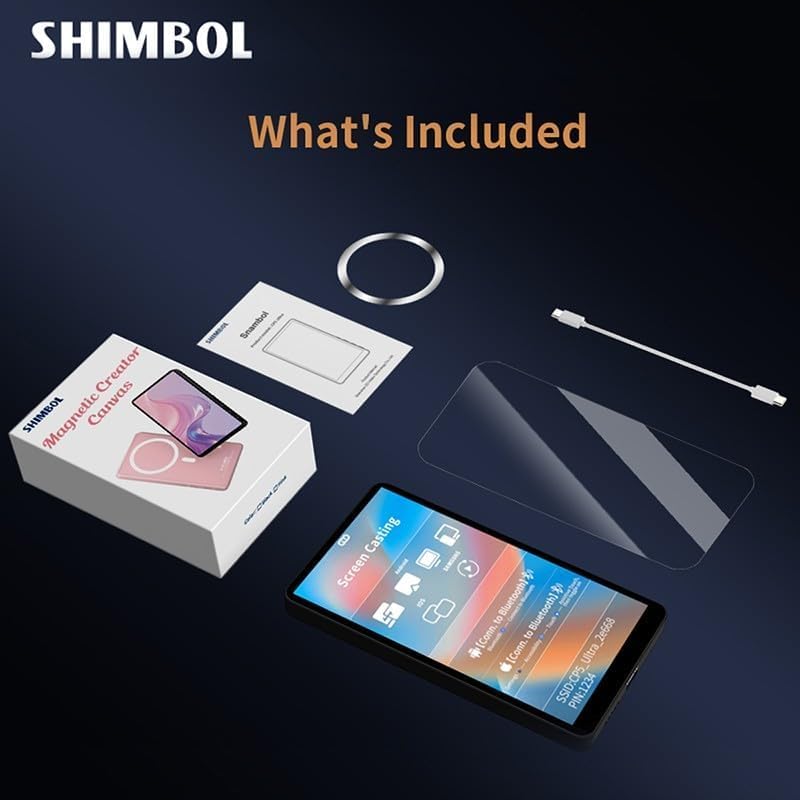
Upon unboxing, ensure all components are present: the CP5 Ultra monitor, a magnetic ring, a USB-C charging cable, and a screen protector. It is recommended to fully charge the device before first use using the provided USB-C cable.
2.2 Укључивање и повезивање
- Укључено: Press and hold the power button on the side of the CP5 Ultra until the screen illuminates.
- Повежите се на Ви-Фи: The monitor will display a QR code and Wi-Fi network details (SSID and password). Use your phone's camera to scan the QR code to join the local network created by the CP5 Ultra.
- Enable Screen Mirroring: On your iPhone or Android device, swipe down (or up, depending on model) to access the Control Center. Tap the 'Screen Mirroring' icon.
- Изаберите уређај: From the list of available devices, select the CP5 Ultra's name (e.g., "CP5_Ultra_XXXXXX"). A checkmark will appear next to the device name when mirroring is active.
- Bluetooth Connection (for Touch Control): Go to your phone's Settings > Bluetooth. Find the CP5 Ultra's Bluetooth name (e.g., "CP5_Ultra_XXXXXX") and tap to connect.
- Enable Accessibility (for Touch Control): For full touch control functionality, navigate to your phone's Settings > Accessibility > Zoom, and ensure 'Zoom' is turned on. To exit the zoom mode, double-tap the screen with three fingers.

2.3 Магнетни прикључак
The CP5 Ultra features a built-in magnet for secure attachment to compatible phones (e.g., MagSafe-enabled iPhones). For phones without built-in magnetic support, an adhesive magnetic ring is provided. Attach this ring to the back of your phone or phone case to enable magnetic mounting.

2.4 Recommended App for 4K Shooting
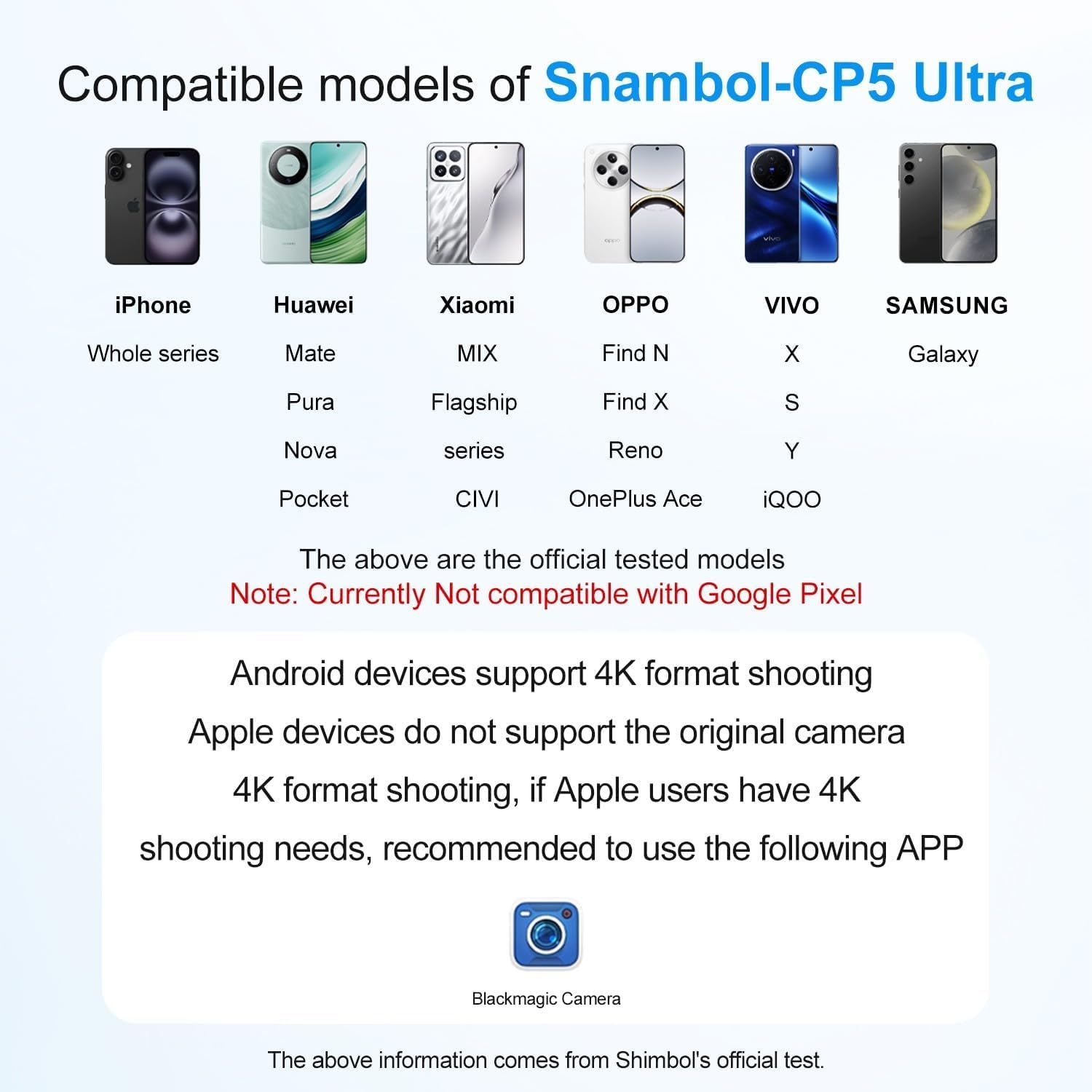
For high-definition 4K shooting without latency, it is recommended to download and use the Blackmagic Camera App with this product.

3. Упутство за употребу
3.1 Основне контроле
The CP5 Ultra allows direct interaction with your phone's camera interface through its touch screen. This includes:
- Multi-Touch Zoom & Focus: Pinch, swipe, and tap on the monitor screen to precisely control zoom and focus within your phone's camera app.
- Снимање: Tap the record button on the monitor to start or stop video recording.
- Rear Camera Switching: Instantly switch to your phone's rear camera for high-quality selfies and vlogs while viewing yourself on the CP5 Ultra.

3.2 Функције бочних тастера
The side buttons on the CP5 Ultra provide quick access to essential functions:
- Горње дугме: Capture (takes a photo or starts/stops video recording).
- Друго дугме: Mirror (flips the display horizontally, useful for self-recording).
- Треће дугме: Zoom-in/Mute (controls zoom level or mutes audio).
- Четврто дугме: Power/Brightness (short press to adjust brightness, long press to power on/off).
3.3 Блуетоотх даљински окидач
The included Bluetooth remote shutter allows for hands-free photo and video capture. Pair the remote with your phone via Bluetooth settings. Once paired, press the button on the remote to trigger your phone's camera shutter.
3.4 Аудио мониторинг
The CP5 Ultra features a built-in speaker, allowing you to play back footage with clear audio directly from the monitor without additional gear.

3.5 Connection Tutorial Video
For a visual guide on connecting your Shimbol CP5 Ultra, please refer to the official tutorial video below:
4. Одржавање
To ensure the longevity and optimal performance of your Shimbol CP5 Ultra monitor, follow these maintenance guidelines:
- Чишћење: Use a soft, lint-free cloth to clean the screen and body. Avoid abrasive materials or harsh chemicals. For stubborn smudges, lightly dampобришите крпу водом или средством за чишћење посебно за екране.
- Складиштење: Store the monitor in a cool, dry place away from direct sunlight and extreme temperatures. Use the provided screen protector to prevent scratches when not in use.
- Руковање: Избегавајте испуштање уређаја или његово излагање јаким ударцима. Не покушавајте да расклапате уређај, јер ће то поништити гаранцију.
- Изложеност води: Уређај није водоотпоран. Избегавајте излагање води или високој влажности.
КСНУМКС. Решавање проблема
- Нема напајања: Уверите се да је уређај потпуно напуњен. Повежите га са извором напајања помоћу USB-C кабла.
- Проблеми са повезивањем:
- Verify that your phone is connected to the CP5 Ultra's local Wi-Fi network.
- Ensure Screen Mirroring is active and the correct device is selected on your phone.
- Check Bluetooth connection for touch control functionality.
- Restart both the CP5 Ultra and your phone.
- Екран на додир који не реагује:
- Потврдите да је Блуетоотх веза успостављена.
- Ensure 'Zoom' is enabled in your phone's Accessibility settings for touch control.
- If the issue persists, try restarting the device and re-establishing connections.
- Lag or Delay in Mirroring:
- Ensure you are within the recommended operating range (up to 50m in open areas).
- Минимизирајте сметње од других бежичних уређаја.
- For 4K shooting, use the recommended Blackmagic Camera App.
- Magnetic Attachment Not Secure:
- If your phone does not have built-in magnetic support, ensure the included magnetic ring is properly attached to your phone or case.
- Check for any obstructions between the monitor and your phone.
6. Спецификације
| Феатуре | Детаљ |
|---|---|
| Број модела | CP5 Ultra-Black |
| Величина екрана | 5 инча |
| Резолуција | КСНУМКСП Фулл ХД |
| Повезивање | 2.4G/5G Dual-Band Wireless, Bluetooth |
| Латенција | <0.04с |
| Распон преноса | Up to 50m (open areas) |
| Трајање батерије | Прибл. 3.5 сата |
| Тежина артикла | 9.5 унци (0.27 килограма) |
| Димензије пакета | 5.75 к 3.54 к 1.42 инча |
| Компатибилни уређаји | Cellphone, Tablet (iPhone, Huawei, Xiaomi, OPPO, VIVO, Samsung Galaxy series. Not compatible with Google Pixel.) |
7. Гаранција и подршка
For warranty information, product support, or service inquiries, please refer to the official Shimbol webсајт или директно контактирајте њихову корисничку службу. Сачувајте рачун као доказ о куповини за евентуалне рекламације по гаранцији.
Посетите Shimbol Store on Amazon за додатне информације о производу и ресурсе за подршку.


