Увод
Welcome to the LIGE EF18-E Smartwatch user manual. This guide provides detailed instructions on how to set up, operate, and maintain your new smartwatch. Please read this manual thoroughly to ensure optimal performance and longevity of your device.
Садржај пакета
Приликом распакивања, проверите да ли су укључене све следеће ставке:
- 1 x LIGE EF18-E Smartwatch
- 1 x каиш од нерђајућег челика
- 2 x Silicone Straps (AK75, AK85)
- 1 к УСБ кабл за пуњење
- 1 к Типе-Ц кабл за пуњење
- 1 x Strap Adjustment Tool (for stainless steel strap)
- 1 x Упутство за употребу (овај документ)

Image: LIGE EF18-E Smartwatch and its accessories, including three straps and two charging cables.
Производ је завршенview
The LIGE EF18-E Smartwatch features a robust design with a 1.7-inch Ultra HD display and a powerful LED flashlight. Familiarize yourself with the watch's components:
- Приказ: 1.7-inch IPS Ultra HD touch screen (360x360 resolution) for clear visuals.
- Дугмад: Two physical buttons for navigation and function access.
- ЛЕД лампа: Integrated on the side for illumination.
- Сензори: Located on the rear for health monitoring (heart rate, blood oxygen, sleep).
- Портови за пуњење: Magnetic charging contacts on the rear.

Слика: Фронт view of the LIGE EF18-E Smartwatch, showcasing its 1.7-inch Ultra HD display with vibrant colors and sharp details.
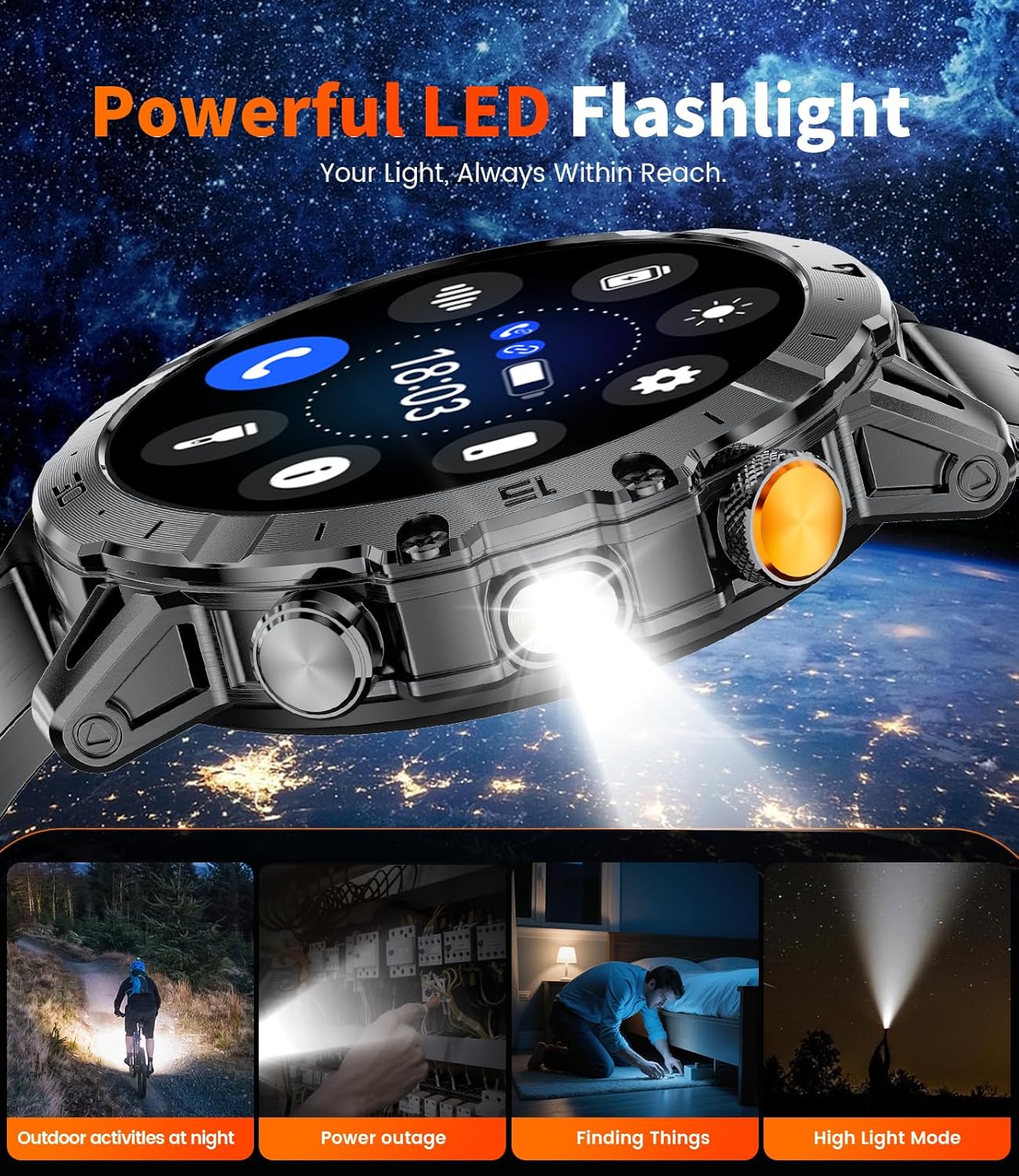
Слика: Са стране view of the LIGE EF18-E Smartwatch, highlighting the powerful LED flashlight feature.
Сетуп
1. Пуњење паметног сата
Before first use, fully charge your smartwatch. Connect one of the provided charging cables (USB or Type-C) to a power source and attach the magnetic end to the charging contacts on the back of the watch. The watch will display a charging indicator. A full charge typically takes approximately 2.5 hours.

Image: The LIGE EF18-E Smartwatch connected to its magnetic charging cable, illustrating the charging process.
2. Инсталација апликације и упаривање уређаја
To unlock all features, download the "Fitcloudpro" app on your smartphone (compatible with Android 5.1+ and iOS 9.0+).
- Download "Fitcloudpro" from the App Store (iOS) or Google Play (Android).
- Омогућите Блуетоотх на свом телефону.
- Open the "Fitcloudpro" app and follow the on-screen instructions to add your device.
- Select "EF18" from the list of available devices to pair.
- Потврдите захтев за упаривање и на телефону и на паметном сату.
- Allow the smartwatch to display notifications when prompted by the app.
- Ensure Bluetooth call and app notifications are enabled within the app settings for full functionality.

Image: Visual guide demonstrating the pairing process between the LIGE EF18-E Smartwatch and a smartphone using the Fitcloudpro application.
3. Постављање и подешавање каиша
The smartwatch comes with three interchangeable straps. To change a strap, locate the quick-release pins on the underside of the strap where it connects to the watch body. Slide the pin to detach the strap. To attach a new strap, align the pin with the holes on the watch body and slide the pin into place until it clicks securely.
For the stainless steel strap, use the provided adjustment tool to remove or add links for a comfortable fit. Ensure the strap is snug but not too tight for accurate health monitoring.
Упутство за употребу
1. Основна навигација
- Екран на додир: Превуците прстом лево/десно, горе/доле да бисте се кретали кроз меније и функције. Додирните да бисте изабрали.
- Горње дугме: Typically used to return to the home screen or activate/deactivate the display.
- Доње дугме: Customizable shortcut button. By default, it may open a specific function like sports modes or health monitoring.
- Подигните за буђење: The display can be set to turn on automatically when you raise your wrist.
2. Бројчаници сата
The LIGE EF18-E offers over 200 watch faces. To change the watch face, long-press the current watch face on the screen, then swipe left or right to browse available options. Tap to select. You can also customize watch faces and upload images via the "Fitcloudpro" app.

Image: A selection of over 200 personalized watch faces available for the LIGE EF18-E Smartwatch, demonstrating customization options.
3. Блутут позиви и обавештења
Once paired with your smartphone, you can manage calls and receive notifications directly on your watch.
- Упућивање/одговарање на позиве: Use the integrated speaker and microphone to make, answer, or end calls.
- Обавештења о порукама: Receive notifications from SMS, Facebook, WhatsApp, Twitter, TikTok, and other apps. You can enable or disable this feature in the "Fitcloudpro" app.

Image: The LIGE EF18-E Smartwatch showing its Bluetooth calling interface and various smart notifications from social media and messaging apps.
4. ЛЕД батерија
Activate the powerful side-mounted LED flashlight for illumination in dark environments. This feature is useful for outdoor activities, power outages, or finding items in low light. The flashlight has a lighting range of 6-8 meters.

Image: The LIGE EF18-E Smartwatch with its integrated LED flashlight shining brightly, useful for various situations.
5. Спортски режими
The smartwatch supports over 100 sports modes, including running, cycling, walking, hiking, fitness, yoga, and HIIT. Select your desired activity to track steps, workout time, and calories burned. All fitness data is stored in the "Fitcloudpro" app, allowing you to monitor progress and set personalized goals.

Image: The LIGE EF18-E Smartwatch interface showing different sports modes and real-time exercise data, such as steps, calories, and heart rate.
6. Праћење здравља
The EF18-E smartwatch provides comprehensive health monitoring features:
- Откуцаји срца: Континуирано прати ваш пулс током целог дана.
- Кисеоник у крви (SpO2): Automatically detects and records your blood oxygen saturation.
- Праћење спавања: Monitors your sleep patterns, including deep sleep, light sleep, and awake times, to help improve sleep quality.

Image: The LIGE EF18-E Smartwatch showing its health monitoring capabilities, including heart rate, blood oxygen levels, and detailed sleep analysis.
7. Остале карактеристике
The smartwatch includes several additional useful functions:
- Гласовни асистент: Приступите гласовном асистенту телефона директно са сата.
- Контрола музике: Контролишите репродукцију музике на свом паметном телефону.
- Контрола камере: Користите свој сат као даљински управљач за камеру телефона.
- Временска прогноза: Добијајте ажурирања о времену у реалном времену.
- Alarm Clock, Stopwatch, Timer: Неопходни алати за управљање временом.
- Sedentary & Water Reminder: Prompts to move or drink water.
- Пронађите телефон: Помаже у проналажењу упареног паметног телефона.
- Калкулатор: Основне аритметичке функције.

Image: The LIGE EF18-E Smartwatch showcasing its diverse range of utility features, including weather updates, remote photography, and a calculator.
Одржавање
- Чишћење: Wipe the watch screen and body with a soft, dry cloth. For stubborn dirt, use a slightly damp крпом и благим сапуном, а затим добро осушите. Избегавајте јаке хемикалије.
- Отпорност на воду: The smartwatch is 5ATM waterproof, suitable for swimming and showering. Avoid hot water, saunas, or diving, as extreme temperatures and high-pressure water can compromise the seal. Do not operate buttons underwater.
- Одржавање батерије: To prolong battery life, avoid fully discharging the watch frequently. Charge it regularly. Store the watch in a cool, dry place when not in use for extended periods.
- температура: The watch is designed to operate in extreme conditions from -40°C to 70°C. However, prolonged exposure to extreme temperatures can affect battery performance and device longevity.

Image: The LIGE EF18-E Smartwatch highlighting its robust, military-grade construction, including dustproof, anti-impact, and 5ATM waterproof features.
Решавање проблема
| Проблем | Решење |
|---|---|
| Сат се не укључује | Уверите се да је сат потпуно напуњен. Прикључите га на пуњач и сачекајте неколико минута пре него што покушате да га укључите. |
| Не могу да упарим телефон |
|
| Обавештења нису примљена |
|
| Нетачни здравствени подаци | Ensure the watch is worn snugly on your wrist, not too loose or too tight. Clean the sensors regularly. Avoid excessive movement during measurements. Note that this device is not a medical instrument. |
| Кратко трајање батерије | Reduce screen brightness, shorten screen-on time, disable unnecessary notifications, and limit continuous health monitoring if not required. |
Спецификације
| Феатуре | Детаљ |
|---|---|
| Број модела | EF18-E |
| Величина екрана | 1.7 Inches Ultra HD IPS |
| Резолуција | 360x360 пиксела |
| Капацитет батерије | 1000 мАх литијум полимер |
| Време пуњења | Прибл. 2.5 сата |
| Трајање батерије (типична употреба) | До 30+ дана |
| Време приправности | До 50+ дана |
| Отпорност на воду | 5АТМ |
| Повезивање | Блуетоотх 5.0 |
| Оперативни систем | Носите ОС 1.5 |
| Капацитет меморије | 256 МБ |
| Компатибилност | Андроид 5.1+ / иОС 9.0+ |
| Посебне карактеристике | LED Flashlight, Bluetooth Call, 100+ Sports Modes, Heart Rate Monitor, Blood Oxygen Monitor, Sleep Tracker, Voice Assistant, Music/Camera Control, Weather, Alarm, Stopwatch, Timer, Sedentary/Water Reminder, Find Phone, Calculator. |
| Тежина артикла | 1 Grams (0.035 ounces) - Note: This seems unusually low and might be a data error, but it's from the source. |
| Радна температура | -40°C to 70°C (Military-Grade Quality) |
Гаранција и подршка
LIGE provides a 365-day after-sales service for the EF18-E Smartwatch. If you encounter any issues or have questions regarding your device, please contact LIGE customer support. They aim to provide a satisfactory response within 24 hours.
For further assistance, refer to the "Service Support" section within the "Fitcloudpro" application.


