1. Увод
Thank you for choosing the EMPIRE GAMING RF906 Wireless Gaming Mouse. This manual provides detailed instructions for setting up, operating, and maintaining your new gaming mouse. Please read this manual carefully before use to ensure optimal performance and longevity of your device.
2. Садржај пакета
Молимо вас да проверите садржај пакета како бисте били сигурни да су сви предмети присутни:
- EMPIRE GAMING RF906 Wireless Gaming Mouse
- USB 2.4 GHz prijamnik
- УСБ-Ц на УСБ-А кабл за пуњење/дата
- Кориснички приручник (овај документ)
3. Производ је готовview
Familiarize yourself with the various components and features of your RF906 gaming mouse.
Слика 3.1: Врх View with Programmable Buttons
Ова слика приказује врх view of the EMPIRE GAMING RF906 mouse, highlighting the main left and right click buttons, scroll wheel, and two additional programmable buttons located near the scroll wheel.

Image 3.2: Ergonomic Design and RGB Lighting
This image displays an angled view of the mouse, emphasizing its ergonomic shape, soft-touch material for comfortable grip, a dedicated thumb rest, and the customizable RGB lighting zones along the sides and logo.

Слика 3.3: Доња страна View and Connection Switches
The bottom of the RF906 mouse is shown, indicating the ON/OFF power switch, the mode selection switch for WiFi (2.4 GHz) and Bluetooth (BT1/BT2), the optical sensor, and the storage slot for the USB 2.4 GHz receiver.
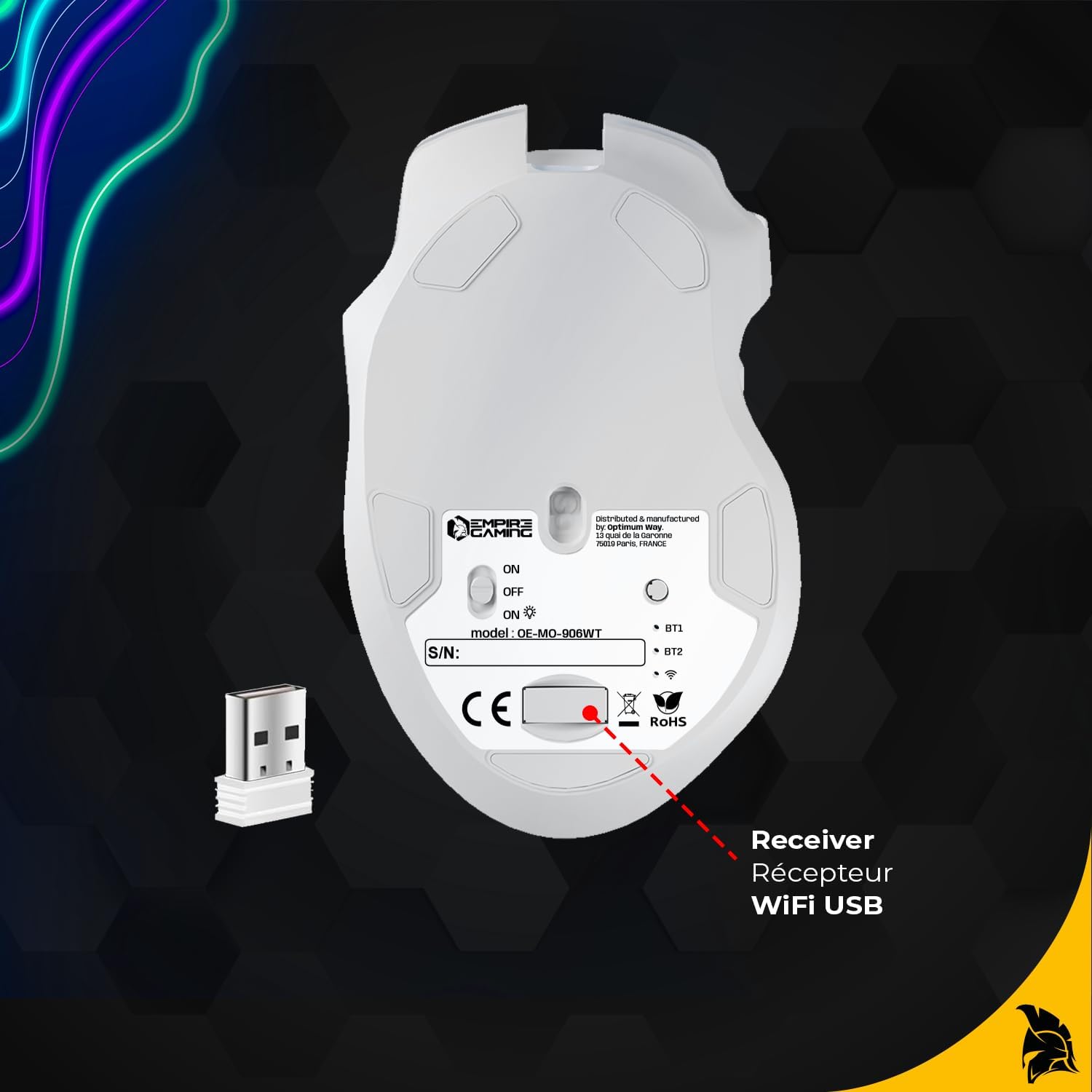
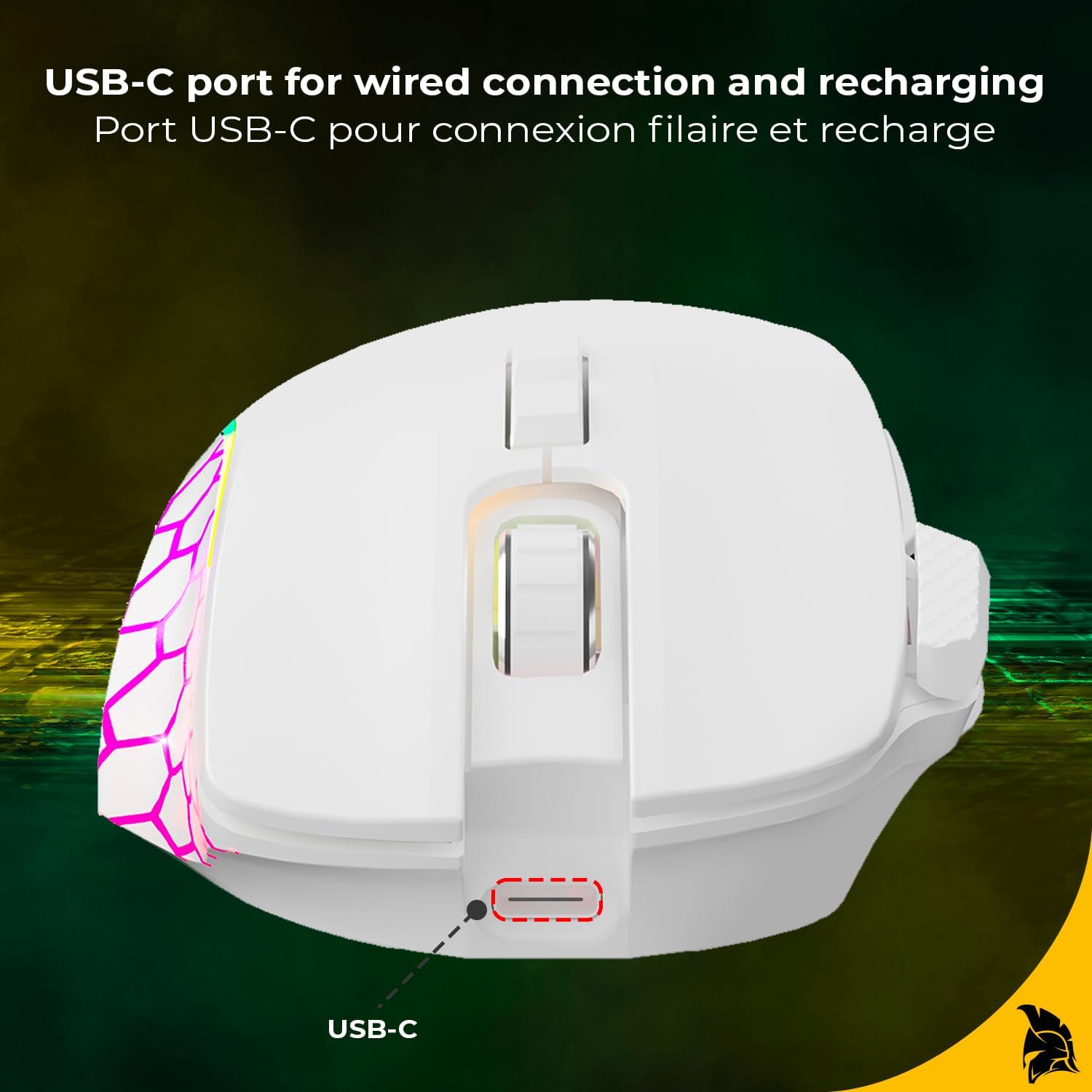
Image 3.4: USB-C Port
This image highlights the USB-C port located at the front of the mouse, used for wired connection and charging the internal battery.
4. Подешавање и повезивање
The RF906 mouse offers three connection modes: 2.4 GHz Wireless, Bluetooth, and Wired.
4.1. Бежична веза од 2.4 GHz
- Locate the USB 2.4 GHz receiver stored in the compartment on the bottom of the mouse (refer to Image 3.3).
- Укључите УСБ пријемник у слободан УСБ порт на рачунару.
- Turn the power switch on the bottom of the mouse to the 'ON' position.
- Set the mode switch on the bottom of the mouse to the '2.4G' position.
- The mouse should automatically connect to your computer. If not, press any button to wake it up.
4.2. Блуетоотх веза
- Turn the power switch on the bottom of the mouse to the 'ON' position.
- Set the mode switch on the bottom of the mouse to either 'BT1' or 'BT2' position.
- На рачунару отворите подешавања за Bluetooth и потражите нове уређаје.
- The mouse should appear as 'RF906' or similar. Select it to pair.
- If prompted, confirm the pairing code.
4.3. Жична веза
- Connect the supplied USB-C cable to the USB-C port on the front of the mouse (refer to Image 3.4).
- Повежите USB-A крај кабла са доступним USB портом на рачунару.
- Миш ће се аутоматски пребацити у жични режим и почети са пуњењем.

Image 4.1: Wireless Connectivity and Battery Life
This image illustrates the wireless capabilities of the RF906 mouse, supporting both 2.4 GHz WiFi and Bluetooth connections, and highlighting its battery life of up to 40 hours on a single charge.
5. Упутство за употребу
5.1. Подешавање DPI-ја
The RF906 mouse features 6 adjustable DPI levels, up to 10000 DPI, allowing you to switch between precision and speed. Use the dedicated DPI button (usually located behind the scroll wheel) to cycle through the preset DPI settings. The RGB lighting may change color to indicate the current DPI level.
5.2. Програмабилни тастери
The mouse is equipped with 8 programmable buttons. These buttons can be customized for various functions, macros, or shortcuts using the dedicated software. This is particularly useful for FPS, MOBA, and MMORPG games.
5.3. Прилагођавање RGB осветљења
The RF906 mouse features customizable RGB backlighting. You can personalize the lighting effects, colors, and patterns to match your gaming setup or personal preference. This customization is performed through the mouse's software.

Image 5.1: RGB Backlighting
This image demonstrates the dynamic and customizable RGB lighting effects available on the RF906 mouse, enhancing the aesthetic of your gaming environment.
5.4. 1000 Hz Polling Rate
The mouse operates with a 1000 Hz polling rate, ensuring exceptional responsiveness and precision. Every movement is instantly registered on screen, providing a smooth and accurate gaming experience.
6. Инсталација софтвера
To unlock the full potential of your EMPIRE GAMING RF906 mouse, including button programming and advanced RGB lighting customization, please install the dedicated software. The software can typically be downloaded from the official EMPIRE GAMING webсајт. Пратите упутства на екрану за инсталацију.
7. Одржавање
7.1. Чишћење
За чишћење миша користите меку, суву крпу. За тврдокорну прљавштину, благоamp cloth with mild soap can be used, but ensure no liquid enters the mouse. Avoid using harsh chemicals or abrasive materials.
7.2. Пуњење батерије
The RF906 mouse is equipped with a built-in Lithium-polymer battery. When the battery is low, connect the mouse to your computer using the supplied USB-C cable. The mouse can be used in wired mode while charging.
КСНУМКС. Решавање проблема
If you encounter issues with your RF906 mouse, please refer to the following common solutions:
- Миш не реагује: Ensure the mouse is powered on and correctly connected (2.4 GHz receiver plugged in, Bluetooth paired, or USB-C cable connected). Check the battery level.
- Lag or disconnections in wireless mode: Ensure the USB receiver is not too far from the mouse and there are no major obstructions. Try plugging the receiver into a different USB port. Reduce interference from other wireless devices.
- DPI се не мења: Ensure the mouse software is installed and updated. Try resetting the mouse to factory settings via the software if available.
- RGB осветљење не ради: Check software settings for RGB customization. Ensure the mouse is not in a power-saving mode that disables lighting.
- Дугмад не раде: Verify button assignments in the mouse software. Test the mouse on another computer to rule out system-specific issues.
If problems persist, please contact EMPIRE GAMING customer support.
9. Спецификације
| Бранд | ЕМПИРЕ ГАМИНГ |
| Модел | РФ906 |
| Технологија повезивања | 2.4 GHz Wireless, Bluetooth, USB Wired |
| ДПИ Левелс | 6 levels, up to 10000 DPI |
| Поллинг Рате | 1000 Хз |
| Број дугмади | 8 (Програмабилно) |
| Сензорна технологија | Оптицал |
| Осветљење | Прилагодљиво РГБ позадинско осветљење |
| Тип батерије | Литијум-полимер |
| Трајање батерије | До 40 сати (бежично) |
| Компатибилност | ПЦ/Мац |
| Димензије (Д к Ш к В) | 12.8 к 7.9 к 4.2 цм |
| Тежина | 122 г |
| Оријентација руке | Амбидектроус |
10. Гаранција и подршка
10.1. Гаранција произвођача
The EMPIRE GAMING RF906 Wireless Gaming Mouse comes with a 2-годишња гаранција произвођачаОва гаранција покрива недостатке у материјалу и изради при нормалној употреби. Молимо вас да сачувате доказ о куповини за потребе подношења захтева за гаранцију.
10.2. Корисничка подршка
For technical assistance, warranty claims, or any questions regarding your EMPIRE GAMING RF906 mouse, please visit the official EMPIRE GAMING website or contact their customer support directly. Contact information can typically be found on the product packaging or the brand's webсајту.


