1. Производ је готовview
The Pyle PLR7103MHU is a 7-inch single DIN touchscreen car stereo designed to enhance your in-car multimedia experience. It features wireless Apple CarPlay and Android Auto for seamless smartphone integration, Bluetooth 5.0 for stable connectivity, USB/USB-C ports for fast charging and media playback, and an AM/FM radio tuner. The unit also includes a backup camera for improved safety during parking maneuvers.

Image 1.1: Pyle PLR7103MHU Car Stereo main unit.
2. Безбедносне информације
Read all instructions carefully before installation and operation. Failure to follow these instructions may result in personal injury or damage to the product or vehicle. Keep this manual for future reference.
- Always consult a professional for installation if you are unsure about any steps.
- Не користите уређај на начин који вам одвлачи пажњу од вожње.
- Уверите се да су сви каблови правилно повезани како бисте спречили кратки спојеви или оштећења.
- Избегавајте излагање уређаја екстремним температурама, директној сунчевој светлости током дужег периода или прекомерној влази.
- Искључите акумулатор возила пре почетка инсталације како бисте спречили електричне опасности.
3. Садржај пакета
Пре него што наставите са инсталацијом, проверите да ли су све ставке присутне у пакету.

Image 3.1: Contents of the Pyle PLR7103MHU package.
- Single DIN Car Stereo Unit
- Ремоте Цонтрол
- Кабел за напајање и ожичење
- Бацкуп Цамера
- Mounting & Cable Accessories (screws, mounting straps, RCA cables, microphone)
4. Водич за инсталацију
4.1 Провере пре инсталације
- Уверите се да је акумулатор возила искључен.
- Confirm the vehicle has a single DIN dashboard opening.
- Review the wiring diagram provided with the unit.
4.2 Монтажа јединице
The PLR7103MHU is designed to fit standard single DIN slots. The screen offers tilt and height adjustments for optimal viewинг.

Image 4.1: Pyle PLR7103MHU unit installed in a vehicle dashboard.
- Уклоните постојећи ауто стерео са контролне табле.
- Connect the wiring harness to the vehicle's wiring and the stereo unit.
- Slide the stereo unit into the single DIN slot.
- Причврстите уређај помоћу приложених носача и вијака за монтажу.
- Adjust the screen tilt and height as needed.
4.3 Ожичење
Refer to the detailed wiring diagram included with your product for specific connections. Key connections include power, ground, speaker outputs, antenna, and auxiliary inputs/outputs.

Слика 4.2: Позади view of the Pyle PLR7103MHU showing various input/output ports.
- Напајање (жуто): Константно 12V+
- Додатна опрема (црвена): Switched 12V+
- Земља (црна): Vehicle chassis ground
- Жице за звучнике: Connect to corresponding vehicle speaker wires (e.g., Front Left +, Front Left -).
- Backup Camera Input (Yellow RCA): Connect to the video output of the backup camera.
- Reverse Trigger (Brown): Connect to the vehicle's reverse light circuit.
- Антена (плава): Снажна антена/ampдаљинско укључивање Liferier-а.
4.4 Инсталација камере за вожњу уназад
The included HD waterproof backup camera provides night vision for enhanced visibility.

Image 4.3: Included waterproof backup camera with night vision capabilities.
- Mount the backup camera at the rear of the vehicle, ensuring a clear view.
- Run the video cable from the camera to the stereo unit's "CAM IN" RCA input.
- Спојите кабл за напајање камере на извор напајања за светла за вожњу уназад на возилу.
- Connect the stereo's reverse trigger wire (usually brown) to the same reverse light power source.
5. Упутство за употребу
5.1 Основни рад
- Укључивање/искључивање: Притисните дугме за напајање (обично дугме за јачину звука) да бисте укључили или искључили уређај.
- Контрола јачине звука: Rotate the volume knob or use the touchscreen controls.
- Избор режима: Press the MODE button to cycle through available sources (Radio, USB, Bluetooth, CarPlay/Android Auto, AUX, AV IN).
- Почетни екран: Press the HOME button to return to the main menu.
5.2 Интерфејс екрана осетљивог на додир
The 7-inch touchscreen provides intuitive control over all functions. Navigate by tapping icons and swiping through menus.
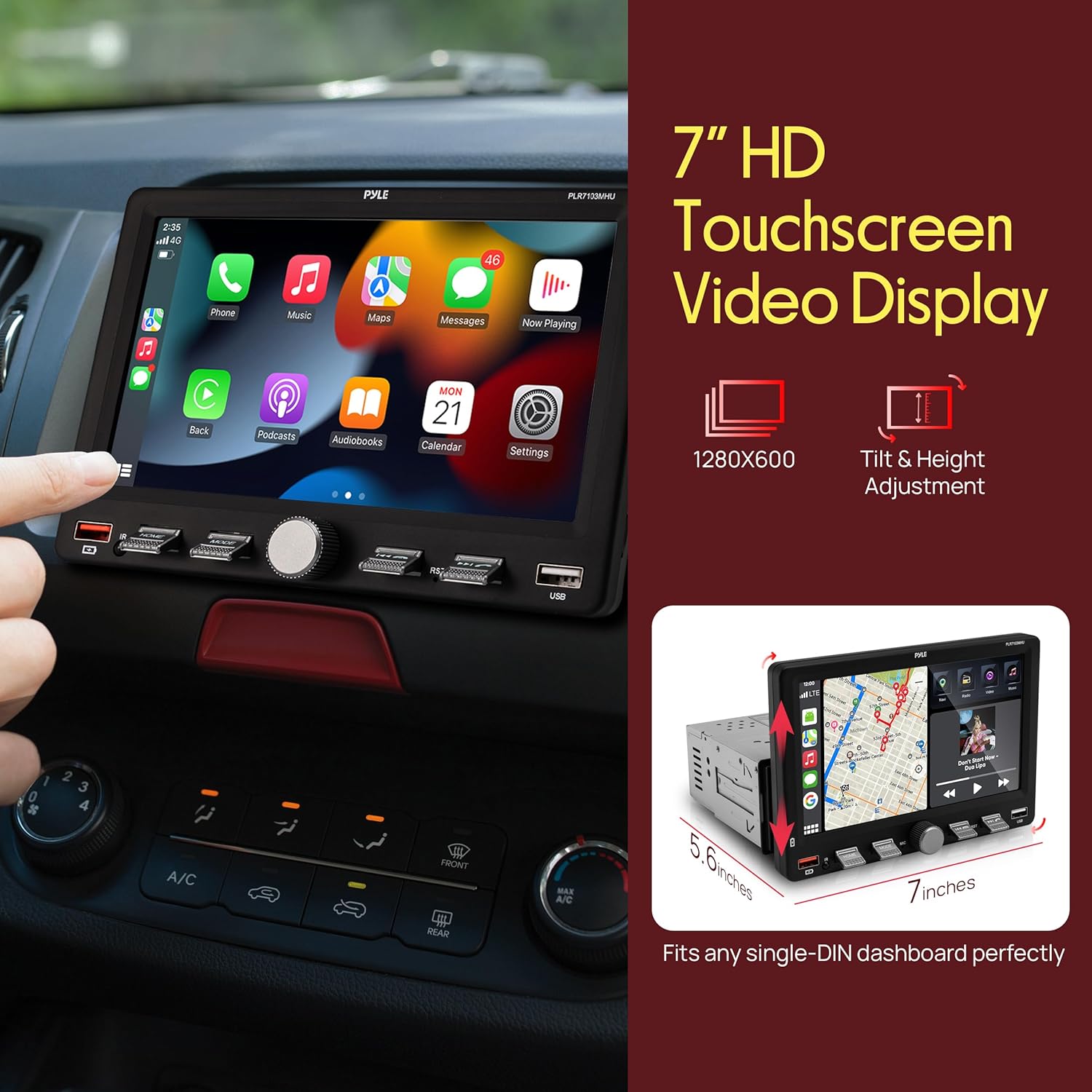
Image 5.1: Touchscreen display showing Apple CarPlay interface.
5.3 Рад радија (AM/FM)
- Select "Radio" from the main menu.
- Use the "Scan" function to automatically search for and store strong stations.
- Manually tune by tapping the frequency up/down arrows.
- Save favorite stations to preset buttons (P1-P6).
6. Функције повезивања
6.1 Бежични Apple CarPlay и Android Auto
Connect your compatible smartphone wirelessly to access navigation, music, calls, and messages directly on the stereo's display.
- Уверите се да је Блутут омогућен на вашем паметном телефону и стерео уређају у аутомобилу.
- Упарите телефон са ауто стерео уређајем путем Блутут-а.
- Once paired, select "CarPlay" or "Android Auto" from the stereo's menu.
- Follow any on-screen prompts on your phone to grant permissions.
6.2 Bluetooth Audio & Hands-Free Calling
Bluetooth 5.0 provides a stable connection for streaming music and making hands-free calls.
- Enable Bluetooth on your phone and the stereo.
- Тражи "Pyle PLR7103MHU" (or similar) on your phone's Bluetooth settings.
- Select the device to pair. A confirmation prompt may appear.
- Once connected, you can stream audio or make/receive calls using the stereo's interface.
6.3 USB/USB-C Media Playback & Charging
The unit features USB and USB-C ports for media playback from flash drives and fast charging of compatible devices.
- Insert a USB flash drive into the USB-A or USB-C port.
- Select "USB" from the main menu to browse and play media files.
- Connect your smartphone or other devices to the USB/USB-C ports for charging.
7. Аудио поставке
Access the Equalizer (EQ) settings to customize your audio experience. The unit features a 10-band EQ.
- From the main menu, select "EQ" or "Sound Setup".
- Adjust frequency bands to your preference.
- Choose from preset EQ modes like Jazz, Classic, Rock, Pop, or Flat.
- Adjust Loudness settings for enhanced bass and treble at low volumes.
8. Рад камере за вожњу уназад
When properly installed, the backup camera automatically displays the rear view when the vehicle is shifted into reverse gear.
- Shift the vehicle into reverse. The screen will automatically switch to the camera view.
- Guide lines may appear on the screen to assist with parking.
- Shift out of reverse to return to the previous screen.
9. Одржавање
- Чишћење екрана: Користите меку крпу која не оставља влакна да нежно обришете екран осетљив на додир. Не користите абразивна средства за чишћење или раствараче.
- Генерално чишћење: Држите уређај без прашине и прљавштине.
- Ажурирања софтвера: Check the Pyle webпериодично проверавајте сајт за доступна ажурирања фирмвера за ваш модел.
КСНУМКС. Решавање проблема
| Проблем | Могући узрок | Решење |
|---|---|---|
| Јединица се не укључује. | Incorrect wiring (power/ground), blown fuse, vehicle battery disconnected. | Check all power and ground connections. Inspect vehicle fuses. Ensure battery is connected. |
| Нема звука из звучника. | Incorrect speaker wiring, volume too low, mute activated, ampпитања лифиера. | Verify speaker connections. Increase volume. Check if mute is active. Consult amplifier manual if external amp се користи. |
| Блутут веза је нестабилна или прекида. | Interference, phone too far, incorrect pairing process, phone software issue. | Ensure phone is close to the unit. Re-pair the device. Restart phone and stereo. Clear Bluetooth cache on phone. |
| CarPlay/Android Auto се не повезује. | Incorrect phone settings, app issues, unstable Bluetooth/Wi-Fi connection. | Ensure CarPlay/Android Auto is enabled on your phone. Check phone's Wi-Fi and Bluetooth. Restart phone and stereo. |
| Камера за вожњу уназад се не приказује. | Incorrect camera wiring, reverse trigger not connected, faulty camera. | Check camera power and video connections. Verify reverse trigger wire connection. Test camera if possible. |
11. Спецификације
| Феатуре | Детаљ |
|---|---|
| Број модела | PLR7103MHU |
| Величина екрана | 7 инча |
| ДИН величина | Сингле ДИН |
| Повезивање | Wireless Apple CarPlay, Android Auto, Bluetooth 5.0, USB, USB-C, Auxiliary, RCA |
| Радио тјунер | АМ/ФМ |
| Излазна снага | 60 Watts (per channel, typically 4 channels) |
| Димензије производа | 5.6"Д к 7"Ш к 4.9"В |
| Тежина артикла | 2.95 фунти |
| Укључена додатна опрема | Backup Camera, Remote Control, Wiring Harness |
12. Видео производа прекоview
Погледајте овај званични видео производа за визуелни прегледview of the Pyle PLR7103MHU 7-inch Single DIN Touchscreen Car Stereo's features and functions.
Видео 12.1: Званични производ је завршенview of the Pyle PLR7103MHU car stereo.
13. Гаранција и подршка
Pyle products are designed for reliability and performance. For specific warranty details, please refer to the warranty card included with your product or visit the official Pyle website. For technical support, troubleshooting assistance, or service inquiries, please contact Pyle customer support through their official channels.
Пајлов званичник Webсајт: ввв.пилеуса.цом


