1. Увод
Thank you for choosing the SOVMIKU Vicohome 2K Indoor Camera CA43. This camera is designed to provide reliable indoor security monitoring with advanced features such as 2K resolution, dual-band Wi-Fi connectivity (2.4GHz and 5GHz), AI tracking, two-way audio, and night vision. This manual will guide you through the setup, operation, and maintenance of your device to ensure optimal performance.

Image: The SOVMIKU Vicohome 2K Indoor Camera CA43, a compact white security camera with a black lens, designed for indoor use.
2. Садржај пакета
Молимо вас да проверите пакет за следеће ставке:
- Vicohome 2K Indoor Camera CA43
- Повер Адаптер
- УСБ-Ц кабл за напајање
- Mounting Kit (screws and anchors)
- Упутство за употребу

Image: A close-up of the SOVMIKU Vicohome 2K Indoor Camera CA43, its power adapter, and mounting accessories, laid out on a white surface.
3. Производ је готовview
The Vicohome CA43 camera features a compact design with a pan/tilt head for wide coverage. Key components include:
- Објектив: 2K (3MP) resolution for clear video.
- Инфрацрвена светла: For night vision capabilities.
- Микрофон и звучник: За двосмерну аудио комуникацију.
- Дугме за ресетовање: Used for device reset during setup or troubleshooting.
- Утор за микро СД картицу: Подржава до 128 ГБ за локалну меморију.
- УСБ-Ц порт: За прикључак на струју.
- Светло индикатора статуса: Provides device status feedback.

Image: A diagram highlighting the microphone, infrared light, lens, speaker, and charge port on the Vicohome CA43 camera.
4. Водич за подешавање
Follow these steps to set up your SOVMIKU Vicohome 2K Indoor Camera CA43:
- Укључено: Connect the camera to a power source using the provided USB-C cable and power adapter. The camera will power on automatically.
- Ресетујте камеру: Locate the reset button (usually near the Micro SD card slot). Press and hold the reset button for approximately 6 seconds until you hear an audible prompt indicating the camera is resetting.
- Download the Vicohome App:
- For Android devices, search for "Vicohome" in the Google Play Store.
- For iOS devices, search for "Vicohome" in the Apple App Store.
- Преузмите и инсталирајте апликацију.
- Create/Sign In to Account: Open the Vicohome app. If you are a new user, sign up for a new account. If you already have an account, sign in using your credentials.
- Додај уређај:
- У апликацији додирните икону „+“ у горњем десном углу да бисте додали нови уређај.
- Select "Add a new device" and choose the "Plug-in device" option.
- Confirm that you hear a sound from the camera and proceed to the next step.
- Повежите се на Ви-Фи:
- The app will prompt you to select your home Wi-Fi network (supports 2.4GHz and 5GHz).
- Enter your Wi-Fi password and confirm.
- The camera will attempt to connect to the network. Once connected, you will hear a confirmation sound and the app will indicate "Connection succeeded".
- Назовите свој уређај: Assign a name to your camera (e.g., "Living Room Camera", "Baby Monitor").
- Set Home & Location: Choose or add a home location for your camera within the app.
- Започни праћење: Once the device is successfully added, you can start viewing the live feed and access all camera features.
Video: Official installation guide for the CA43 camera, demonstrating power-on, reset, app download, Wi-Fi connection, and device naming steps.
5. Упутство за употребу
5.1 Уживо View и репродукцију
- Open the Vicohome app and select your camera to view живи феед.
- Use the on-screen controls to pan (horizontal) and tilt (vertical) the camera for a 360° view.
- Приступ снимљен фооtage from the "Library" or "Playback" section in the app.

Image: A smartphone screen displaying the Vicohome app with live feeds from multiple cameras, illustrating multi-device monitoring.
5.2 Двосмерни аудио
- Од уживо view, додирните икону микрофона да бисте говорили преко звучника камере.
- Tap the speaker icon to hear audio from the camera's environment.

Image: A split image showing two children playing in a kitchen on one side, and a person interacting with the camera via the Vicohome app's two-way audio feature on a smartphone on the other side.
5.3 Детекција покрета и праћење помоћу вештачке интелигенције
- Enable motion detection in the app settings to receive alerts when movement is detected.
- The AI tracking feature allows the camera to automatically follow detected motion within its field of view.
- Customize detection sensitivity and activity zones for precise monitoring.

Image: A white cat walking on a piano, with red tracking boxes overlaid, demonstrating the camera's motion tracking capabilities.
5.4 Хитан СОС
- The camera features a one-touch SOS call button. Pressing this button will immediately contact pre-set emergency contacts through the app.
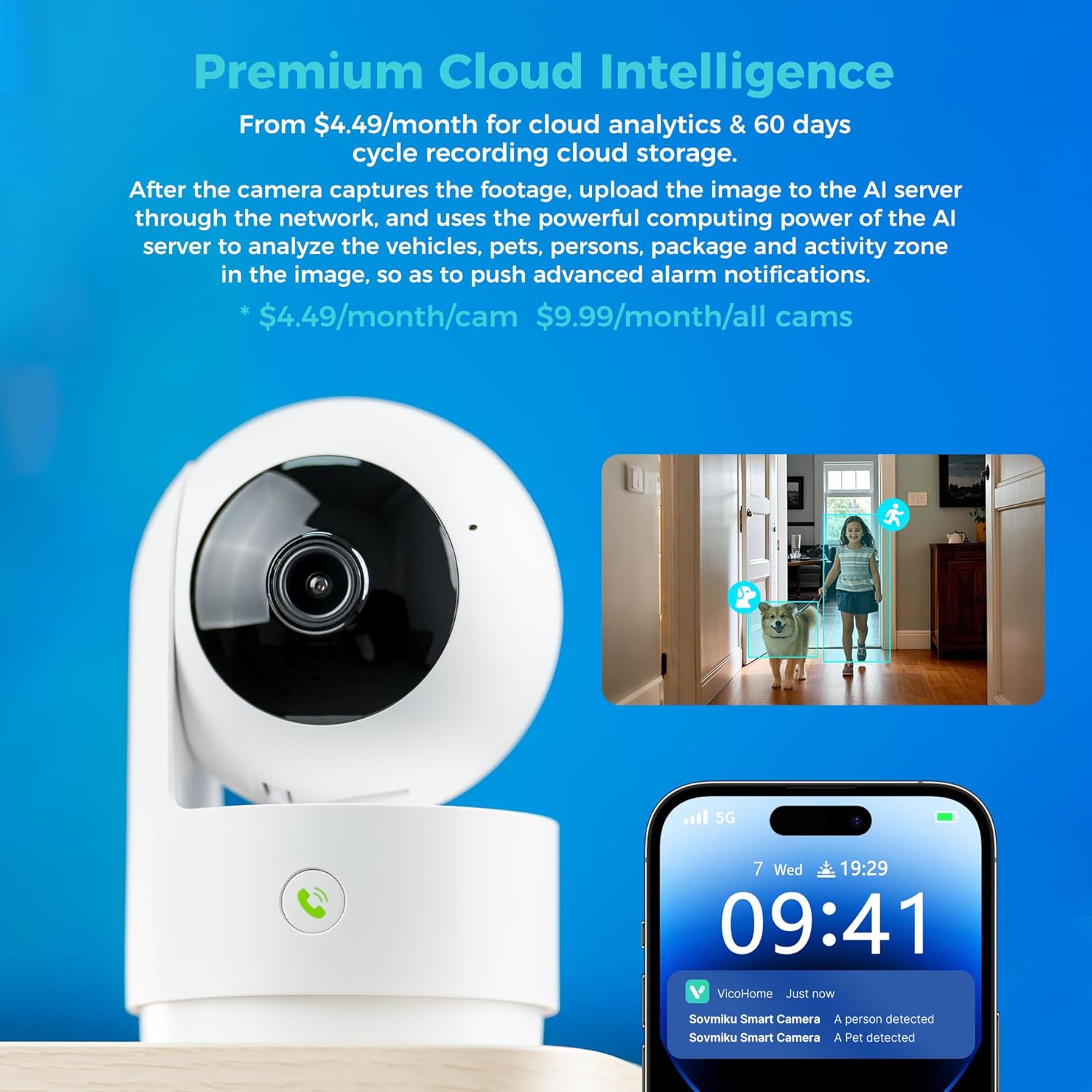
Image: A hand pressing the emergency SOS button on the camera, with a smartwatch showing an incoming call from the Vicohome app, indicating the emergency alert feature.
5.5 Режим приватности
- Activate Privacy Mode in the app to physically hide the camera lens, ensuring privacy when monitoring is not desired.

Image: Two Vicohome cameras side-by-side, one in normal operating mode and the other in privacy mode with its lens retracted, demonstrating the privacy feature.
6. Карактеристике
- 2K резолуција: Снима јасан и детаљан видео записtage (3MP effective still resolution).
- Двопојасни Ви-Фи: Подржава Wi-Fi мреже од 2.4 GHz и 5 GHz за флексибилно повезивање.
- 360° Pan/Tilt: Нуди широк viewing angle with horizontal (83.5°), vertical (44°), and diagonal (59.2°) movement.
- АИ праћење: Automatically detects and follows human or pet movement.
- Двосмерни аудио: Комуницирајте са особама у близини камере користећи уграђени микрофон и звучник.
- Ноћни вид: Equipped with infrared LEDs for clear black and white video in low-light conditions.
- Локално и складиштење у облаку: Supports Micro SD card up to 128GB for local storage and offers optional cloud storage services.
- Хитан СОС: One-touch call feature for immediate contact in emergencies.
- Режим приватности: Physically hides the camera lens for enhanced privacy.
- Seamless Vicohome App Compatibility: Integrates with existing Vicohome devices for unified management.

Image: The Vicohome camera with example images demonstrating its 3MP resolution, showing clear details of a dog and a child in a home setting.

Image: A graphic illustrating the Vicohome camera's compatibility with both 2.4GHz and 5GHz dual-band Wi-Fi networks.

Image: A hand inserting a Micro SD card into the camera, with icons for 128GB storage and cloud storage, indicating local and cloud storage options.
7. Одржавање
- Чишћење: Користите меку, суву крпу за чишћење објектива и кућишта камере. Избегавајте абразивна средства за чишћење или раствараче.
- Ажурирања фирмвера: Regularly check the Vicohome app for available firmware updates to ensure your camera has the latest features and security enhancements.
- Напајање: Ensure the camera is connected to a stable power source. Use only the provided power adapter or a compatible replacement.
- Пласман: Place the camera in a location where it has a clear view and is protected from extreme temperatures or direct moisture.
КСНУМКС. Решавање проблема
- Камера се не повезује на Ви-Фи:
- Ensure your Wi-Fi password is correct and the camera is within range of your router.
- Try resetting the camera and repeating the setup process.
- Verify your router supports 2.4GHz or 5GHz Wi-Fi and is not using a hidden SSID.
- Без живота View:
- Check your internet connection and ensure the camera is powered on.
- Restart the Vicohome app.
- Упозорења о покрету нису примљена:
- Проверите да ли је детекција покрета омогућена у подешавањима апликације.
- Проверите подешавања обавештења апликација на свом паметном телефону.
- Проблеми са двосмерним звуком:
- Ensure microphone and speaker permissions are granted to the Vicohome app on your phone.
- Check the volume settings on both the app and your phone.
9. Спецификације
| Феатуре | Детаљ |
|---|---|
| Препоручена употреба | Индоор Сецурити |
| Бранд | SOVMIKU |
| Назив модела | ЦА43 |
| Технологија повезивања | Wi-Fi (2.4 GHz и 5 GHz) |
| Посебна карактеристика | Adjustable, AI Tracking, Two-Way Audio, Night Vision, SOS Call, Privacy Mode |
| Унутрашња/спољна употреба | Индоор |
| Компатибилни уређаји | iOS, Android, iPad OS |
| Контролни метод | Апп |
| Извор напајања | Цордед Елецтриц |
| Ефективна резолуција мировања | 3 МП (2К) |
| Видео Енцодинг | Х.265 |
| Тип флеш меморије | Мицро СД |
| Max Flash Memory Supported | 128 ГБ |
| Тежина артикла | 1.5 фунти |
| Материјал | ПВЦ |
10. Гаранција и подршка
- гаранција: The product comes with a 1-Year Manufacturer Warranty.
- Политика размене: Enjoy a 180-Day No-Risk Guarantee, backed by a 6-month replacement promise for defects.
- Корисничка подршка: Free expert support is available 24/7 to assist with any questions or issues.
For further assistance, please refer to the contact information provided in your product packaging or through the Vicohome app.


