Увод
This manual provides detailed instructions for the use and maintenance of your GOBOULT Raven True Wireless Stereo (TWS) Earbuds. Please read this manual thoroughly before using the product to ensure proper operation and to maximize your listening experience.

Слика: Прекоview of GOBOULT Raven TWS Earbuds showcasing main features like 70 hours playtime, app support, dual device pairing, 10mm drivers, quad mic environmental noise cancellation, and available color options.
Шта је у кутији
Your GOBOULT Raven TWS Earbuds package includes the following items:
- GOBOULT Raven TWS Earbuds (Left and Right)
- Футрола за пуњење
- УСБ кабл за пуњење
- Multiple Sizes of Eartips
- Кориснички приручник (овај документ)
- Гарантни лист
Производ је завршенview
The GOBOULT Raven TWS Earbuds are designed for comfort and high-quality audio. Familiarize yourself with the components:
- Еарбудс: Left (L) and Right (R) earbuds with touch control areas and microphones.
- Футрола за пуњење: Stores and charges the earbuds. Features a USB Type-C charging port.
- ЛЕД индикатори: On both earbuds and the charging case, indicating battery status, charging, and pairing mode.
- микрофони: Quad microphones for Environmental Noise Cancellation (ENC) during calls.

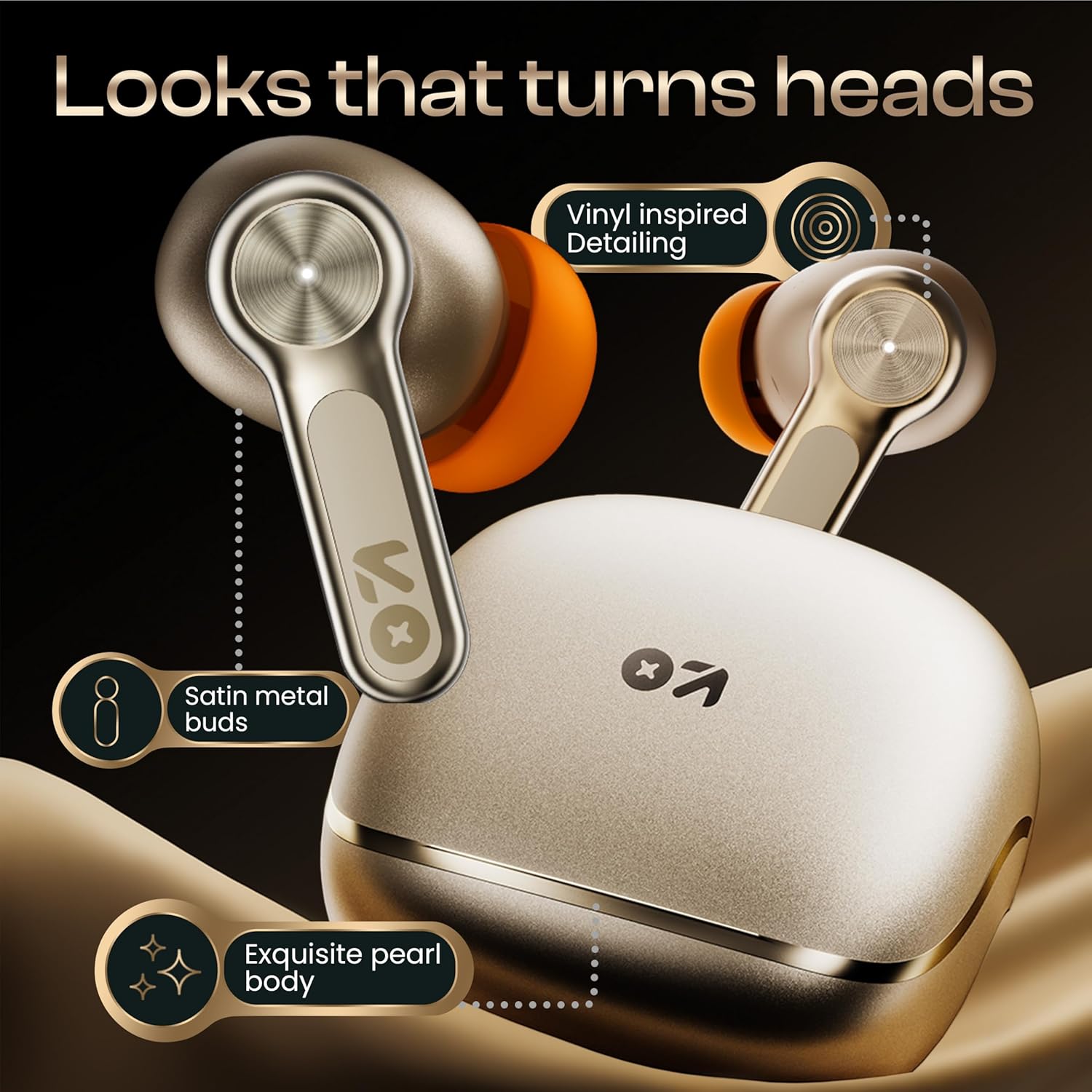
Слика: Детаљна view of the GOBOULT Raven earbuds and their charging case, showcasing the satin metal finish and exquisite pearl body design.
Сетуп
1. Почетно пуњење
Пре прве употребе, потпуно напуните слушалице и кућиште за пуњење.
- Ставите обе слушалице у футролу за пуњење.
- Повежите USB Type-C кабл за пуњење са портом за пуњење на кућишту и са извором напајања.
- The LED indicator on the case will show charging status. Once fully charged, the indicator will change or turn off.
A 10-minute charge provides approximately 120 minutes of playtime.

Image: The GOBOULT Raven earbuds being charged in their case, highlighting the impressive 70-hour total battery life and the quick charge capability (10 mins charge for 120 mins playtime).
2. Упаривање са уређајем
The earbuds use Bluetooth 5.4 for stable and quick connections.
- Отворите кућиште за пуњење. Слушалице ће аутоматски ући у режим упаривања (ЛЕД индикатори ће трептати).
- На свом уређају (паметном телефону, таблету, лаптопу) омогућите Блутут.
- Тражи "GOBOULT Raven" in the list of available Bluetooth devices and select it to connect.
- Once connected, the LED indicators on the earbuds will stop flashing.
The earbuds feature Blink&Pair™ technology for instant pairing after the initial setup.

Image: The GOBOULT Raven earbuds and case, emphasizing the upgraded Bluetooth v5.4 for instant pairing and reliable connection, along with support for SBC and AAC audio codecs.
3. GOBOULT App Installation
For enhanced customization and control, download the GOBOULT App from your device's app store.
- Тражи "GOBOULT" in the App Store (iOS) or Google Play Store (Android).
- Install the app and follow the on-screen instructions to connect your Raven earbuds.
- The app allows you to customize sound profiles (EQ modes), control features, and manage touch controls.

Image: A smartphone screen displaying the GOBOULT Amp APP, illustrating features like equalizer customization, custom touch controls, gaming mode activation, and widget support for a personalized audio experience.
Упутство за употребу
Додирните контроле
The GOBOULT Raven earbuds feature intuitive touch controls on each earbud. The specific functions can often be customized via the GOBOULT App.
| Акција | Функција |
|---|---|
| Један додир (Л/Д) | Пуштање/паузирање музике, одговарање/прекидање позива |
| Двоструки додир (Л) | Превиоус Трацк |
| Двоструки додир (R) | Нект Трацк |
| Троструки додир (Л/Д) | Активирајте гласовни помоћник |
| Дуги притисак (Л/Д) | Reject Call, Toggle Gaming Mode (customizable) |
Note: These are typical touch control functions. Refer to the GOBOULT App for exact and customizable controls.
Слика: Детаљна view of the GOBOULT Raven earbud's touch-sensitive surface, indicating areas for music playback control and call management.
Упаривање два уређаја
The earbuds can connect to two devices simultaneously, allowing seamless switching between them.
- Pair the earbuds with your first device (e.g., smartphone) as described in the "Pairing with a Device" section.
- Disconnect Bluetooth on the first device or put the earbuds back in the case and close it, then open it again to re-enter pairing mode.
- Pair the earbuds with your second device (e.g., laptop).
- Reconnect the earbuds to the first device via its Bluetooth settings. The earbuds should now be connected to both.
Звук ће се аутоматски пребацити на уређај који репродукује садржај или прима позив.

Image: The GOBOULT Raven earbuds and their case positioned between a smartphone and a laptop, demonstrating the dual device pairing feature for seamless switching between audio sources.
Режим играња (ултра ниска латенција)
Activate Gaming Mode for a 50ms ultra-low latency experience, ideal for gaming and video playback.
- Gaming Mode can typically be activated via a specific touch control gesture (refer to your GOBOULT App settings or the table above).
- You can also enable/disable Gaming Mode through the GOBOULT App.

Image: The GOBOULT Raven earbuds and their charging case next to a gaming controller, emphasizing the Combat™ Gaming Mode with 50ms ultra-low latency for an optimized gaming experience.
Гласовни асистент
Access your device's voice assistant (Google Assistant, Siri) directly from the earbuds.
- Perform the designated touch control gesture (e.g., triple tap) to activate the voice assistant.
- Изговорите команду након захтева.

Image: A composite image illustrating the Smart AI Voice Assistance feature, showing integration with "Ok Google" and "Hey Siri", alongside the IPX5 water-resistant rating of the earbuds.
Одржавање
Чишћење
- Редовно чистите слушалице и кућиште за пуњење меком, сувом крпом која не оставља влакна.
- Уклоните врхове слушалица и очистите ушни восак или остатке са млазница слушалица помоћу мале четкице или памучног штапића.
- Уверите се да су контакти за пуњење на обе слушалице и кућишту чисти и суви.
Отпорност на воду (ИПКС5)
The GOBOULT Raven earbuds are IPX5 water-resistant, meaning they can withstand sweat and light rain. They are not designed for submersion in water.
- Do not expose the earbuds to running water or submerge them.
- If they get wet, wipe them dry thoroughly before placing them back in the charging case.
Складиштење
Чувајте слушалице у футроли за пуњење када се не користе да бисте их заштитили и одржали напуњеним.
- Избегавајте складиштење на екстремним температурама или високој влажности.
Решавање проблема
| Проблем | Могуће решење |
|---|---|
| Слушалице се не упарују |
|
| Само једна слушалица ради |
|
| Лош квалитет звука |
|
| Проблеми са пуњењем |
|
Спецификације
| Феатуре | Детаљ |
|---|---|
| Назив модела | Raven (Airbass Earbuds) |
| Повезивање | Блуетоотх в5.4 |
| Домет | До 10 метара |
| Аудио Дриверс | 10мм динамички драјвери |
| Плаитиме | До 70 сати (са футролом за пуњење) |
| Време пуњења | Approx. 20 minutes (for quick charge) |
| Аудио Латенци | 50ms (Gaming Mode) / 45ms (as per spec) |
| Микрофони | Куад микрофон са поништавањем буке из околине (ЕНЦ) |
| Отпорност на воду | ИПКС5 |
| Контролни метод | Додир, глас |
| Посебне карактеристике | Dual Device Pairing, GOBOULT App Support, Smart AI Voice Assistance |
| Фреквенцијски одзив | 20 Hz (lower bound) |
| Осетљивост | 115 дБ |
| Хардверски интерфејс | УСБ тип Ц |
| Димензије производа | 5 к 4.5 к 5.4 цм |
| Тежина артикла | 600 г (тежина паковања) |
Напомена: Спецификације су подложне променама без претходне најаве.
Гаранција и подршка
Информације о гаранцији
Your GOBOULT Raven TWS Earbuds come with a 1-годишња гаранција произвођача from the date of purchase. This warranty covers manufacturing defects and ensures trusted performance and premium build quality.
- Please retain your purchase receipt and the warranty card for warranty claims.
- Гаранција не покрива оштећења настала услед злоупотребе, незгода, неовлашћених модификација или нормалног хабања.
Корисничка подршка
For any queries, technical assistance, or warranty claims, please contact GOBOULT customer support. Refer to the contact information provided on your warranty card or visit the official GOBOULT webсајт за детаље подршке.
Произвођач: GOBOULT, B-67 Wazirpur Industrial Area, New Delhi 110052, India


