1. Увод
Thank you for choosing the GOBOULT Z40 V2.0 Truly Wireless In-Ear Earbuds. This manual provides essential information to help you set up, operate, and maintain your earbuds for optimal performance. Please read these instructions carefully before use and retain them for future reference.
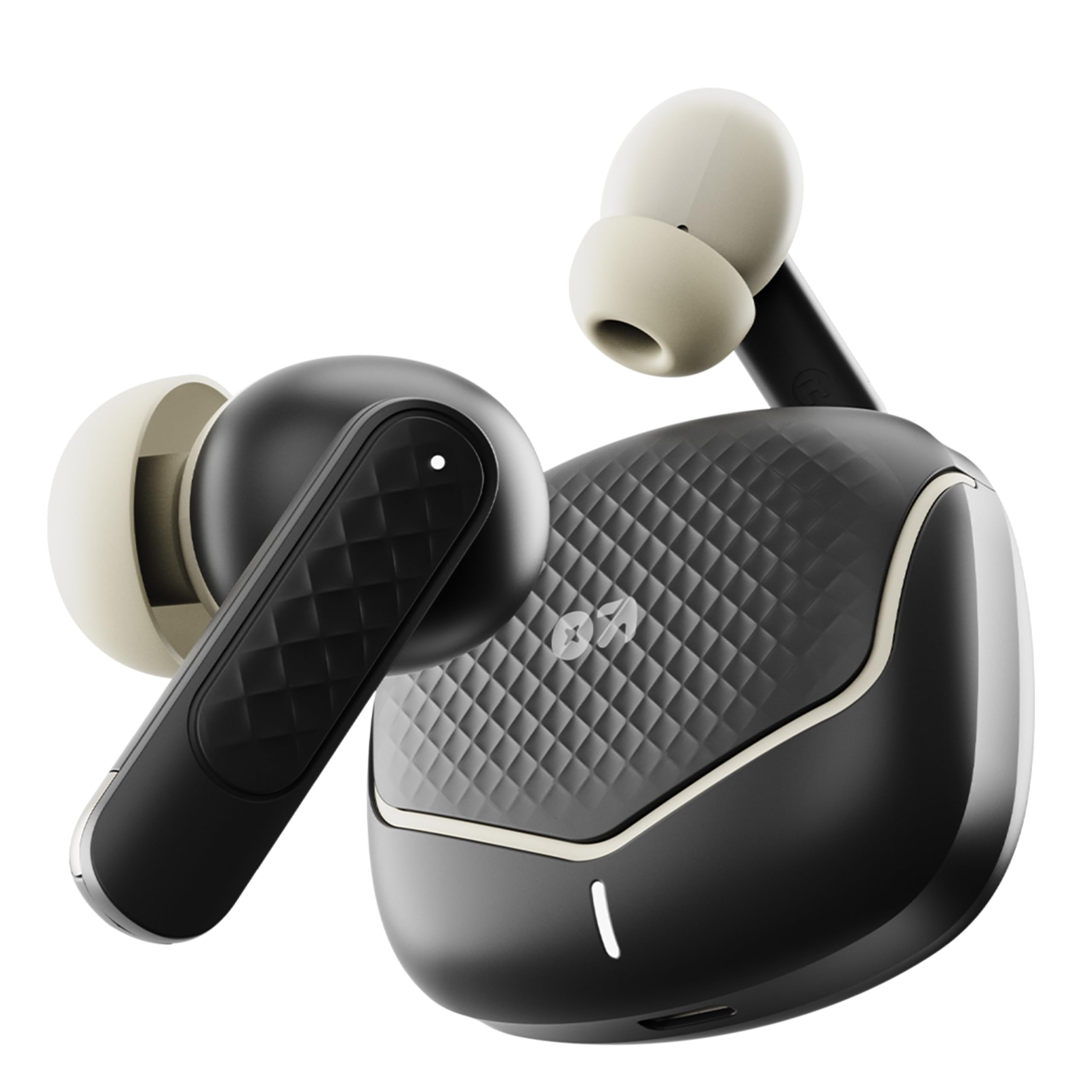
Image: The GOBOULT Z40 V2.0 earbuds with their charging case, showcasinг елегантан дизајн.
2. Садржај пакета
Уверите се да су све ставке присутне у пакету:
- GOBOULT Z40 V2.0 Earbuds (Left and Right)
- Футрола за пуњење
- УСБ кабл за пуњење типа Ц
- Навлаке за уши (разних величина)
- Кориснички приручник (овај документ)
- Гарантни лист
3. Производ је готовview
The GOBOULT Z40 V2.0 earbuds feature a compact design with advanced audio technology. Key components include:
- Еарбудс: Equipped with 13mm dynamic drivers for enhanced bass and clear audio. Each earbud includes touch control sensors and multiple microphones for Environmental Noise Cancellation (ENC).
- Футрола за пуњење: Provides extended battery life and protects the earbuds. Features a USB Type-C charging port and an LED indicator.
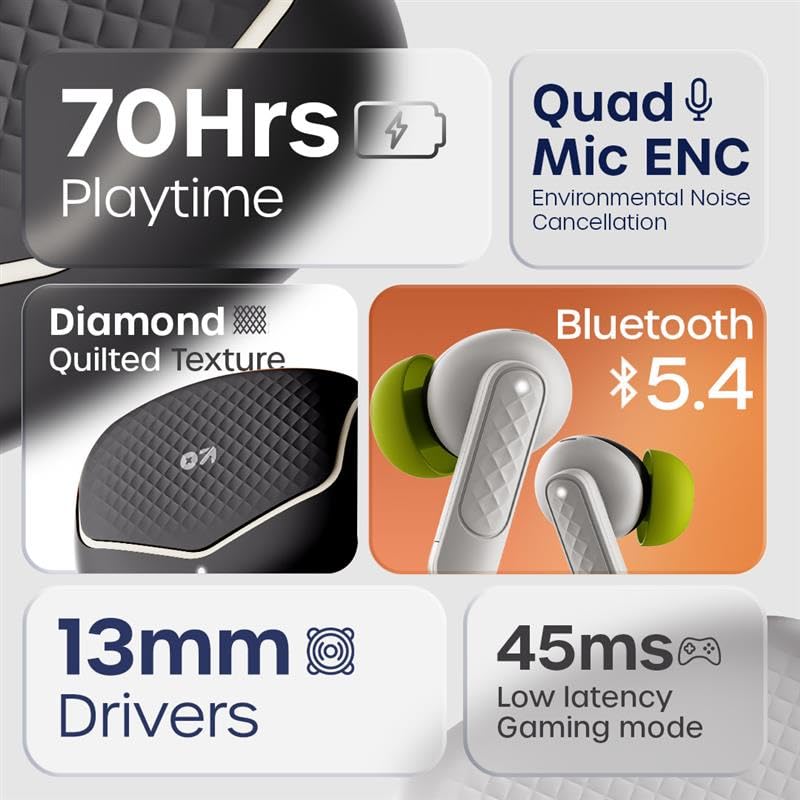
Image: An infographic highlighting key features such as 70 hours playtime, Quad Mic ENC, Bluetooth 5.4, 13mm drivers, and 45ms low latency.

Image: The iconic V-Flip charging case and earbuds displayed in Opal Black, Onyx Grey, Solar Orange, and Arctic Blue color options.
4. Подешавање
4.1. Пуњење слушалица и футроле
Пре прве употребе, потпуно напуните слушалице и кућиште за пуњење.
- Ставите слушалице у кућиште за пуњење.
- Повежите USB Type-C кабл за пуњење са портом за пуњење на кућишту и са извором напајања.
- The LED indicator on the case will show charging status. Once fully charged, the indicator will change or turn off.
A 10-minute charge provides approximately 120 minutes of playtime. The case provides up to 70 hours of total playtime with multiple charges.

Image: Visual representation of the charging case and earbuds, highlighting 70 hours battery life and fast charging capability (10 mins charge = 120 mins playtime).
4.2. Упаривање са уређајем
The GOBOULT Z40 V2.0 uses Bluetooth 5.4 for quick and reliable pairing.
- Отворите кућиште за пуњење. Слушалице ће аутоматски ући у режим упаривања.
- На свом уређају (паметном телефону, таблету, лаптопу) омогућите Блутут.
- Тражи available Bluetooth devices and select "GOBOULT Z40 V2.0" from the list.
- Када се повежу, чуће се звук потврде и слушалице ће бити спремне за употребу.
The earbuds feature Blink&Pair™ technology for quicker pairing.

Image: The charging case open with earbuds, illustrating the upgraded Bluetooth v5.4 for quicker pairing and higher reliability with Blink&Pair™ Tech.
5. Упутство за употребу
5.1. Додирните Контроле
Слушалице имају интуитивне контроле на додир за управљање звуком и позивима:
| Акција | Функција |
|---|---|
| Један додир (лево/десно) | Пуштање/паузирање музике, одговарање/прекидање позива |
| Двоструки додир (десно) | Нект Трацк |
| Двоструки додир (лево) | Превиоус Трацк |
| Троструки додир (лево/десно) | Активирајте гласовни помоћник |
| Дуги притисак (лево/десно) | Одбаци позив |
| Дуг притисак (лево/десно, 2 секунде) | Toggle Gaming Mode (Low Latency) |

Image: A user interacting with the earbuds to activate voice assistant, demonstrating hands-free control. Also highlights the IPX5 water resistance.
5.2. Упућивање и примање позива
The Z40 V2.0 earbuds are equipped with Quad Microphones and Environmental Noise Cancellation (ENC) for clear call quality.
- Одговори на позив: Једном додирните било коју слушалицу.
- Заврши позив: Једном додирните било коју слушалицу током позива.
- Одбиј позив: Дуго притисните било коју слушалицу.
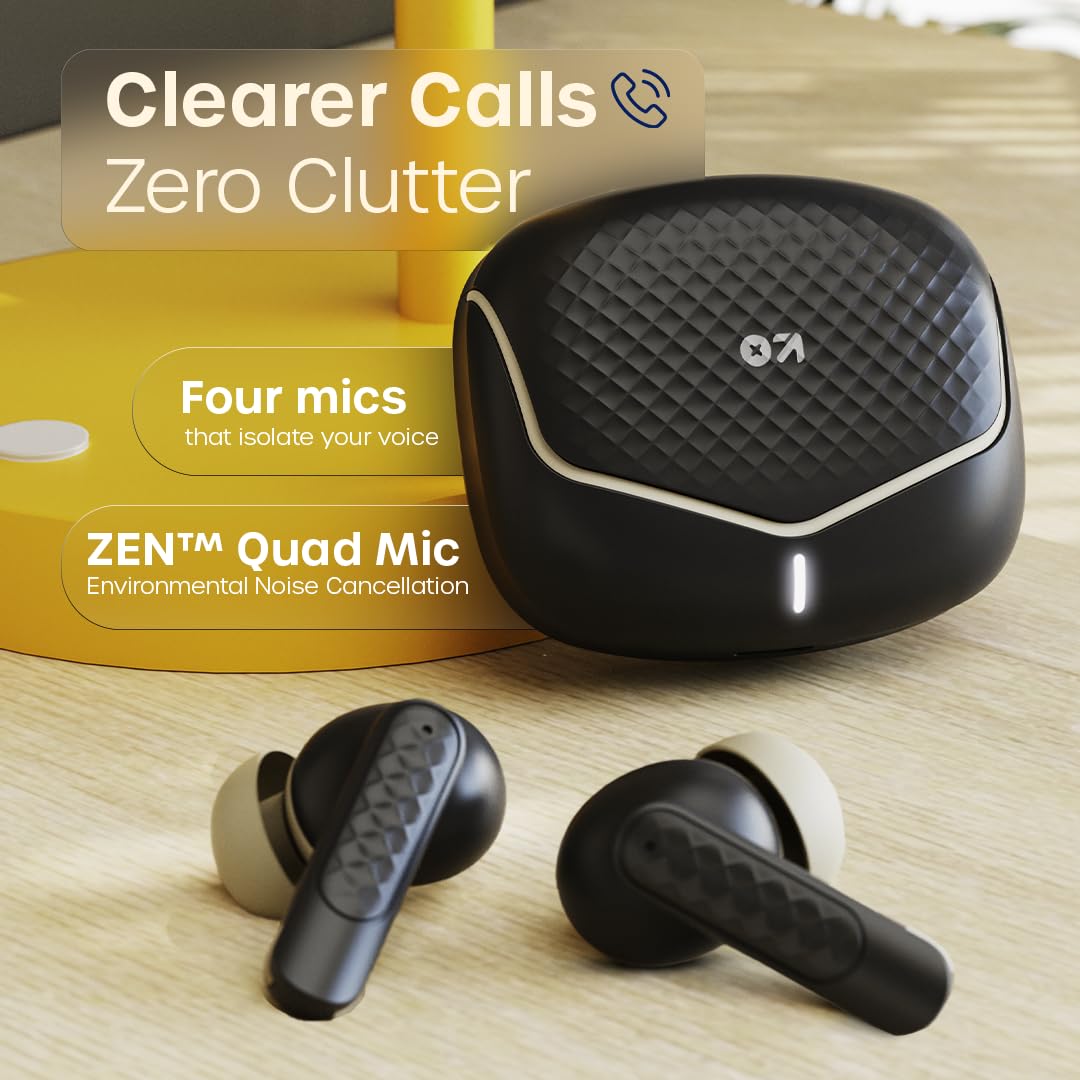
Image: The charging case and earbuds, emphasizing the ZEN™ Quad Mic Environmental Noise Cancellation for clearer calls.
5.3. Gaming Mode (Low Latency)
Activate Gaming Mode for reduced audio latency, ideal for gaming and video playback.
- Активирај/Деактивирај: Дуго притисните било коју слушалицу у трајању од 2 секунде.
This mode provides a 45ms low latency experience for synchronized audio and visuals.

Image: Earbuds and charging case near a gaming console, illustrating the 45ms low latency Combat™ Gaming Mode for faster responses.
6. Одржавање
6.1. Чишћење
Редовно чишћење помаже у одржавању квалитета звука и хигијене.
- Користите меку, суву крпу која не оставља влакна да бисте обрисали слушалице и кућиште за пуњење.
- Gently remove any earwax or debris from the eartips and speaker mesh using a small brush or cotton swab.
- Не користите абразивна средства за чишћење, алкохол или хемијске раствараче.
6.2. Складиштење
Када се не користе, чувајте слушалице у њиховој футроли за пуњење како бисте их заштитили од прашине, оштећења и како би остале напуњене.
6.3. Отпорност на воду (IPX5)
The GOBOULT Z40 V2.0 earbuds are IPX5 water-resistant, meaning they can withstand sweat and light splashes of water. They are not designed for submersion in water or for use during swimming. Ensure earbuds are dry before placing them back in the charging case to prevent damage.
КСНУМКС. Решавање проблема
Ако наиђете на проблеме, испробајте следећа решења:
| Проблем | Решење |
|---|---|
| Слушалице се не упарују | Ensure earbuds are charged. Turn off and on Bluetooth on your device. Forget "GOBOULT Z40 V2.0" from your device's Bluetooth list and re-pair. |
| Само једна слушалица ради | Place both earbuds back in the charging case, close the lid, then open again. Ensure both earbuds are charged. Re-pair with your device. |
| Ниска јачина звука или лош квалитет звука | Adjust volume on your device. Clean the speaker mesh and eartips. Try different sized eartips for a better seal. |
| Проблеми са пуњењем | Ensure the charging cable is securely connected. Try a different USB port or power adapter. Clean the charging contacts on both earbuds and case. |
| Контроле на додир не реагују | Уверите се да су вам прсти чисти и суви. Поново покрените слушалице тако што ћете их ставити у футролу и извадити. |
8. Спецификације
Technical details of the GOBOULT Z40 V2.0 Earbuds:
| Феатуре | Детаљ |
|---|---|
| Назив модела | Z40 V2.0 (Airbass Earbuds) |
| Повезивање | Блуетоотх в5.4 |
| Блуетоотх домет | 10 метара |
| Величина аудио драјвера | 13мм динамички драјвери |
| Микрофони | Куад микрофон са поништавањем буке из околине (ЕНЦ) |
| Аудио Латенци | 45 милисекунди (режим игре) |
| Трајање батерије (укупно) | До 70 сати (са кућиштем за пуњење) |
| Време пуњења | Fast Charging (10 mins charge for 120 mins playtime) |
| Порт за пуњење | УСБ Типе-Ц |
| Отпорност на воду | ИПКС5 |
| Контролни метод | Контрола додиром |
| Фреквенцијски одзив | 20 Хз |
| Осетљивост | 115 дБ |
| Тежина артикла | 600 g (Product + Packaging) |
| Димензије производа | 5.8 к 4 к 4.9 цм |
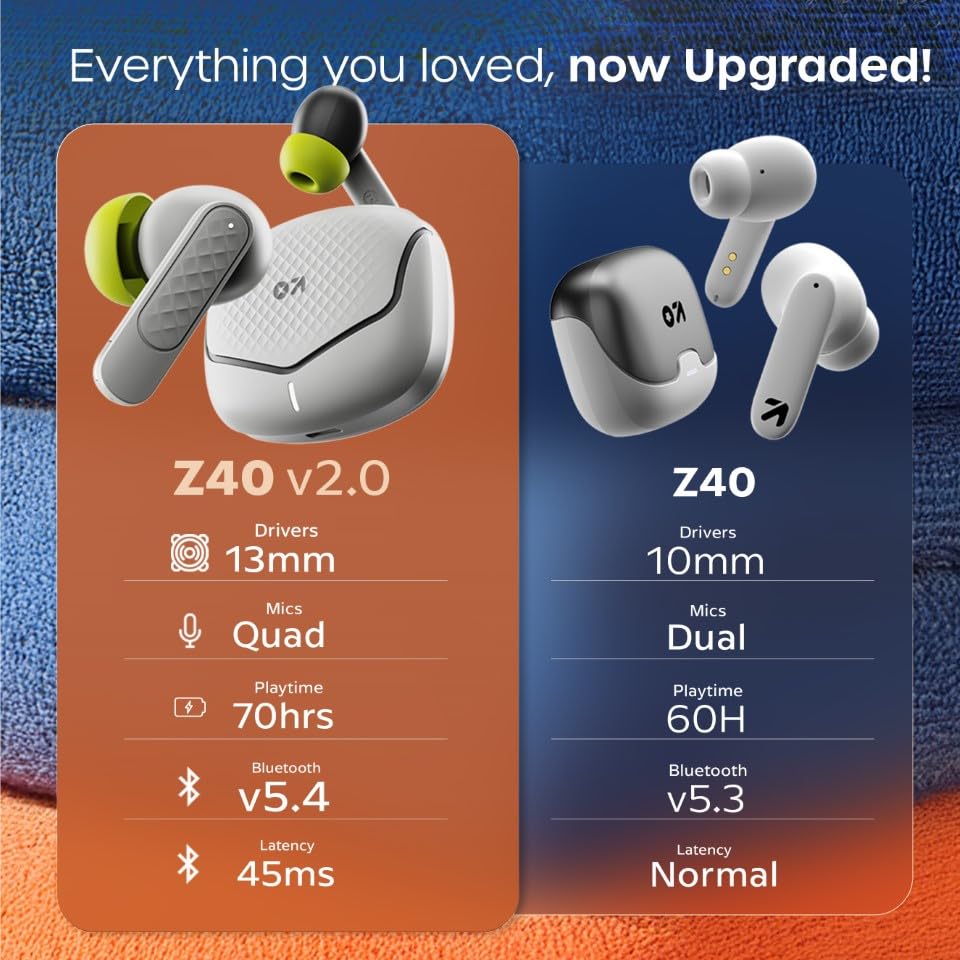
Image: A comparison table showing upgrades from Z40 to Z40 V2.0, including 13mm drivers, Quad Mics, 70hrs playtime, Bluetooth v5.4, and 45ms latency.
9. Гаранција и подршка
The GOBOULT Z40 V2.0 earbuds come with a Двогодишња гаранција произвођача from the date of purchase. This warranty covers manufacturing defects and ensures trusted quality and durability.
For warranty claims, technical support, or any product-related inquiries, please refer to the contact information provided on your warranty card or visit the official GOBOULT support webсајту.
Произвођач: GOBOULT, B-67 Wazirpur Industrial Area, New Delhi 110052, India