Упутства и корисничка упутства за Raspberry Pi
Raspberry Pi manufactures affordable, credit-card-sized single-board computers and microcontrollers designed for education, hobbyist projects, and industrial automation.
About Raspberry Pi manuals on Manuals.plus
Распберри Пи is a globally recognized British computing brand, known for developing a series of small, low-cost single-board computers (SBCs) and microcontrollers. Originally created to promote the teaching of basic computer science in schools, the brand has grown into a phenomenon widely used by makers, engineers, and educators. The product lineup features high-performance boards like the Raspberry Pi 4 and 5, the compact Raspberry Pi Zero series, and the Raspberry Pi Pico microcontroller range.
Beyond the boards themselves, Raspberry Pi offers a comprehensive ecosystem of accessories, including cameras, displays, and "HAT" (Hardware Attached on Top) expansion boards. The platform is supported by extensive official documentation and a massive global community, making it the go-to choice for projects ranging from retro gaming consoles and media centers to robotics and industrial monitoring systems.
Упутства за Raspberry Pi
Најновији приручници од manuals+ курирано за овај бренд.
РаспберриПи КМС ХДМИ излазни графички драјвер Упутство за употребу
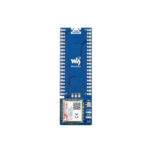
РаспберриПи СИМ7020Е НБ-ИоТ модул за Распберри Пи Пицо упутство за употребу
РаспберриПи РГБ Фулл Цолор ЛЕД Матрик Панел Упутство за употребу
Raspberry Pi Monitor Product Brief
Raspberry Pi Setup and Configuration Guide
Pico Python SDK: MicroPython for RP2040 Microcontrollers
The Official Raspberry Pi Projects Book Volume 4
Manual de Usuario: Raspberry Pi 5 (8GB)
Raspberry Pi Camera Module 3: Product Overview и Спецификације
Hardware Design with RP2350 Microcontrollers: A Comprehensive Guide
Get Started with MicroPython on Raspberry Pi Pico: A Comprehensive Guide
Raspberry Pi 400: Compact Personal Computer Overview
Getting Started with Raspberry Pi 4G Base HAT and Quectel Modules
Raspberry Pi Pico 2 W Datasheet - RP2350 Microcontroller with Wireless
Raspberry Pi manuals from online retailers
Raspberry Pi 500 Desktop Computer Kit User Manual
Raspberry Pi 4 Model B (1GB) User Manual
Raspberry Pi Compute Module 3+ Lite User Manual
Raspberry Pi Zero 2 W Instruction Manual
Raspberry Pi 4 Model B (8GB) User Manual
Raspberry Pi NoIR Camera Module V2 - 8MP 1080P30 Instruction Manual
Raspberry Pi 2 Model B Desktop User Manual
RS Components Raspberry Pi 3 Model B+ Motherboard User Manual
Raspberry Pi 4 Model B 8GB User Manual
Raspberry Pi 15W USB-C Power Supply (Model KSA-15E-051300HU) User Manual
Упутство за употребу модула камере од 5MP за Raspberry Pi
Raspberry Pi 4 Model B (2GB) User Manual
Raspberry Pi video guides
Погледајте видео записе о подешавању, инсталацији и решавању проблема за овај бренд.
Raspberry Pi Pico Signal Testing with Oscilloscope: Engineering Demonstration
Raspberry Pi Pico RGB Keypad Demonstration
Raspberry Pi Pico Display: A Compact Screen for Your Projects
Raspberry Pi Pico Case Design and 3D Printing
Raspberry Pi AI HAT+ with Hailo-10H: Real-Time Video Analysis Demo
Raspberry Pi 5: Reliable WS2812B LED Control with SPI Bus
Raspberry Pi Pico W with NeoPixel LED Control using MicroPython
Raspberry Pi Pico H-Bridge Motor Control with MicroPython
Raspberry Pi Pico with TB67H451 H-Bridge: Audio Synthesis Demo
RP2040 Microcontroller with BLDC Motor Control Demo
Raspberry Pi Pico MicroPython SD Card Tutorial: Setup and Usage
Raspberry Pi Pico ATP Communication Demo with Logic Analyzer
Raspberry Pi support FAQ
Честа питања о упутствима, регистрацији и подршци за овај бренд.
-
Where can I find the official documentation for my Raspberry Pi?
Official documentation, including setup guides, configuration tutorials, and hardware specifications, is available at the Raspberry Pi Documentation hub (raspberrypi.com/documentation).
-
What is the default username and password for Raspberry Pi OS?
Older versions of Raspberry Pi OS used 'pi' as the username and 'raspberry' as the password. Newer versions require you to create a custom username and password during the initial setup via the Raspberry Pi Imager.
-
How do I power my Raspberry Pi board?
Raspberry Pi boards typically require a high-quality power supply. The Pi 4 and Pi 400 use a USB-C connector (5.1V, 3A recommended), while earlier models like the Pi 3 use a Micro-USB connector (5.1V, 2.5A recommended).
-
Where can I find compliance and safety datasheets?
Product Information Portal (PIP) at pip.raspberrypi.com hosts the datasheets, compliance documents, and safety information for all Raspberry Pi products.